



Home » Best Practices for Robust Identity and Access Governance » Best Practices to Achieving Maturity in Your Entitlement Management Strategy
Best Practices to Achieving Maturity in Your Entitlement Management Strategy
Learn how to effectively implement and enforce a mature entitlement management program to combat permission creep and ensure proper access control.
Explore the chapters:
- Chapter
- Identity and Access Governance
- Privileged Access Management Best Practices
- Identity Lifecycle Management
- Identity Governance and Administration
- Identity Governance Solutions
- Automated User Provisioning
- Access Governance Tools
- Federated Identity Access Management
- Vendor Privileged Access Management
- Identity Governance Framework
- Entitlement Management
- Hybrid Identity Management
- Chapter
- Identity and Access Governance
- Privileged Access Management Best Practices
- Identity Lifecycle Management
- Identity Governance and Administration
- Identity Governance Solutions
- Automated User Provisioning
- Access Governance Tools
- Federated Identity Access Management
- Vendor Privileged Access Management
- Identity Governance Framework
- Entitlement Management
- Hybrid Identity Management
Table of Contents
Stop AD Threats As They Happen
Cayosoft Protector provides continuous monitoring and real-time alerts across your entire Microsoft Identity stack
Like This Article?
Subscribe to our LinkedIn Newsletter to receive more educational content
Permission creep represents one of the most prevalent security vulnerabilities in enterprise environments. The term describes the steady accumulation of excessive and unnecessary access rights as users transition between roles. Unlike discrete breaches or zero-day exploits, permission creep emerges silently through normal organizational operations. This technical debt compounds significantly when identity systems operate in silos. When a user account is compromised—whether through phishing, credential stuffing, or insider threats—the attacker inherits the accumulated entitlements across multiple systems and services, often without triggering alerts or audit trails.
Entitlement management (EM) is a disciplined practice that addresses the challenge of permission creep by ensuring that every user, system, and service has precisely the access they need and that this access is continuously reviewed, monitored, and adjusted as responsibilities change. It transforms access control from a one-time provisioning event into an ongoing governance discipline.
This article provides a technical blueprint for implementing a mature EM program that enforces the principle of least privilege (PoLP).
Summary of key entitlement management best practices
The following table summarizes the seven foundational best practices for a robust entitlement management strategy.
|
Best practice |
Description |
|---|---|
|
Enforce the principle of least privilege |
Grant identities only the bare minimum permissions necessary for their function, and remove standing administrative rights. |
|
Centralize hybrid identity governance. |
Establish a single control plane to manage policies and permissions across both on-premises Active Directory and cloud-based Entra ID. |
|
Automate the identity lifecycle |
Implement automated workflows for users across different phases to ensure that access is instantly granted or revoked based on HR status. |
|
Implement periodic access attestation and certification |
Require business owners (not just IT) to periodically review and certify that their users’ access rights remain valid. |
|
Streamline access requests and approvals |
Replace ad hoc emails with a self-service catalog where users can request access packages subject to policy-based approval workflows |
|
Utilize a hybrid RBAC/ABAC model |
Follow a hybrid approach that combines role-based access control for structure with attribute-based access control for granularity. |
|
Maintain continuous monitoring and auditing |
Ensure that all permission changes are logged, monitored for threats in real-time, and capable of being rolled back. |
Manage, Monitor & Recover AD, Entra ID, Microsoft 365

Unified Console
Use a single tool to administer and secure AD, Entra ID, and M365

Track Threats
Monitor AD for unwanted changes – detect for security or critical functions

Instant Recovery
Recover global enterprise-wide Active Directory forests in minutes, not days
Enforce the principle of least privilege
The principle of least privilege (PoLP) is a key foundation of modern security architecture. NIST defines it as restricting access rights for users, accounts, and computing processes to the minimum necessary to accomplish assigned tasks.
To implement and enforce PoLP, first define the baseline by working with department heads and team leads to document the access each role requires. You also need to remove standing administrative access and replace it with just-in-time (JIT) access. In a JIT arrangement, an administrator operates with a standard user account for daily tasks; when they need to perform a privileged action, they are granted temporary, on-demand elevated access that automatically expires. For example, a database administrator could request temporary access to perform a specific maintenance task, with that access being automatically revoked after 2 hours.
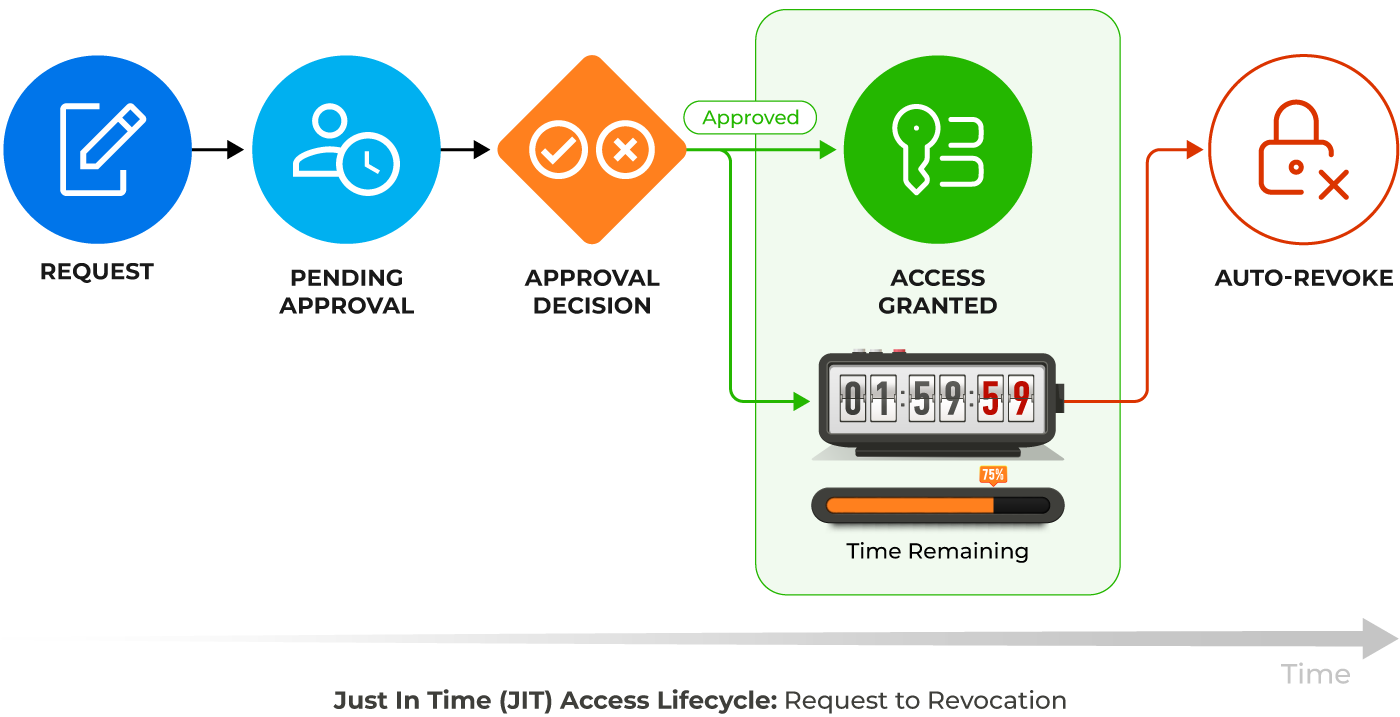
PoLP must also extend to service accounts, APIs, and bots. These accounts often have excessive permissions (e.g., “Full Control”) because it is convenient for developers, but they are frequently targeted because they are rarely rotated and often unmonitored.
Centralize hybrid identity governance
For most enterprises, identity is split between legacy on-premises Active Directory (using Kerberos and LDAP) and Microsoft Entra ID (formerly Azure AD) for cloud services. Managing entitlements in these silos leads to security gaps and policy drift. For example, disabling a user in AD might not immediately revoke their cloud session tokens, leaving a window of exposure.
To effectively manage entitlements, organizations need a unified control plane that abstracts the complexity of this hybrid environment. Administrators should not have to toggle between Active Directory Users and Computers (ADUC) and the Entra admin center to provision a single user.
Microsoft offers Entra Connect Sync and Entra Cloud Sync to synchronize identities and group memberships from on-premises AD to Entra ID. This ensures consistency, but it’s one-directional. For complete governance, you need a unified policy layer that sits above both AD and Entra ID and enforces consistent policies across both. Platforms like Cayosoft Administrator bridge this gap by providing a unified command center in such cases. As a result, IT teams can manage hybrid identities, groups, and policies for both AD and Entra ID from a single interface.
With Cayosoft Administrator, admins can also:
- Define access policies once and enforce them across both environments
- Manage authorization policies for both AD groups and Entra ID roles
- Orchestrate provisioning and deprovisioning workflows across all systems
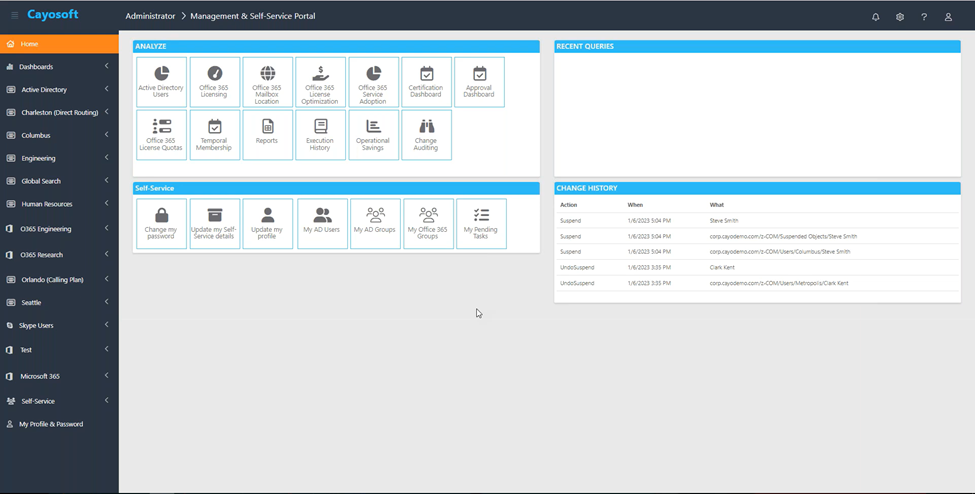
Centralizing governance essentially helps you eliminate the manual coordination nightmare. When a new hire joins, their onboarding occurs in a single process, and both on-premises and cloud systems update automatically. When they leave, their access disappears across both environments in minutes, not days.
Manage, Monitor & Recover AD, Entra ID, M365, Teams
| Platform | Admin Features | Single Console for Hybrid (On-prem AD, Entra ID, M365, Teams) | Change Monitoring & Auditing | User Governance (Roles, Rules, Automation) | Forest Recovery in Minutes |
| Microsoft AD Native Tools | ✓ | ||||
| Microsoft AD + Cayosoft | ✓ | ✓ | ✓ | ✓ | ✓ |
Watch our recorded & upcoming educational webinars about identity protection
Automate the identity lifecycle
The identity lifecycle describes a user’s journey through your organization: hire, role change, promotion, department move, and leave. At the beginning of each stage, their access should automatically adjust, but organizations commonly manage this aspect manually, making the moving phase the single biggest source of privilege creep.
The gold standard for EM is to integrate the identity and access management (IAM) platform directly with the Human Resources (HR) system. As a result, the HR system acts as the authoritative source of truth, such that:
- When a new hire is added to HR, the IAM system detects the event and automatically provisions the account, mailbox, and access packages on Day 1.
- When HR updates a user’s department or job title, the system triggers an atomic transaction; for instance, it grants the employee access to their new department and simultaneously revokes the old departmental access.
- When a termination date is reached in HR, the system instantly disables the account across all directories and revokes active sessions.
Cayosoft Administrator can help you automate these joiner-mover-leaver workflows by connecting directly to HR systems and third-party data sources. It features rule-based administration that detects changes in user attributes and triggers the appropriate provisioning or deprovisioning tasks across the hybrid environment, eliminating the human error inherent in manual management.
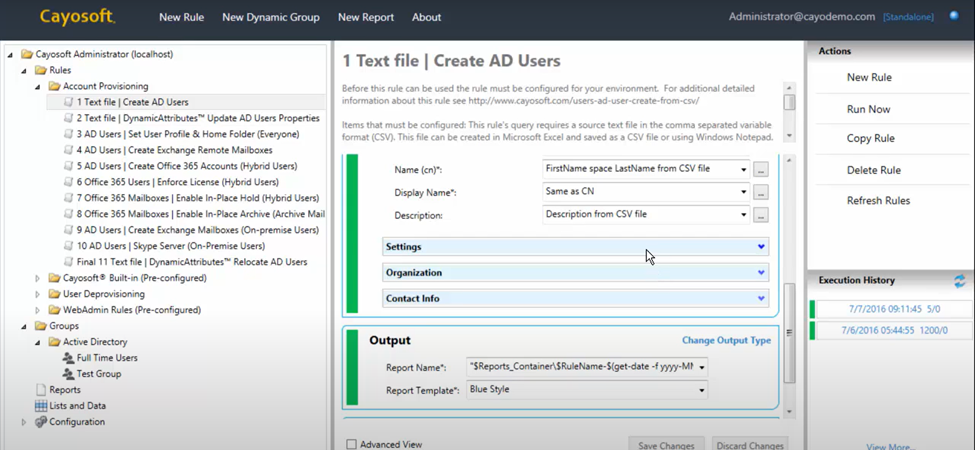
Cayosoft Administrator’s automation capabilities also help you eliminate the risk of orphaned accounts and access creep by automatically enforcing defined, consistent rules. Finer control ensures that the principle of least privilege is consistently applied across the IT environment and the attack surface is minimized.
Implement periodic access attestation and certification
Only business owners know who really needs access to what. An IT administrator can implement effective policies, but they cannot know whether the employee legitimately needs access to that marketing shared drive or that permission was never intended. Consider whether your entitlement management system can decentralize decision-making through access attestation. Access attestation is a process where business owners periodically review and certify that their users’ access rights remain valid. Different verticals of an enterprise can have different questions and justification reasons for a particular access right to remain valid (or not).
The typical quarterly or semi-annual access attestation process works like this:
- Identification: The system identifies all users and access within a business owner’s span of control.
- Review: The business owner receives a dashboard/report showing each user and their entitlements, and attests whether each is valid or invalid.
- Remediation: Invalid access is automatically marked for revocation.
- Reporting: Results are summarized for security, audit, and compliance teams.
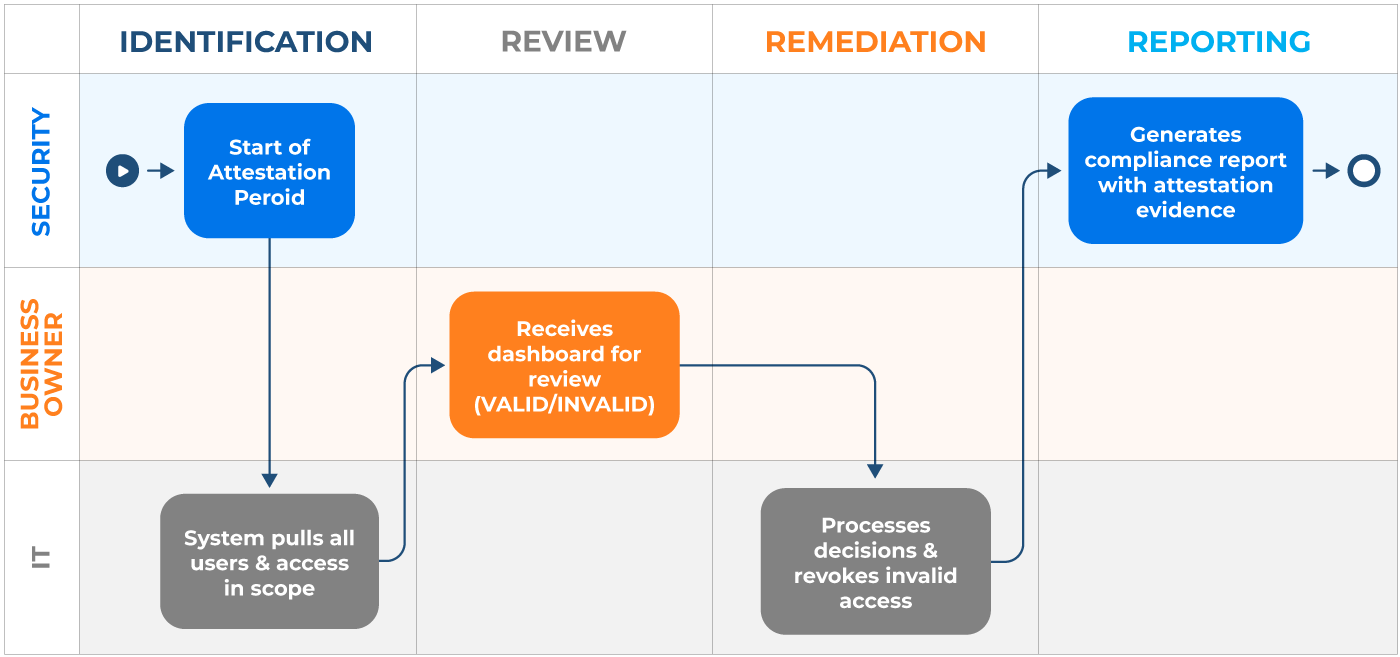
When you have thousands of users, manual review becomes impossible. Cayosoft Administrator includes built-in attestation features that empower business owners to perform these certifications via a simple web portal. This process creates an immutable audit trail, which is essential for satisfying compliance requirements under frameworks such as SOX, HIPAA, and GDPR.
Learn About The First-Ever Monitoring and Rollback for Microsoft Intune
Streamline access requests and approvals
Replacing ad hoc email access requests with structured, policy-driven processes is a critical security control. The problem with access requests flowing through email and help desk tickets is that there is no consistency in approval decisions and there’s also usually no audit trail for compliance.
A mature EM program enables a self-service model to address inconsistency in approval decisions. Rather than email-based requests being processed manually, you can implement structured, policy-driven access request workflows with defined approvers, consistent criteria, and immutable audit trails.
One effective approach is using preconfigured access packages, which are curated bundles of entitlements for a specific role or project. Instead of requesting individual permissions, users request preconfigured packages, which simplifies approval logic and reduces decision inconsistency.
The following illustration highlights a sample scenario of a user requesting access for a QA database and the workflow until entitlements are granted.

Access packages can also help you eliminate inconsistencies. For instance, you can define a “New Hire – Engineering” package once, and every new engineer gets identical access, eliminating inconsistencies where one hire gets database access while another doesn’t. In addition, employees get access in hours, not weeks; IT can focus on high-risk approvals, not routine provisioning, and audit trails are automatic and complete.
Another common practice is to use your internal ticketing system (ServiceNow, Jira, etc.) for requests and let the native identity governance tool handle the logic and enforcement. In such cases, you implement custom approval workflows integrated with the ticketing tool through rule-based routing to ensure consistent approver assignment. Note that the common goal across both the approaches must be to eliminate ad hoc email-based requests in favor of structured, auditable processes.
Utilize a hybrid RBAC/ABAC model
The range of access control models is broad, and understanding the differences between role-based access control (RBAC) and attribute-based access control (ABAC) helps you design a scalable, contextual solution. The following table compares the two approaches.
| Aspect | RBAC | ABAC |
|---|---|---|
| Access basis | User’s role or job title | Attributes such as user, resource, environment, and context |
| Decision logic | If user has role → grant access | If attributes satisfy policy → grant access |
| Context awareness | None or very limited | High (location, time, device health, network state, etc.) |
| Granularity | Coarse-grained | Fine-grained |
| Policy flexibility | Rigid; changes require role redesign | Highly flexible; policies adapt to changing conditions |
| Scalability | Becomes complex with many roles (“role explosion”) | Scales better with dynamic environments |
| Administrative overhead | Simpler to implement and audit | More complex to design and manage |
| Example rule | “Maintenance Engineer can access PLC dashboard” | “Engineer can access PLC dashboard only when on site, during shift hours, and from a compliant device.” |
Most organizations benefit from a hybrid approach where RBAC provides the structural foundation (which users should have access to) and ABAC layers on contextual enforcement (when and where access is granted).
As an organization, you should adopt a staged, risk-driven approach to hybrid RBAC/ABAC implementation rather than attempting full deployment simultaneously. Begin by documenting all organizational roles and their required access patterns. Work with department heads to establish which resources (databases, file shares, applications) each role should access.
In Active Directory Domain Services, create security groups that represent functional roles. An example using ActiveDirectory PowerShell module would look like this:
					Import-Module ActiveDirectory

$GroupName = "DBAdministrators"
$OUPath   = "OU=Security Groups,DC=example,DC=com"
$Members  = @("Alice", "Bob", "Carol")

New-ADGroup `
    -Name $GroupName `
    -SamAccountName $GroupName `
    -GroupScope Global `
    -GroupCategory Security `
    -Path $OUPath `
    -Description "Database administrators with RW access to production database servers"

Add-ADGroupMember `
    -Identity $GroupName `
    -Members $Members
Next, identify high-risk scenarios requiring ABAC, because not all access requires conditional policies. Organizations should focus ABAC implementation on high-value, high-risk scenarios, such as access to production infrastructure, sensitive data repositories, and privileged administrative actions. You want to ask “Which access would cause the most damage if compromised?” Focus conditional policies on those resources first.
For identified high-risk scenarios, layer Conditional Access policies on top of role-based group memberships. These policies evaluate environmental and device attributes before granting access and can be added from the Microsoft Entra Admin Center under Entra ID > Conditional Access. An example policy for database administrator access could have criteria like this:
					Policy Name: DBA Access from Safe Locations
Assignment:
  - Target users/groups: DBA--Administrators
  Conditions:
  - Locations: Include Corporate Office IP ranges, VPN gateway
  - Device state: Require compliant device (Intune-managed)
  - Device compliance: Disk encryption enabled
  - Sign-in risk: No high-risk sign-in detected
Access Controls:
  - GRANT access when all conditions are met
  - OTHERWISE: Block access OR require multi-factor authentication
The policy above ensures that even if the user is a member of DBA, they can access database resources only when connecting from a trusted location on a compliant device. If they attempt access from an unrecognized location or noncompliant device, the conditional access policy blocks or challenges the request regardless of her role.
Finally, after initial rollout, monitor policy effectiveness and refine based on organizational patterns. For instance, you can remove rules that never trigger, simplify rules that consistently trigger but add little security value, and gradually expand ABAC policies as operational proficiency increases. This staged approach helps you build capability while monitoring what works and what doesn’t.
Maintain continuous monitoring and auditing
Every recommendation outlined in this article would be useless without visibility. Organizations must know not just who has access, but when that access changed, who changed it, why it changed, and what the user could do with any new access.
Entra ID provides basic change logging, but these logs are often insufficient for governance purposes. Using Microsoft Entra ID Audit Logs and Azure Log Analytics, organizations with primarily cloud-based identity can configure extended retention in Azure Log Analytics and build custom alerts, though this requires significant engineering effort and may not provide out-of-the-box rollback. To build complete audit trails, your entitlement management system also requires a monitoring layer that captures and retains comprehensive entitlement change data.
For hybrid environments spanning on-premises Active Directory and Entra ID, utilizing third-party platforms like Cayosoft often is the most practical approach, as they abstract the complexity of correlating changes across two separate logging systems and provide built-in rollback functionality.
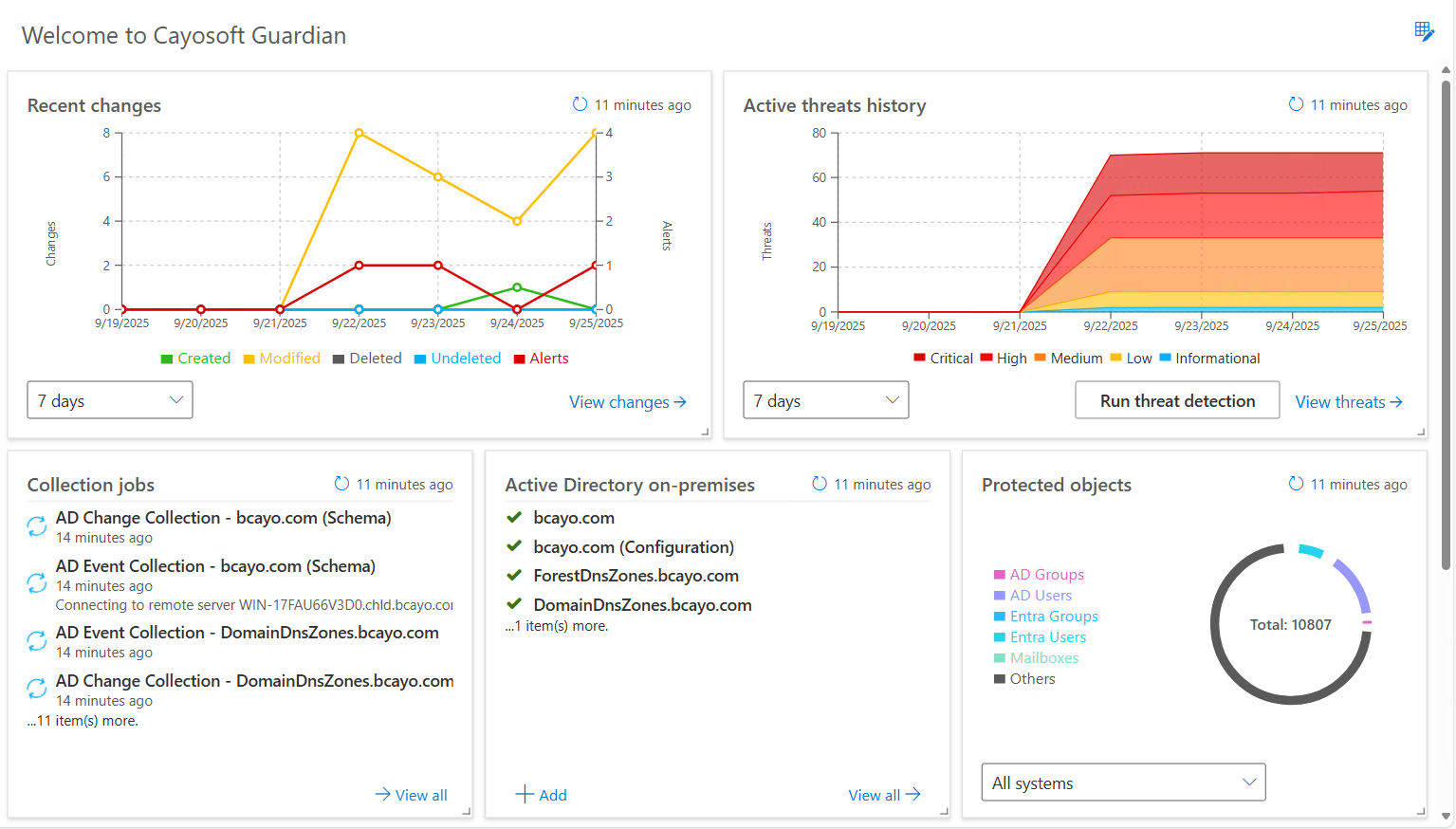
Cayosoft Guardian provides real-time change monitoring and instant rollback for hybrid AD and Entra ID. It captures every change to objects, attributes, and group memberships. If an unauthorized change is detected, such as a privilege escalation, administrators can reverse it with a single click, restoring the environment to its secure state without the downtime associated with full-system backups.
Watch a 15-minute Demo of Microsoft Intune Change Monitoring and Recovery
Conclusion
As you add applications, hire employees, and respond to threats, your entitlement strategy must evolve accordingly. You need a unified lens to see the true reach of a single identity across your entire hybrid environment. Unfortunately, fragmented native tools cannot help with this level of oversight.
Cayosoft bridges that gap. It lets you manage your legacy and cloud systems together, automating the setup process and ensuring that people only have the access they need when they need it. The platform makes your identity setup visible, easy to manage, and actually secure. Request a personalized Cayosoft Demo to see how.
Stop AD Threats As They Happen
Cayosoft Protector provides continuous monitoring and real-time alerts across your entire Microsoft Identity stack
Like This Article?
Subscribe to our LinkedIn Newsletter to receive more educational content