



Home » How to Build a Resilient Plan Using Disaster Recovery Best Practices » Essential Active Directory Forest Recovery Best Practices
Essential Active Directory Forest Recovery Best Practices
Learn how to recover an Active Directory forest using verified backups, isolated environments, and structured validation gates.
Explore the chapters:
Table of Contents
Stop AD Threats As They Happen
Cayosoft Protector provides continuous monitoring and real-time alerts across your entire Microsoft Identity stack
Like This Article?
Subscribe to our LinkedIn Newsletter to receive more educational content
Active Directory (AD) manages the authentication and authorization for nearly all corporate assets. At its core, an Active Directory forest is the highest-level security and configuration boundary in AD Domain Services, containing one or more domains that share a common schema, configuration, and trust relationships. Even in a single-domain forest, AD is associated with authentication, authorization, name resolution, policy enforcement, device and service identities, and a long list of application dependencies.
Think of the AD forest as the power grid; if it fails, every light goes out. Similarly, a forest-wide failure or compromise can render business services inoperable, making forest recovery necessary. When the logical integrity of domain controllers (DCs) is no longer trustworthy or is so corrupted that they risk propagating dangerous data to others—for example, after ransomware, a destructive insider, or a scripted misconfiguration that spreads across all domains—recovering the forest from trusted backups is often the only way to restore a safe and consistent identity fabric.
Traditionally, AD forest recovery has been a largely manual, runbook-driven effort that takes days or even weeks, especially when rebuilding multiple domains and DCs across sites. In a crisis, the difference between a recovery that takes 24 hours and one that takes 20 minutes can mean millions of dollars in saved revenue and the preservation of an organization’s reputation.
This article is intentionally hands-on and operational. It assumes readers understand basic AD concepts (e.g., forests, domains, DCs, DNS, and Kerberos) and focuses on what to prepare, what to check, and how to execute each phase of a secure forest recovery.
Summary of key best practices for Active Directory Forest recovery
This table summarizes key practices that IT admins should adopt when performing an Active Directory forest recovery.
| Best practice | Description |
|---|---|
| Establish a forest recovery readiness baseline | Define prerequisites, inventories, and “known-good” references before an incident. |
| Maintain verified system state backups for all domain controllers | Ensure that DC system state backups are secure, complete, within safe age limits, and proven restorable via periodic testing. |
| Use an isolated recovery environment (IRE) | Restore AD in a clean, isolated segment to prevent reinfection and tightly control time/DNS/dependency behavior. |
| Establish a pre-restore integrity and persistence gate | Select a known-good restore point and verify that you are not reintroducing persistence via GPO/SYSVOL, privileged groups, or suspicious configuration. |
| Restore the first domain controller | Authoritatively restore the initial DC in the IRE and stabilize core services (AD DS, DNS, time/Kerberos), including proper FSMO handling. |
| Validate domain health with structured acceptance checks | Use native tools to confirm AD replication health, resolve synchronization errors, and verify sysvol replication. |
| Reconnect member servers and applications in controlled waves | Rejoin workloads using a priority-based wave model to prevent DC overload and detect latent infections. |
| Automate and orchestrate recovery workflows | Leverage scripts, tools, and automated workflows to reduce human error and accelerate recovery timelines. |
Manage, Monitor & Recover AD, Entra ID, Microsoft 365

Unified Console
Use a single tool to administer and secure AD, Entra ID, and M365

Track Threats
Monitor AD for unwanted changes – detect for security or critical functions

Instant Recovery
Recover global enterprise-wide Active Directory forests in minutes, not days
Establish a forest recovery readiness baseline
Forest recovery success is largely determined before an incident happens, and a well-documented readiness baseline is easily the foundation of any successful disaster recovery effort. A readiness baseline tells you what we have, what “good” looks like, and how you can prove you are “back to good” after a restoration.
It is important to have a readiness baseline, but it is equally important to understand what must be recovered (Tier 0 assets and critical dependencies) and where trustworthy recovery data resides. This includes inventories of DCs and domains, documentation of the current topology, known-good reference states for critical groups and GPOs, and clear ownership for execution and sign-off.
Here are some specifics:
- Define the minimum recovery data set, including:
- System state backups for at least one writable DC per domain, plus metadata about backup age and validation status.
- Documentation of forest structure: domains, sites, Flexible Single Master Operations (FSMO) roles, GC locations, DNS integration, and trust relationships.
- DSRM passwords and Domain Admin / Enterprise Admin credentials stored in a secure vault.
- Identify and protect Tier 0 assets:
- Treat Tier 0 as the control plane: DCs, AD forest/domains, identity infrastructure (PKI, ADFS/IdP), and virtualization hosts for DCs.
- Maintain an inventory of Tier 0 accounts, groups, servers, and management workstations, and protect them with hardened access controls.
- Define and document validation gates:
- Establish explicit stop/go checkpoints, such as “integrity gate passed,” “first DC restored and stabilized,” and “replication and SYSVOL health verified before reconnecting production.”
- Ensure each gate has clearly defined success criteria and designated owners authorized to approve progression to the next phase.
- These mandatory checkpoints prevent teams from prematurely reconnecting to production and reintroducing persistence, broken replication, or SYSVOL issues.
- Pre-build recovery runbooks and IRE patterns:
- Document repeatable steps and command sequences for restore, health checks, and reconnection waves, including example
repadminanddcdiaginvocations. - Predefine an IRE pattern (network segmentation, DNS/time behavior) so that it can be activated rapidly when needed.
- Document repeatable steps and command sequences for restore, health checks, and reconnection waves, including example
Building and maintaining a readiness baseline manually is challenging, particularly for Tier 0 assets where configuration drift can go undetected for weeks. Cayosoft Guardian’s continuous change monitoring addresses this by recording every identity change across on-premises AD, Entra ID, and Microsoft 365 in real time, capturing who made each change, what was changed, and when. This living record can serve as an always-current reference for what a known-good state looks like, making it considerably easier to define and validate baseline configurations before an incident occurs.
Manage, Monitor & Recover AD, Entra ID, M365, Teams
| Platform | Admin Features | Single Console for Hybrid (On-prem AD, Entra ID, M365, Teams) | Change Monitoring & Auditing | User Governance (Roles, Rules, Automation) | Forest Recovery in Minutes |
| Microsoft AD Native Tools | ✓ | ||||
| Microsoft AD + Cayosoft | ✓ | ✓ | ✓ | ✓ | ✓ |
Watch our recorded & upcoming educational webinars about identity protection
Maintain verified system state backups for all domain controllers
A forest recovery is only as good as the media used to perform it, and the quality, age, and trustworthiness of the backups used can fundamentally constrain the recovery process. You also want to know whether to use a system state or a bare-metal backup.
A system state backup captures the AD database, SYSVOL, registry, and critical system components on a DC, making them the primary data source for forest recovery. In contrast, a bare-metal recovery (BMR) backup includes all the system state data plus the OS binaries and driver configurations. A BMR backup is not strictly required for forest-wide identity recovery if system state backups are available.
The age of the backup is something that needs to be managed with security in mind. Older backups materially increase risk because they may exceed safe restore windows, e.g., tombstone lifetime considerations, which is the period (typically 180 days) during which a deleted object is retained before being permanently removed. For instance, restoring from backups older than tombstone lifetime can also cause lingering objects and USN rollback scenarios that require additional cleanup and careful replication validation, but too-new backups might already contain attacker-induced corruption or persistence.
To ensure that your backup is trustworthy, you need to protect your backup storage from tampering because backup compromise is common in identity-impacting incidents. Treat backup infrastructure as a separate high-value target. To defend against this, you should:
- Store backups on immutable storage or offline rotation
- Use separate credentials (not AD Domain Admin) for backup admin access
- Enable alerting on backup deletion, modification, vault policy changes, or anomalous access patterns as part of the security operations center’s detection logic
- Ensure that backup encryption keys are stored securely and recoverably
One of the hardest problems in backup validation is confirming that what was stored is also free of attacker-introduced persistence, and a conventional backup infrastructure gives you very little visibility into the integrity of the data it holds. Cayosoft Guardian addresses this differently: rather than relying solely on periodic system state snapshots, it maintains continuously tested, malware-scanned backups and a real-time change record that is preserved independently of Windows event logs. This is especially relevant in identity-impacting incidents, where threat actors frequently target event logs early in the attack chain to blind SIEM tooling. Having a tamper-resistant, out-of-band audit trail alongside the backup makes it considerably easier to assess whether a given restore point is actually clean, and to answer the question “how far back do we need to go?” with evidence rather than guesswork.
Use an isolated recovery environment (IRE)
When an infection is forest-wide, the production network is considered toxic. Restoring a domain controller directly into the live, compromised network reintroduces it into the same hostile conditions that caused the failure, greatly increasing the risk of rapid reinfection.
An isolated recovery environment (IRE) is a network segment that is completely distinct and isolated from the compromised production environment. Its purpose is to provide a safe space where the forest can be recovered while blocking all communication with the live production environment until validation gates are satisfied.
A functional IRE must mirror the critical components of the production environment without risk, and it typically includes the following items.
| Component | Requirement | Purpose |
|---|---|---|
| Network segmentation | No routing to/from the production network | Prevents the lateral movement of malware and attackers |
| DNS infrastructure | Local DNS zones within the IRE | Ensuring that restored DCs resolve their own SRV records to function |
| Time source | A reliable time source (or authoritative time configuration plan) | Prevents Kerberos authentication failures due to time drift |
| Clean virtualization | Dedicated hosts or a clean cloud subscription | Ensures that the hypervisor itself isn’t compromised |
Before starting the recovery, you should verify the network isolation with concrete tests:
- No IP routing between IRE and production networks; confirm with network path and firewall rule testing
- No overlapping subnets or address conflicts with production; all name resolution inside the IRE resolves only to IRE endpoints
- Packet captures showing no DC attempting to reach production DCs, NTP, or endpoints unintentionally
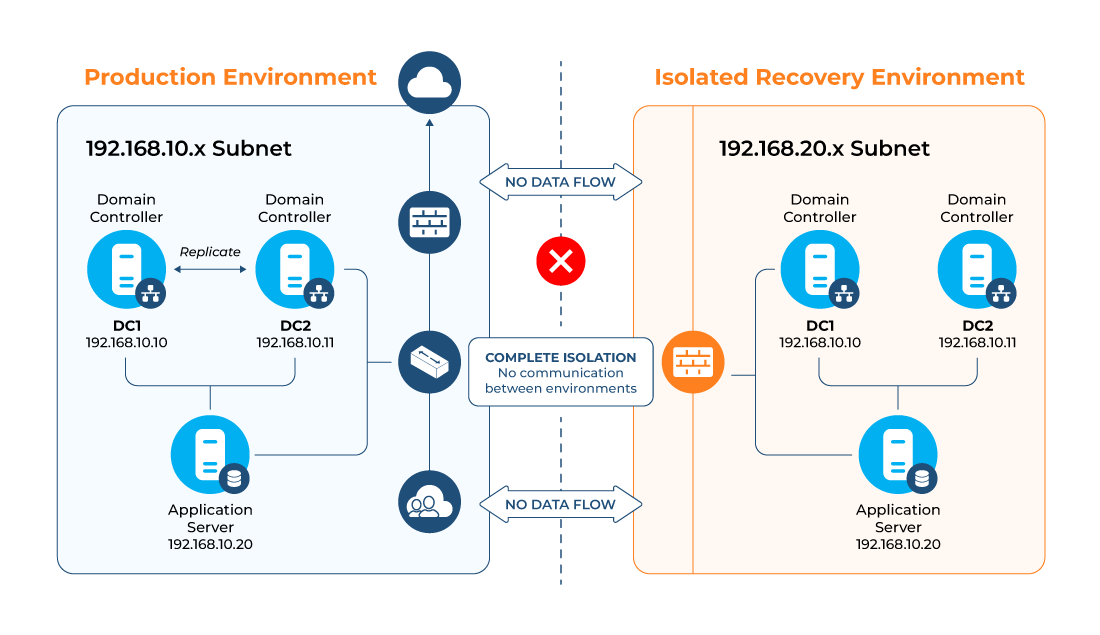
At this IRE gate (as defined earlier), ensure that all tests pass successfully, and document all evidence.
The requirement for a clean, isolated recovery environment is well understood in principle, but standing one up under pressure, with correct DNS behavior, time sources, and network isolation verified, is one of the most operationally demanding parts of a recovery. Cayosoft Guardian Instant Forest Recovery takes a different structural approach: rather than constructing an IRE at the time of an incident, it maintains a continuously validated standby forest in an isolated cloud environment that is tested daily and verified to be free of production contamination. In practice, this means the isolation, DNS configuration, and forest topology have already been validated before any incident occurs, removing one of the most error-prone phases from the critical path of recovery.
Establish a pre-restore integrity and persistence gate
One common and dangerous mistake in AD recovery is restoring a backup that already contains the attacker’s backdoor or malicious configuration. Consider a ransomware scenario: If the threat actor was present in the environment for weeks before the ransomware was triggered, your most recent backup is likely compromised.
The “pre-restore integrity and persistence gate” is a deliberate checkpoint where you choose a restore point and validate, as far as possible, that it does not reintroduce known persistence or malicious configuration. It acknowledges that backup selection is a security decision, not just a technical one.
These are some key points and insights to note in this phase:
- Select an evidence-based “known-good” restore point:
- Select the most recent backup confidently preceding compromise indicators or malicious changes, even if that means losing more recent legitimate updates.
- Use detection timelines, log analysis, EDR findings, and change management records to bracket when compromise likely began.
- Using Windows Backup Administrator (wbadmin), you can check available system state backups by running the command:
wbadmin get versions
In the output, take note of the version identifier because you will need it later.

- Check common AD persistence mechanisms: In the case of an attack, check for common AD persistence mechanisms, including AD-integrated tasks like scheduled tasks or startup scripts, or GPOs and logon/logoff scripts that introduce insecure configuration.
- Decide what to do when integrity is uncertain: Choose the latest restore point that predates suspicious changes, then apply stricter validation and assume that risk of additional compromise remains.
This is another validation gate, and you should not proceed to restore DCs until stakeholders agree on the chosen restore point and associated risks. Record the decision, rationale, and assumptions for post-incident review and future improvement.
Free Ransomware webinar: Why Traditional AD Recovery Tools Aren’t Enough
Restore the first domain controller
The restoration of the first DC in the forest root domain is a critical and technical process and especially important because it holds schema and configuration data, often serves as a DNS root, and maintains key trust relationships. Restoration into the IRE should follow a carefully scripted sequence, including system state restore, boot into Directory Services Restore Mode (DSRM), time configuration, and DNS validation. Only when the first DC is clean and stable should further DCs be added or production connectivity considered.
The exact steps vary by backup tooling, but the logic remains consistent. At this stage, it is assumed that you have created a system state backup, the IRE has been prepared, and all isolation tests passed.
Here is the sequence for restoring the first DC:
- Boot the DC in DSRM by running the command below, which configures Windows to boot into DSRM on the next restart:
bcdedit /set safeboot dsrepair
- Another method is via System Configuration: On your keyboard, press Win + R, type msconfig, and click Enter.
- Click the “Boot” tab, check the “Safe boot” box, and select “Active Directory repair.”
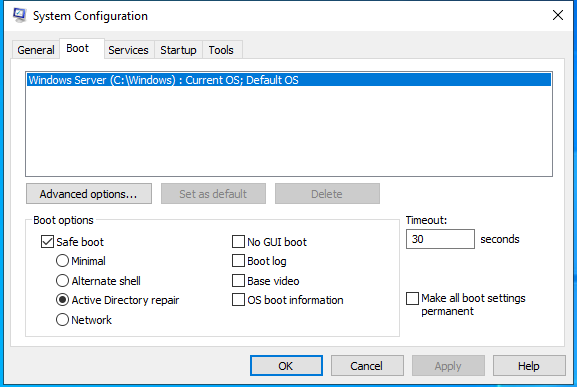
- Instead of rebooting, you want to shut down the server and ensure that it is moved to the IRE before you proceed.
- Once in the IRE, boot the server into DSRM, as this is the only mode where the AD database can be overwritten. To log in to DSRM, you should log in with .\Administrator and the DSRM password.
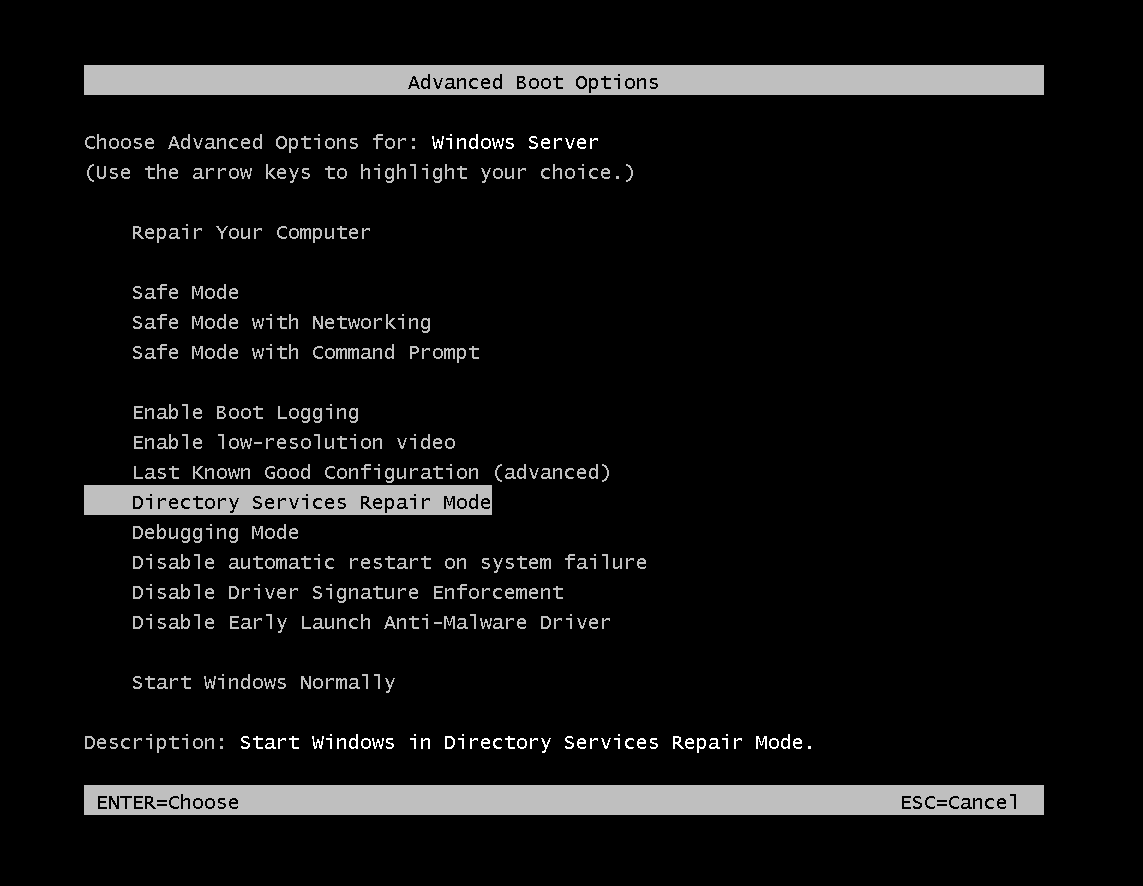
- Use the wbadmin command or the Windows Server Backup GUI to restore the System State from your verified media. To perform the restore, run this command in PowerShell:
wbadmin start systemstaterecovery -version: -authsysvol
The command initiates a system state recovery operation from a specific backup identified by <versionID>. The -authsysvol parameter makes the SYSVOL restore authoritative, marking the restored SYSVOL as the primary version so that, after reboot and replication resumption, other domain controllers replicate SYSVOL content from this machine rather than overwriting it.
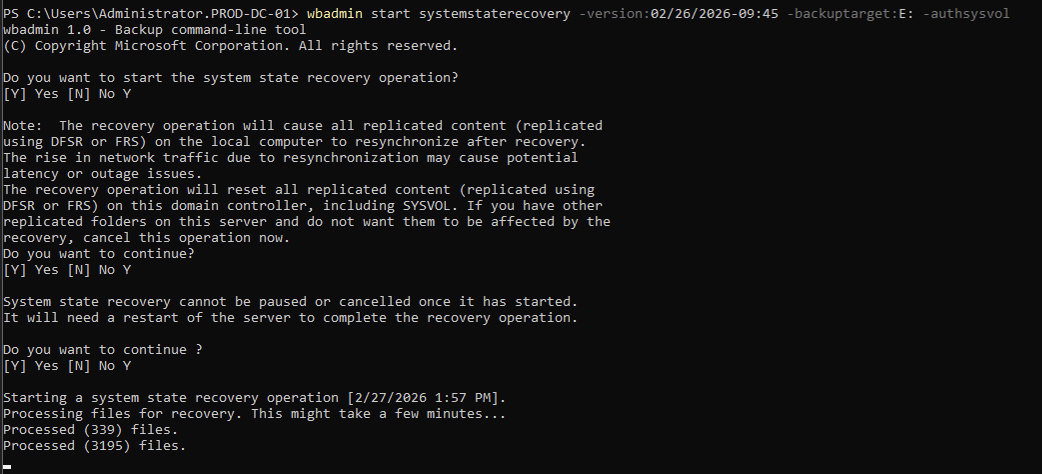
When the recovery process is completed, you will be prompted to restart the computer. Before doing that, ensure to reverse the process above by unchecking the “Safe boot” box so the server can boot normally.

Move-ADDirectoryServerOperationMasterRole -Identity "PROD-DC-01" -OperationMasterRole PDCEmulator, RIDMaster, InfrastructureMaster, SchemaMaster, DomainNamingMaster -Force
After seizing, you can verify by running the command below in PowerShell:
netdom query fsmo
The response should show you the restored DC that has all the FSMO roles.

Validate domain health with structured acceptance checks
Once the first DC is restored, structured acceptance checks ensure that AD is functionally healthy before any reconnection to production. Microsoft provides explicit guidance for verifying replication and SYSVOL health using tools such as repadmin and dcdiag. The first DC must pass all health checks as a prerequisite for adding subsequent DCs, at which point the collective health of all DCs becomes the final acceptance criterion. Crucially, since this DC is currently isolated and authoritative, the initial replication checks primarily verify internal database consistency and self-replication.
Healthy replication generally means the following:
- All DCs within a domain and across domains (where appropriate) show no lingering replication failures or topology issues.
- repadmin /replsum and related commands show no persistent error codes or excessive replication latency for required partners.
- Consistent inbound/outbound replication status exists across DCs.
- DNS and AD topology are consistent with the restored environment.
Healthy replication is a hard gate; if replication is not healthy, reconnecting production workloads can amplify inconsistency and cause widespread authentication and policy failures.
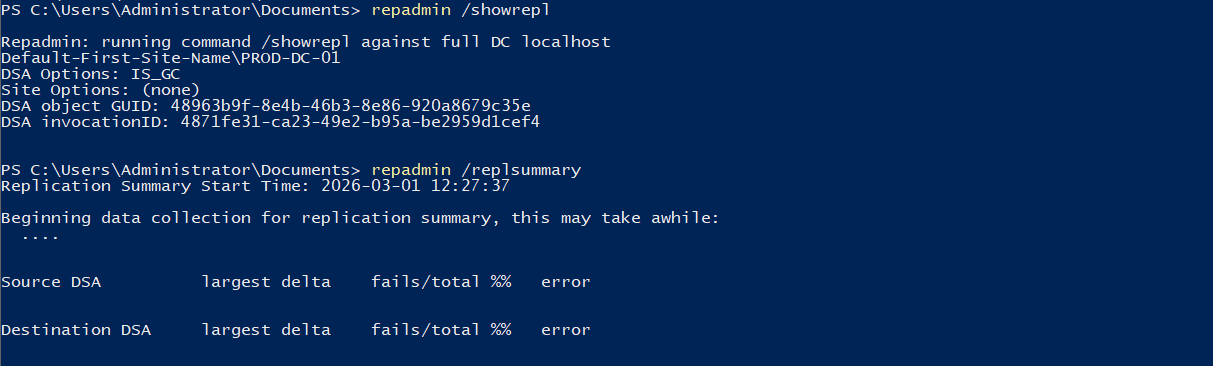
Use repadmin for replication diagnostics: Run the commands below to check for replication diagnostics:
repadmin /replsummary
repadmin /showrepl
You want to look out for failures or errors, (such as waiting for initial replication, access is denied, or the target principal name is incorrect), and also confirm the “Default-First-Site-Name.”
Use dcdiag for broader domain health checks: The dcdiag tool performs a comprehensive suite of tests, including checking if the DC is actually advertising itself as a DC to the network, verifying that all required SRV records are correctly registered, and confirming the integrity of the SYSVOL shared folder. The command for this is simply “dcdiag”.
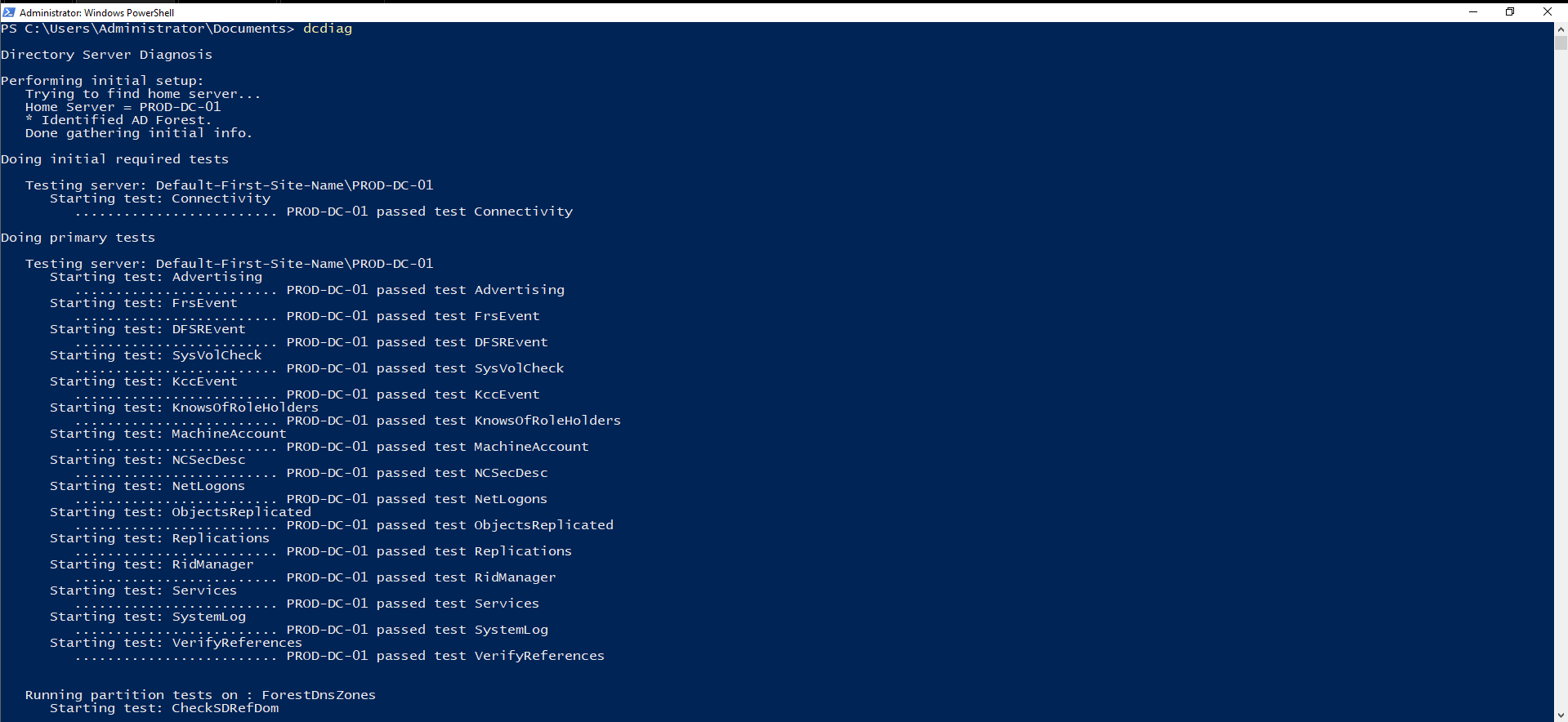
You want to ensure that every test passes, particularly for DNS, NETLOGON, and SYSVOL availability, and interpret and remediate failures before reconnecting other servers.
You should treat health validation as a mandatory acceptance gate and should not connect member servers or applications until replication and SYSVOL checks pass to an agreed threshold. Document residual warnings and risk acceptances where full remediation is deferred.
Once the first DC successfully passes all acceptance checks, the next major phase of recovery is to restore the remaining domain controllers. These subsequent DCs must be introduced as global catalogs and synchronize correctly from the first, authoritative DC. Only after the entire forest topology is fully restored and passes a final collective health check should the environment proceed to the next phase.
Native tools like repadmin and dcdiag remain the authoritative source for replication and domain health diagnostics, and the checks described in this section should be carried out regardless of what additional tooling is in use. That said, one gap in purely native validation is the ongoing monitoring picture. Once the checks pass at a point in time, there is no automatic tripwire if something changes before production reconnection begins. Cayosoft Guardian’s real-time change monitoring can be used to fill this gap. Watching for unexpected object modifications, privilege escalations, or GPO changes in the restored environment during the validation window can provide a continuous signal that the forest remains in its expected state between formal acceptance checks. This is particularly useful in the period between first DC stabilization and final collective health acceptance, where the environment is still isolated but multiple DCs are being added.
Reconnect member servers and applications in controlled waves
Even after AD is healthy in the IRE, reconnecting the broader environment must be treated as a risk-managed process. Reconnecting everything at once can overwhelm your freshly restored DCs with authentication requests, and this may mask the signals of a latent malware infection. An advantage of phased reconnection is that it aids troubleshooting and reduces the chance that a compromised workload will immediately undermine the recovered forest.
Each wave should have clear criteria, including which systems are included, what pre-checks to perform, how to validate success, and stop/go rules before expanding the scope. This is especially important in scenarios where the forest recovery followed a security incident and adversary persistence may still exist on non-AD systems.
A practical wave model for a single-domain forest could be like the following:
- Wave 1: Identity-adjacent services (e.g., PKI, federation/SSO, privileged access workstations, and management tooling needed to administer AD)
- Wave 2: Core business applications that directly depend on AD for authentication/authorization and provide high business value
- Wave 3: Remaining servers and endpoints, including less critical systems and workstation populations
For each wave, you want to validate application dependencies before declaring a wave complete. Confirm SPNs, service account or gMSA configuration, Kerberos delegation settings, and LDAP/LDAPS connectivity for key applications.
You will commonly face broken trust relationships after restoration, and you choose to either repair secure channels or rejoin systems. You should “repair” when the system is trusted as clean, you can validate integrity, and want minimal disruption. Use tools like Test-ComputerSecureChannel and Reset-ComputerMachinePassword to repair machine account secure channels when possible.
However, you should opt to rejoin when the host is suspected of being compromised, or the system’s configuration is untrusted or drifted.
Automate and orchestrate recovery workflows
Recovery involves many repetitive, error-prone tasks: backup selection, restore commands, service checks, repadmin and dcdiag diagnostics, DNS verification, secure-channel repairs, and so on. Performing these manually under pressure is error-prone and slow. Automation and orchestration help encode known-good sequences, reduce human error, and shrink recovery timelines. Some key benefits of automation in forest recovery include:
- Consistency: Repeat the same, tested sequence of steps across drills and real incidents, reducing variance.
- Speed: Automate repetitive operations (e.g., running dcdiag/repadmin across DCs, checking DNS records, resetting secure channels) to cut time to recovery.
- Auditability: Maintain logs of executed steps, parameters, and results for post-incident review and compliance.
While Microsoft doesn’t provide a “one-click” recovery button, almost every step in the recovery guide can be automated using PowerShell and ntdsutil script files. Advanced solutions like Cayosoft’s patent-pending Guardian Instant Forest Recovery (GIFR) implement forest recovery as an orchestrated runbook that combines automated restore, DNS cutover, and verification steps with manual approval gates.
GIFR is a purpose-built instant AD forest recovery solution with workflow‑driven orchestration for full forest, DC, and object‑level restores. Instead of administrators manually rebuilding domain controllers, matching system state backups, and wiring up an isolated environment, GIFR executes a predefined sequence of steps that can be reused across incidents and drills.
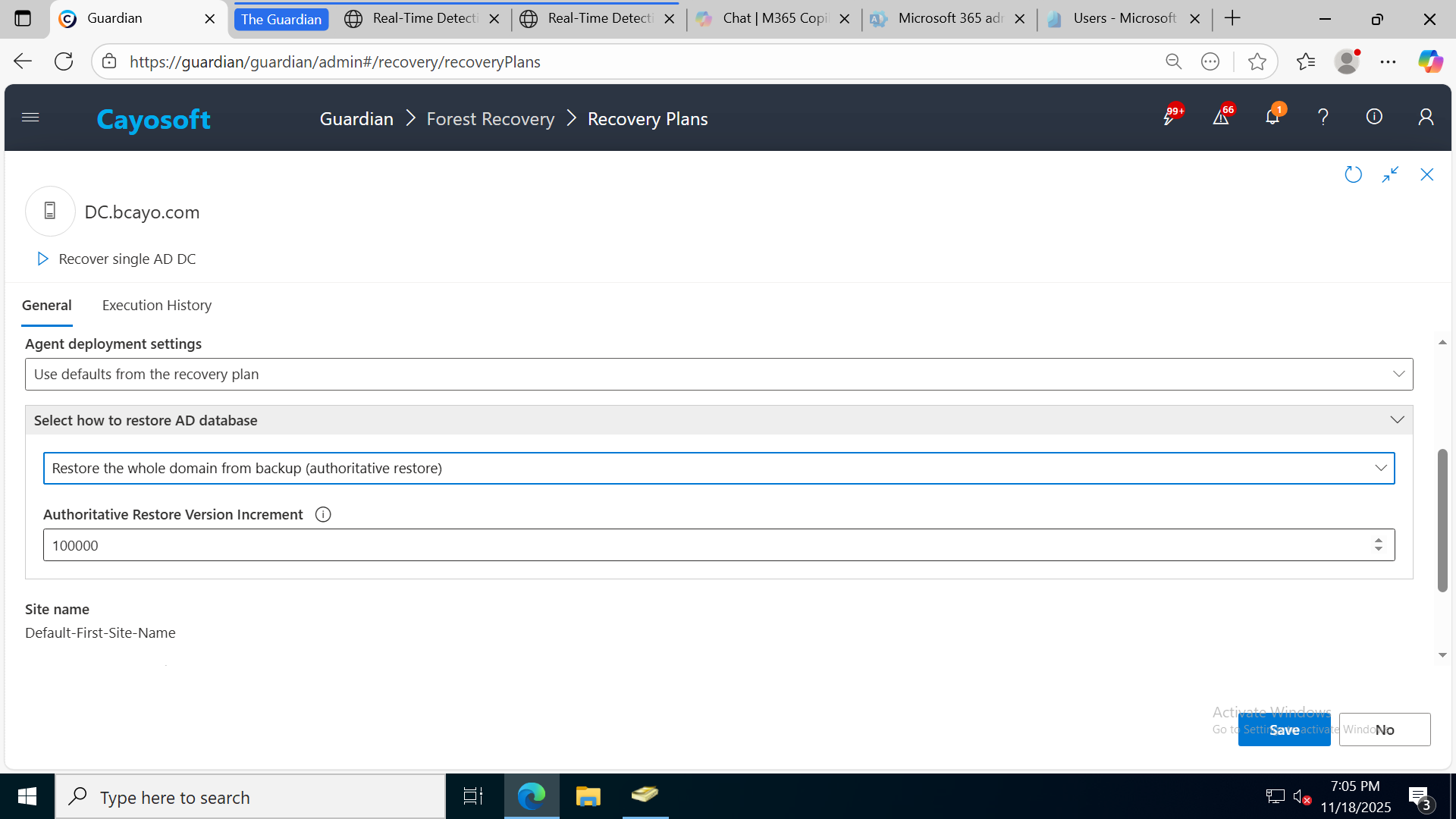
Many of the steps you would normally script are chained together with explicit checkpoints before moving to the next phase. This lets teams “pause for confirmation” at critical stages, such as validating isolation or backup integrity, before proceeding to the next phase.
With Cayosoft Guardian, continuous change monitoring and instant rollback shift recovery from a one‑off, crisis‑only event to an always‑on capability. The platform records identity changes in real time, maintains immutable, malware‑scanned backups, and can roll back specific objects or entire forests in minutes. This not only accelerates forest recovery but also provides the forensic and evidentiary backbone for making confident, evidence‑based decisions at each validation gate.
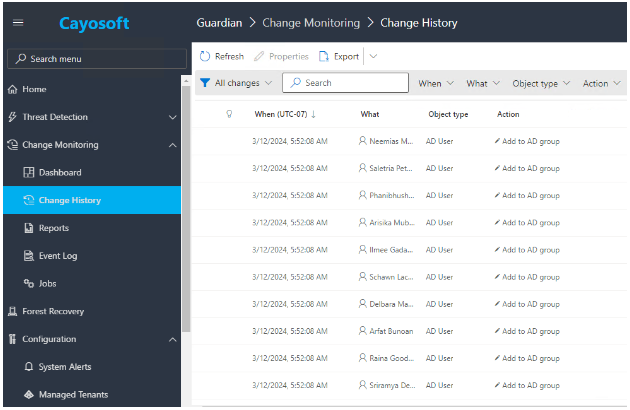
This matters because:
- You get better evidence for your validation gates (you can see exactly which objects were changed and when, and by whom).
- You can contain incidents earlier by rolling back malicious changes at the object level, potentially avoiding the need for a full forest recovery in some cases.
- When a forest-level event does occur, you arrive with pre-validated, malware‑scanned backups and a detailed change history, instead of only hoping yesterday’s backup is clean.
Watch our recorded & upcoming educational webinars about identity protection
Conclusion
Active Directory forest recovery can be seen as the ultimate test of an organization’s identity resilience. It is a process that requires a delicate balance between technical expertise and strategic orchestration. When an attack or failure forces you to roll back an entire forest, it forces you to confront uncomfortable questions:
- Can we distinguish clean from functional?
- Can we prove integrity before restoring trust?
- Have we designed our recovery posture accordingly?
Organizations that see forest recovery as a capability and continuously rehearse, measure, and improve it tend to uncover broader weaknesses in access design, monitoring, and change control long before a crisis exposes them.
There is also a strategic dimension. As enterprises adopt hybrid identity models and cloud-integrated services, the forest remains a fundamental anchor. Even when authentication extends into cloud identity platforms, on-premises AD frequently continues to hold critical roles, service accounts, and trust relationships. A compromised forest can ripple far beyond a single data center.
To learn more about how Cayosoft’s GIFR, with standby directory technology, can act as an alternative to legacy forest recovery tools and provide true forest-level fault tolerance, click here.
Stop AD Threats As They Happen
Cayosoft Protector provides continuous monitoring and real-time alerts across your entire Microsoft Identity stack
Like This Article?
Subscribe to our LinkedIn Newsletter to receive more educational content