



Home » How to Build a Resilient Plan Using Disaster Recovery Best Practices
How to Build a Resilient Plan Using Disaster Recovery Best Practices
Learn seven proven disaster recovery best practices to build a resilient, holistic enterprise IT recovery strategy.
Explore the chapters:
Next Chapter >
Table of Contents
Stop AD Threats As They Happen
Cayosoft Protector provides continuous monitoring and real-time alerts across your entire Microsoft Identity stack
Like This Article?
Subscribe to our LinkedIn Newsletter to receive more educational content
Disasters are inherently inevitable in enterprise IT, and their causes are only becoming increasingly broad. A disaster in this context refers to an event catastrophic enough to fall outside general response capabilities and to trigger formal disaster recovery (DR) procedures.
The canonical DR example generally focuses on data recovery after physical loss of a key data center, or something along those lines. While this remains a critical pillar, in the modern landscape, organizations also need to be ready to quickly recover far more than that, including incidents involving identity infrastructure, DNS, network configuration, and key tooling. Modern breaches often target the identity layer first to paralyze recovery efforts. If you cannot authenticate, you cannot recover.
This article will explain seven proven disaster recovery best practices to help you formalize a DR strategy that covers critical dependencies and provide advice on how to ensure it remains effective over time.
Summary of key disaster recovery best practices
The table below summarizes seven disaster recovery best practices that this article will cover in more detail.
Best practice | Description |
Treat disaster recovery holistically | Plan for the recovery of enterprise identity infra, DNS, network config, and critical tooling in addition to standard data recovery. |
Inventory assets and prioritize in line with business impact | Run an exhaustive asset inventory and tier criticality by business impact. Let this drive prioritization, remembering to map dependencies and consider their impact. |
Choose the right recovery architecture | Determine Recovery Time Objective / RTO (max tolerable downtime) + Recovery Point Objective / RPO (max tolerable loss), and use these to guide architecture decisions and tradeoffs. |
Implement a resilient backup strategy | Properly segment backups from production and utilize identity-aware recovery tools to prevent re-infection. |
Define activation criteria, notification process, and escalation pathways | Make sure you have proper escalation and notification pathways in place for once a disaster response is triggered, and ensure thresholds, criteria, and ownership for said activation are well defined. |
Create a formal recovery plan with explicit and clear ownership | Document all recovery procedures and technical details needed for successful recovery and assign redundant but specific individual owners to avoid misses due to the bystander effect. |
Test regularly, learn from failure, and keep plans current | Stress-test all aspects of your defined recovery process regularly and directly utilize lessons learned to update documentation and improve efficiency. |
Manage, Monitor & Recover AD, Entra ID, Microsoft 365

Unified Console
Use a single tool to administer and secure AD, Entra ID, and M365

Track Threats
Monitor AD for unwanted changes – detect for security or critical functions

Instant Recovery
Recover global enterprise-wide Active Directory forests in minutes, not days
Treat disaster recovery holistically
Historically, advice regarding disaster recovery has focused almost exclusively on data recovery. For example, backup resiliency, proper geographical and technical segmentation, and regularly tested restore workflows are staples of traditional disaster recovery best practices. These basic DR planning steps are all still critical and relevant, but they’re no longer sufficient on their own. Even if you can theoretically reliably recover data, that’s meaningless if you can’t also recover the corporate identity required for access.
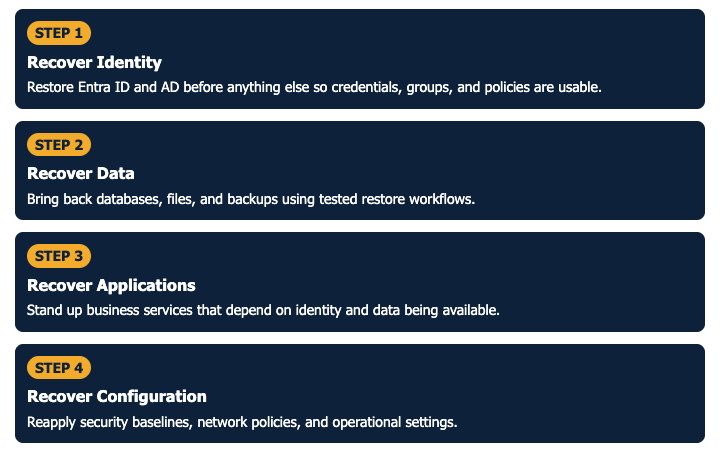
A holistic DR strategy that includes dedicated Entra ID and Active Directory (AD) disaster recovery is a must. Platforms like Cayosoft Guardian can holistically address these aspects by protecting the identity layer as a standalone, recoverable asset, ensuring that your “keys to the kingdom” are available the moment you begin the broader recovery process
Numerous modern breaches in highly secure environments have exploited this common weakness, and threat actors are even using generic ransomware to target smaller companies. Identity is only one example – modern DR needs to plan for the recovery of everything material to a specific organization, not just the traditional, canonical data layer example. The sections below will explore this further.
Manage, Monitor & Recover AD, Entra ID, M365, Teams
| Platform | Admin Features | Single Console for Hybrid (On-prem AD, Entra ID, M365, Teams) | Change Monitoring & Auditing | User Governance (Roles, Rules, Automation) | Forest Recovery in Minutes |
| Microsoft AD Native Tools | ✓ | ||||
| Microsoft AD + Cayosoft | ✓ | ✓ | ✓ | ✓ | ✓ |
Watch our recorded & upcoming educational webinars about identity protection
Inventory assets and prioritize in line with business impact
No practitioner, regardless of experience, can protect assets that they don’t know exist – let alone develop a coherent recovery strategy for such. A proper asset inventory is essential, and one nuance often missed is that it must include all critical assets, not just those immediately obvious and flagged by Engineering or IT. Some teams within the company may have critical workflows and data stored with a cloud provider not authorized by the company, leading to a lack of visibility and an inability to recover.
Another, unfortunately common example is when companies handle DNS configurations one-off in an external portal, only a few people know about, with ad-hoc authentication not tied to Single Sign-On (SSO). Organizations need to ensure assets like these are known so they can properly plan and be notified of key-holder departures, etc.
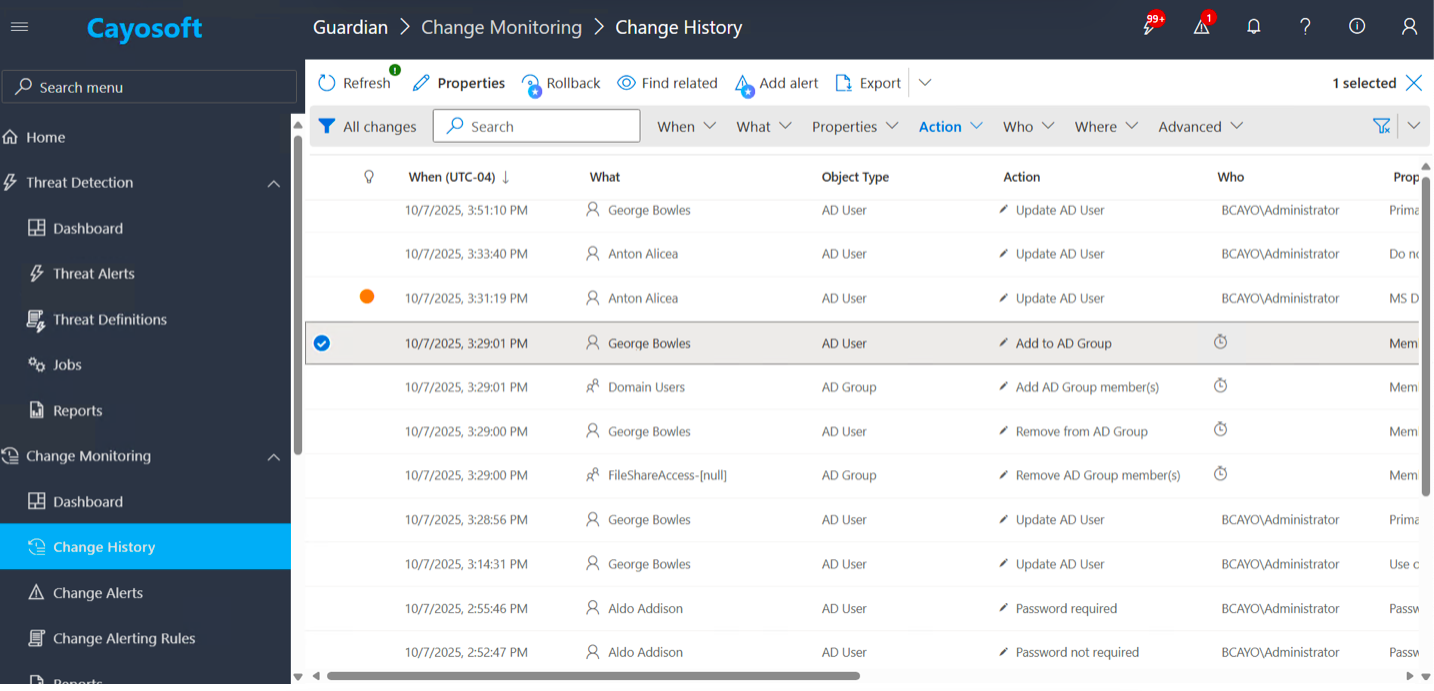
Visibility in hybrid environments is a common gap in DR readiness. Tracking identity changes separately across on-prem and cloud AD can lead to partial blindness or fragmentation in the “whole picture” view during a recovery scenario. Unified control planes that consolidate historical identity changes across all environments, such as Cayosoft Guardian, can effectively eliminate this gap.
After a team has created the most exhaustive inventory possible, the next step is proper prioritization. Critical engineering areas may, counterintuitively, not be the most critical for the business as a whole, depending on the specific product portfolio and organizational structure. Collectively iterate over the assets, asking yourself what the actual business impact of downtime and/or data loss would be for each, and involve the relevant business stakeholders to make final prioritization calls where necessary.
These decisions are inherently cross-functional. Beyond technical and revenue impact, what user trust degradation or public relations (PR) impact is conceivably in scope? Is there legal/compliance exposure risk? Etc. So use a formal business impact analysis to prioritize your efforts, remembering business impact is not a technical decision made in isolation.
The only critical isolated technical aspect to investigate here is dependency chains. If recovering a specific business asset is essential, all upstream services it depends on must also be grouped into the same risk tier and prioritized similarly. Map all dependencies rigorously and have peers double-check your work, particularly around potential undocumented upstreams and other legacy issues.
Choose the right recovery architecture
Recovery Time Objective (RTO) and Recovery Point Objective (RPO) are foundational metrics traditionally referenced in Disaster Recovery planning. RTO defines the maximum tolerable downtime, and RPO defines the maximum tolerable data loss. For example, an RTO of four hours means the business has determined it can survive no more than four hours of downtime in the given system before the impact becomes unacceptable. An RPO of 24 hours means the business can tolerate losing up to one day’s worth of data.
While nothing new, these metrics still play a crucial role in anchoring architectural decisions. They do this by ultimately mapping to three canonical DR architectures:
- Cold Standby environments maintain infrastructure components in a completely offline state, meaning they incur no compute costs until a disaster occurs. The RPO is entirely dependent on your data replication cadence; while it is well-suited for relaxed metrics, the actual data loss window is determined by how frequently snapshots or backups are shipped to the cold site, rather than a fixed multi-day limitation.
- Warm Standby environments run a scaled-down replica that receives periodic data updates, making them suitable for RTOs of a few hours.
- Hot Standby environments maintain a fully active, synchronized replica capable of essentially instant failover (something that becomes necessary as RTO and RPO requirements approach zero).
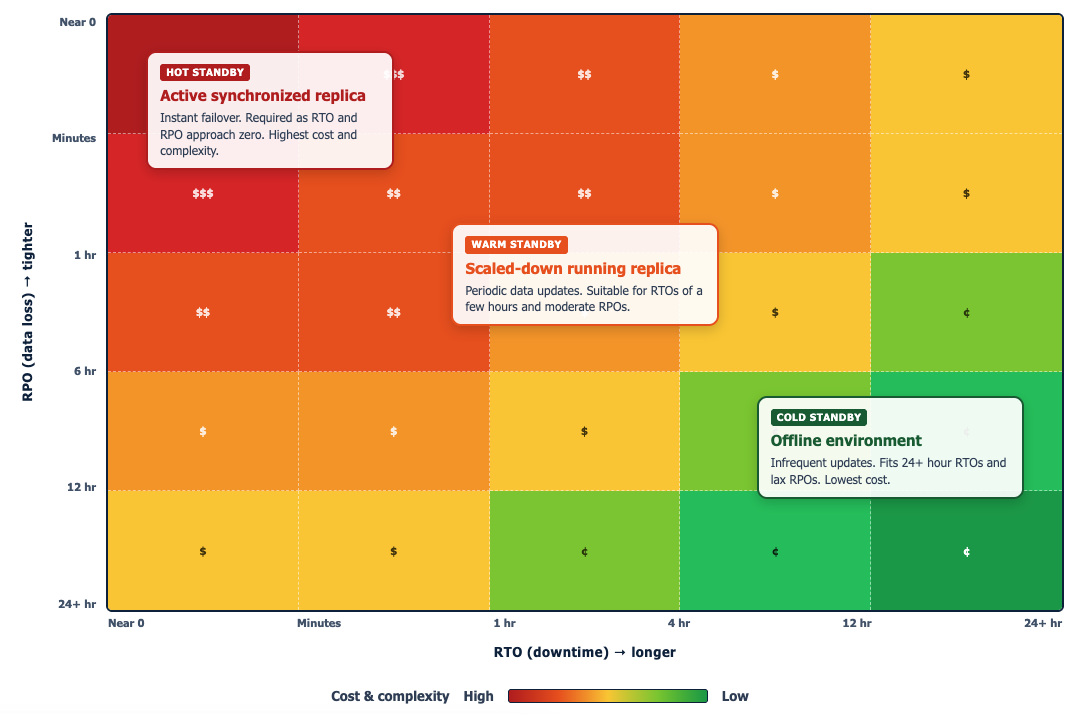
The illustration above shows an example of how you can map RTO/RPO tolerance. The tighter the RTO and RPO, the further into the red zone you sit and the more expensive the architecture becomes. Hot Standby lives in the top-left where downtime and data loss must be near zero. Warm Standby occupies the middle band for a few hours of tolerance. Cold Standby fits the bottom-right where 24+ hour windows are acceptable. RTO and RPO are business tolerance decisions, so executive buy-in is required before locking in any of these architectures.
Having a general understanding of these environments gives you a concrete framework for translating your business tolerance decisions into the right infrastructure and cost-tradeoff decisions. One nuance that sometimes creates issues here is forgetting that both metrics are not technical IT decisions but rather business tolerance decisions that require executive involvement. Neither IT nor Site Reliability Engineering (SRE) can make these decisions in isolation without involving key business executives and getting their buy-in. Do this early, and make sure you document all decisions rigorously for posterity and review.
Implement a resilient backup strategy
The critical requirement for backups is that they remain both available and intact, even in the event of a catastrophe that renders production unusable. This requires both calculated redundancy and segmentation across several dimensions: geographic isolation to defend against acts of god or site-compromising issues; network segmentation to reduce the risk of lateral movement reaching backup infrastructure; separate credentials or an entirely different authentication scheme and host to protect against identity compromise; immutable or Write-Once-Read-Many (WORM) protected copies so backups can’t be altered or deleted even if the system itself is compromised; and finally, a truly offline or air-gapped backup to act as an absolute last resort.
Your org may not have the resources to build all of this out, nor may your business require it at its current level of maturity, nor may risk analysis justify it, but this overview is a great north star to reference as the organization grows.
One final comment, though, and it’s the most important. Backups should not be considered reliable unless their recovery procedures are regularly tested. Teams should perform a full mock restore on an appropriate cadence based on system and data criticality. Business-critical assets should undergo a full restore validation at least monthly, while lower-criticality systems should be tested similarly at least quarterly as a baseline. Restore workflows constantly change due to evolving environments, employee churn, etc., leading to knowledge loss. Discovering key issues mid-disaster rather than during scheduled validation drills can turn what would otherwise be a competent disaster response into a true disaster.
Free Ransomware webinar: Why Traditional AD Recovery Tools Aren’t Enough
Define activation criteria, notification process, and escalation pathways
Disaster recovery plans need clearly defined activation criteria and ownership. Sometimes collaboration with SRE makes sense to reduce policy and procedure duplication, but organizations must clearly distinguish between a standard incident and a disaster. Incident response (IR) covers routine disruptions that on-call engineers handle day to day: a service degradation, a failed deploy, a bad config push, etc. These events are typically bounded in scope and recoverable through standard runbooks or escalation paths.
Disaster recovery, by contrast, is triggered when an event catastrophically exceeds the capacity of normal incident management, threatens multiple systems (or the business as a whole), and requires the highest level of executive involvement and cross-functional coordination. A good way to differentiate between the two is by remembering that while an incident can severely impact an organization, a disaster, particularly one not properly planned for, can end it.
Create a formal recovery plan with clear ownership
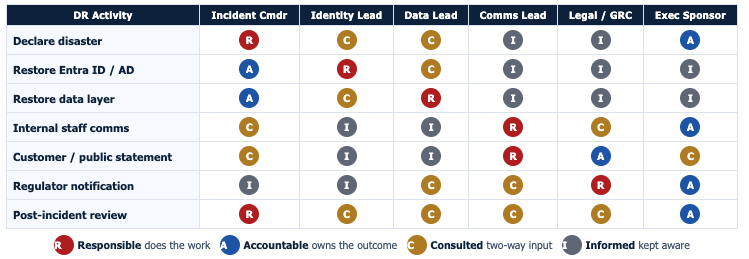
Your disaster recovery plan must cover everything from technical procedures and policies to communication protocols (internal, external, and out-of-band). It should also clearly document regulatory reporting requirements and their triggers to ensure proactive compliance and avoid unnecessary future scrutiny. Executive involvement is also non-negotiable when putting together this document. Resourcing and acceptable tolerance decisions are fundamentally business decisions that need business-level buy-in and approval.
Once a disaster recovery plan is formulated and approved, the most common failure mode often ultimately relates to diffuse or unclear ownership. Assigning key responsibilities to teams or large groups instead of individuals can inevitably invite a bystander-like effect, where everyone thinks someone else is handling the issue, so no individual actually does. You can largely mitigate this by assigning specific, important roles to named individuals, with a clear protocol for escalation to other named individuals if the first is unreachable.
Losing access to the recovery plan during a disaster is also unfortunately common. Teams should store at least one mirrored copy of the plan in a location that will survive any conceivable disaster and remain accessible to all members involved. If the plan is stored in Google Drive and a ransomware attack prevents access to Google Drive due to identity overrides, a circular dependency would be created, severely impeding recovery.
Stress-test regularly, learn from failure, and keep plans current
Untested plans are simply assumptions, not capabilities. Don’t fall into the psychological trap of feeling comfortable with your recovery posture without fully validating all defined flows. Not just once at the beginning, either, while you’re first setting things up; this testing needs to be ongoing at a relatively frequent cadence. Technologies and environments change, named employees leave, and runbooks become stale for both of these reasons. A solid but untested plan can become useless much faster than one often expects.
So test, test, and keep on testing. Tabletop exercises can validate procedural logic, but they can’t effectively flag nitty-gritty infrastructure gaps that only surface during actual recovery flow attempts. Full simulations reveal a lot more, but they also cost more – run a quick cost-benefit analysis for your org to determine ideal frequency, but ultimately you should be running both. Specifically assign a named owner to every exercise to tabulate learnings and drive documentation and process updates flagged as necessary.
Of course, simulations are only half the battle; real-world incidents are also unnervingly capable of exposing gaps that even the most extensive exercises miss. Because of this, they are often some of the best learning opportunities available. By policy, a blameless post-mortem should be required after every real-world recovery to discuss what worked, what failed, and whether any changes are needed to existing runbooks, policies, etc.
The term blameless was bolded intentionally – people operating in an environment without this as a foundation can become worried about retaliation or judgment. This often makes them much more likely to hide useful information to protect themselves, resulting in the loss of critical learning opportunities and potential process improvements.
Watch our recorded & upcoming educational webinars about identity protection
Conclusion
The single most critical takeaway from this article should be that disaster recovery is inherently an ongoing discipline, not just a one-and-done deliverable. The organizations that manage disaster recovery best aren’t necessarily the ones with the most sophisticated architecture – they’re often the ones that recognize this living nature and build tabletop simulations, drills, and blameless post-mortems into their company’s core ethos.
But shifting to that continuous testing mindset is incredibly difficult if your recovery tools still require hours of manual work and multi-day forest rebuilds.
Cayosoft is built specifically to address this bottleneck in modern enterprise environments, enabling you to test your recovery flows frequently without disrupting daily operations. Book a personalized demo to see how Cayosoft can help you automate instant recovery of your Microsoft environments.
Stop AD Threats As They Happen
Cayosoft Protector provides continuous monitoring and real-time alerts across your entire Microsoft Identity stack
Like This Article?
Subscribe to our LinkedIn Newsletter to receive more educational content