



Home » How to Implement Identity Threat Detection and Response Best Practices » IAM Security Best Practices for Identity Lifecycle
IAM Security Best Practices for Identity Lifecycle
Learn seven IAM security best practices to protect identities, enforce least privilege, and detect threats.
Next Chapter >
Stop AD Threats As They Happen
Cayosoft Protector provides continuous monitoring and real-time alerts across your entire Microsoft Identity stack
Like This Article?
Subscribe to our LinkedIn Newsletter to receive more educational content
Every modern security incident eventually traces back to an identity. Whether the attacker is phishing an admin, abusing a stolen API key, or pivoting through a forgotten service account, the front door of the breach almost always carries someone’s credentials. It is for this reason that identity and access management (IAM) has moved from just a back-office IT function to the center of enterprise security strategy.
IAM is the discipline of ensuring that the right people and machines have the right access to the right resources, at the right time, for the right reason. It encompasses authentication, authorization, governance, and increasingly, the detection of identity-based threats. However, most organizations now operate hybrid environments, mixing on-premises Active Directory with cloud directories like Microsoft Entra ID, which means the challenge with IAM has grown more difficult because the perimeter is dissolved.
That is where IAM intersects with identity threat detection and response (ITDR): IAM defines the rules and the identities, and ITDR watches for when those rules are bent or broken. This article walks through seven practices that, taken together, define a mature identity-centric security program.
Summary of key best practices to adopt when implementing IAM security
To establish a baseline for defense, organizations must embrace a multi-layered identity strategy. The following table outlines the foundational best practices required to secure modern digital infrastructure.
|
Best practice |
Description |
|---|---|
|
Implement zero-trust architecture |
Adopt a “never trust, always verify” approach, leveraging continuous, context-aware access controls. |
|
Apply the principle of least privilege |
Restrict user, administrative, and machine access strictly to what is required for their specific functions. |
|
Enforce phishing-resistant MFA |
Transition away from vulnerable MFA methods (SMS/push) to hardware-backed, FIDO2/WebAuthn standards. |
|
Secure non-human identities |
Establish rigorous governance, secret rotation, and monitoring for service accounts, API keys, and machine identities. |
|
Automate identity lifecycle management |
Mitigate orphaned account risks through automated provisioning, dynamic role adjustments, and immediate deprovisioning. |
|
Implement continuous monitoring and auditing |
Maintain real-time visibility into identity telemetry. |
|
Adopt identity threat detection and response |
Detect and respond to identity-related threats through behavioral analytics and anomaly detection. |
Learn how ITDR must evolve to account for non-human identities (NHI)
Implement zero-trust architecture
Zero-trust architecture (ZTA) is not a product, vendor stack, or single feature you turn on. NIST SP 800-207 defines it as a set of principles where every access request is authenticated, authorized, and continuously validated based on all available signals, independent of network location, the operative word being “continuously.” It is popularly known as “never trust, always verify.”
In the context of IAM, zero trust translates into context-aware access policies. Every time a user or workload tries to reach a resource, the access decision is computed dynamically from a rich set of inputs:
- User identity and entitlements: Who the requester is, what groups they belong to, what their employment status is, and what their explicit privileges grant.
- Device posture: Whether the device is corporate-managed, encrypted, patched, has EDR running, or has been flagged for noncompliance by your MDM.
- Network and location signals: Geolocation, ASN, and whether the connection represents an impossible-travel pattern relative to the previous session.
- Behavioral risk score: How the current request compares to the user’s typical patterns, for instance, time of day, application accessed, data volume, and sequence of actions.
- Resource sensitivity: A request to read a public marketing page is not the same as a request to export a payroll database, and the policy should reflect that.
The policy engine combines these signals to create a trust algorithm, producing one of three outcomes: allow, allow with step-up authentication, or block.
One crucial aspect of zero trust is that it does not just stop after initial evaluation; continuous authentication means that a session that was trustworthy at sign-in must remain trustworthy. If the device falls out of compliance or if behavioral analytics flag anomalous activity, the session should be re-evaluated and, if necessary, its permissions revoked.
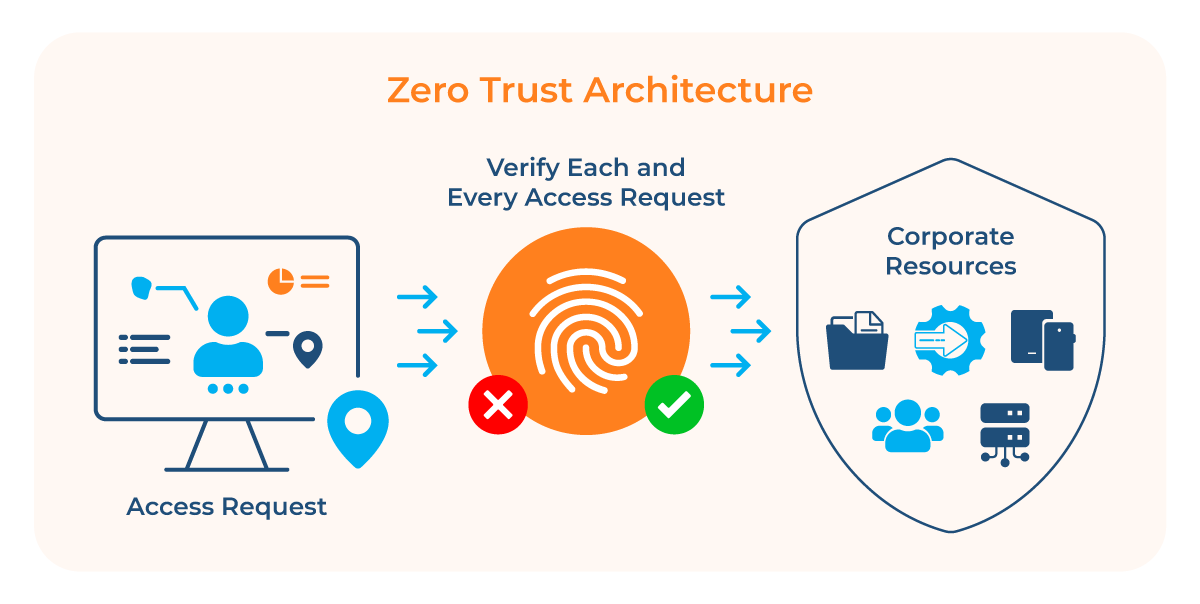
In the Microsoft ecosystem, zero trust is operationalized through the policy engine of Microsoft Entra Conditional Access. It acts as the decision-maker, aggregating real-time signals to formulate an “if-then” logic path: If a specific set of conditions is met, then grant, limit, or block access. A practical demonstration of zero trust’s “if-then” signal evaluation is a Conditional Access policy that blocks legacy authentication protocols.
Clients using IMAP, SMTP, POP3, or Exchange ActiveSync cannot satisfy modern Conditional Access conditions and are therefore impossible to continuously evaluate, making them structurally incompatible with zero trust. Blocking them is not just a hardening step; it is a prerequisite for ZTA to function as intended.
Microsoft Entra simplifies the policy creation through its Conditional Access template gallery. Navigate to Entra ID > Conditional Access > Policies > New policy from template. Under the Zero Trust category, select Block legacy authentication, and select Review + Create. The policy is created in report-only mode by default.
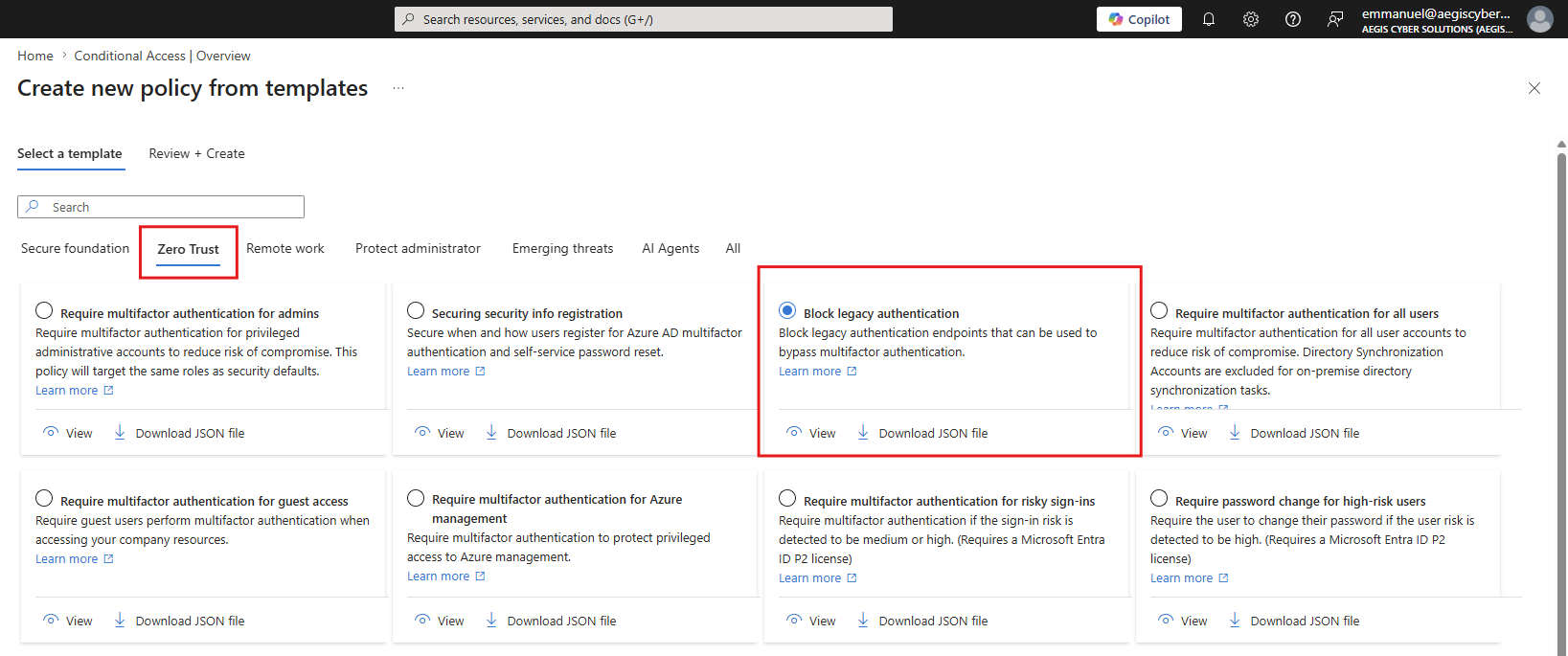
Important note: Always start a new Conditional Access policy in report-only mode and confirm the impact in the sign-in logs before changing it to enabled because a misconfigured policy in enforcement mode can lock administrators out of the tenant.
Apply the principle of least privilege
The principle of least privilege (PoLP) is one of the oldest ideas in computer security and one of the hardest to maintain at enterprise scale. The principle is simple: Every identity should have only the permissions strictly necessary to perform its job and only for as long as it needs them.
Why this matters operationally is straightforward. The MITRE ATT&CK framework documents that lateral movement and privilege escalation are essential phases of nearly every targeted intrusion. When an attacker compromises an account that has standing access to dozens of systems, they do not need to escalate; they simply walk in. Least privilege constrains the blast radius of every compromised credential.
The practical question is how to model and enforce permissions, and two access-control models are prevalent:
- Role-based access control (RBAC) assigns permissions to roles and assigns roles to users. RBAC is easy to understand and audit. It struggles, however, with combinatorial explosion, where every special case becomes a new role—large enterprises can end up with thousands of roles that nobody fully understands.
- Attribute-based access control (ABAC) evaluates access decisions against the attributes of the subject, resource, action, and environment, expressed as policies. ABAC scales better for fine-grained, context-sensitive decisions. It is more complex to author and reason about, and it requires high-quality attribute data.
|
Dimension |
RBAC |
ABAC |
|
Granularity |
Coarse-grained at the role level |
Fine-grained at the attribute level |
|
Context Awareness |
Static; no awareness of time, location, or device |
Dynamic; evaluates context (tags, time, environment) at runtime |
|
Scalability |
Suffers from “role explosion” at scale |
Scales seamlessly with attributes, though it requires careful attribute governance |
In practice, most mature programs use both. RBAC forms the backbone for broad job-function permissions; ABAC handles the policy edge cases (“contractors from this vendor, accessing this project’s resources, only during business hours, only from compliant devices”).
On top of both sits just-In-time (JIT) access, which eliminates standing privileges. Instead of permanently assigning a user to a Domain Admin group, a JIT system grants the equivalent rights only for a defined window—say, two hours—with an approval workflow and a logged justification. It then automatically removes them. Microsoft Entra Privileged Identity Management (PIM)is a common example. The operational benefit here is that, at any given moment, almost no one has high privilege, which dramatically shrinks the attacker’s opportunity window.
For the most sensitive accounts, such as domain admins, privileged access management (PAM) vaults add another layer where credentials are stored in an encrypted vault, sessions are brokered through an isolated jump host, the underlying password is rotated on every check-out, and a tamper-evident recording of the entire administrative session is produced for later review. A well-run PAM program means that no human ever sees or types a domain-admin password directly, and every privileged action has a reviewable record.
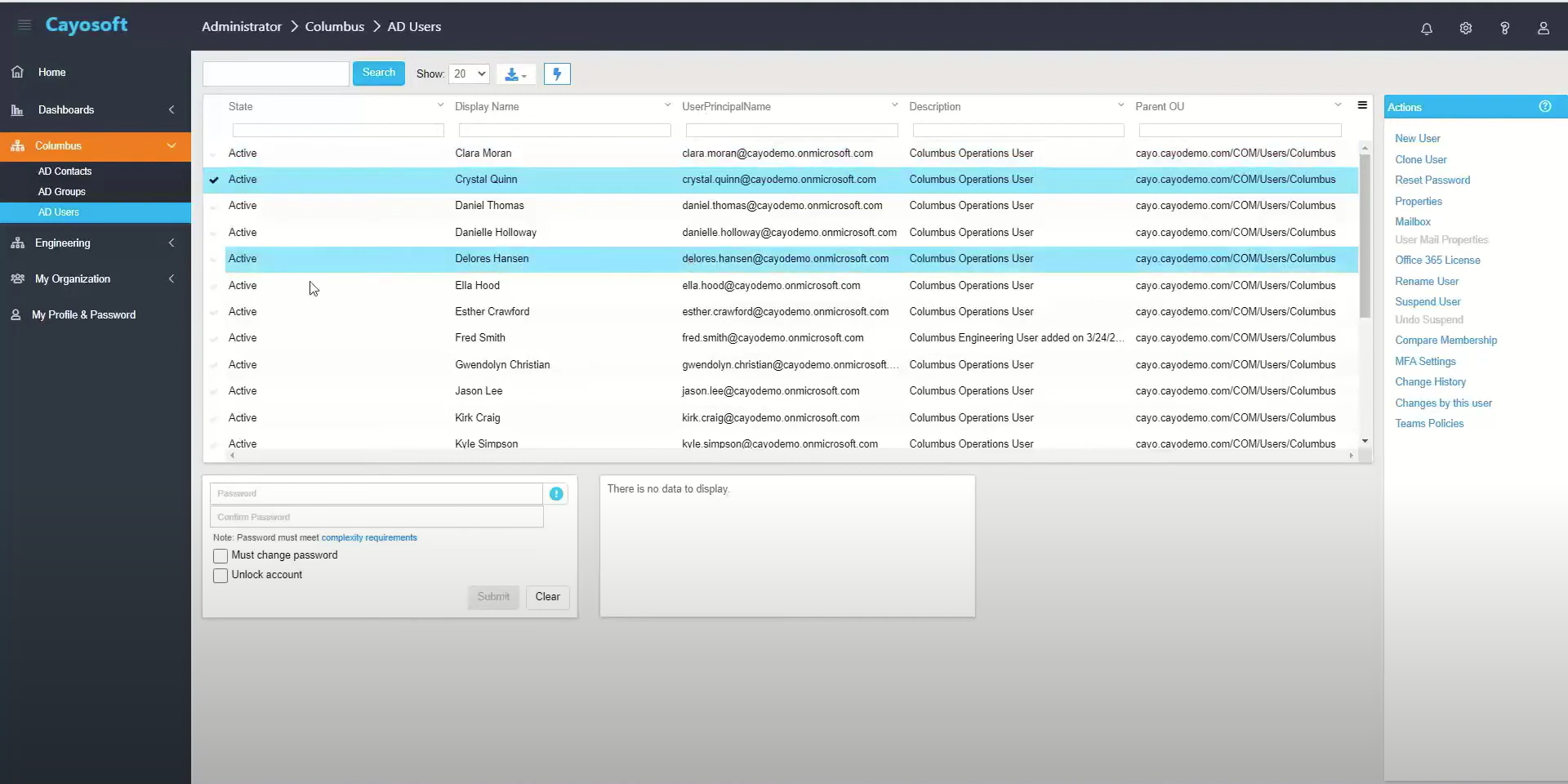
Though native Azure tools provide robust frameworks, hybrid administration across on-premises AD, Entra ID, and Microsoft 365 often requires navigating multiple disjointed portals and crafting complex PowerShell scripts. Furthermore, granting help desk personnel the ability to manage objects often requires granting them broad, excessive native rights.
Third-party solutions like Cayosoft Administrator bridge this operational gap for organizations whose Tier 0 identity infrastructure spans on-premises Active Directory and Microsoft Entra ID. It provides a unified administration plane across AD, Entra ID, Exchange Online, Microsoft 365, and Teams, letting security teams enforce fine-grained delegation down to specific objects, attributes, and operations rather than handing administrators broad native admin rights. That kind of attribute-level scoping is exactly what PoLP looks like in practice and what the native Microsoft RBAC model alone does not easily produce.
Read about Microsoft 365 E7 licensing and the rise of agent identities
Enforce phishing-resistant MFA
Multi-factor authentication is the single highest-leverage control most organizations can deploy. It is also routinely bypassed when implemented poorly, and engineers building MFA programs need to understand exactly how attackers defeat the weaker factors before deciding what to roll out.
SMS and voice-based one-time passwords are vulnerable to SIM-swapping attacks, where an attacker tricks a mobile carrier into transferring the victim’s phone number to a SIM under their control. Additionally, push-notification MFA can be compromised through MFA fatigue, where attackers repeatedly send approval prompts until the user inadvertently approves. The 2022 Uber incident is an example of this technique succeeding.
To combat these advanced tactics, organizations must transition to phishing-resistant MFA, which defeats this class of attack by binding authentication to the legitimate origin cryptographically. In Microsoft Entra ID, this is achieved by deploying FIDO2 security keys or passkeys, which use public‑key cryptography such that a private key is generated and stored securely on a hardware authenticator (such as a security key or secure element) and never leaves the device. During authentication, the authenticator signs a unique, time‑bound challenge that is cryptographically bound to the legitimate website’s domain (origin binding), eliminating the possibility of reusing captured responses on a different site.
To enforce this standard, administrators must configure Authentication Strengths within Entra Conditional Access. By creating a policy that requires a “phishing-resistant MFA” authentication strength for all highly privileged roles, the system explicitly blocks legacy MFA methods from accessing critical resources.
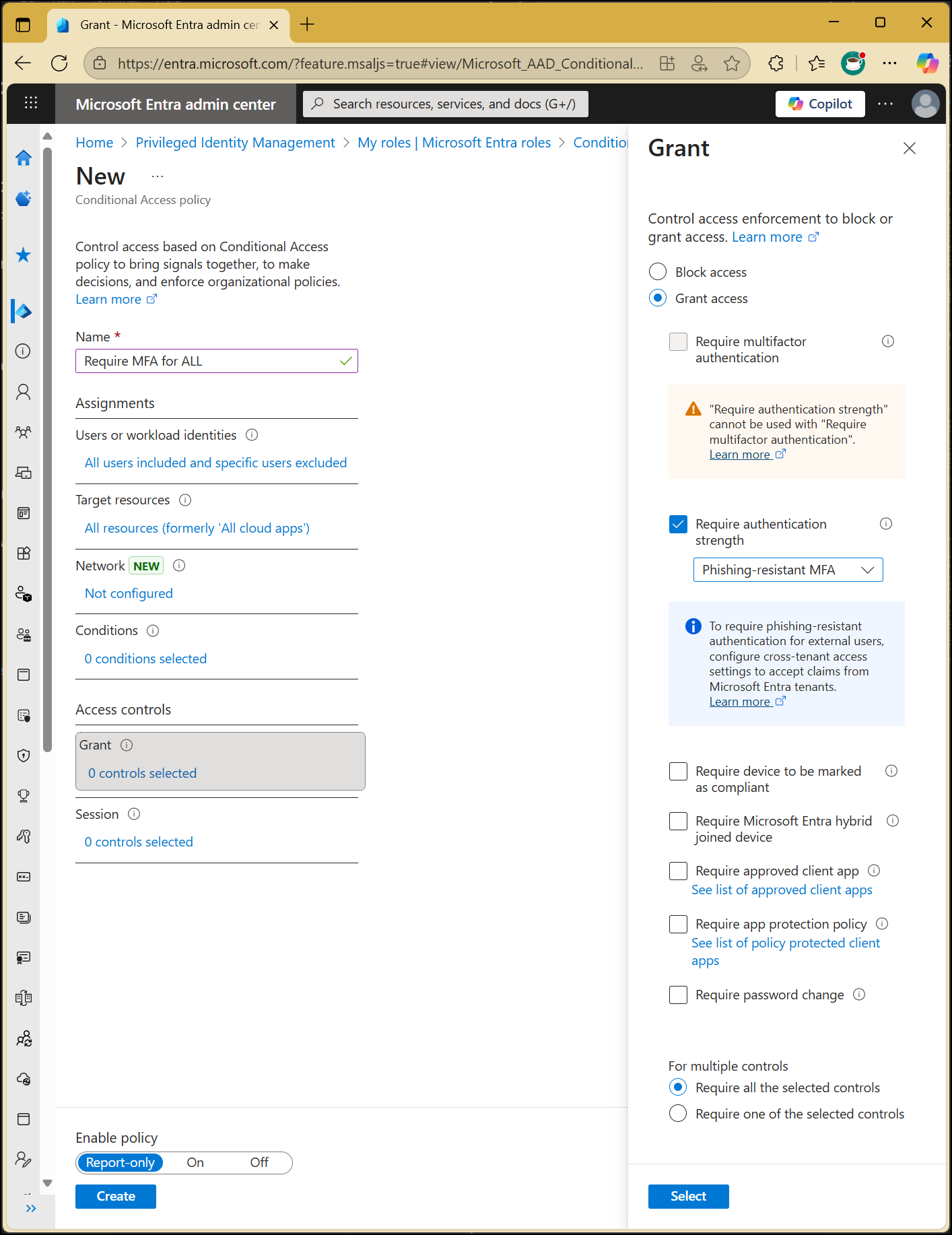
In practice, it is best to prioritize phishing‑resistant MFA rollout for the highest‑value targets first, then expand coverage to more user populations, and, where possible, move toward passwordless experiences that improve both security and usability.
Secure non-human identities
For every human user in your environment, there are likely many times more non-human identities (NHIs): service accounts, API keys, certificates, SSH keys, CI/CD pipeline credentials, etc. Industry studies from organizations such as the Cloud Security Alliance and major identity vendors have repeatedly highlighted the fact that NHIs outnumber human identities by a wide margin in cloud-heavy environments, with ratios of 10:1 or greater commonly reported.
Non-human identities present three structural problems:
- They proliferate at scale outside normal IAM processes.
- They are routinely over-privileged.
- They rely on long-lived static secrets that are rarely rotated.
Mitigation starts with automated discovery across on-premises infrastructure, cloud platforms, and CI/CD pipelines. Discovery tools and cloud APIs can enumerate service principals, workload identities, and embedded credentials to build an authoritative inventory. From there, organizations should define explicit lifecycle states (created, active, rotating, deprecated, and decommissioned) tied to real workloads. CI/CD and container identities should be created on deployment and torn down when those resources are destroyed, eliminating orphaned machine identities.
All secrets should be centralized in a vault. Applications should retrieve them at runtime via an authenticated API, not environment variables. The vault enforces access policies, logs every retrieval, and provides a single rotation chokepoint.
Finally, every NHI should have a documented owner, purpose, minimum-permission justification, and rotation policy. Many breach post-mortems trace back to an NHI whose owner had left the company years prior, leaving no one able to safely disable it without risking a production outage.
Respond Instantly to Identity Threats

Monitor AD for unwanted changes – detect for security or critical functions

Recover global enterprise-wide Active Directory forests in minutes, not days

Use a single tool to administer and secure AD, Entra ID, and Microsoft 365
Automate identity lifecycle management
Every account that exists in your environment is a potential attack surface, and when the account belongs to someone who left the company eight months ago, it is an attack surface with no business value at all. Yet manual offboarding remains shockingly common, and the result is the same: orphaned accounts.
Industry breach reports have consistently identified unaddressed orphaned accounts as a recurring root cause across breach categories, and they are exactly the accounts attackers love because they are valid, often privileged, and unmonitored.
To remediate this, organizations must automate the identity lifecycle by establishing a single source of truth, typically the human resources information system (HRIS), and wiring it into IAM. When HR marks a new hire as joining, the IAM platform automatically provisions accounts and entitlements based on standardized role and attribute mappings; when HR marks a termination, the IAM platform promptly disables accounts, revokes tokens, and severs external access.
Even with good initial provisioning, access tends to drift over time as users accumulate permissions. Routine, automated access reviews close the loop on the JML process. Quarterly or semi-annual access reviews, where managers attest that each direct report still needs each access grant, catch drift that automation alone cannot. If the reviewer fails to respond within the designated timeframe, the system can be configured to auto-revoke the access, enforcing the principle of least privilege continuously and satisfying stringent compliance mandates.
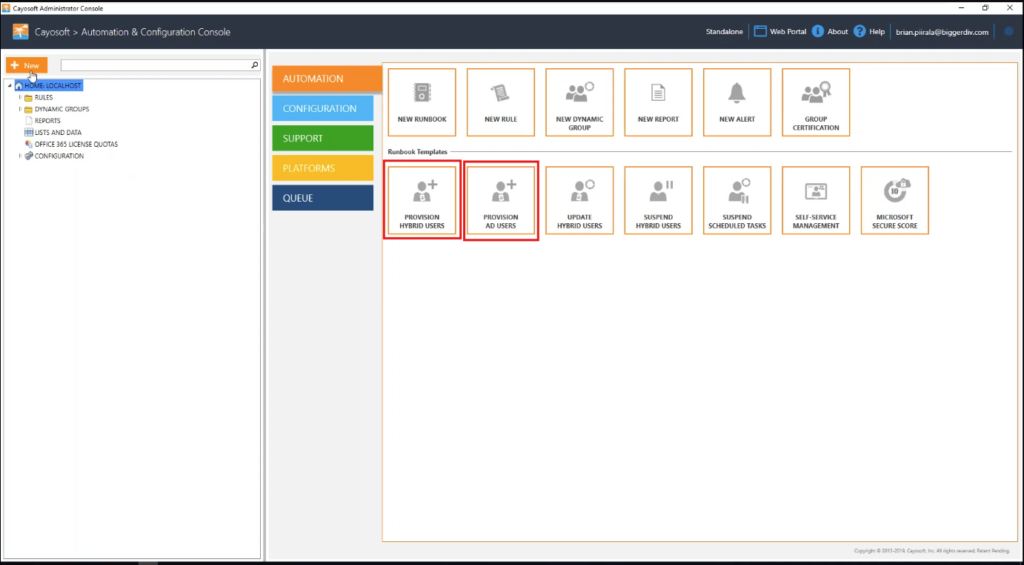
For environments built on Microsoft Active Directory and Entra ID, this is exactly the lifecycle that Cayosoft Administrator is designed to automate. It can drive provisioning and deprovisioning across hybrid AD and Entra ID from a single workflow, which removes a common source of orphaned accounts: the gap between an on-premises AD account being disabled and the corresponding Entra ID account, mailbox, Teams membership, and group memberships actually being cleaned up. In hybrid environments, that gap is where most orphaned-account incidents are born.
Implement continuous monitoring and auditing
A zero-trust architecture is blind without continuous diagnostics and real-time telemetry because even the best preventive controls occasionally fail. Continuous monitoring and auditing of identity activities provide the visibility needed to detect configuration drift, misconfigurations, malicious insiders, and account compromise.
A mature monitoring program produces three kinds of value:
- Forensic record: When an incident happens, who did what, from where, and when. Active Directory audit logs, Entra ID sign-in and audit logs, cloud trail logs, and IAM platform logs all need to be collected, time-synchronized, and retained according to regulatory requirements.
- Configuration drift detection: Identity infrastructure is rarely attacked through novel zero-days—it is attacked through misconfigurations. Continuous comparison of the current state against a known-good baseline shows these changes in real time.
- Real-time anomaly alerting: Examples of anomalies include failed-then-successful sign-in patterns, impossible-travel events, sign-ins from anonymizing infrastructure, password spray patterns, mass downloads, and unusual privilege use.
Collecting this data centrally allows security teams to correlate events across systems and gain a holistic view of identity behavior. Security information and event management (SIEM) platforms aggregate logs from identity providers, directories, applications, and infrastructure, providing dashboards, correlation rules, and long‑term storage for compliance. User and entity behavior analytics (UEBA) augments SIEM by building behavior baselines for users and entities and then scoring anomalies such as unusual access times, atypical resource usage, or suspicious lateral movement.
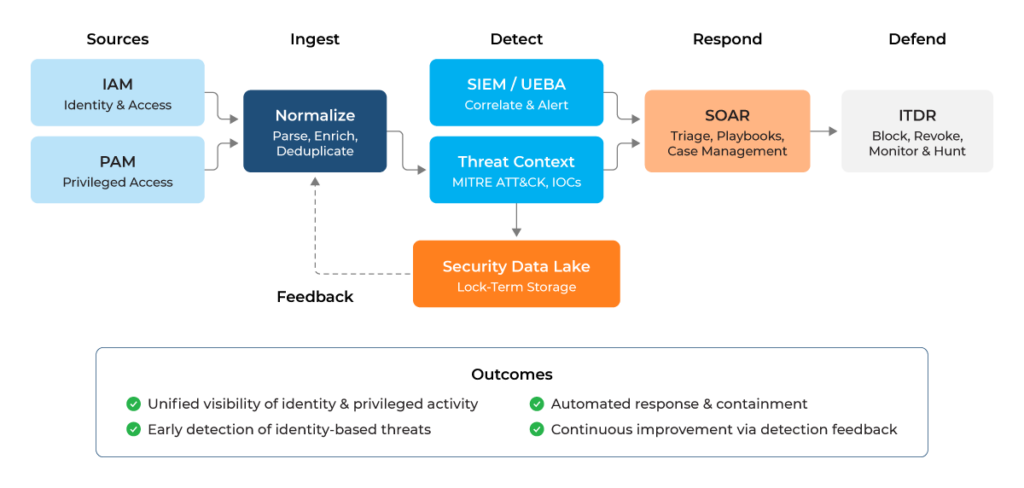
Another practical tip for engineers is to test your alerting end-to-end at least quarterly with a tabletop exercise and make sure your detection rules map to a known framework. An example is MITRE ATT&CK, particularly the credential-access (TA0006), persistence (TA0003), and privilege-escalation (TA0004) tactics. This way, you know what coverage you have and what gaps remain—detection engineering is a continuous practice, not a one-time deployment.
Watch our recorded & upcoming educational webinars about identity protection
Adopt identity threat detection and response
Endpoint detection and response (EDR) transformed how defenders saw and responded to malware on workstations and servers. However, identity-based attacks largely happen above the endpoint; they mostly happen in the directory, in token issuance, in OAuth grant flows, etc.
Consider a realistic SOC scenario where an attacker successfully compromises an identity and uses legitimate administrative credentials to abuse directory services. The attacker might modify Entra ID Conditional Access policies or alter Group Policy Objects (GPOs). Because the attacker is utilizing valid tokens and executing cloud API commands rather than running malicious binaries on a local host, traditional EDR sensors on the endpoint will view the traffic as legitimate administrative activity and fail to detect the anomaly.
That gap is what ITDR fills because while EDR protects the device, ITDR protects the identity. ITDR is the convergence of identity-infrastructure protection, exposure management, threat intelligence, and incident response, focused specifically on identity-layer attacks. Additionally, a mature ITDR program goes beyond mere detection; it must encompass rapid containment and recovery capabilities (ITDR+R) because a compromised Active Directory forest can incapacitate an entire organization, ceasing business operations and communications instantly.
Organizations that run heavily on Microsoft Active Directory and Entra ID face unique identity security challenges, including complex forests, legacy protocols, and hybrid synchronization patterns. Solutions such as the Cayosoft Guardian Platform focus specifically on identity threat detection and response for Microsoft environments and operationalize ITDR across four distinct stages: detection, analysis, containment, and recovery.
Here are some of the key features of Cayosoft Guardian:
- Detection and contextual intelligence: Tools like Cayosoft Guardian Protector continuously monitor hybrid identity changes across AD, Entra ID, and Microsoft 365. When an anomaly occurs, the system captures the precise context, including who made the change, what was altered, and the originating IP.
- Instant rollback and response: Detecting a threat is insufficient if remediation takes hours of manual log parsing. ITDR+R (“+R” stands for Remediation) solutions close the gap between detection and incident containment by offering one-click, granular rollback capabilities. If an attacker alters hundreds of group memberships or deletes critical policies, administrators can execute an attribute-level rollback in seconds. This restores directory integrity without requiring a full infrastructure rebuild or the risky process of restoring from tape backups.
- Instant forest recovery: In worst-case scenarios where ransomware successfully encrypts or corrupts the entire Active Directory domain, traditional bare-metal recovery can take days or weeks. This process comes with high risks of manual error and reinfection from compromised backups. Cayosoft Guardian utilizes a patented pre-recovery by design technology that automatically maintains a continuously validated, clean, and malware-safe standby forest in an isolated cloud environment. Should the production AD suffer a catastrophic failure, administrators can execute an immediate cutover to the standby forest, reducing downtime from weeks to mere minutes and ensuring rapid business continuity.
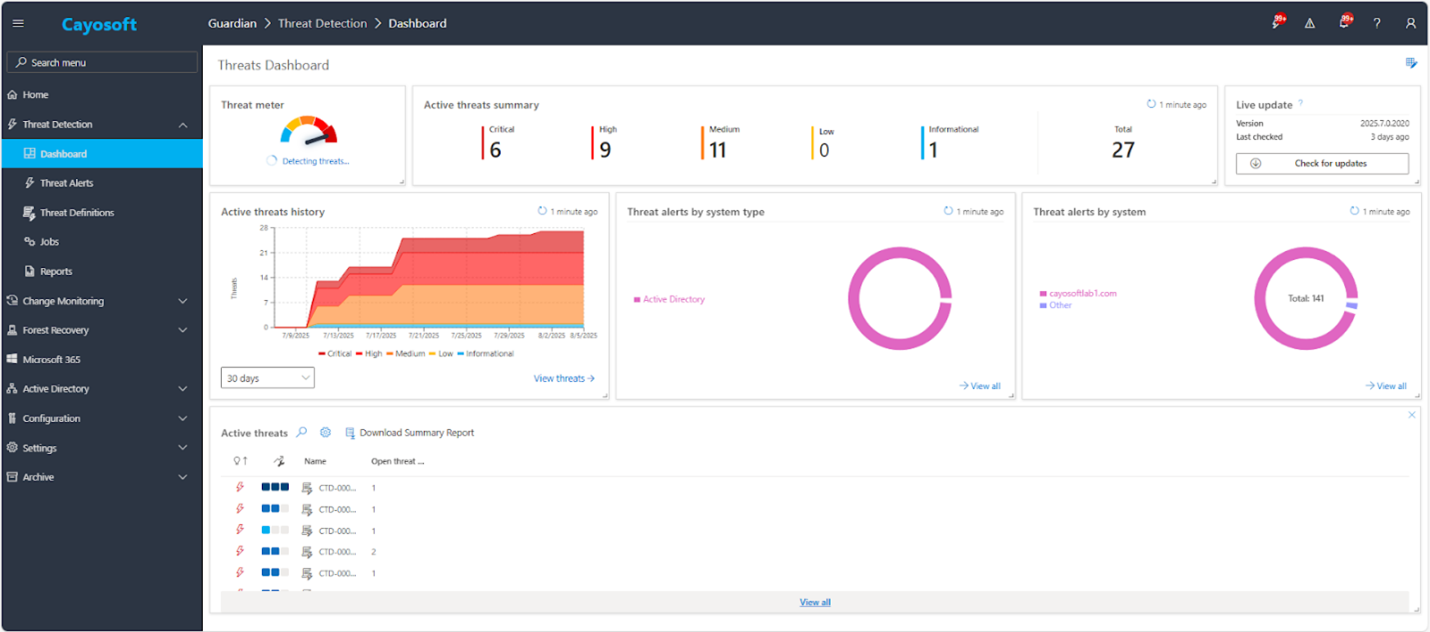
For engineers planning an ITDR program, start with an inventory of the directory you actually have. Document every domain controller, every federation trust, every privileged group, every service account with privileged rights, and every delegated permission. The first detections an ITDR tool produces are usually about your own posture; address those before tuning behavioral detections. Then integrate the ITDR feed into your SIEM and SOAR so identity attacks become first-class incidents in your existing workflow rather than alerts living in a separate console.
| Platform | Admin Features | Single Console for Hybrid (On-prem AD, Entra ID, M365, Teams) |
Change Monitoring/Auditing | User Governance (Roles Rules, Automation) |
Forest Recovery in Minutes |
| Microsoft AD Native Tools | ✓ | ||||
| Microsoft AD + Cayosoft | ✓ | ✓ | ✓ | ✓ | ✓ |
Conclusion
Most identity security programs are still optimized for the wrong problem. They are focused on keeping attackers out, which made sense when the attackers were on the other side of the firewall. However, they don’t work when the attacker is already inside, as a phished session token or forgotten service account.
The best practices discussed in this article are not independent initiatives. They are interlocking layers that jointly supply the policy framework, define the entitlement shape, and respond to active attacks against the identity infrastructure itself.
If your team is not sure about your posture today, the most useful starting point is an honest assessment. How many privileged accounts have standing access? How many service accounts have an identifiable owner? How quickly does a termination flow from HR to AD to Entra ID to every SaaS app? From there, teams can prioritize investments and engineering work that reduce identity risk the fastest, particularly with a platform that is purpose-built to address exactly these questions.
Stop AD Threats As They Happen
Cayosoft Protector provides continuous monitoring and real-time alerts across your entire Microsoft Identity stack
Like This Article?
Subscribe to our LinkedIn Newsletter to receive more educational content