



Use CasesRecover
Reverse and Recover with Rollback and Granular Active Directory Recovery
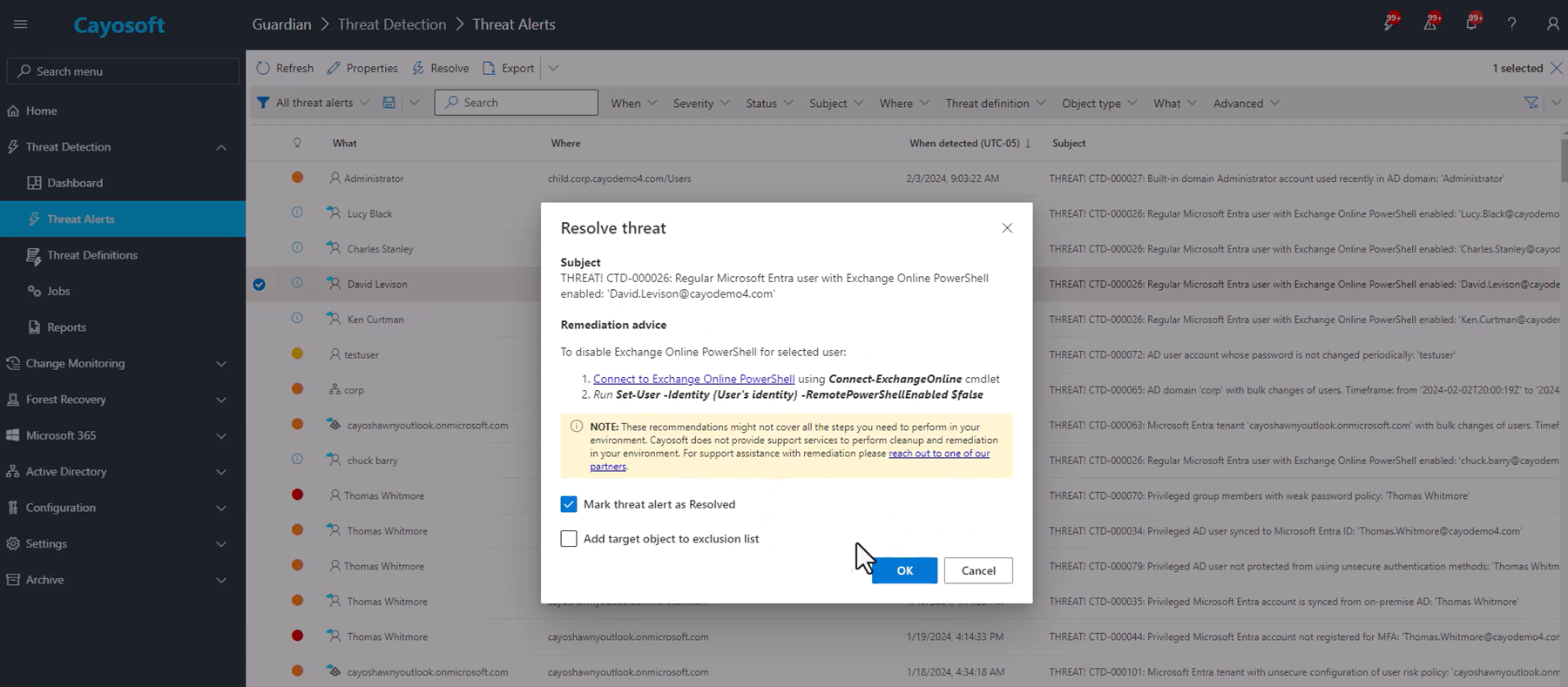
Monitor Threats. Reverse Damage. Recover Active Directory in Minutes.
“The biggest shift was psychological. We no longer worry whether recovery will work during an outage because the standby forest is continuously validated before we ever need it.”
— Senior Active Directory Architect, Fannie Mae
Identity Threats Move Fast. Recovery Must Move Faster.
Most identity failures do not begin with catastrophic destruction.
They begin with:
- Privilege escalation
- Misconfigurations
- Ransomware activity
- Unauthorized policy changes
- Administrative mistakes
- Identity drift
The problem is not just detecting these changes. It is recovering from them before they become business outages.
The Difference: Cayosoft Guardian Instant Forest Recovery™
Cayosoft combines real-time monitoring, rollback, granular recovery, and patented standby Active Directory forest recovery in a unified identity resilience platform built for modern hybrid Microsoft environments.
- Detect risky identity changes
- Reverse unwanted modifications instantly
- Recover deleted objects and configurations
- Restore Active Directory forests in minutes
- Prevent reinfection after ransomware or compromise
- Maintain business continuity during identity failures
Recovery Starts Before the Outage
Traditional backup and recovery solutions force organizations to rebuild Active Directory after a compromise.
That recovery process often includes:
- Restoring domain controllers
- Rebuilding DNS
- Recovering SYSVOL
- Re-establishing replication
- Recovering FSMO roles
- Troubleshooting trust failures
- Validating authentication manually
During ransomware attacks or identity compromise, those manual processes become slow, fragile, and operationally dangerous.
Cayosoft changes the model entirely.
Instead of waiting for failure, Cayosoft continuously:
- Monitors identity changes
- Detects threats
- Preserves change history
- Enables rollback
- Maintains a clean standby forest
- Validates recovery readiness automatically
Recovery becomes a controlled operational cutover instead of an emergency reconstruction project.
Roll Back Small Problems Before They Become Major Outages
Not every incident requires full forest recovery.
Many operational failures begin with:
- Faulty PowerShell scripts
- Unauthorized administrative changes
- Group membership mistakes
- Misconfigured policies
- Accidental object deletion
- Conditional Access changes
- Intune configuration drift
- Identity synchronization errors
Cayosoft Guardian Audit & Restore continuously tracks changes across:
- Active Directory
- Entra ID
- Microsoft 365
- Intune
- Exchange
- Teams
Administrators can instantly reverse unwanted changes at the:
- Object level
- Attribute level
- Group level
- Policy level
without restoring full backups or disrupting production systems.
When Rollback Is Not Enough, Recover the Entire Forest
Some incidents escalate beyond granular recovery.
Ransomware, corruption, insider attacks, and domain-wide compromise may require complete Active Directory forest recovery.
Cayosoft Guardian Instant Forest Recovery™ delivers:
- Patented standby forest recovery
- Clean isolated recovery infrastructure
- Automated recovery orchestration
- Recovery validation
- Near-instant operational cutover instead of manual domain controller reconstruction.
The Difference Between Rollback and Forest Recovery
Incident Type | Cayosoft Recovery Method |
Accidental group change | Instant rollback |
Misconfigured policy | Granular recovery |
Unauthorized privilege escalation | Change reversal |
Deleted object or OU | Object recovery |
Intune configuration drift | Rollback |
Widespread ransomware compromise | Standby forest cutover |
Domain controller destruction | Instant forest recovery |
Forest-wide corruption | Full standby forest activation |
Built for Modern Identity Threats
Traditional backups restore data.
Cayosoft restores operational identity resilience.
That includes:
- Real-time monitoring
- Threat detection
- Rollback
- Granular recovery
- Full forest recovery
- Recovery orchestration
- Hybrid identity continuity
from a unified platform.
Recover Cleanly Without Reinfection
One of the largest risks in traditional recovery is restoring compromised identity state.
Legacy backups may contain:
- Hidden persistence mechanisms
- Malicious privilege changes
- Compromised Group Policy
- Rogue administrative accounts
- Unauthorized security changes
Cayosoft restores only required AD components into clean, isolated environments to reduce reinfection risk during recovery.
Instant Recovery Without Rebuilding Infrastructure
Cayosoft continuously maintains a standby Active Directory forest that is:
- Isolated
- Validated
- Patched
- Orchestrated
- Ready for cutover
This eliminates the need to:
- Build replacement servers
- Restore compromised system state
- Reconstruct replication manually
- Troubleshoot recovery sequencing during crisis
Paradigm Technica’s independent validation found Cayosoft up to 99% faster than traditional recovery alternatives.
Cayosoft is Built for Hybrid Microsoft Environments
Modern identity environments extend far beyond on-prem Active Directory.
Cayosoft supports monitoring, rollback, and recovery across:
- Active Directory
- Entra ID
- Microsoft 365
- Exchange
- Intune
- Teams
- Multi-domain forests
- Hybrid identity synchronization
This unified architecture helps eliminate operational gaps between disconnected identity tools.
Recovery Architecture That Survives Real Attacks
During major incidents:
- Domain controllers may be encrypted
- Recovery consoles may be compromised
- DNS may fail
- Backup systems may become inaccessible
- Infrastructure may be seized for forensic investigation
Cayosoft’s standby forest architecture operates independently from compromised production infrastructure, enabling recovery even when the primary environment is unavailable.
From Threat Detection to Full Operational Recovery
Most tools stop at monitoring.
Cayosoft extends identity resilience through:
- Threat detection
- Continuous monitoring
- Granular rollback
- Object recovery
- Full forest recovery
- Automated orchestration
- Validated standby infrastructure
This allows organizations to:
- Reverse small problems quickly
- Contain identity compromise
- Recover from catastrophic failure
- Restore business operations faster
Why Organizations Replace Traditional AD Recovery Tools
Traditional Recovery | Cayosoft |
Recovery begins after outage | Recovery prepared before outage |
Backup-only workflows | Continuous monitoring and rollback |
Manual rebuilds | Automated orchestration |
Slow forest recovery | Standby forest cutover |
Reinfection risk | Clean isolated recovery |
Multiple disconnected tools | Unified identity resilience platform |
Untested recovery plans | Continuous recovery validation |
Built for the Moment
Cayosoft Guardian Instant Forest Recovery™ combines rollback, granular recovery, and patented standby Active Directory recovery in a unified operational platform.
When identity fails, organizations can:
- Detect threats immediately
- Reverse unwanted changes
- Recover deleted objects
- Restore clean Active Directory operations
- Recover entire forests in minutes
- Maintain business continuity
without relying on fragile manual recovery processes.
h2
Title
text
Title
- listitem
- listitem
- listitem
- listitem
- listitem
Title
text
Title
- listitem
- listitem
- listitem
- listitem
- listitem
Title
text
Title
- listitem
- listitem
- listitem
- listitem
- listitem
Title
text
Title
- listitem
- listitem
- listitem
- listitem
- listitem
Title
text
Title
- listitem
- listitem
- listitem
- listitem
- listitem
headline
text
- listitem
- listitem
- listitem
headline
text
- listitem
- listitem
- listitem
headline
text
- listitem
- listitem
- listitem
headline
text
- listitem
- listitem
- listitem
h2
text
Control Your Entire Microsoft Identity Environment
Active Directory|Entra ID|Microsoft 365|Intune
Detect threats, reverse unwanted changes, and recover Active Directory in minutes.
Cayosoft Enterprise Suite


FAQ
Rollback and forest recovery solve different categories of identity failures.
Rollback
Rollback reverses targeted identity changes without rebuilding infrastructure.
Examples include:
- Group membership reversal
- Attribute restoration
- GPO rollback
- Conditional Access reversal
- Intune configuration recovery
- Privileged role removal
Rollback is typically:
- Granular
- Fast
- Non-disruptive
- Object-focused
- Attribute-focused
Forest recovery
Forest recovery restores the operational identity infrastructure itself after catastrophic compromise or destruction.
Examples include:
- Ransomware impact
- Domain controller destruction
- Forest corruption
- Widespread compromise
- Irrecoverable replication damage
Forest recovery involves restoring:
- Authentication infrastructure
- Trust relationships
- Replication topology
- DNS integration
- SYSVOL consistency
- FSMO operations
Granular rollback and full forest recovery are complementary operational capabilities.
Most identity incidents begin as small changes rather than catastrophic destruction.
Examples include:
- Privilege escalation
- Group membership mistakes
- Conditional Access misconfiguration
- PowerShell automation errors
- Synchronization drift
- Unauthorized delegation changes
If detected early, these changes can often be reversed without broader recovery operations.
Rollback minimizes:
- Operational disruption
- Recovery time
- Administrative complexity
- Business downtime
Traditional backups are coarse-grained.
Restoring a backup to recover one object or policy may:
- Overwrite legitimate changes
- Introduce replication conflicts
- Restore stale configurations
- Cause operational downtime
- Reintroduce compromised state
Modern hybrid identity operations increasingly require:
- Object-level recovery
- Attribute-level rollback
- Policy-specific restoration
- Near real-time remediation
rather than full infrastructure restoration.
Granular recovery restores specific identity components without restoring entire domain controllers or forests.
Granular recovery may include:
- User restoration
- Group restoration
- OU recovery
- Attribute rollback
- GPO restoration
- Administrative role reversal
Granular recovery reduces blast radius and operational disruption during remediation.
Object-level recovery restores specific AD objects individually.
Examples include:
- Users
- Groups
- OUs
- Contacts
- Service accounts
- Computer objects
This avoids restoring entire backups for isolated incidents.
Attribute-level rollback restores only selected object attributes, not entire objects.
Examples include:
- Group membership
- Proxy addresses
- Delegation attributes
- SIDHistory
- Administrative flags
- UPN values
Attribute-level rollback is important because many incidents affect only portions of the object state.
Common rollback scenarios include:
- Faulty PowerShell execution
- Administrative mistakes
- Synchronization failures
- Unauthorized privilege escalation
- Conditional Access changes
- Intune drift
- Group sprawl
- Accidental deletion
- Misconfigured policies
Most operational identity failures begin as isolated changes before expanding into larger outages.
Identity drift occurs when permissions, policies, or configurations gradually diverge from the intended governance state.
Examples include:
- Excessive privilege accumulation
- Stale group memberships
- Delegation sprawl
- Orphaned administrative access
- Configuration inconsistency
Drift creates operational instability and an increased attack surface over time.
Ransomware increasingly targets identity infrastructure.
Attackers may:
- Modify privileged groups
- Tamper with GPOs
- Create rogue accounts
- Disable security controls
- Weaken Conditional Access
- Destroy domain controllers
Rollback allows organizations to reverse malicious changes quickly while broader containment and recovery operations proceed.
Active Directory forest recovery restores the operational identity infrastructure of an entire AD forest after catastrophic compromise or destruction.
This may involve restoring:
- Domain controllers
- DNS
- SYSVOL
- Replication topology
- Trust relationships
- FSMO roles
- Authentication functionality
Forest recovery is one of the most operationally complex infrastructure recovery processes in enterprise IT.
Traditional recovery often requires manually rebuilding identity infrastructure during crisis conditions.
Common recovery tasks include:
- Restoring domain controllers
- Recovering SYSVOL
- Rebuilding DNS
- Re-establishing replication
- Recovering FSMO roles
- Validating authentication
- Troubleshooting trust failures
During ransomware or compromise, these workflows become:
- Slow
- Error-prone
- Operationally dangerous
- Difficult to validate
Standby forest recovery maintains a continuously prepared recovery forest separate from production infrastructure.
The standby forest is typically:
- Isolated
- Patched
- Validated
- Synchronized
- Recovery-ready
Recovery becomes an operational cutover instead of manual infrastructure reconstruction.
Traditional recovery begins after failure.
Standby forest recovery prepares recovery infrastructure before failure occurs.
Traditional recovery often requires:
- Infrastructure rebuild
- System state restoration
- Replication reconstruction
- DNS troubleshooting
- Recovery sequencing
Standby architecture shifts recovery from reactive reconstruction to proactive readiness.
Compromised production environments may contain:
- Malware persistence
- Rogue privilege assignments
- Backdoored GPOs
- Compromised synchronization
- Malicious service accounts
Isolated recovery infrastructure reduces the risk of reinfection during recovery operations.
Recovery orchestration automates the sequencing and coordination of recovery operations.
Examples include:
- DNS restoration
- Replication sequencing
- FSMO transfer
- SYSVOL validation
- Authentication verification
- Service restoration
Automation reduces human error during high-pressure recovery scenarios.
Untested recovery plans frequently fail during real incidents.
Validation ensures:
- Recovery infrastructure remains operational
- Replication remains healthy
- Authentication succeeds
- DNS functions correctly
- Recovery sequencing works properly
Continuous validation reduces uncertainty during crisis conditions.
Backups only confirm that data exists.
Recovery readiness confirms the organization can:
- Restore operational authentication
- Rebuild trust relationships
- Resume identity services
- Recover business operations
Operational recovery capability matters more than the mere existence of a backup.
Modern identity environments extend beyond on-prem AD into:
- Entra ID
- Microsoft 365
- Teams
- Intune
- Exchange Online
- Azure RBAC
- Conditional Access
Recovery must consider:
- Synchronization dependencies
- Hybrid trust relationships
- Cloud authorization
- Tenant-wide identity continuity
Identity recovery increasingly spans both on-prem and cloud infrastructure.
Legacy backups may contain compromised identity state.
Examples include:
- Backdoored GPOs
- Rogue ACLs
- Malicious delegation
- Unauthorized admin accounts
- Hidden persistence mechanisms
Restoring the compromised state may immediately reintroduce attacker access.
Examples include:
- Untested recovery plans
- Excessive privileged accounts
- Weak delegation boundaries
- Dormant administrative accounts
- Backup dependency without orchestration
- Unvalidated standby infrastructure
These conditions increase operational recovery risk.
Examples include:
- Privilege escalation
- GPO tampering
- Domain controller compromise
- Replication manipulation
- Administrative abuse
- Conditional Access tampering
- Mass object modification
- Ransomware encryption activity
IOC severity determines whether rollback or full recovery becomes necessary.
PowerShell is widely used for:
- Administration
- Automation
- Synchronization
- Bulk changes
- Group management
Operational mistakes may rapidly affect:
- Users
- Groups
- Policies
- Delegation
- Authentication settings
Paradigm Technica modeled large-scale identity deletion resulting from scripting errors as a realistic operational risk scenario.
Rollback effectiveness depends on rapid detection.
Delayed detection allows:
- Privilege propagation
- Replication spread
- Lateral movement
- Additional corruption
- Persistence establishment
Continuous monitoring shortens remediation windows significantly.
SIEM platforms provide detection, but generally do not provide:
- Object rollback
- Attribute restoration
- Recovery orchestration
- Identity-specific recovery workflows
- Forest cutover capability
Detection alone does not restore operational identity infrastructure.
Zero Trust assumes identity compromise may occur.
Recovery strategy should therefore support:
- Least privilege
- Rapid remediation
- Administrative isolation
- Clean recovery environments
- Continuous validation
Rollback and recovery operationalize resilience after compromise.
Identity resilience and recovery support controls within:
- SOX
- HIPAA
- PCI-DSS
- GDPR
- NIST 800-53
- CJIS
- ISO 27001
- FedRAMP
Auditors increasingly examine:
- Recovery readiness
- Administrative accountability
- Backup validation
- Recovery testing
- Operational continuity
Recovery architecture
- Standby infrastructure
- Isolation capability
- Recovery orchestration
- Validation workflows
Granular recovery capability
- Object-level rollback
- Attribute-level rollback
- Policy restoration
- Hybrid identity recovery
Operational resilience
- Continuous monitoring
- Threat detection
- Reinfection protection
- Recovery readiness testing
Scalability
- Multi-domain support
- Multi-forest support
- Enterprise-scale replication
- Hybrid synchronization awareness
Security capability
- Immutable audit visibility
- Administrative attribution
- IOC detection
- IOE detection
Traditional recovery solutions often depend heavily on:
- Backup-only workflows
- Manual orchestration
- System-state restoration
- Infrastructure rebuilds
- Unvalidated recovery procedures
Modern identity resilience increasingly requires:
- Continuous monitoring
- Granular rollback
- Recovery orchestration
- Standby recovery infrastructure
- Hybrid identity continuity
Organizations increasingly prioritize operational readiness over backup retention alone.
Identity resilience means organizations can:
- Detect identity threats quickly
- Reverse unwanted changes immediately
- Recover deleted objects
- Restore clean authentication services
- Recover entire forests rapidly
- Maintain business continuity during compromise
Modern identity resilience increasingly combines:
- Threat detection
- Continuous monitoring
- Rollback
- Granular recovery
- Forest recovery
- Automated orchestration
- Hybrid identity continuity
Identity recovery is no longer just backup restoration. It is an operational continuity infrastructure for the Microsoft identity control plane.