



Blog > Cayosoft Administrator Advances Microsoft 365 Security with Service Principal Authentication

Cayosoft Administrator Advances Microsoft 365 Security with Service Principal Authentication

Microsoft 365 administration is changing. As organizations strengthen security through multifactor authentication (MFA), Conditional Access policies, and identity governance initiatives, traditional service accounts used for unattended administration are becoming increasingly difficult to manage securely.

To help administrators adapt to this shift, Cayosoft Administrator now features Service Principal-based authentication as the new recommended model for Microsoft 365 connectivity. This approach aligns with Microsoft’s modern authentication strategy while reducing dependency on highly privileged connection accounts.

Our latest release also includes new functionality for cloud group ownership transfers during user suspension, ensuring lifecycle processes continue to operate correctly when using Service Principals.

The Growing Challenge of Connection Accounts

For years, many administrative platforms relied on dedicated Microsoft 365 connection accounts to perform automated management tasks.

While effective, this model is increasingly at odds with modern security requirements.

Organizations now regularly enforce:

  • Multifactor Authentication (MFA)
  • Conditional Access policies
  • Third-party MFA solutions
  • Strong authentication requirements for privileged accounts
  • Zero Trust security principles

These same requirements can create operational challenges for unattended automation. The account must remain available to execute administrative tasks while simultaneously satisfying every security control applied to privileged identities.

At the same time, Microsoft continues to deprecate legacy technologies and introduce new capabilities that favor application-based authentication models.

The result is clear: Service Principals are becoming the preferred approach for secure, unattended Microsoft 365 administration.

Why do Active Directory and Entra ID attack paths persist?

Identity attack paths persist because access rarely disappears when the original reason for it is gone. Nested groups stretch privilege beyond the team that requested it. ACLs grant WriteDACL, WriteOwner, GenericAll, or GenericWrite where nobody expects them. GPO edit rights become code execution. Service accounts keep SPNs and weak passwords long after the owner has moved on. Legacy access survives reorganizations, migrations, acquisitions, emergency changes, and cloud projects.

What's changes in Cayosoft Administrator 13.2.1?

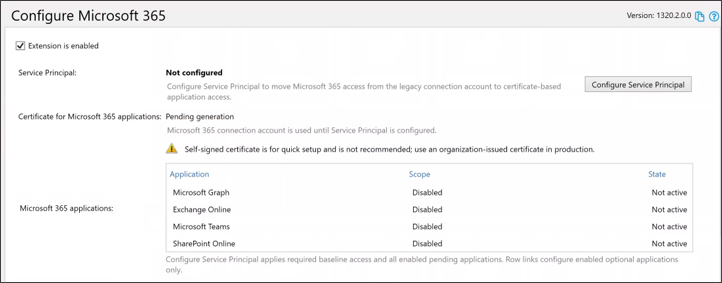
Cayosoft Administrator 13.2.1 introduces Service Principal authentication as the default approach for Microsoft 365 connectivity.

For new deployments, administrators are guided through Service Principal configuration during initial installation.

For existing deployments, organizations can transition from connection accounts directly through the Microsoft 365 extension configuration.

The setup process is designed to simplify adoption while maintaining security best practices.
Certificate Management Options

During configuration, administrators can choose between two certificate models.
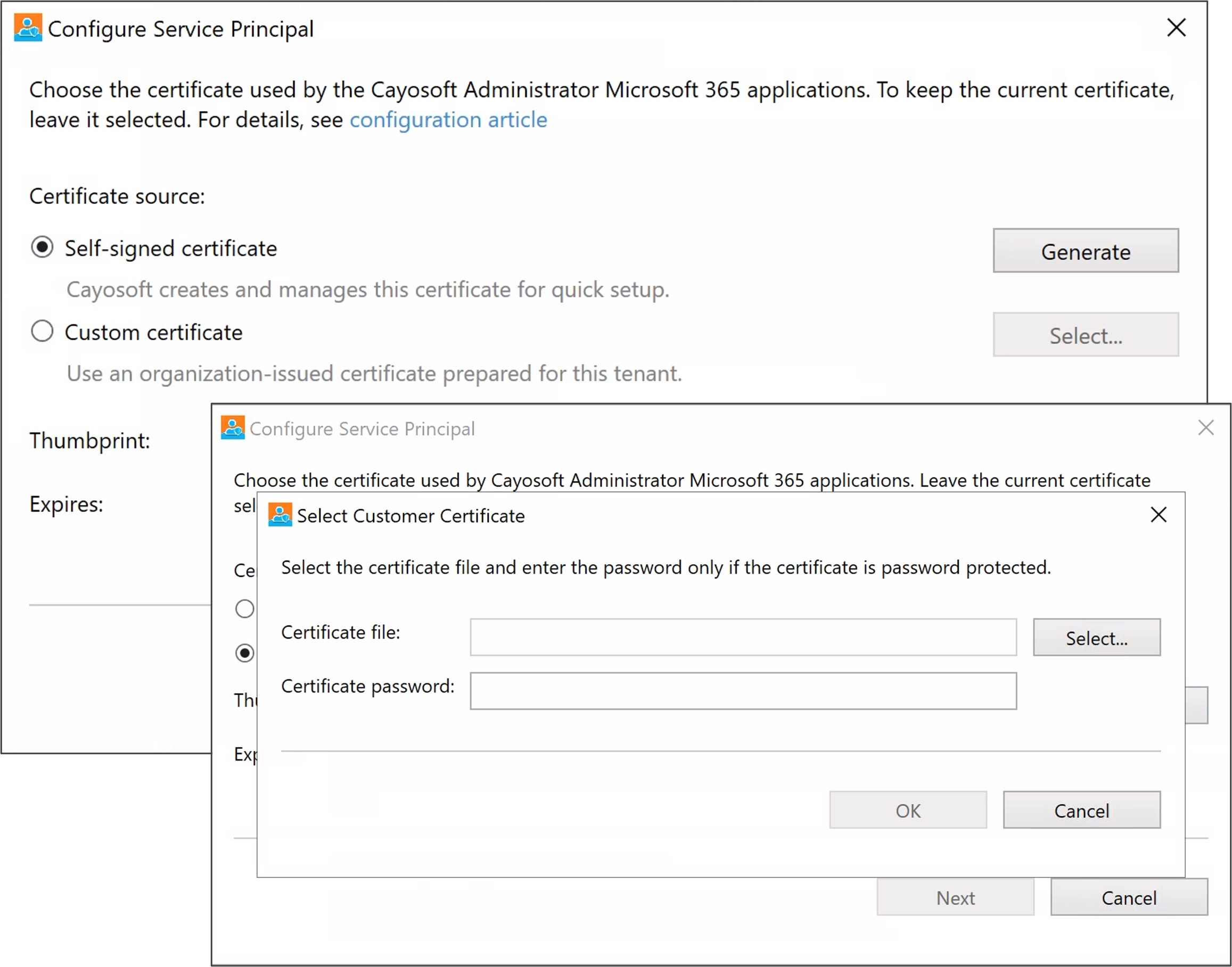
Self-Signed Certificates

Self-signed certificates provide a simple onboarding experience and are useful for proof-of-concept deployments or initial testing.

Features include:

  • Automatic certificate generation
  • 45-day lifespan
  • Automatic rotation before expiration
  • Minimal setup requirements

While convenient, self-signed certificates are best suited for evaluation and short-term deployments.

Organization-Issued Certificates

For production environments, organizations can use their own PKI-issued certificates.

Benefits include:

  • Alignment with existing PKI standards
  • Compliance with internal security policies
  • Optional password protection
  • Certificate lifecycle management under organizational control

This approach allows Administrator to fit naturally into established enterprise security practices.

How Service Principal Authentication Works

The new model is straightforward.

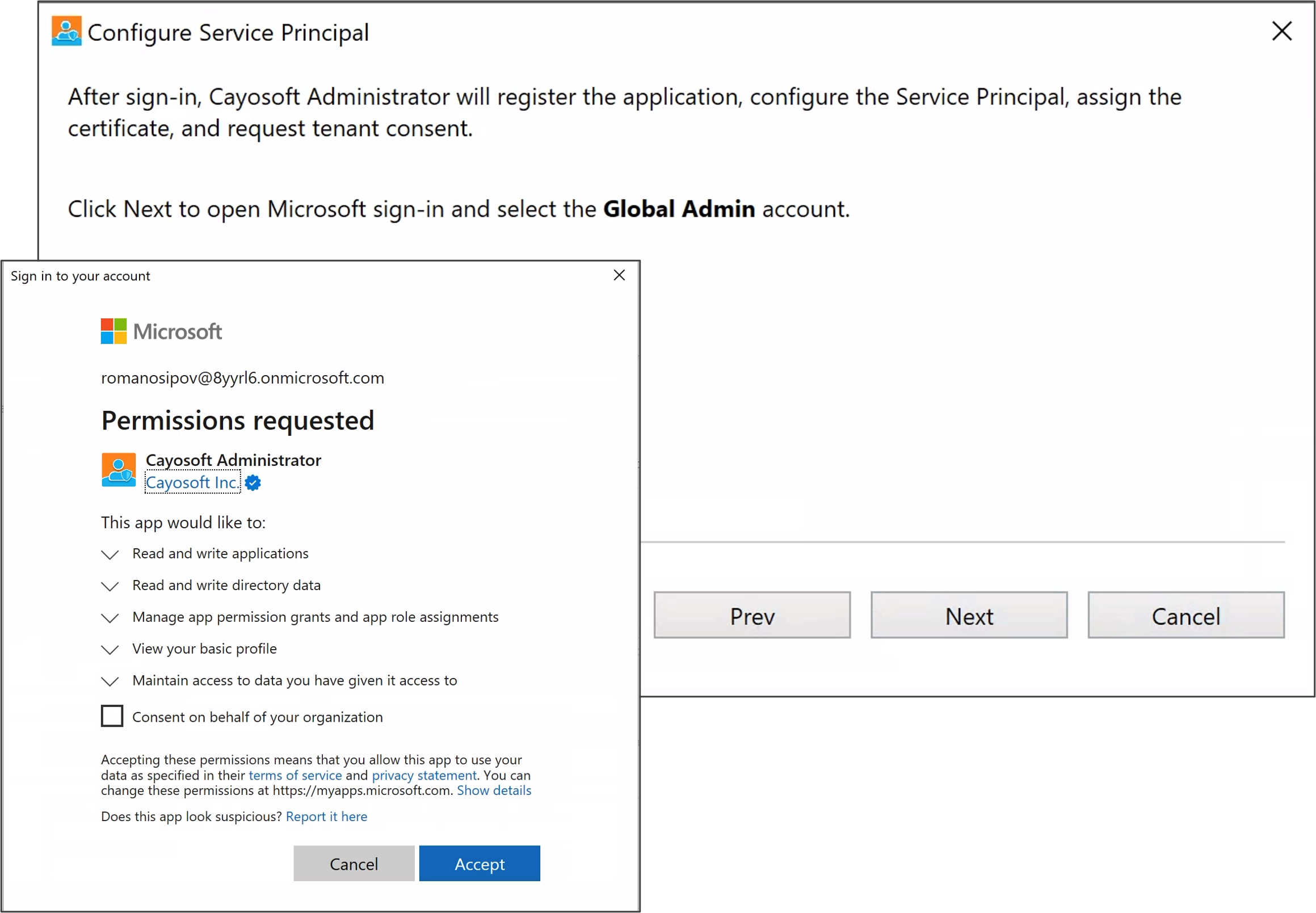
  1. A Global Administrator performs an initial interactive sign-in.
  2. Cayosoft creates or updates the required Entra ID application registrations.
  3. Microsoft Entra ID provisions the corresponding service principal.
  4. Required permissions are assigned.
  5. Administrator stores the application identity and certificate references.
  6. Future Microsoft 365 operations authenticate using the application identity instead of a privileged user account.

Once configured, administrative operations can execute without depending on a standing Global Administrator account.
Required Roles and Permissions

The initial configuration process requires:

  • Global Administrator
  • Exchange Administrator

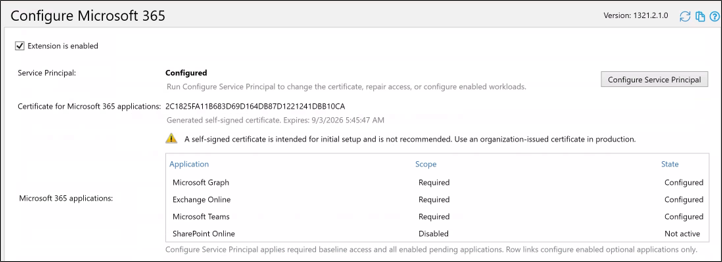
Administrator requests only the permissions needed for the configured workloads.

Baseline permissions include:

  • Microsoft Graph
  • Exchange Online

Optional permissions can also be configured for:

  • Microsoft Teams
  • SharePoint Online

This gives organizations flexibility to align permissions with the services they actively manage.
What are toxic combinations in identity security?

Most teams can spot the obvious bad setting. The harder part is spotting the combination that turns several manageable issues into one serious path.

Unconstrained delegation, a service account with an SPN, delegated GPO rights, a stale SID, a vulnerable certificate template, an app registration with long-lived credentials, or a service principal with high-impact Graph permissions may each look manageable. Together, they become the identity attack path.

That is why identity teams need to evaluate combinations, not just isolated settings. Do not only ask whether an account is privileged. Ask what that account can influence, what trusts it inherits, and what recovery depends on it.

Addressing Lifecycle Management Challenges

Moving to Service Principals can introduce workflow considerations for some Microsoft 365 operations.

One example is ownership transfer during user suspension.

Historically, ownership reassignment could rely on interactive user context. With Service Principal authentication, ownership transfer must follow a more deterministic approach.

To address this, Cayosoft Administrator 13.2.1 introduces a new Fallback Group Owner setting.

When suspending a user:

  • A designated fallback owner can be selected.
  • Ownership transfers follow a predictable path.
  • Transfers are skipped when no eligible owner exists.
  • Teams and groups are evaluated independently based on ownership eligibility.

This helps ensure cloud groups remain properly managed throughout user lifecycle events, even under the Service Principal model.
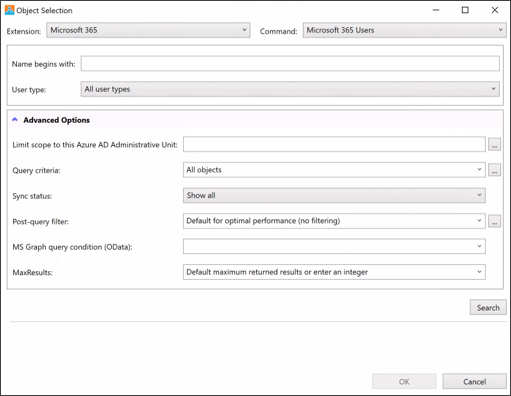

Benefits of Moving to Service Principals

For organizations modernizing their Microsoft 365 administration strategy, the move to Service Principals provides several advantages.

Improved Security Alignment

Authentication no longer depends on maintaining privileged user accounts specifically for automation.

Better Compatibility with MFA and Conditional Access

Organizations can apply stronger security requirements to privileged users without disrupting administrative automation.

Reduced Operational Risk

Authentication becomes tied to managed application identities rather than individuals.

Alignment with Microsoft’s Direction

Administrator follows Microsoft’s preferred authentication model for modern cloud administration.

Simplified Long-Term Administration

Organizations gain a scalable approach that works with evolving security requirements and future Microsoft platform changes.

Looking Ahead

As Microsoft 365 security continues to evolve, administrative tooling must evolve with it.

Cayosoft Administrator 13.2.1 helps organizations take that next step by replacing legacy connection account models with Service Principal authentication. The result is a more secure, more maintainable, and more future-ready approach to Microsoft 365 administration.

That means reviewing privilege as a system, not a spreadsheet. Teams should prioritize high-impact paths, validate Tier 0 dependencies, investigate drift, test recovery assumptions, and continuously revisit exceptions that were originally approved for valid reasons.

FAQs

What is a Service Principal in Microsoft 365?

A Service Principal is a non-human identity in Microsoft Entra ID that allows applications, automation tools, and management platforms to authenticate and access Microsoft 365 resources without using a user account. Instead of relying on a traditional service account with a username and password, a Service Principal uses certificates or secrets to securely perform administrative tasks and automated processes.

As organizations implement stronger security controls such as MFA, Conditional Access, and Zero Trust policies, traditional service accounts become more difficult to manage for unattended administration. Service Principals align with Microsoft’s modern authentication approach by reducing reliance on highly privileged user accounts while providing a more secure and manageable way to authenticate automated processes and administrative tools.

Service Principals improve security by enabling least-privilege access, eliminating the need to store administrator credentials in automation workflows, and supporting certificate-based authentication. They also help organizations maintain secure administrative operations as Microsoft continues to modernize identity and access management across Microsoft 365 and Microsoft Entra ID.

See Cayosoft in Action

Cayosoft is recognized by Gartner as an ITDR solution provider and provides solutions that make identities more resilient to attacks and guarantee a fast forest recovery, if needed. Learn how Cayosoft Guardian facilitates granular change tracking, post-breach analysis, and long-term AD security improvements. Schedule a demo to see the capabilities in depth.

See Cayosoft in Action

Cayosoft is recognized by Gartner as an ITDR solution provider and provides solutions that make identities more resilient to attacks and guarantee a fast forest recovery, if needed. Learn how Cayosoft Guardian facilitates granular change tracking, post-breach analysis, and long-term AD security improvements. Schedule a demo to see the capabilities in depth.

Related Content