



Restoring a hard-deleted Entra ID object sounds like it should be the end of the problem. The user is back, the group is back, the named location is back. But in most environments, it is only the beginning of a longer manual task.
Conditional Access policies, application role assignments, and PIM role assignments don’t reference objects by name. They reference them by objectId — a GUID assigned at creation. When an object is hard-deleted and later recreated, Entra assigns a new objectId. Every policy and assignment that held the original ID is now pointing at something that no longer exists.
Cayosoft Guardian now addresses this as part of the restore operation. When a hard-deleted user, group, or named location is restored through Guardian’s Change History, Guardian automatically updates the stale objectId references across Conditional Access policies, app role assignments, and PIM role assignments. The object is restored and its relationships are repaired together.
Why objectId changes break access configuration
Entra ID’s soft-delete handles accidental deletions well. When a user or group is soft-deleted and restored within the 30-day window, the objectId doesn’t change and all linked policies and assignments stay intact.
Hard deletion is different. Once an object is purged from the recycle bin — or deleted through a path that bypasses it, such as certain on-premises sync operations — it is gone permanently. Any recreation generates a new objectId. To every Conditional Access policy, app role assignment, or PIM assignment that stored the original ID, the object simply doesn’t exist.
What makes this a persistent operational problem is that the failures are not visible. A Conditional Access policy doesn’t raise an alert when a referenced objectId is no longer valid — it silently drops the user or group from enforcement. An app role assignment that points to a deleted principal stays in the system as a stale record without granting any access. An administrator has to know to look, and has to know where.
The reconstruction work that follows a hard-delete recovery is manual by nature: identify which policies and assignments referenced the deleted object, and update each one. In a production tenant with dozens of Conditional Access policies and hundreds of app role assignments, this is not a quick task.
Conditional Access policies: gaps that don’t announce themselves
Conditional Access policies define the authentication and access requirements for M365, Azure, and connected SaaS applications. Users and groups appear in each policy’s include and exclude scope; named locations define the trusted IP ranges and country filters that policies use as conditions. All of these are stored by objectId.
When a user or group referenced in a policy is hard-deleted and recreated, the policy continues to display the name — but the underlying ID it holds is stale. The implications depend on where the object appeared.
A group in an exclusion scope stops working silently. If that group was used to exempt break-glass accounts or service accounts from MFA enforcement, those accounts are no longer exempt after the group is recreated after being hard-deleted. The policy appears unchanged; the enforcement has changed.
A group in an include scope produces the opposite effect. If the policy targeted a specific group for a compliance check or access restriction, the new group is outside the policy’s scope. The control is no longer applied to the intended population.
Named locations used as trusted IP ranges or country filters follow the same pattern. A named location cannot be deleted while it is still referenced by an active Conditional Access policy, so deletions of named locations happen after the associated policies are already removed. When those policies and locations are both restored, the location reference in the policy points to the old ID. The geo or IP filter doesn’t resolve.
App role assignments: application access silently revoked
App role assignments record which users and groups can access enterprise applications through defined roles. An HR system might use roles like Employee and Manager. A line-of-business application might have Reader, Contributor, and Admin. These assignments are the mechanism by which Entra controls which identities reach which applications — and they are stored with a reference to the principal’s objectId.
When a user or group is hard-deleted and recreated, the assignment record remains in the system but points to an ID that no longer exists. The recreated user or group gains no application access from those assignments.
This is the scenario that creates the most operational follow-up work: a department group is hard-deleted and recreated during a migration or incident response. The group had role assignments across dozens of enterprise applications. None of those assignments carry over to the new group. Restoring access means locating each affected application, identifying the role, and re-adding the group — one assignment at a time.
For individual user accounts, the same logic applies. A user hard-deleted and later recreated loses all their app role assignments. Without an external record of what the user held, reconstruction depends on logs, tickets, or institutional knowledge about what access the account had.
PIM role assignments: privileged access gaps after recovery
Privileged Identity Management governs just-in-time and standing access to high-privilege Entra and Azure roles. PIM eligible and active assignments reference the assigned principal by objectId. When a user or group is hard-deleted and recreated, the new object has no PIM assignments attached to it.
The practical consequence: a recreated administrative account cannot activate or use any of the roles it previously held until those assignments are manually restored. For accounts that held multiple PIM assignments across Entra and Azure roles, rebuilding that configuration requires knowing exactly what the account was eligible for — information that lives in audit logs if it was captured, or in institutional knowledge if it wasn’t.
This is also the failure mode that attracts the most scrutiny from compliance and security teams. A recovery event that successfully restores an account but leaves it without its expected PIM assignments creates a gap between the access configuration the organization believes it has and the one that is actually in place. That gap may not surface until the user attempts to activate a role.
What Guardian does
Guardian tracks Entra changes continuously, including deletions. When an object is hard-deleted, Guardian retains a record of that object’s state and the relationships it held — including which Conditional Access policies referenced it, which app roles it belonged to, and which PIM assignments were attached to it.
When a hard-deleted user, group, or named location is restored through Guardian’s Change History, Guardian recreates the object in Entra and then scans Conditional Access policies, app role assignments, and PIM role assignments for any reference to the original objectId. Each match is updated to the new ID.
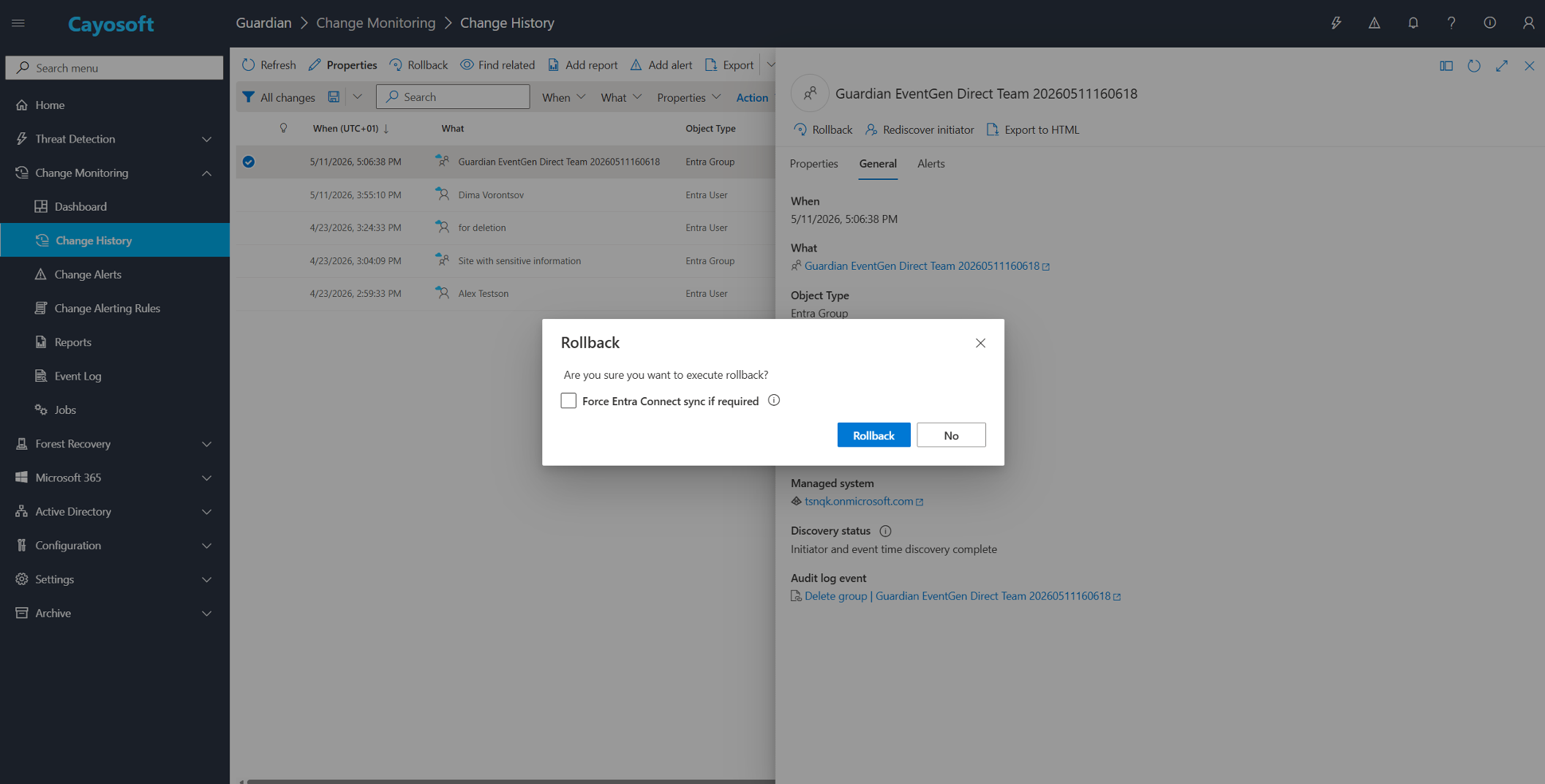
The administrator restores the object. Guardian handles the reconciliation. The access configuration reflects the intended state without a separate audit pass.
Where native recovery stops
Entra’s soft-delete is effective for accidental deletions caught within the 30-day window. Soft-deleted objects restore with their original objectId and all their relationships remain intact.
Hard-deleted objects fall outside that window. Once purged, Entra has no recovery path, and any recreation produces a new objectId. The relationship restoration that Guardian provides is specific to this scenario: recovery of objects that Entra cannot restore natively, combined with automatic repair of the access configuration that referenced them.
Conclusion
Hard-deleted Entra ID objects have always required more than just recreation. The object comes back, but the access control configuration — Conditional Access policies, application role assignments, PIM assignments — still points at an objectId that no longer exists. Finding and repairing those references has been manual work, and in environments with mature identity configurations, it adds up quickly.
Guardian now handles that repair as part of the restore. The object and its relationships are brought back together, and the access configuration reflects the intended state without a separate audit step.
h3
h3
hello
call out
h3
h2
hello
| hello | hello | hello |
| hello | hello | hello |
| hello | hello | hello |
| hello | hello | hello |
| hello | hello | hello |
| hello | hello | hello |
h2
hello
h3
hello
h3
hello
h3
hello
callout
h2
h3
callout
h3
Key Takeaways
FAQs
See Cayosoft in Action
Cayosoft is recognized by Gartner as an ITDR solution provider and provides solutions that make identities more resilient to attacks and guarantee a fast forest recovery, if needed. Learn how Cayosoft Guardian facilitates granular change tracking, post-breach analysis, and long-term AD security improvements. Schedule a demo to see the capabilities in depth.