



Updated November 4, 2026
By Craig Birch, Technology Evangelist/Principal Security Engineer
TL;DR
Microsoft ended support for AGPM in April 2026, leaving Group Policy change management unsupported and unpatched. Cayosoft Group Policy Management replaces AGPM with a supported, governed lifecycle for every GPO (check out, edit, check in, submit, approve, and deploy) plus version history, rollback, policy analysis, and multi-domain control. A built-in migration carries your AGPM history forward, so organizations keep governed change, separation of duties, and rapid recovery without relying on unsupported tooling.
As organizations continue modernizing their IT infrastructure, legacy management tools are gradually being phased out in favor of more scalable, cloud‑centric solutions. One tool that has reached its end of life is Microsoft Advanced Group Policy Management (AGPM).
Long valued for extending the capabilities of the Group Policy Management Console (GPMC), AGPM provided organizations with robust change control, versioning, and workflow capabilities for managing Group Policy Objects (GPOs). Delivered as part of the Microsoft Desktop Optimization Pack (MDOP) for Software Assurance, AGPM played a critical role in maintaining secure and compliant on‑premises environments.
Microsoft ended support for AGPM in April 2026, a significant shift for organizations that still rely on it for Group Policy governance. AGPM no longer receives security updates, bug fixes, or vendor support, so IT teams that haven’t yet migrated need a supported path forward now.
In this blog, we’ll break down how Cayosoft Group Policy Management replaces AGPM’s governed change workflow, how your AGPM history migrates with you, and how it helps organizations reduce security, operational, and compliance risk without relying on unsupported tooling.
Cayosoft Solves Typical AGPM Business Tasks
| Capability | AGPM | Cayosoft |
| Track Group Policy changes | Tracks GPO changes with version history | Tracks every GPO change through checked-in versions, comments, and approval records |
| Centralized change history | Maintains historical versions of GPOs | Archives every checked-in version; previous versions are retained, not overwritten |
| Rollback of GPO changes | Can roll back to previous GPO versions | Rolls back to any archived version or restores GPO settings to a known good state |
| Recovery of deleted GPOs | Supports restoring deleted GPOs | Supports restoring deleted GPOs |
| Audit trail for changes | Provides basic audit trail | Records versions, comments, approvals, and user actions: who, what, when, and why |
| Focus on Group Policy control | Governance of GPO lifecycle | Governs the full GPO lifecycle and controls who can edit, approve, and deploy |
| Offline editing and check-in/check-out | Offline archive with check-out and check-in | Offline repository with check-out locking, editing, and check-in; Active Directory stays untouched until deployment |
| Pre-deployment approval | Request, approve, and deploy workflow | Submit, approve or reject, and deploy as separate steps that can be assigned to different users and groups |
| Policy analysis | Settings difference reports | Policy comparisons, difference reports, conflict analysis, and Resultant Set of Policy analysis |
| Multi-domain management | Managed domain by domain | One browser-based console for trusted and untrusted domains and forests |
| Change history after migration | Stored in the AGPM archive | Migrated with every version, approver, comment, and deployment event intact |
How Cayosoft improves on AGPM
| Area | AGPM | Cayosoft advantage |
| Product lifecycle | Unsupported since April 2026 | Actively developed and supported |
| Speed of recovery | Manual rollback workflows | Rapid rollback to any archived version |
| Delegation control | Static role separation | Separate edit, approve, and deploy rights assigned to different users and groups |
| Approval enforcement | Pre‑change approval only | Submit, approve or reject, and deploy as distinct, recorded steps |
| Automation compatibility | Limited | PowerShell automation, designed for modern IT operations |
| Security posture | Operational governance | Governed change with separation of duties, full history, and rapid rollback |
The Security Risks of Unsupported GPO Tooling
Since April 2026, AGPM no longer receives security updates, bug fixes, or vendor support. This introduces significant security and operational risk because Group Policy directly controls authentication, authorization, and security configuration across the environment.
- No security updates or vendor support since April 2026 (due to AGPM end of life)
- Increased exposure to Active Directory attacks targeting Group Policy
- Permanent risk from unpatched vulnerabilities
- Unsupported interaction with Tier 0 assets
- Higher audit and risk review findings
- Reduced confidence and longer recovery during incidents
- Governance and compliance gaps for security‑enforcing systems
AI-assisted attacks raise the stakes by applying machine reasoning, speed, and persistence to find and exploit vulnerabilities. Attackers can exploit Group Policy to deliver malicious payloads directly to devices and servers, and because Group Policy reaches so many systems, its misuse can sharply magnify an attacker’s blast radius.
How Cayosoft Supports Modern Group Policy Management
Cayosoft Group Policy Management modernizes Group Policy governance with a supported, governed lifecycle: controlled change before deployment, separation of duties across editing, approval, and deployment, full version history, and rapid rollback. It is built for how Active Directory teams work today, across multiple domains and forests and with automation at scale.
Governance before change, recovery after change
Cayosoft Group Policy Management gives AGPM users the governed change lifecycle they relied on, and extends it. Every GPO moves through an explicit check-out, edit, check-in, submit, approve, and deploy workflow in an offline repository, so Active Directory stays untouched until the approved version is deployed.
- Govern change: Durable version history, comments, user actions, and approval records for every GPO.
- Recover confidently: Restore a known-good policy quickly with archived versions, rollback, policy comparison, difference reporting, conflict analysis, and Resultant Set of Policy analysis.
- Control every domain: Manage trusted and untrusted domains and forests from one browser-based console, with separate role-based rights for editing, approval, and deployment.
- Standardize operations: Replicate reusable gold policies and automate repeatable work with PowerShell, without relying on fragmented scripts or local procedures.
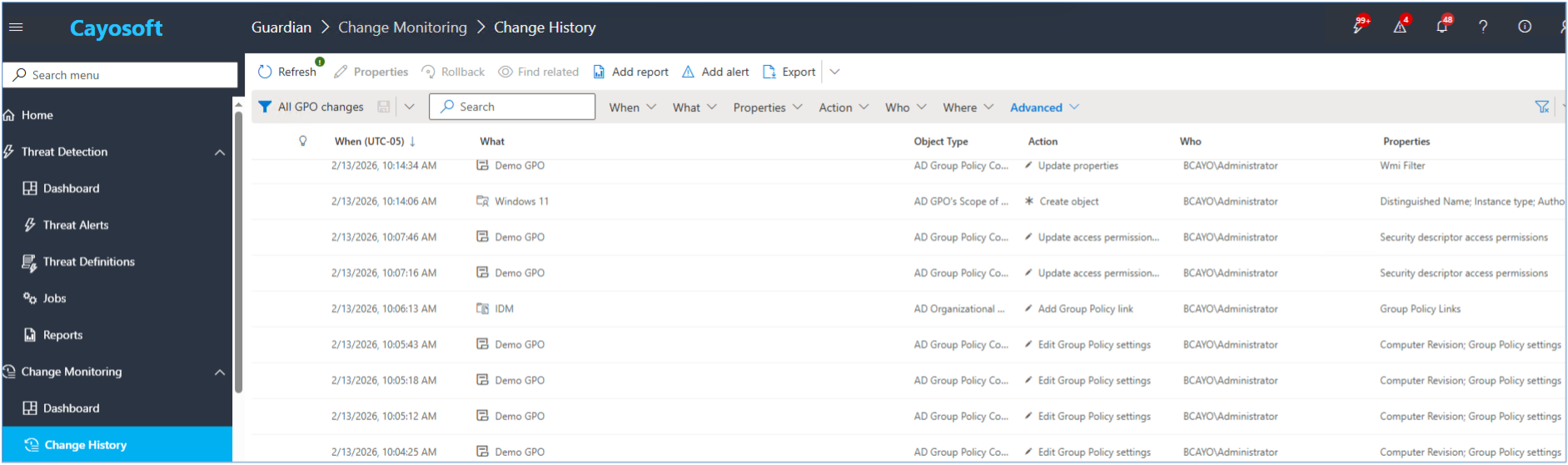
Change Visibility and Tracking
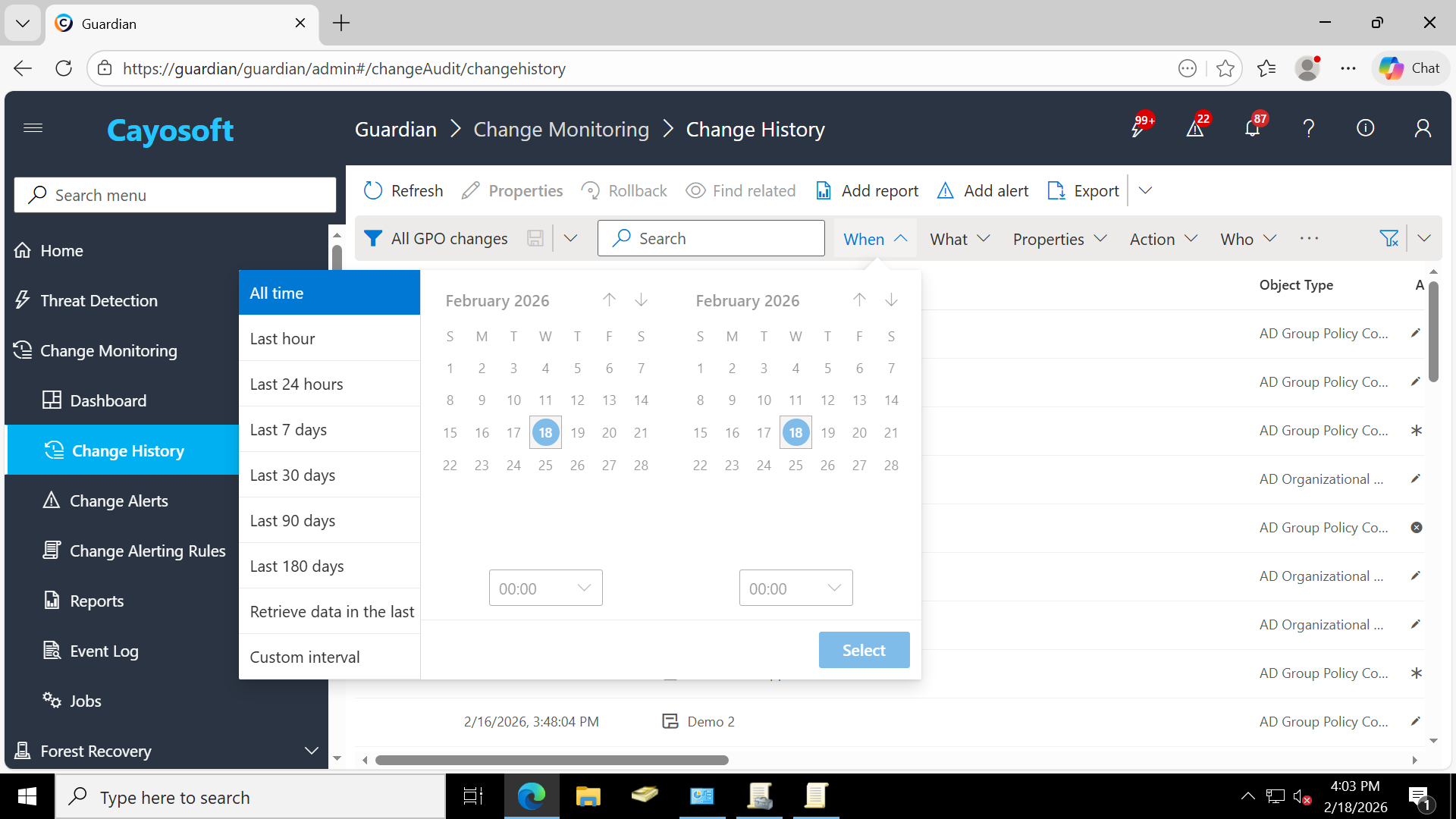
Once access is granted, Active Directory applies Group Policy changes immediately by design. Cayosoft Guardian complements Administrator by providing continuous visibility into all Group Policy activity.
Guardian tracks what changed, who made the change, and when it occurred, allowing administrators and security teams to quickly identify unexpected or risky modifications without slowing down daily operations.
Group Policy change monitoring in Cayosoft Guardian
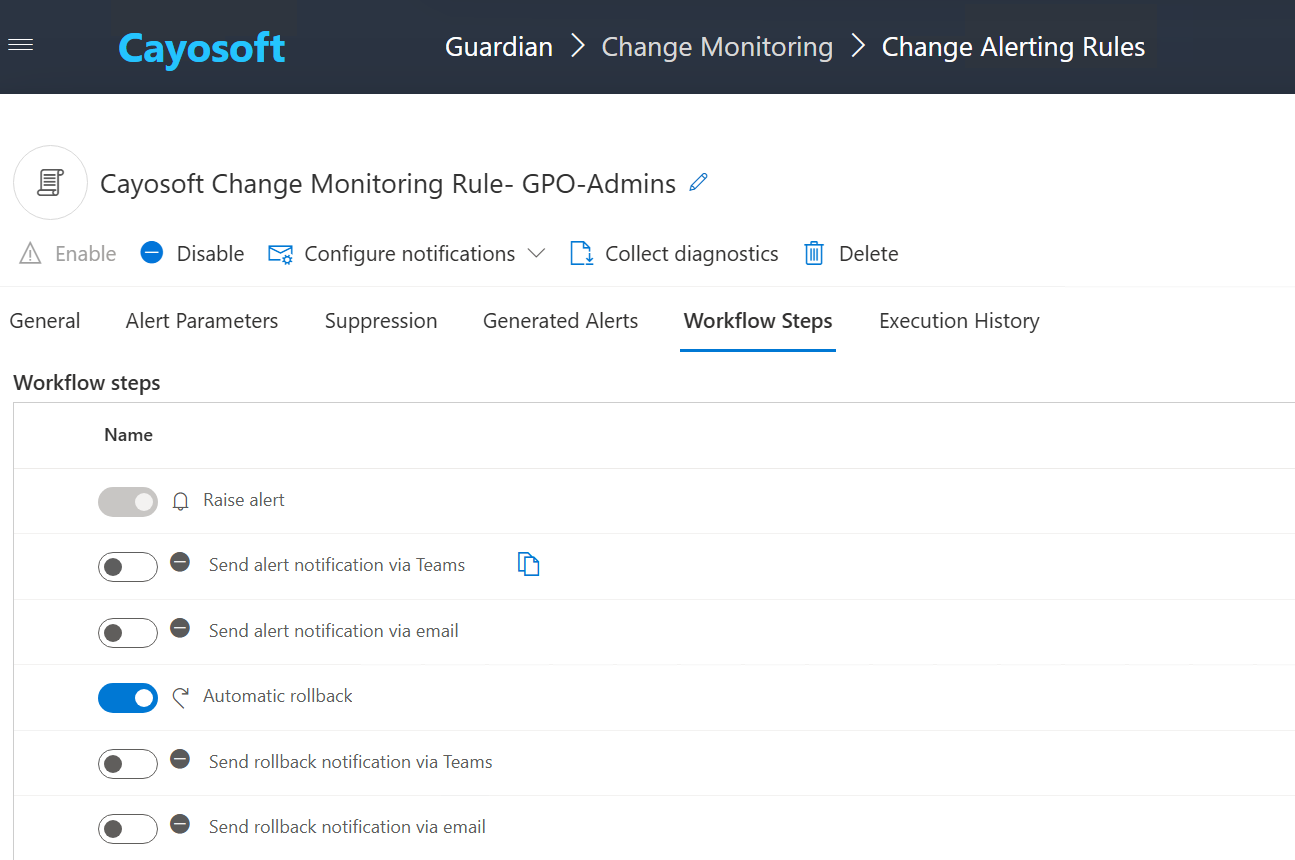
Guardian can also protect critical Group Policy delegation groups, such as t0gpoadmins. Any membership or permission change that does not originate from an approved account, such as the Cayosoft Administrator service account or a designated built in Administrator account, is automatically rolled back. This prevents unauthorized privilege expansion and enforces delegation boundaries even when changes are attempted outside approved paths.
Cayosoft Guardian Auto rollback of Protected Groups (GPO-Admins)
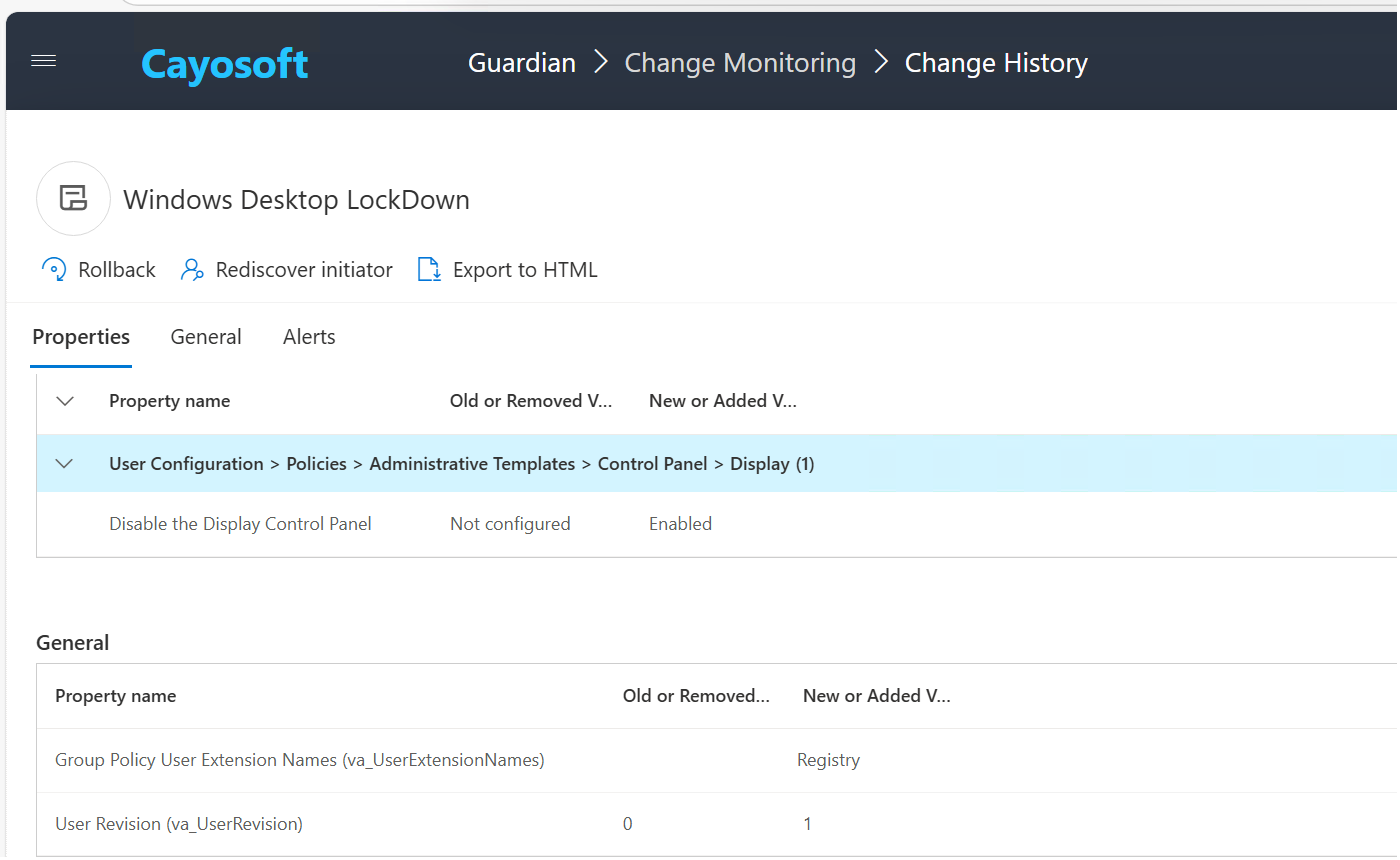
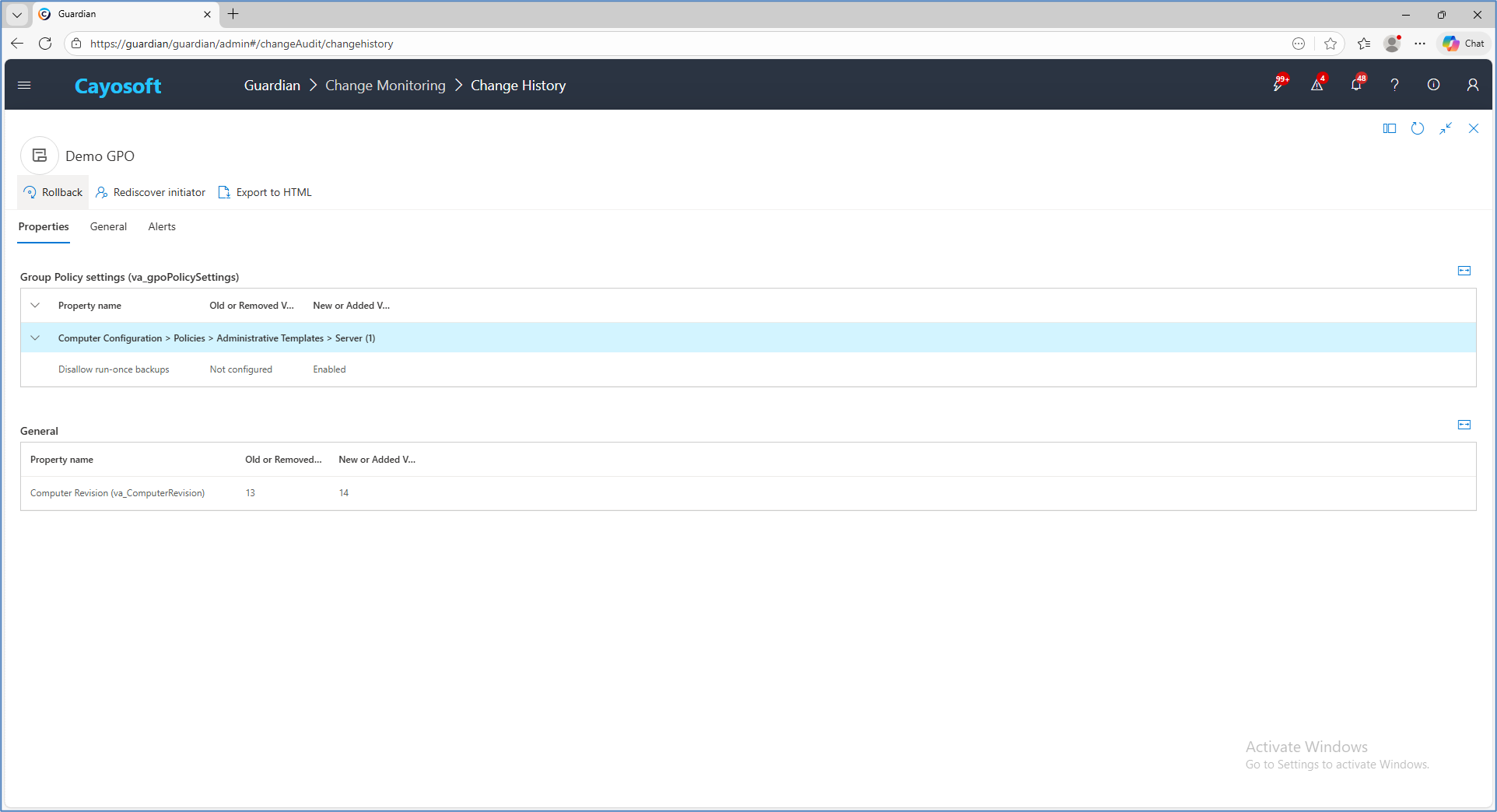
Group Policy Setting Details Before and After in Cayosoft Guardian
Centralized History for Recovery
Guardian maintains change history that supports rollback and recovery scenarios. Administrators can respond quickly to configuration drift, mistakes, or malicious modifications without relying on unsupported tools.
Rollback and GPO Recovery
Guardian supports rolling back GPO settings and recovering deleted Group Policy objects. These capabilities are essential during security incidents and operational outages where speed and accuracy matter.
Group Policy rollback and recovery in Cayosoft Guardian
Detection and Response Focus
While AGPM emphasized controlling how changes were made, Guardian focuses on detecting changes, responding to them, and restoring known good configurations when necessary.
Bring Your AGPM History with You
A built-in migration brings every AGPM-controlled GPO into Cayosoft Group Policy Management along with its full history: each checked-in version, the people who changed and approved it, and when it was deployed. The migration is read-only against the AGPM archive, so AGPM keeps running until you decide to retire it. Teams can start with a dry run, pilot a handful of GPOs, verify the results, and then migrate the rest.
Built For Modern Active Directory Operations
Cayosoft Group Policy Management is designed for environments that rely on automation, scripting, and scale. Teams get a governed workflow for planned change, PowerShell automation for repeatable work, gold policies for consistent standards, and fast rollback when a change needs to be undone, keeping Group Policy under control without slowing operations.
Group Policy does not exist in isolation. Cayosoft fits into a broader identity resilience strategy, where visibility, control, and recovery across Active Directory help organizations detect issues earlier, respond faster, and recover with confidence.
In practical terms, Cayosoft helps organizations manage the impact of Group Policy changes, whether they are accidental, automated, or malicious.
Who Should Consider Cayosoft as an AGPM Replacement
Cayosoft Group Policy Management is built for organizations retiring AGPM that need to keep governed change control for Group Policy without relying on unsupported tooling. It replaces AGPM’s core workflow, including offline editing, check-in/check-out, pre-deployment approval, version history, and rollback, and carries your AGPM history forward. It’s designed for enterprises and public-sector organizations with business-critical Active Directory, large or distributed GPO estates, multiple domains or forests, and regulated or audited operations.
Organizations seeking a modern approach to Group Policy governance, one that combines governed change control with separation of duties, full version history, policy analysis, and rapid rollback, should evaluate Cayosoft Group Policy Management as their AGPM replacement.
Conclusion: Moving Forward After AGPM End of Life
AGPM gave organizations a governed way to manage Group Policy change. Today’s Active Directory environments still need that control, now with vendor support, multi-domain reach, and fast recovery when a change goes wrong.
Cayosoft Group Policy Management modernizes Group Policy governance by combining governed change before deployment, separation of duties across editing, approval, and deployment, full version history, and rapid rollback after change. This approach aligns with how Group Policy actually behaves in production environments.
With AGPM now unsupported, choosing a replacement is more than a tooling decision. It’s a security and risk decision.
The real question is how effectively your organization can govern change, control who can approve and deploy it, and recover when a Group Policy change goes wrong.
That is where Cayosoft fits.
FAQs
Advanced Group Policy Management (AGPM) is a Microsoft tool, delivered through the Microsoft Desktop Optimization Pack (MDOP), that added change control, versioning, and approval workflows to the Group Policy Management Console.
No. Microsoft ended support for AGPM in April 2026. It no longer receives security updates, bug fixes, or vendor support.
Cayosoft Group Policy Management is a supported AGPM replacement. It provides offline editing, check-in/check-out, pre-deployment approval, version history, rollback, policy analysis, and multi-domain control, and it migrates your AGPM history so past changes and approvals stay intact.
Unpatched vulnerabilities, no vendor support, higher audit findings, and slower recovery during incidents. Because attackers can use Group Policy to deliver malicious payloads across devices and servers, an ungoverned process can sharply expand an attacker’s blast radius, especially as AI-assisted attacks increase speed and persistence.
Cayosoft Group Policy Management keeps the governed lifecycle and adds conflict analysis, Resultant Set of Policy analysis, gold-policy replication, PowerShell automation, and one browser-based console for trusted and untrusted domains and forests.