



Finding the right Active Directory object often requires more than searching by name.
In large environments, administrators frequently need to locate users, groups, computers, and contacts using Active Directory attributes such as employee IDs, department values, custom identifiers, asset information, or organization-specific data stored in Active Directory.
The latest release of Cayosoft Administrator (13.2.1) introduces support for searching AD objects by additional Active Directory attributes directly from the web portal, making it easier to locate the exact object needed without creating custom queries or exporting data.
The Limitation of Traditional Searches
Traditional directory searches typically focus on object names.
While that works for many scenarios, administrators often need answers to questions like:
- Which user has this employee ID?
- Which computer has this asset tag?
- Which users belong to a specific cost center?
- Which groups contain a particular custom attribute value?
Without attribute-based searching, administrators may need to:
- Build custom reports
- Create specialized queries
- Export directory data
- Search through multiple tools
This slows down operational tasks and increases administrative effort.
What's New in Cayosoft Administrator 13.2.1?
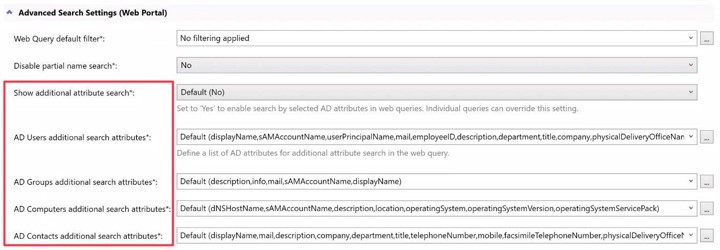
Cayosoft Administrator now supports searching by additional Active Directory attributes directly from supported Web Portal queries.
Administrators can configure:
- Active Directory Users
- Inactive Users
- Locked-Out Users
- User Templates
- Groups
- Contacts
- Computers
Searches can be configured globally or customized for individual queries.
Organizations maintain full control over which attributes are available for searching.
Flexible Configuration Options
The feature is designed to support different operational requirements.
Administrators can:
- Enable or disable the capability globally
- Allow individual queries to inherit global settings
- Override settings on specific queries
- Define allowed attribute lists
- Limit searchable attributes to approved values
This balance provides flexibility while maintaining governance over search behavior.
How the Search Works
The new search capability adds an additional filtering condition that works alongside existing search criteria.
Users can:
- Open a supported Web Portal query.
- Select a configured attribute.
- Enter a search value.
- Refine results using both standard and attribute-based matching.
Additional attribute searches use a CONTAINS operation, allowing users to find matching records without requiring exact values.
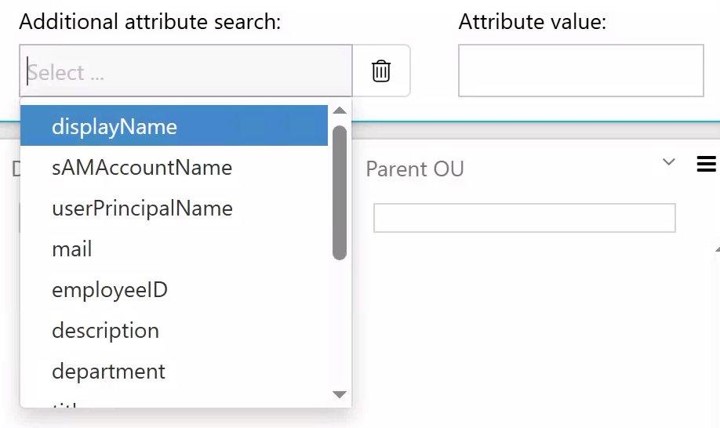
The selected attribute must exist in the Global Catalog and use a supported attribute type.
Real-World Benefits
Faster Helpdesk Operations
Support staff can locate users or devices using business identifiers instead of relying solely on names.
Improved Administrative Efficiency
Administrators spend less time creating reports or running multiple queries.
Better Support for Large Environments
Organizations with hundreds of thousands of directory objects can locate records using the identifiers most relevant to their processes.
Support for Custom Business Data
Searches can leverage attributes already used by the organization rather than forcing administrators into name-based workflows.
Customer-Driven Innovation
This enhancement was requested by multiple organizations.
Their common challenge was simple: object names alone were not enough.
By bringing attribute-based searching directly into the Web Portal, Administrator helps teams find the information they need faster while reducing operational complexity.
Conclusion
Active Directory contains valuable information far beyond names and email addresses. Cayosoft Administrator unlocks that data by allowing organizations to search using the Active Directory attributes that matter most to their business.
The result is faster troubleshooting, more efficient administration, and quicker access to the information administrators need every day.
FAQs
Active Directory attributes are the individual data fields stored on every directory object. A user object holds attributes like givenName, mail, department, and employeeID. A computer object holds attributes like operatingSystem and description. The attributes available to each object type are defined by the Active Directory schema.
In Active Directory Users and Computers, enable Advanced Features from the View menu, then open a user and select the Attribute Editor tab. PowerShell also works: Get-ADUser username -Properties *. Neither method lets you search across the directory by those values, which is the gap Cayosoft Administrator’s Web Portal search closes.
sAMAccountName, userPrincipalName, displayName, givenName, sn, mail, department, title, manager, and employeeID cover most day-to-day administrative work. Organizations then add custom values through extensionAttribute1 through extensionAttribute15 or through schema extensions.
Yes, provided the attribute is present in the Global Catalog and uses a supported type. In Cayosoft Administrator, an administrator adds the attribute to the allowed list, either globally or for a specific Web Portal query, after which it becomes selectable as a search condition.
Two causes account for most cases. Either the attribute is not replicated to the Global Catalog, or it uses an attribute type the search does not support. Check the attribute’s schema definition first, then confirm it has been added to the allowed attribute list for that query.
No. Additional attribute searches use a CONTAINS operation, so a partial value returns matching records. Searching a partial asset tag or a fragment of a department name will return results.
Yes. Cayosoft Administrator’s web portal exposes configured Active Directory attributes as a search field, so helpdesk staff can look up objects by employee ID or asset tag without scripting access or elevated permissions.
See Cayosoft in Action
Cayosoft is recognized by Gartner as an ITDR solution provider and provides solutions that make identities more resilient to attacks and guarantee a fast forest recovery, if needed. Learn how Cayosoft Guardian facilitates granular change tracking, post-breach analysis, and long-term AD security improvements. Schedule a demo to see the capabilities in depth.