



TL;DR
hello
Manager-based groups sound simple until you need them to work in production.
You may need one group for a leader and everyone below them. You may need separate groups for each manager and their team. Or you may need a dynamic group of top managers in a specific department that stays current as the org changes.
Those are practical, common Microsoft 365 admin scenarios. They are also the scenarios that usually turn into manual group maintenance or custom automation.
That is why the new manager-based rules in Cayosoft Administrator matter. With support for Microsoft 365 Family Groups and Dynamic Groups, admins can now build manager-based distribution and security groups with hierarchy depth, optional manager inclusion, scoping, and scheduled updates.
Where this helps in practice
Build one group for an entire reporting tree
One of the most common tasks is straightforward: create a single group for a top-level leader and include everyone in that reporting chain.
That could be a distribution list for leadership communications, a security group for an application rollout, or a targeting group for a department‑wide change.
With Cayosoft Administrator, you can create a Microsoft 365 Family Group, add the Microsoft 365 Users – Direct Reports (FG) membership rule, select the manager, enable Treat the top manager as manager for all subordinates, and set Levels of management hierarchy to All.
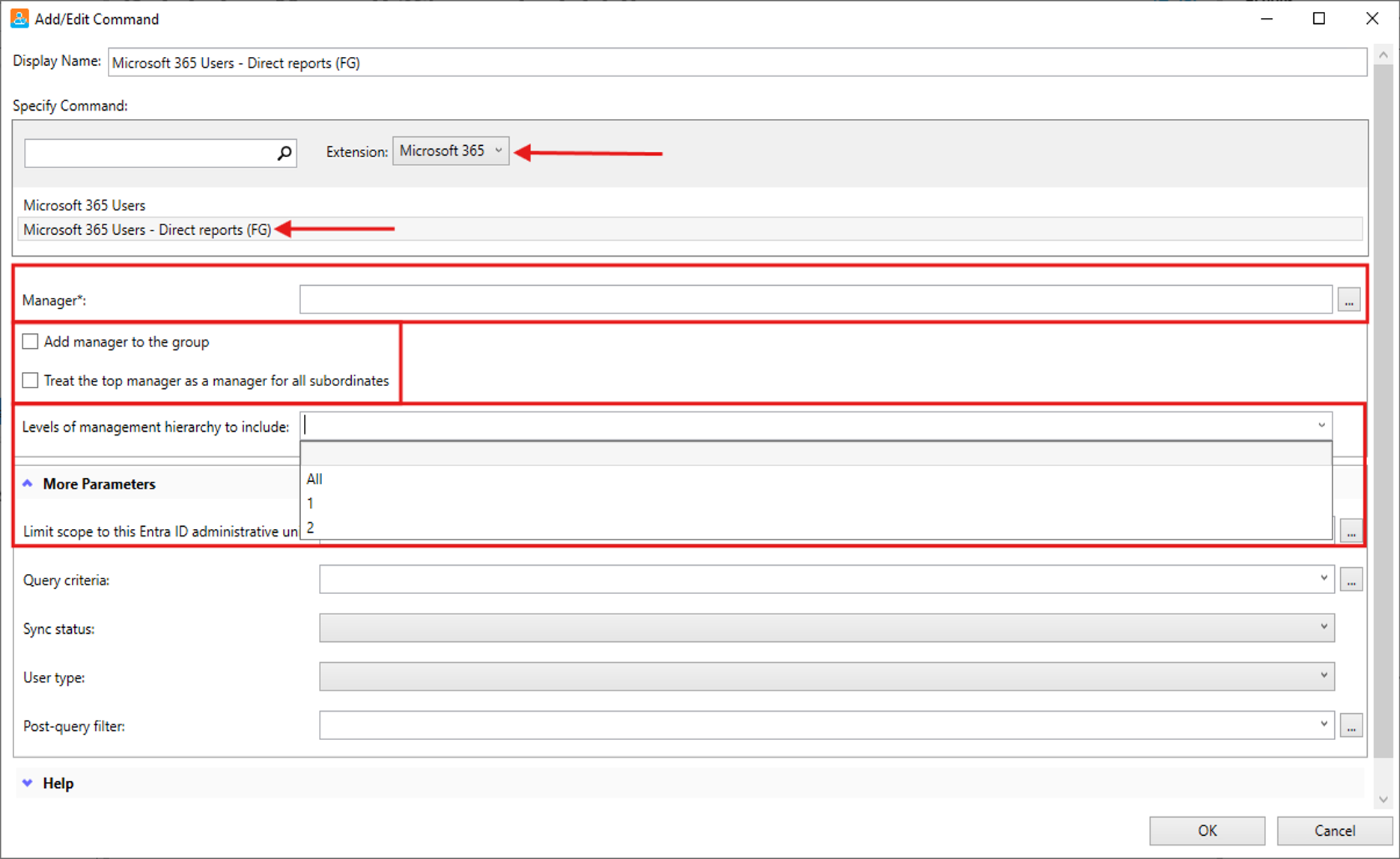
The result is one group containing all direct and indirect reports for that leader.
Keep the hierarchy instead of flattening it
Sometimes a single rollup group is not what you want. In many organizations, the better model is to keep the management structure visible in the groups themselves.
For example, a VP may need a group with their direct reports, while each director under that VP needs a separate group for their own team.
Cayosoft Administrator supports that scenario as well. In a Microsoft 365 Family Group rule, you can use the same manager-based membership rule, enable Add manager to the group, and set the hierarchy depth to a defined level such as 2 or even all, to create a tree of manager-subordinate groups for managers on all levels.
That creates a manager-subordinate group structure instead of a flat rollup:
- One group for the top manager and direct reports
- Additional groups for subordinate managers and their own direct reports
That is a much better fit when communication, permissions, or delegated administration follow management boundaries.
Find the right managers, not every manager
Another real operational challenge is scoping. In practice, admins rarely want a manager-based group across the entire tenant. They want a specific slice of the organization.
Examples include:
- Top managers in Sales
- Users under a leader inside a specific administrative boundary
- Manager-based groups filtered to the right population before membership is applied
This is where Cayosoft Administrator’s Dynamic Group rule helps. You can use the Microsoft 365 Users – Direct Reports membership rule, define the manager, control the levels of management hierarchy, and then narrow the result with Entra ID administrative unit scope, query criteria, and post‑query filters.
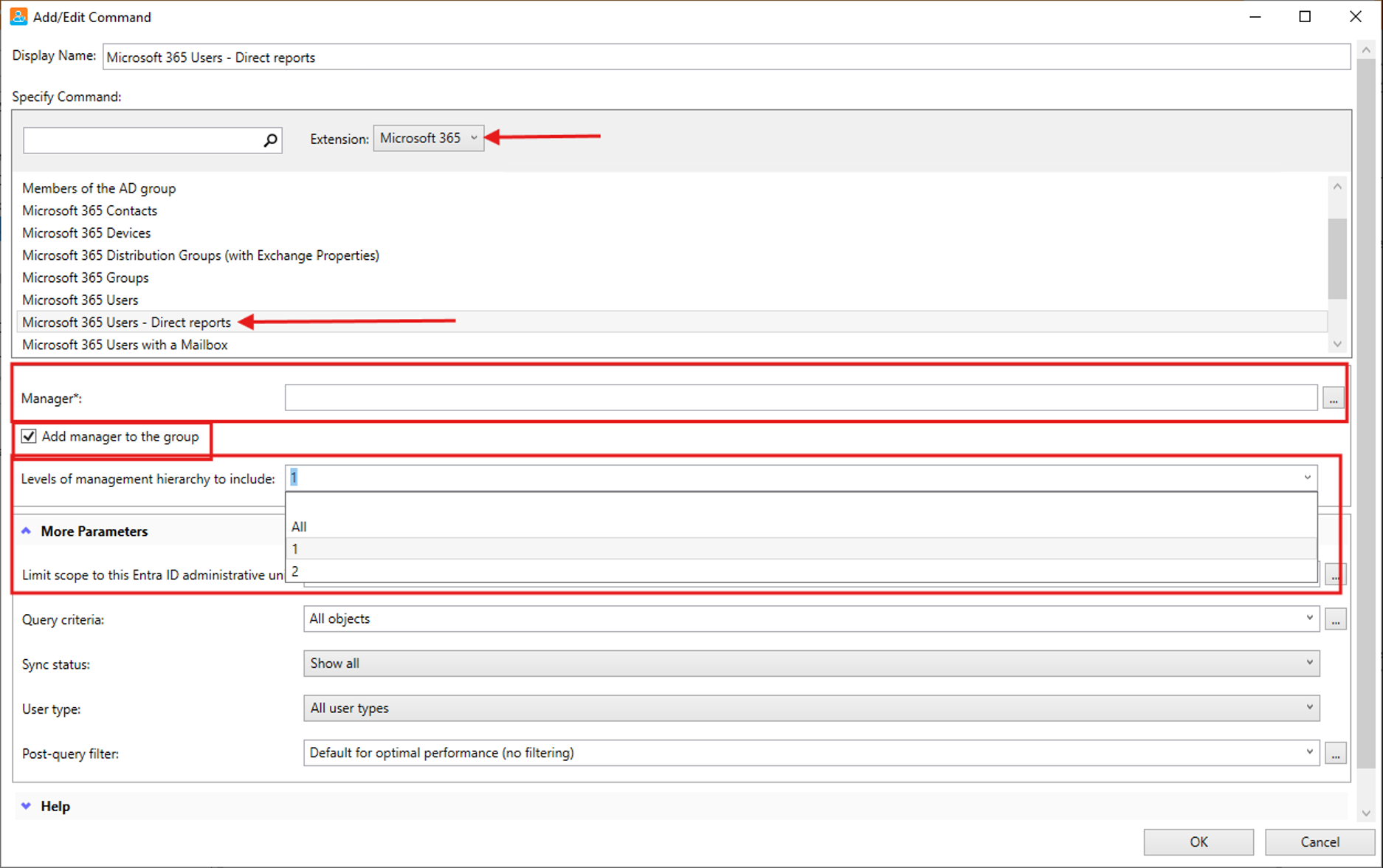
If the goal is to enumerate high-level leaders in Sales, set Levels of management hierarchy to 1, scope the rule with Query Criteria to Sales, and schedule it to run every hour or every day.
The result is a group that stays aligned with the org without constant manual work.
Reduce script maintenance for org‑based groups
The technical problem with manager-based groups is usually not creating them once. It is keeping them accurate as reporting lines change.
That is where manual processes and custom scripts create long-term overhead. Someone has to maintain the logic, monitor scheduled jobs, and troubleshoot when the output no longer matches the org chart.
With Cayosoft Administrator, manager-based membership is built into the product workflow. You can configure the rule, scope it correctly, and let scheduling keep the result current.
That gives admins a cleaner operational model for org-based distribution and security groups.
Why this is useful for Microsoft 365 admins
This update is not just about a new rule. It is about making a set of common group management scenarios easier to implement and easier to run.
You can decide:
- Which manager anchors the rule
- Whether the manager is included in the group
- How many hierarchy levels should be evaluated
- Whether you want one rollup group or hierarchy-based manager-team groups
- Whether the rule should be limited by administrative unit or query criteria
- How frequently it should run
That combination of hierarchy awareness and admin control is what makes the feature practical.
Manager-based groups are one of those requirements that sound easy until they become an ongoing operational task.
If you have needed a full reporting-tree group, manager-and-team group sets, or scoped dynamic groups for leaders in a business unit, Cayosoft Administrator now gives you a direct way to build and maintain those scenarios in Microsoft 365.