



Home » Ransomware Recovery: 10 Best Practices for Microsoft Environments » Essential Best Practices to Protect Against Ransomware
Essential Best Practices to Protect Against Ransomware
Learn practical best practices to protect against ransomware, including MFA, least privilege, and network segmentation.
Explore the chapters:
Next Chapter >
Table of Contents
Stop AD Threats As They Happen
Cayosoft Protector provides continuous monitoring and real-time alerts across your entire Microsoft Identity stack
Like This Article?
Subscribe to our LinkedIn Newsletter to receive more educational content
Ransomware is commonly defined as malware that encrypts data to extract a ransom. While that definition is technically correct, it is rarely just a malware problem. Instead, it is an identity and access control failure that eventually results in encryption. For security professionals, the real challenge is not the encryption itself, but the compromised identities that allowed the attack to scale in the first place.
In real-world incidents, attackers rarely deploy ransomware immediately after gaining access. Instead, they spend significant time moving laterally through the environment to abuse credentials, modify permissions, establish persistence, and remove safeguards. By the time files are encrypted, attackers have full control over administrator accounts, identity systems, and recovery paths. This is why many organizations struggle to recover even when backups exist.
Some ransomware variants that have caused significant global disruption and severely impacted enterprises, public services, and critical infrastructure worldwide include WannaCry, REvil (Sodinokibi), LockBit, and Ryuk. The attack often follows an initial compromise through phishing, exposed services (e.g., via virtual private networks that attackers can access due to weak security), or abused credentials. In many cases, attackers don’t just encrypt critical data; they first move laterally, escalate privileges, and weaken defenses to increase the overall impact.
In this article, we discuss practical best practices that can help administrators and engineers prevent ransomware attacks.
Summary of key practices to protect against ransomware
| Best practice | Description |
|---|---|
| Implement email security | Implement email security controls, such as filtering (URL analysis, spoofing, and impersonation detection) and email attachment inspection to block phishing emails and malicious attachments before they reach users’ inboxes. Also set up structured vulnerability and patch management to remediate exploitable weaknesses across systems and applications. |
| Enforce the principle of least privilege | Users should be given only the bare minimum of permissions necessary to perform their tasks or functions to reduce the risk of misuse. Such a policy aligns the organization with zero-trust principles, where every access is continuously verified based on identity, context, and risk, and never implicitly trusted. |
| Enforce phishing-resistant multi-factor authentication (MFA) | Implement phishing-resistant multi-factor authentication (MFA), such as FIDO2-standard security keys or certificate-based authentication, to protect against credential theft and prevent unauthorized access, even if passwords are compromised. |
| Periodically train users for awareness | Provide targeted training periodically, consisting of “do’s” and “don’ts” of information security that assist users in identifying phishing, malware, social engineering attempts, and other common ransomware delivery methods. |
| Deploy endpoint detection and response (EDR) and extended detection and response (XDR) solutions | Deploy EDR/XDR tools to detect malicious activity, such as suspicious system process behavior, unusual privilege use, or file encryption that signature-based tools often miss. XDR extends visibility by correlating events across endpoints, networks, identity systems, and cloud environments. |
| Implement network segmentation | Segment your networks to contain ransomware and prevent it from spreading beyond the initially compromised system, thus limiting lateral movement. |
| Monitor identity and directory changes continuously | Monitor unexpected changes in identity and directory platforms (on-prem or cloud-based) for users, group memberships, and permissions, as they might indicate early signs of ransomware attacks. |
| Delegate administrative privileges | Split broad admin roles into smaller, task-specific roles to limit the impact of a compromised admin account. |
| Perform tabletop exercises to validate ransomware prevention readiness | Conduct periodic walkthroughs of realistic simulations (tabletop exercises) of ransomware attacks to uncover gaps and strengthen your defenses before a real incident occurs. |
Free Ransomware webinar: Why Traditional AD Recovery Tools Aren’t Enough
Implement email security
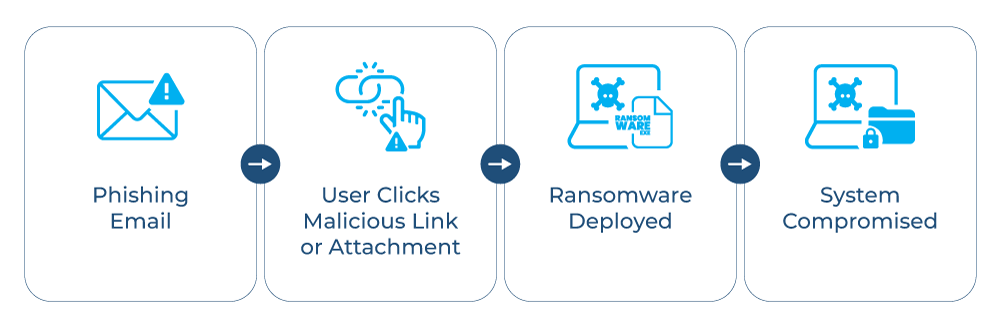
Email continues to be a preferred entry point for ransomware because it enables attackers to directly target users with minimal friction. Phishing messages, weaponized attachments, and malicious links are commonly used to establish an initial foothold. In several real-world ransomware incidents, phishing emails were used to steal credentials first, followed by identity abuse and lateral movement before encryption was triggered.
Even in environments with regular awareness training, it is risky to rely only on users to identify these threats. When attachments and links are examined prior to delivery, email security controls are more effective. This method shifts detection away from individual judgment and toward consistent, automated inspection across the organization. In practice, this includes URL analysis, attachment inspection, and detection of spoofing or impersonation attempts before messages are delivered to users.
Finding attempts to impersonate someone and lookalike domains is just as important. Attackers often register domains that closely resemble legitimate ones or spoof internal senders to gain trust. Detecting these patterns early helps prevent spear (targeted) phishing attempts that are specifically designed to bypass basic filtering and lead to stolen credentials or the execution of malware.
While email-based attacks are common, they are not the only entry point. Attackers also exploit unpatched vulnerabilities in operating systems, applications, and externally exposed services. Implementing a structured vulnerability and patch management process helps reduce this risk by ensuring that known security flaws are remediated before they can be exploited.
Enforce the principle of least privilege
The principle of least privilege is based on a simple idea: People should only be able to do what they need to do and nothing more. In ransomware incidents, too many permissions can turn a small breach into a widespread impact. When attackers gain access to an overprivileged account, they can disable controls, modify configurations, or move laterally much faster than they should be able to.
In most enterprise environments, excessive permissions accumulate over time. People change roles, take on short-term duties, or get short-term access that is never entirely revoked. These privileges remain in place long after the original need has passed if they are not reviewed regularly. Regularly identifying and removing unnecessary access helps reduce potential entry points and restricts what ransomware operators can do if credentials are compromised. This approach aligns closely with zero-trust principles, where access is continuously verified, based on identity, context, and risk, and never assumed based on prior authentication alone.
Least privilege should also apply to service and automation accounts, not just user and administrator accounts. People often forget about these accounts, but they often have extensive permissions and run unattended.
In cases where MFA cannot be applied, such as non-interactive service accounts, organizations should rely on compensating controls like the following:
- Managed identities: ensuring that applications don’t store credentials in application code or config files/scripts
- Credential vaulting: securely storing and rotating secrets like API keys or service account passwords
- Strict IP allowlisting: restricting where access can originate
- Regular credential rotation to reduce exposure
Enforcing strict access limits for all identity types helps contain abuse during a compromise.
Many organizations leverage specialized directory administration platforms to manage these controls effectively across hybrid AD, Entra ID, and Microsoft 365. Solutions like Cayosoft provide the automated delegation and unified oversight needed to maintain these least-privilege policies at scale, reducing the risk of human error or configuration drift.
Enforce phishing-resistant multi-factor authentication (MFA)
Phishing-resistant multi-factor authentication is one of the best ways to protect against the impact of stolen or phished credentials. Unlike traditional MFA methods such as SMS or push notifications, phishing-resistant mechanisms like FIDO2-standard/protocol security keys (like USB keys, e.g., YubiKey) verify logins using cryptographic authentication tied to the application, making it extremely difficult for attackers to capture or reuse credentials through phishing.
Another approach is certificate-based authentication, in which a trusted digital certificate is used instead of a password to verify identity. Since there is no password to steal or replay, these mechanisms significantly reduce the risk of credential-based attacks, including credential replay and man-in-the-middle attacks. These mechanisms should be enforced for all privileged accounts and for remote access paths such as VPNs, cloud management portals, and administrative consoles, as these are frequently targeted due to the broad access they provide when compromised.
Wherever possible, MFA coverage should be expanded to include service and automation accounts in addition to interactive user logins. Although these accounts often operate in the background, they are attractive targets because they remain active over time and have elevated permissions. Applying phishing-resistant MFA or similar compensating controls lowers the risk of credential abuse and limits how far an attacker can go after initial access.
Phishing-resistant MFA should not be seen as an extra feature but as a baseline control. While it does not prevent every attack, it makes them much harder to execute by breaking common ransomware tactics that rely on password reuse, phishing, or credential dumping. When consistently enforced across all identity platforms, phishing-resistant MFA helps contain compromises early and reduces the likelihood that a single leaked credential will lead to a broader incident.
Manage, Monitor & Recover AD, Entra ID, Microsoft 365

Unified Console
Use a single tool to administer and secure AD, Entra ID, and M365

Track Threats
Monitor AD for unwanted changes – detect for security or critical functions

Instant Recovery
Recover global enterprise-wide Active Directory forests in minutes, not days
Periodically train users for awareness
User awareness training is an essential part of ransomware prevention, especially for those who regularly use email, share files, and access external content. People who work in finance, HR, support, and administration are often exposed to a higher volume of inbound messages and do more document sharing. This makes them more likely to be the targets of phishing and social engineering attacks. Instead of treating all users the same, focusing training efforts on these groups helps address the areas of highest risk.
Training is most effective when it is based on real-life situations that users face at work every day. This includes examples such as fake invoice emails, links to document-sharing sites that look like common collaboration tools, or messages that pretend to be from internal teams or trusted partners. People can better spot subtle warning signs when they use familiar scenarios instead of trying to follow general advice that doesn’t always lead to real-life decisions.
Training sessions should be short, targeted, and relevant to remain effective over time. Sessions that are too long or frequent can make people tired and less interested, which makes the sessions less effective. Brief, role-specific refreshers delivered on a regular basis help keep people aware without disrupting productivity or overwhelming them.
Deploy endpoint detection and response (EDR) and extended detection and response (XDR) solutions
EDR and XDR play a critical role in ransomware prevention by focusing on what is happening on systems at runtime rather than just whether a known malware signature is present. EDR solutions look for suspicious behavior patterns on endpoints, such as unusual process activity, unexpected parent–child process relationships, or attempts to disable security controls, unlike traditional antivirus tools. XDR extends this visibility by correlating signals across endpoints, networks, identity systems, and cloud workloads. This combined visibility is essential when attackers utilize new or modified ransomware variants that evade signature-based detection.
In real environments, ransomware activity often shows clear signals before it does a lot of damage. Common indicators include abnormal process execution, quick modification or encryption of files, unexpected use of scripting tools, or processes attempting to access large numbers of files in a short time. EDR helps security teams identify these patterns early, giving them a chance to intervene before the attack progresses further.
It’s also essential to be able to respond quickly at the endpoint. Ransomware can be stopped from spreading laterally by fast containment actions, such as isolating an affected system from the network. This limits the impact and buys valuable time to investigate and fix the root cause promptly.
However, prevention and detection alone are not sufficient. Organizations should maintain secure, regularly tested backups that are isolated from the production environment, such as offline or immutable backups. In ransomware scenarios, backups often provide the only reliable way to restore operations without paying a ransom. Regular restore testing is equally important to ensure that data can be recovered when needed.
Watch our recorded & upcoming educational webinars about identity protection
Implement network segmentation
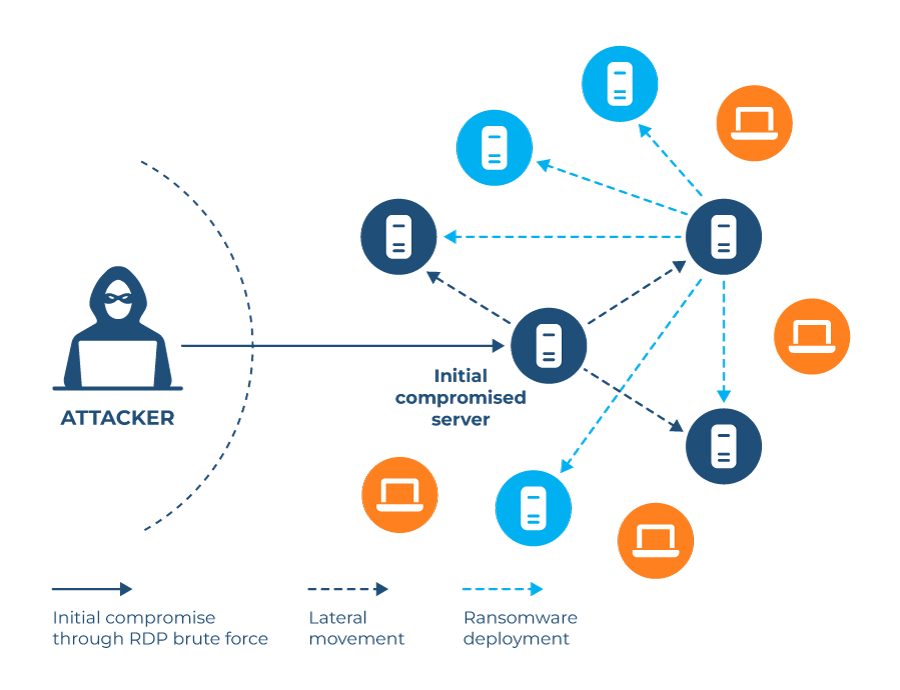
Once ransomware gains initial access to an environment, its ability to spread laterally often determines the overall impact. In flat networks with little or no internal segmentation, where most systems can talk to each other by default, attackers can move from a single compromised endpoint to file servers, application servers, or domain controllers with minimal resistance (limited firewall rules or access restrictions) to slow or block lateral movement. This lateral movement is a common cause of ransomware attacks that quickly escalate from a localized issue into a full-scale outage.
By placing user endpoints, servers, and critical systems in separate network zones with controlled communication paths, network segmentation helps limit the spread. User workstations should not have unrestricted access to server networks, and sensitive systems should be isolated behind additional controls. Segmentation doesn’t have to be too complicated to be effective; just separating user, server, and management networks can significantly limit lateral movement.
Segmentation is important because it still works even when perimeter defenses fail. Phishing, credential theft, or exposed services can still lead to initial compromise, but segmentation reduces how far an attacker can go from there. Organizations can limit damage and recover more quickly by containing ransomware to smaller parts of the environment.
Monitor identity and directory changes continuously
Ransomware attacks often start with identity systems because they control who can access what in the environment. Changes to user accounts, group memberships, roles, or permissions can indicate that an attacker is preparing to escalate privileges or move laterally. In multiple enterprise ransomware investigations, attackers were observed modifying group memberships or administrative roles hours or days before encryption began. Continuously monitoring identity and directory changes helps bring these early signs to light before ransomware activity spreads widely.
This visibility becomes significantly more effective when identity telemetry is integrated with broader logging and detection systems, such as SIEM or XDR platforms. Correlating identity changes with endpoint, network, or application activity provides deeper context and helps security teams detect coordinated attack patterns earlier.
In fast-moving incidents, security teams need to understand what changed and act right away. Solutions that provide real-time monitoring along with the ability to immediately reverse unauthorized or suspicious changes add an extra layer of protection. Rolling back malicious modifications to identities or permissions can obstruct an attack in progress and stop it from doing more damage.
It’s hard to keep this level of visibility and control manually in complex, hybrid environments. Tools designed to manage, monitor, and recover modern Microsoft platforms like Active Directory, Entra ID, and Microsoft 365 can help enforce consistent supervision. Platforms like Cayosoft help teams quickly undo risky modifications and restore to a known-good state by applying automated, policy-driven rollback for identity and directory changes, narrowing the opportunity for ransomware to propagate.

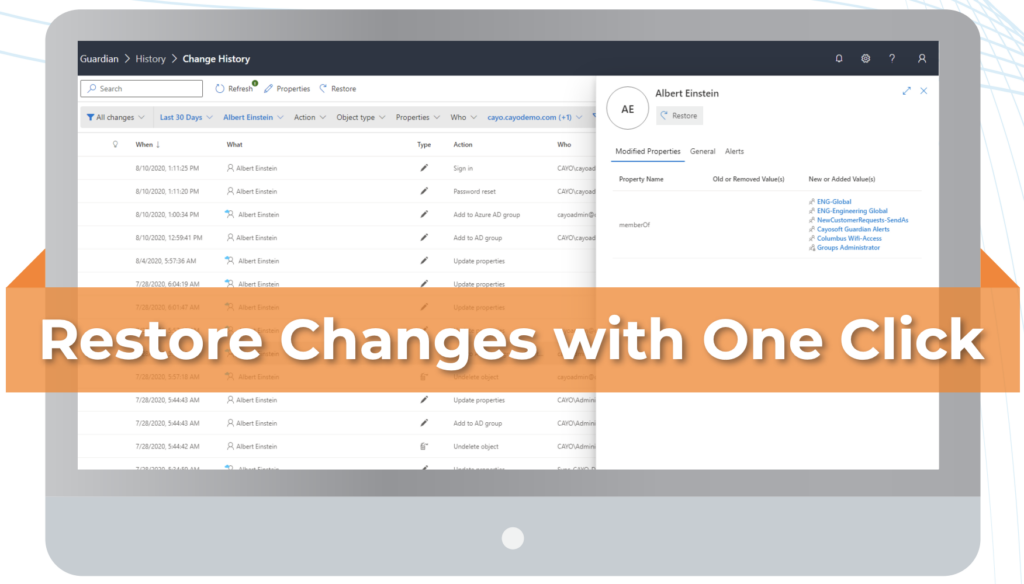
The dashboards above showcase centralized visibility across Active Directory, hybrid, and cloud identities, along with detailed change history and the ability to roll back identity and permission changes. Together, these capabilities support continuous identity change monitoring, rapid investigation of suspicious activity, and quick restoration to a known-good state during ransomware or privilege escalation attempts.
Delegate administrative privileges
Ransomware operators frequently target administrative accounts because they have excessive privileges that allow them to disable security controls, modify configurations, and access critical systems quickly. When a single admin account has broad directory or tenant-level permissions, a successful compromise can have a much bigger impact and speed up lateral movement.
Delegating administrative privileges by role and function helps reduce this risk. Instead of granting full administrative access, tasks can be broken down into smaller roles that serve a specific purpose, such as user management, group administration, or configuration changes. This approach limits what any single compromised account can do and makes it easier to detect suspicious activity.
In practice, managing delegated access on a large scale requires consistent enforcement and clear accountability. Secure admin delegation platforms like Cayosoft help ensure that administrative tasks are executed accurately through controlled workflows and keep track of who did what and when. This balance of delegation and oversight reduces dependence on overprivileged accounts and strengthens defenses against ransomware attacks.
Perform tabletop exercises to validate ransomware prevention readiness
Tabletop exercises provide a practical way to validate how identity and access controls work during a simulated ransomware scenario, without impacting production systems. By going through a realistic attack sequence, teams can evaluate whether controls like access restrictions, monitoring, and escalation processes work as expected under pressure.
These exercises often expose gaps that are easy to miss during day-to-day operations. Common findings include a lack of visibility into what changed, when it changed, and where the change occurred across identity systems such as AD, Azure AD, or Microsoft 365. They often lack the ability to quickly identify and roll back unauthorized changes. Identifying these gaps early helps teams figure out where preventive controls might not work.
The value of tabletop exercises increases when organizations have tools in place that can undo unintentional or malicious changes because teams can practice realistic decisions and recovery steps, not just discuss them hypothetically. This directly makes the response faster and more effective during an actual incident.
Manage, Monitor & Recover AD, Entra ID, M365, Teams
| Platform | Admin Features | Single Console for Hybrid (On-prem AD, Entra ID, M365, Teams) | Change Monitoring & Auditing | User Governance (Roles, Rules, Automation) | Forest Recovery in Minutes |
| Microsoft AD Native Tools | ✓ | ||||
| Microsoft AD + Cayosoft | ✓ | ✓ | ✓ | ✓ | ✓ |
Watch our recorded & upcoming educational webinars about identity protection
Conclusion
Ransomware prevention is most effective when it focuses on fixing common weaknesses, such as excessive privileges, weak identity controls, and limited visibility into changes across the environment. Many incidents escalate not because a single control failed, but because multiple gaps went unnoticed over time.
Preventing ransomware is thus not a one-time effort. It requires continuous enforcement of access controls, ongoing monitoring of identity and configuration changes, and regular validation to ensure controls still work as intended. By applying prevention as a continuous practice through regular monitoring, controls, and improvement, organizations can adapt as environments and attack techniques evolve.
Teams should periodically review their ransomware prevention posture, especially around identity, access, and change visibility, and consider automated, policy-driven approaches where manual methods are no longer effective.
To see how automation can help close identity and access gaps and strengthen ransomware prevention across hybrid environments, readers can explore solutions like Cayosoft to see these practices applied in real-world scenarios.
Stop AD Threats As They Happen
Cayosoft Protector provides continuous monitoring and real-time alerts across your entire Microsoft Identity stack
Like This Article?
Subscribe to our LinkedIn Newsletter to receive more educational content