



Home » Best Practices for Robust Identity and Access Governance » A Practical Guide to Vendor Privileged Access Management with Microsoft Entra ID
A Practical Guide to Vendor Privileged Access Management with Microsoft Entra ID
Learn about the risks, challenges, and core principles of vendor privileged access management and how to leverage Microsoft Entra ID for effective control.
Explore the chapters:
- Chapter
- Identity and Access Governance
- Privileged Access Management Best Practices
- Identity Lifecycle Management
- Identity Governance and Administration
- Identity Governance Solutions
- Automated User Provisioning
- Access Governance Tools
- Federated Identity Access Management
- Vendor Privileged Access Management
- Identity Governance Framework
- Chapter
- Identity and Access Governance
- Privileged Access Management Best Practices
- Identity Lifecycle Management
- Identity Governance and Administration
- Identity Governance Solutions
- Automated User Provisioning
- Access Governance Tools
- Federated Identity Access Management
- Vendor Privileged Access Management
- Identity Governance Framework
Table of Contents
Stop AD Threats As They Happen
Cayosoft Protector provides continuous monitoring and real-time alerts across your entire Microsoft Identity stack
Like This Article?
Subscribe to our LinkedIn Newsletter to receive more educational content
Modern organizations work with a growing number of third-party vendors and contractors who need access to critical systems and data to perform their jobs. Managing these external relationships involves granting permissions and privileges, which come with significant security and operational challenges.
Without proper controls, vendor access can cause significant risks, compliance headaches, and operational overhead. Vendor privileged access management (VPAM) helps address these issues by ensuring vendors get only the access they need, for the right amount of time, while providing continuous monitoring and control.
In this article, we’ll not only explore what risks, challenges, or core principles of VPAM are, but also look at how you can leverage Microsoft Entra ID (formerly Azure Active Directory) to effectively manage and secure vendors’ privileged access in your environment.
Summary of key vendor privileged access management principles
The table below summarizes the key VPAM principles this article will explore in more detail.
| Principle | Core function |
|---|---|
| Least privilege access | Restricts vendor permissions to the minimum necessary to perform their specific task, limiting the blast radius of a compromise. |
| Just-in-Time (JIT) access | Grants temporary access only when actively needed, eliminating high-risk standing privileges. |
| Zero-trust security | Enforces the “never trust, always verify” model by continuously validating vendor identity and device posture. |
| Comprehensive monitoring | Maintains detailed visibility by logging commands and recording sessions to ensure non-repudiation and aid investigations. |
| Strong authentication | Requires multifactor authentication (MFA) for all privileged access to prevent account compromise from weak or stolen passwords. |
Manage, Monitor & Recover AD, Azure AD, Office 365
Unified Console
Use a single tool to administer and secure AD, Azure AD, and Office 365
Track Threats
Monitor AD for unwanted changes – detect for security or critical functions
Instant Recovery
Recover global enterprise-wide Active Directory forests in minutes, not days
What is vendor privileged access management?
Vendor privileged access management (VPAM) is a specialized security approach that extends privileged access controls beyond your organization’s internal perimeter to include third-party vendors, contractors, and service providers. Unlike traditional PAM, which focuses on managing internal administrative users, VPAM addresses the unique risks posed by external parties who bring their own devices, operate under different security standards, and have limited accountability to your organization.
Common scenarios where vendors need privileged access include IT service providers performing system maintenance, software vendors delivering technical support, consultants implementing solutions, and managed service providers handling ongoing operations.
At its core, VPAM applies a few fundamental security principles to vendor access. Vendors receive only the minimum access required for their specific tasks – no broad administrative rights. Access is time-bound and automatically revoked when work ends. All vendor activities are monitored and logged, creating an audit trail. And every vendor must verify their identity using multiple methods before gaining access.
VPAM risks and challenges
Many studies show that vendor-related breaches are becoming more frequent and costly, often because controls over vendor access are weak or nonexistent. Consequently, achieving true third-party security demands a dual-perspective analysis that focuses on security and operations.
Security risks
Weak credential practices create immediate vulnerabilities. Many vendors use weak passwords, share credentials among their team members, or reuse the same passwords across multiple client environments. As a result, if one client experiences a breach, all others are instantly exposed. Worse still, when vendor employees leave, their access often remains active because the client doesn’t typically receive a notification. These orphaned accounts become permanent, exploitable security holes.
Granting vendors too much access is also quite common. Vendors frequently receive broader permissions than their specific tasks require. Instead of getting precise, least-privilege access only to the systems they need, they are often given full administrative rights or broad role assignments. If one of these accounts is compromised or misused, the potential for massive damage and lateral movement across your systems increases greatly.
Finally, vendors connecting from unmanaged devices or networks with poor security pose significant risks, including malware and lateral movement. For example, a VPN link that grants a vendor full network access becomes an open tunnel for attackers if that vendor’s device is compromised. From that point, an attacker can move sideways through your network, accessing sensitive systems the vendor never needed to touch.
Operational challenges
The problems do not end with the security risk itself, but are amplified by the significant operational and management challenges that follow. A fundamental issue is the lack of visibility into vendor activities. Traditional remote access methods provide minimal logging and rarely include session recording. Consequently, security teams are forced into slow, manual management processes that are both inefficient and highly prone to human error. The issue is particularly acute during access deprovisioning, when vendors commonly retain access long after their contracts end because there is no mechanism to track and automatically deactivate accounts. If an incident occurs, you cannot quickly determine what happened, who was responsible, or which data was accessed.
Manage, Monitor & Recover AD, Azure AD, M365, Teams
| Platform | Admin Features | Single Console for Hybrid (On-prem AD, Azure AD, M365, Teams) | Change Monitoring & Auditing | User Governance (Roles, Rules, Automation) | Forest Recovery in Minutes |
| Microsoft AD Native Tools | ✓ | ||||
| Microsoft AD + Cayosoft | ✓ | ✓ | ✓ | ✓ | ✓ |
Core principles of vendor privileged access management
VPAM core principles are built on the zero-trust architectural mandate and apply the technical controls developed within privileged access management (PAM) to address the distinct business risk posed by third-party access.
The specific application of these concepts to VPAM is a specialized framework developed by security analysts, technology vendors, and industry bodies (such as the Cybersecurity and Infrastructure Security Agency (CISA) and various compliance standards bodies) to mitigate the unique risks posed by third-party access.
Least privilege access
Every vendor must receive the absolute minimum set of permissions required to complete their specific tasks. For example, if a vendor’s scope is troubleshooting a SQL database, they should receive read-only database access, not full administrative rights to the underlying server operating system. Typically, this is enforced through RBAC so that vendors can only execute actions directly tied to their authorized roles. The principle is vital because if a vendor’s account is compromised, the attacker’s blast radius is immediately limited.
Just-in-time access
Vendor access should be time-bound and granted only when actively needed. The opposite—”standing privileges” where vendors maintain permanent access—is how most vendor-related breaches happen. Just-in-time access means a vendor requests access when work begins, receives approval, gets temporary access for a defined period (typically 2-8 hours), and then loses access automatically. If they need access again tomorrow, they can request it.
Zero-trust security
All vendor access operates under a zero-trust model: never trust, always verify. This means continuously authenticating vendor identities (not just at login), monitoring their activities in real-time, and validating that their actions remain within authorized boundaries.
Comprehensive monitoring
Organizations must maintain detailed visibility into all vendor activities. These practices include logging every command and file transfer, recording the session video, and conducting post-session audits. Monitoring serves a dual purpose: first, it provides the evidence security teams need to detect malicious or anomalous behavior; and second, it ensures non-repudiation and provides the full audit trail required for compliance investigations.
Strong authentication
MFA must be mandatory for all vendor access to privileged systems. A password compromise is no longer sufficient to gain entry if a second factor (such as a mobile authenticator app) is required. This simple control is statistically proven to prevent the vast majority of identity-related attacks by ensuring identity assurance before any policy is applied.
Learn About The First-Ever Monitoring and Rollback for Microsoft Intune
How Microsoft Entra ID supports VPAM
Microsoft Entra ID provides several capabilities organizations can use to implement proper vendor privileged access management. These tools are designed to work together to create a comprehensive security framework for 3rd-party access.
Entra ID B2B Collaboration
Entra ID B2B enables secure onboarding of vendor users without creating new accounts in your directory. Instead of managing a separate password for your system, vendors use their existing business identity from their home organization. This is important because it means vendors have accountability in both directions – to their own company and to you.
B2B Collaboration also provides cross-tenant access policies that let you define exactly which vendors can be invited and what they can access. You can require vendors to accept terms of use before gaining any access, creating a clear record of acknowledgment.
Privileged Identity Management (PIM)
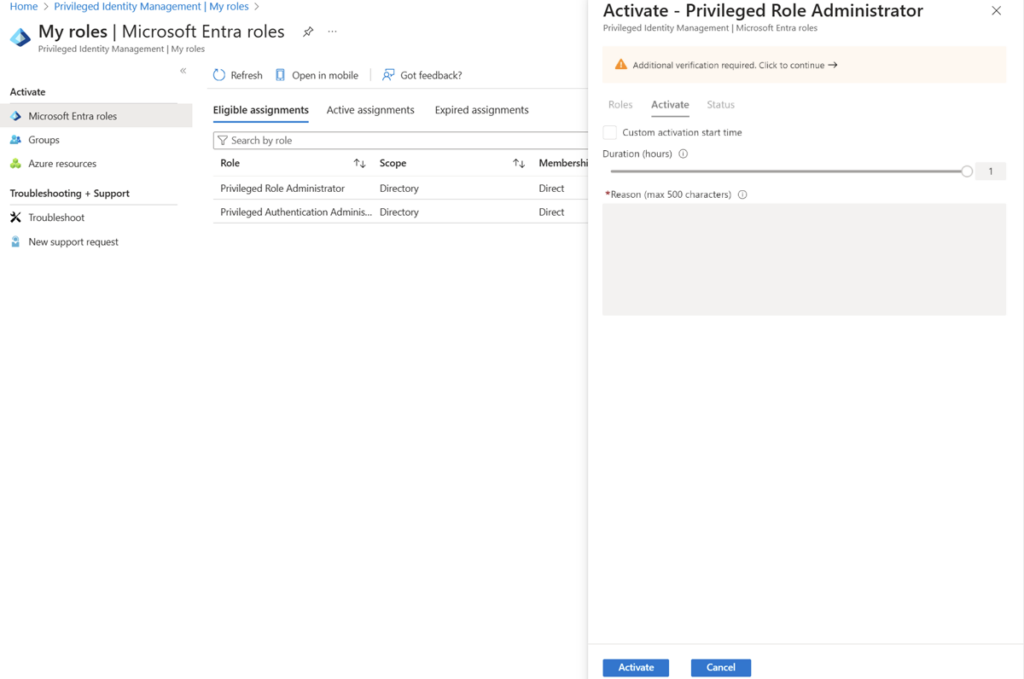
Privileged Identity Management (PIM) is where just-in-time access happens. Rather than assigning vendors to privileged roles permanently, you assign them as “eligible” for those roles. When they need access, they request activation. Optionally, their manager (or security team) approves the request. They get temporary access for a defined period, and then it automatically expires.
PIM also sends notifications when vendors request access, allowing security teams to monitor when and why vendor privileges are being activated. You can review these activations regularly and revoke access that’s no longer needed.
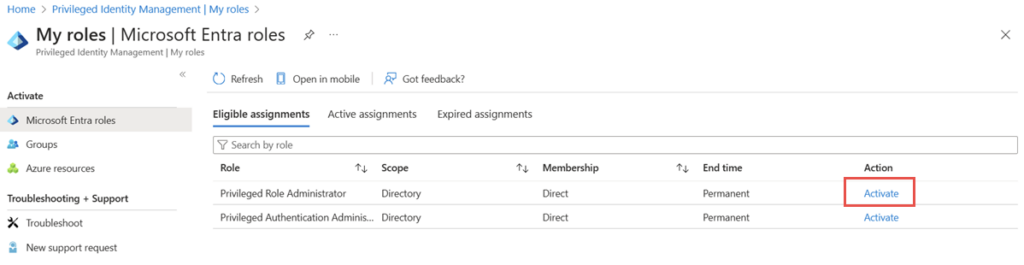
List of eligible roles for activation. (Source)
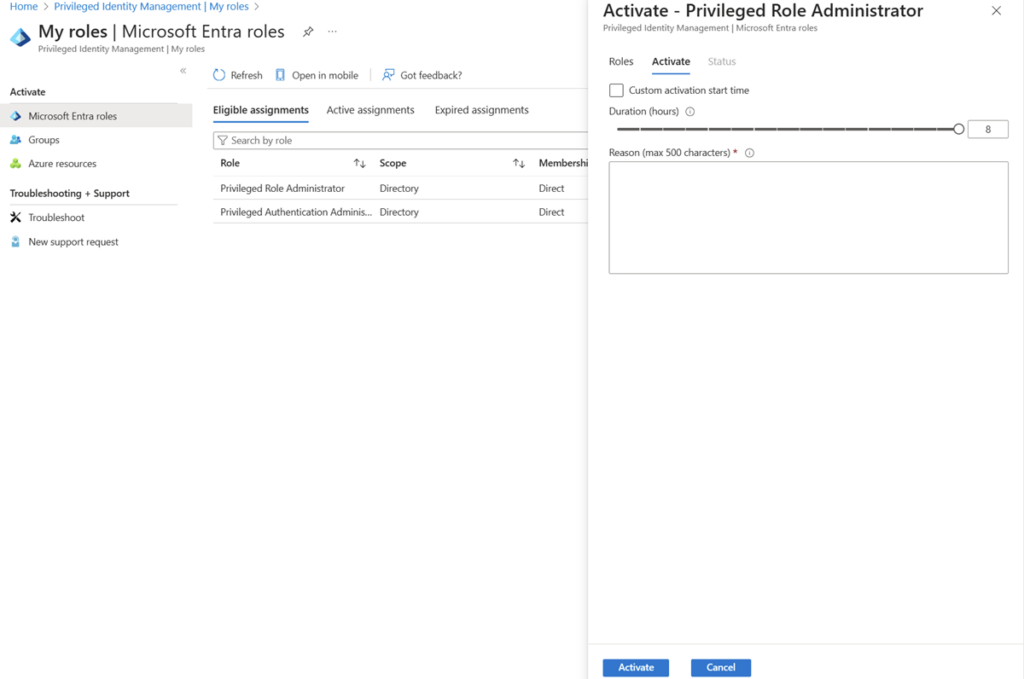
PIM activation form where the user sets activation time and enters justification. (Source)
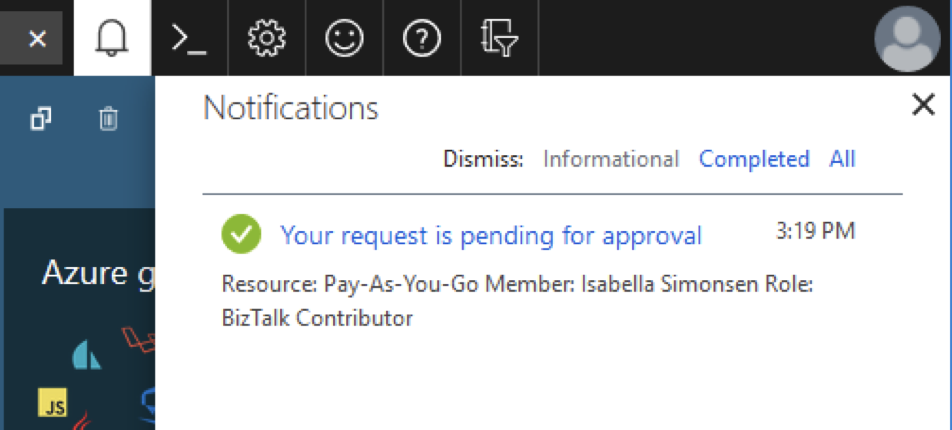
Notification in Entra ID indicating role activation is awaiting approval. (Source)
Conditional Access policies
Conditional Access lets you enforce additional security controls specifically for vendor users. You can require MFA for every access attempt, block logons from geographic regions your vendor shouldn’t be in, enforce device compliance requirements, and disable legacy authentication methods.
The value here is that these controls are automatic – you don’t have to manually review each access attempt. If someone tries to sign in at 3 AM from an unusual location, the access is blocked without human intervention.
Access reviews and governance
Access reviews force periodic certification of vendor permissions. Rather than assuming vendor access is still needed, you require business owners to actively confirm it. Entra ID can schedule these reviews automatically and even execute removal if no one certifies that access is still needed.
This is critical not only for security but also for compliance. For example, you can generate compliance reports to present the auditors with control over recent activities.
Entitlement Management
For complex vendor scenarios, Entitlement Management provides self-service access requests. Instead of vendors contacting IT saying “I need access to System X”, or raising several tickets, they can request an access package that bundles all the resources they need for a project. Approval workflows are automated based on your rules, and access automatically expires when the project ends.
How to configure vendor access step by step
Before jumping into technical steps, it’s important to understand the workflow you’re building. Here’s the typical vendor access lifecycle and best-practice example: A vendor joins your project and requests access via a self-service portal or Entitlement Management. Their request is automatically routed to a business owner for approval. Once approved, they receive just-in-time access through PIM. When they activate that access, Conditional Access policies verify their identity and the device they’re using. Their activities are logged. After the project ends, access automatically expires. And before they leave, their access is reviewed one more time to confirm it’s no longer needed.
Each step addresses a specific risk. The following sections describe the steps to set this up.
Plan your vendor privileged access management strategy
Before implementing technical controls, define your approach to vendor access. This means deciding:
- Vendor categorization: Do you have different types of vendors (IT support vs. strategic consultants vs. developers etc.)? Each type might need different controls.
- Access duration: How long should typical access last? Two hours? Eight hours?
- Approval: Who approves vendor access? IT security? The business owner? Both?
- Monitoring requirements: What activities do you need to log? Do you need session recording for high-risk access?
- Time limits for relationships: Should vendor access be renewed annually even if they’re long-term? This forces periodic review.
Configure Entra ID B2B Collaboration
B2B collaboration is the foundation for secure vendor onboarding. Without it, you’d have to create local accounts for every vendor, which may be a management nightmare.
1. Navigate to Entra ID > External Identities > External collaboration settings
2. Set Guest user permissions to “Limited” rather than the default
3. Under Collaboration restrictions, specify which domains vendors can be invited from (or block specific domains if you want to restrict certain countries)

Admin view of configuring domain allow/block rules to control which organizations’ users can invite. (Source)
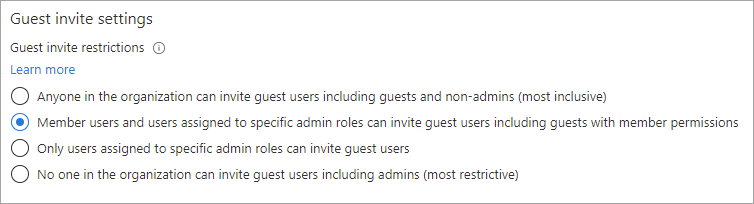
Settings panel for choosing which roles or users are allowed to send guest invitations in Entra ID. (Source)
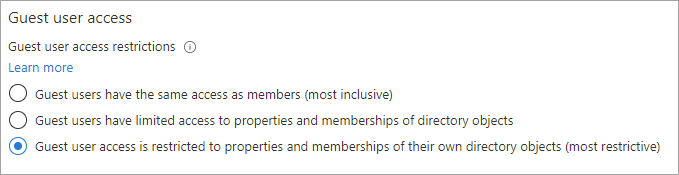
Options for setting guest users’ access level, limiting what directory info and resources they can view. (Source)
Create vendor-specific terms of use that vendors must accept before they get any access.
4. Go to Entra ID > Identity Governance > Terms of use
5. Create a new terms of use document with your vendor security requirements and acceptable use policy
6. Configure Require consent and make this a prerequisite for access
7. Link this to your Conditional Access policies (which we’ll do in Step 5)
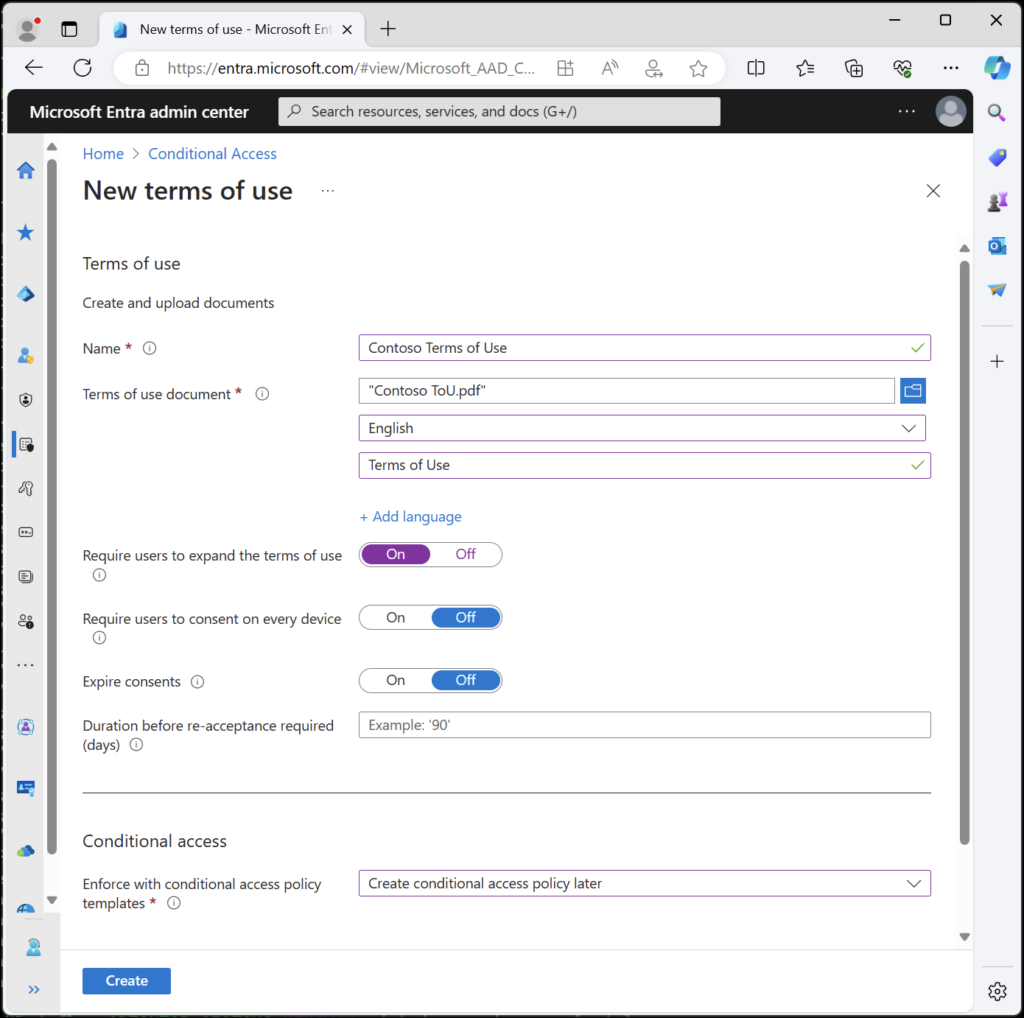
Example terms of use configuration view (Source)
Set up PIM
PIM is where just-in-time access is enforced. This is the mechanism that prevents vendors from having permanent access.
Enable PIM for your tenant:
1. Navigate to Entra ID > Identity Governance > Privileged Identity Management
2. Select Entra roles (for Azure AD administrative roles) or Azure resources (if vendors need access to Azure resources like VMs or databases)
3. Configure notification settings so you receive alerts when vendors request access
Create vendor-specific roles with minimal permissions:
4. Define custom roles with only the specific permissions vendors need for their tasks (don’t assign broad roles like “Global Admin” or “Exchange Admin”)
5. Set the maximum activation duration to a reasonable time (typically 2-8 hours for vendor access)
6. Configure approval requirements so vendors can’t self-approve access
7. Require MFA for all role activations
PIM role settings with activation duration limited, approval required, and MFA enforced (source)
Configure Conditional Access for vendors
Conditional Access policies enforce additional security controls automatically.
- Go to Entra ID > Security > Conditional Access
- Create a new policy named something like “Vendor Access – MFA and Location Restriction”
- Under Assignments > Users and groups, select Guest users
- Under Conditions, configure:
- Locations: Block access from high-risk geographic regions
- Sign-in risk: Block high-risk sign-in attempts automatically
- Under Access controls > Grant, require:
- Multi-factor authentication
- Terms of use acceptance
- Device compliance (if applicable)
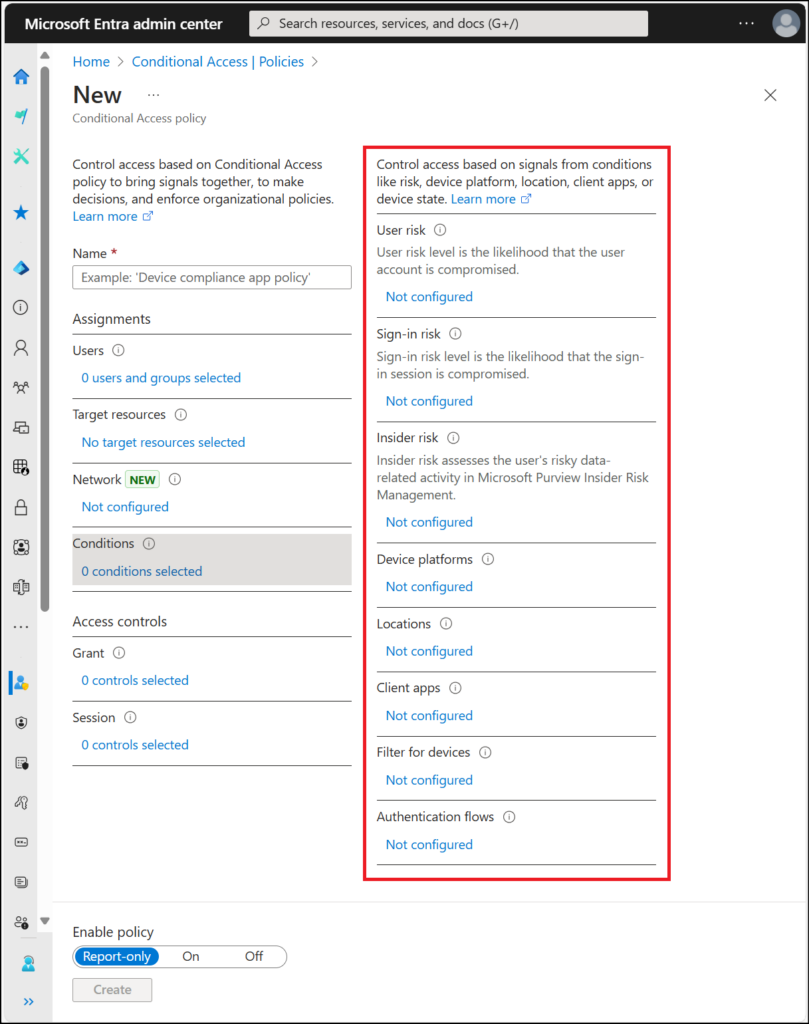
Conditional access conditions configuration (Source)
Implement monitoring and auditing
Monitoring is critical because if you can’t see what’s happening, you can’t catch problems or prove compliance.
Configure audit logging:
- Navigate to Entra ID > Monitoring > Audit logs
- Ensure detailed logging is enabled for all identity operations
- Set up log retention based on compliance requirements (typically 1-3 years)
- Export logs to Azure Log Analytics or your SIEM for long-term analysis
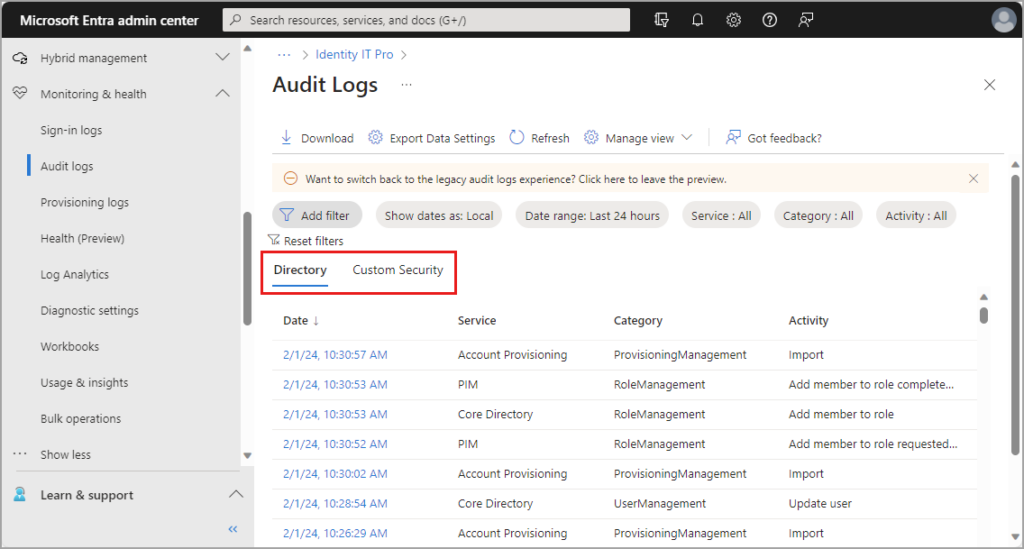
Entra ID audit logs view (Source)
Set up recurring access reviews:
1. Go to Entra ID > Identity Governance > Access reviews
2. Create a new access review for vendor roles
3. Set the review frequency (monthly or quarterly)
4. Assign business owners as reviewers
5. Configure Auto-apply results to automatically remove access if not reviewed
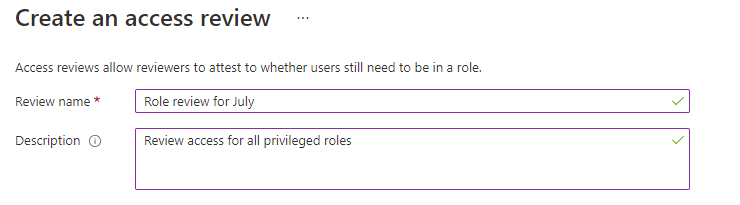
Form for entering the access review’s name and description to identify the review for users and reviewers. (Source)
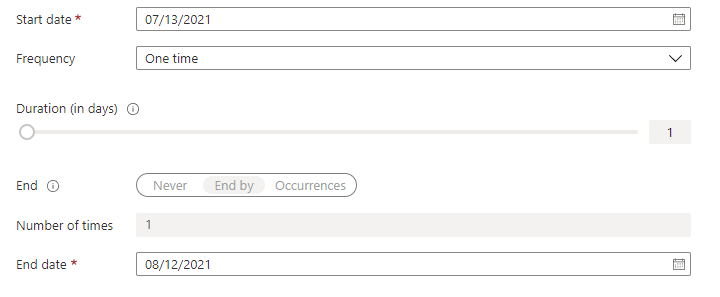
Settings panel where you select when reviews start and end, how often they repeat, and the review’s duration. (Source)
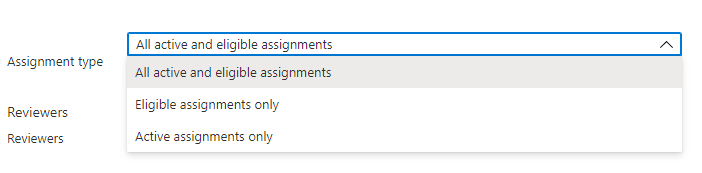
Options for selecting if the review targets eligible, active, or all privileged assignments. (Source)
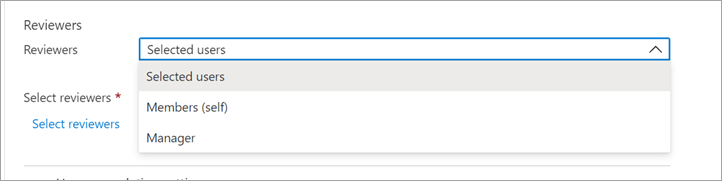
Screen for assigning who will review access, including specific users, self, or manager. (Source)
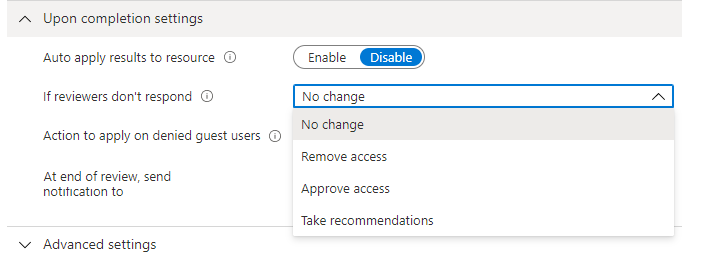
Settings to decide automatic actions when reviewers don’t respond, such as keeping or removing access. (Source)
With your security team, based on available logs, configure alerts:
6. Set up alerts for vendor privilege escalation attempts
7. Monitor for failed authentication attempts from vendors
8. Track unusual access patterns (access at unusual times, from unusual locations)
Vendor onboarding process
The actual onboarding process is straightforward once everything is configured.
- Use Entra ID B2B to send an invitation to the vendor’s email address
- Include a brief note about your security requirements and the terms of use they’ll need to accept
- The vendor clicks the invitation link, reviews the terms of use, and accepts them
- Assign them to the appropriate security group (this triggers PIM eligibility)
- Test their access with limited permissions initially to confirm everything works
Five key vendor privileged access management best practices
When implementing vendor privileged access management in production environments, teams should follow these five key best practices:
- Start with minimal access rights and expand only as business needs require. It’s easier to grant additional permissions than to revoke excessive access after it’s been provided.
- Automate everything you can. Manual workflows for approvals, reviews, and offboarding are where mistakes happen. Entra ID can handle these automatically.
- Schedule and enforce access reviews rather than treating them as optional. Business owners should be required to certify quarterly that vendor access is still needed. If they don’t review it, access should be removed automatically.
- Document everything, including vendor access policies, approval decisions, and review outcomes. This documentation supports both security and compliance objectives.
Use time-bound access for all vendor engagements. Even long-term vendor relationships should have periodic access renewal requirements.
Common vendor privileged access management mistakes and issues to avoid
Organizations should be aware of, and work to avoid, these six common mistakes and issues that can derail a vendor privileged access management implementation.
- Over-provisioning vendor access. This is the most common mistake. Vendors often receive broad administrative rights when specific, limited permissions would suffice. This happens because it’s “easier” to give them more access than to figure out exactly what they need. It’s not easier
- Not implementing a solid offboarding process. Forgetting offboarding processes can leave vendor access in place long after the contracts have ended. Implement automated processes to remove access when relationships terminate. Don’t rely on remembering to do this manually.
- Insufficient monitoring. Inadequate access monitoring and logging leaves you blind to vendor activities. Ensure comprehensive logging. If something goes wrong, you need to know what happened.
- Weak authentication requirements that significantly increase risk. Always enforce MFA for privileged vendor access. This should be non-negotiable.
- Allowing (or not detecting) shared credentials. Shared credentials should never be used for vendor access. Each individual vendor employee should have a unique account.
- Manual access management processes don’t scale. You can handle a few vendors manually, but when you have dozens or hundreds, manual processes become error-prone. Automate from the start.
Watch a 15-minute Demo of Microsoft Intune Change Monitoring and Recovery
Conclusion
Effective vendor privileged access management is essential for organizations that rely on third-party providers while maintaining a strong security posture. The challenge isn’t that you can’t trust vendors – it’s that you shouldn’t risk giving them more access than necessary and leaving their access unmonitored.
Microsoft Entra ID provides the tools to implement proper practices without sacrificing operational efficiency. The key is to start with a clear strategy: define what vendors need, implement just-in-time access so they can’t maintain permanent access, require MFA to prevent compromised passwords from granting access, monitor their activities to catch problems, and review permissions regularly.
Add automated workflows and strong authentication to your strategy, and it should remain effective, ensuring the business operates efficiently while the organization is secured. You don’t want to kill business operations with security at the end of the day. Stay flexible but smart.
Stop AD Threats As They Happen
Cayosoft Protector provides continuous monitoring and real-time alerts across your entire Microsoft Identity stack
Like This Article?
Subscribe to our LinkedIn Newsletter to receive more educational content