



Home » How to Implement Identity Threat Detection and Response Best Practices » How to Defend Against Identity-Based Attacks in Microsoft Environments
How to Defend Against Identity-Based Attacks in Microsoft Environments
Learn how identity-based attacks exploit Microsoft environments and the ten best practices that stop them cold.
Next Chapter >
Table of Contents
Stop AD Threats As They Happen
Cayosoft Protector provides continuous monitoring and real-time alerts across your entire Microsoft Identity stack
Like This Article?
Subscribe to our LinkedIn Newsletter to receive more educational content
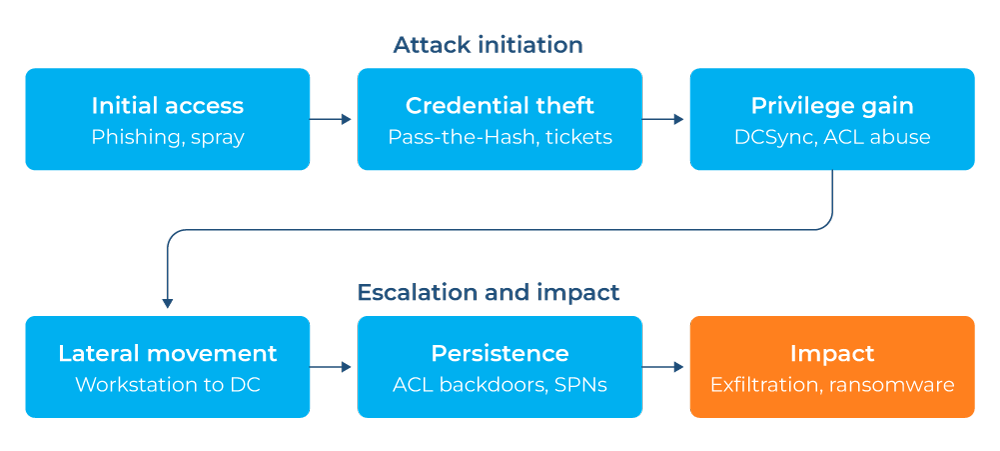
Identity-based attacks are the dominant entry point in breaches of Microsoft environments. Adversaries do not infiltrate—they just log in. They steal credentials through phishing, brute-force attacks on weak passwords, abuse of misconfigured service accounts, or exploitation of trust relationships in Active Directory to move laterally and escalate privileges. By the time encryption or data exfiltration begins, the attacker has typically held privileged access for days or weeks.
The challenge is that most identity attacks use legitimate tools and protocols: Pass-the-Hash uses standard Windows authentication, Kerberoasting requests valid service tickets, and DCSync mimics normal domain controller replication. Without specific detection logic in your environment, these techniques stay invisible to general-purpose monitoring.
This article covers ten best practices for defending Microsoft environments against identity-based attacks, spanning Active Directory, Microsoft Entra ID, and Microsoft 365.
Summary of identity-based attack defense best practices
| Best practice | Description |
|---|---|
| Monitor privileged account access continuously | Monitor privileged group membership in real time and alert immediately on any unauthorized change, with a full change history for investigation and rollback. |
| Enforce phishing-resistant MFA across all identity entry points | Require phishing-resistant MFA, hardware FIDO2 keys, or certificate-based authentication for every privileged account, remote access path, and internet-facing service. |
| Detect credential theft techniques | Monitor for indicators of Pass-the-Hash, Pass-the-Ticket, and Kerberoasting to detect stolen credentials before lateral movement occurs. |
| Harden Active Directory against persistence | Monitor ACL changes on AdminSDHolder, the domain root, and the Domain Controllers OU in real time, and roll back unauthorized modifications immediately. |
| Secure Entra ID against app and service principal abuse | Monitor OAuth consents, service principal credentials, and federated identity configurations for unauthorized changes, with investigation context and rollback capability. |
| Implement and enforce Conditional Access policies | Restrict access by location, device compliance, and risk level, and block legacy authentication protocols entirely. |
| Monitor for lateral movement via identity abuse | Alert on anomalous Kerberos ticket requests, LDAP reconnaissance queries, and unusual service account activity. |
| Protect against password spray and brute force | Enable Entra ID Smart Lockout, enforce password bans, and monitor for distributed, low-frequency authentication failures. |
| Enforce least privilege across roles and delegation | Remove standing access not operationally required and replace it with just-in-time access using privileged identity management (PIM). |
| Prepare an identity-specific incident response procedure | Document the containment sequence for a compromised privileged account, including isolation, session revocation, and log preservation. |
Learn how ITDR must evolve to account for non-human identities (NHI)
Monitor privileged account access continuously
Threat actors target privileged accounts because they offer the highest return, where a single Domain Admin or Global Administrator credential grants access to every system that trusts the domain. The first action in most identity compromises is privilege escalation, which goes unnoticed without continuous visibility into group membership.
Privileged group membership changes in real time, accounts added for emergencies and never removed, and service accounts accumulating permissions between audits, are exactly where attackers operate. Monitor Domain Admins, Enterprise Admins, Schema Admins, Backup Operators, and Entra ID privileged roles continuously, and alert the moment any membership change occurs outside a documented change window. Identify accounts with AdminCount set to 1 that no longer belong to a protected group, since these retain elevated ACLs (access control lists) from prior membership.
To monitor Domain Admin membership and flag orphaned AdminCount=1 accounts, run this code:
					# List Domain Admin members with last logon and password age
Get-ADGroupMember -Identity 'Domain Admins' -Recursive |
  Get-ADUser -Properties LastLogonDate, PasswordLastSet, AdminCount |
  Select-Object Name, SamAccountName, LastLogonDate, PasswordLastSet, AdminCount |
  Sort-Object LastLogonDate

# Find users with AdminCount=1 no longer in protected groups
$protectedGroups = @(
  'Domain Admins',
  'Enterprise Admins',
  'Schema Admins',
  'Administrators'
)

Get-ADUser -Filter { AdminCount -eq 1 } -Properties AdminCount |
  Where-Object {
    $groups = Get-ADPrincipalGroupMembership $_ | Select-Object -ExpandProperty Name
    -not ($groups | Where-Object { $_ -in $protectedGroups })
  } |
  Select-Object Name, SamAccountName, AdminCount
Enforce phishing-resistant MFA across all identity entry points
Multi-factor authentication is still one of the most effective controls for mitigating credential-based identity attacks; stolen passwords are worthless against an MFA-protected account. However, your environment may have coverage gaps: VPN connections that authenticate against legacy RADIUS without MFA, on-premises applications that use basic authentication, or break-glass accounts excluded from MFA policies for convenience. Threat actors specifically probe for these gaps, since legacy protocols, application passwords, and federated trust configurations are common targets.
Enforce phishing-resistant MFA, FIDO2 hardware keys (phishing-resistant hardware security keys), or certificate-based authentication, for every privileged role, VPN, RDP, and OWA (Outlook Web Access) connection. Block Basic Auth and NTLM (NT LAN Manager, an older Windows authentication protocol) through Conditional Access, and disable TOTP apps (time-based one-time password authenticator apps) for privileged accounts, since push notifications and one-time codes are vulnerable to real-time phishing. Audit MFA registration status to confirm no gap remains.
To find users without MFA registered, query Entra ID’s authentication method registration report:
					# Report on MFA registration status for all users
Connect-MgGraph -Scopes 'UserAuthenticationMethod.Read.All'

Get-MgReportAuthenticationMethodUserRegistrationDetail -All |
  Where-Object { $_.IsMfaRegistered -eq $false } |
  Select-Object UserPrincipalName
Requires Entra ID P1/P2 licensing and Reports.Read.All permission.
Reference: Microsoft: Plan an Entra ID MFA deployment
Detect credential theft techniques
The three most common credential theft techniques in Active Directory are Pass-the-Hash, Pass-the-Ticket, and Kerberoasting. Pass-the-Hash uses a captured NTLM hash to authenticate without the plaintext password, Pass-the-Ticket reuses a stolen Kerberos ticket, and Kerberoasting requests service tickets for accounts with Service Principal Names (SPNs) and cracks them offline.
Each technique leaves a detectable trace, as shown in the following table.
Technique | Event ID | What to look for |
|---|---|---|
Pass-the-Hash | 4624 (logon type 3) | A logon from an unexpected source or from a workstation to a server with no interactive session |
Pass-the-Ticket | 4769 | Unusual encryption types or ticket lifetimes |
Kerberoasting | 4769 | A burst of requests for RC4-encrypted tickets (encryption type 0x17) on an account capable of AES; RC4 is an older, weaker cipher unsuitable for modern Kerberos |
Privilege escalation | 4672 | Special privileges assigned following an unusual network logon |
Unexpected NTLM use | 4776 | NTLM authentication on a server that should be Kerberos-only |
Without specific alerting on these signals, the patterns go undetected in standard monitoring.
To hunt for Kerberoasting and unexpected NTLM authentication in Microsoft Sentinel using Kusto Query Language (KQL), run the following:
					# Hunt for RC4 Kerberos service ticket requests (Kerberoasting indicator)
# Run in Microsoft Sentinel (KQL)
SecurityEvent
| where EventID == 4769
| where TicketEncryptionType == '0x17'
| where ServiceName !endswith '$'
| where AccountName !endswith '$'
| summarize count() by AccountName, ServiceName, IpAddress
| where count_ > 5
| sort by count_ desc

# Hunt for NTLM authentication from unexpected sources
SecurityEvent
| where EventID == 4776
| where Status == "0x0"
| summarize AttemptCount = count() by AccountName, WorkstationName, bin(TimeGenerated, 1h)
| where AttemptCount > 10
| sort by AttemptCount desc
Harden Active Directory against persistence
Threat actors who gain Domain Admin access rarely stop at data theft. They plant persistence through modified AdminSDHolder ACLs, add DCSync rights on low-privilege accounts, backdoor accounts in protected groups, or golden ticket infrastructure. These mechanisms survive password resets and account deletions.
The AdminSDHolder object controls the ACLs of every protected account and group. Every 60 minutes, the SDProp process copies its ACL to each protected object, so an attacker who adds an entry there gains a self-replicating backdoor. DCSync rights granted directly on the domain root achieve a similar effect without group membership.
Monitor the AdminSDHolder ACL continuously and alert the moment any principal outside the approved list appears; a persistence backdoor can be planted in minutes and may survive standard remediation if not caught at the change event. Track every change to the domain root ACL and Domain Controllers OU (organizational unit) ACL in real time, capturing exactly who made the change and when. Preserve that change history so unauthorized DCSync rights, GPO (Group Policy Object) modifications, and unexpected delegations can be identified precisely and rolled back without manual reconstruction.
To audit the AdminSDHolder ACL and find accounts with DCSync rights on the domain root, run:
					# Audit AdminSDHolder ACL for unexpected principals
$adminSDHolder = "CN=AdminSDHolder,CN=System,$((Get-ADDomain).DistinguishedName)"
$baseline = @(
  'NT AUTHORITY\SYSTEM',
  'BUILTIN\Administrators',
  'DOMAIN\Domain Admins',
  'DOMAIN\Enterprise Admins'
)

(Get-Acl "AD:$adminSDHolder").Access |
  Where-Object {
    $_.IdentityReference -notin $baseline
  } |
  Select-Object IdentityReference, ActiveDirectoryRights, AccessControlType

# Find accounts with DCSync rights on the domain root
$dcsyncRights = @(
  'Replicating Directory Changes',
  'Replicating Directory Changes All',
  'Replicating Directory Changes In Filtered Set'
)

(Get-Acl "AD:$domainDN").Access |
  Where-Object {
    $_.ActiveDirectoryRights -in $dcsyncRights -and
    $_.IdentityReference -notmatch 'SYSTEM|Domain Controllers|Enterprise Domain Controllers'
  } |
  Select-Object IdentityReference, ActiveDirectoryRights, AccessControlType
Reference: Microsoft: AdminSDHolder and SDProp
Cayosoft Guardian Audit & Restore — Unified Change History
Cayosoft Guardian Audit & Restore maintains a time-stamped change history for every ACL modification across Active Directory, including AdminSDHolder, the domain root, and the Domain Controllers OU. When an identity-based attack plants a persistence backdoor, your team can identify exactly when the change was made and which account made it. It can then roll it back instantly without reconstructing the ACL from memory under incident conditions.
Secure Entra ID against app and service principal abuse
A threat actor with Global Administrator access can create a service principal with application-level permissions, grant it Mail.Read across every mailbox, and it will be able to add credentials that survive the next password rotation. Service principals do not appear in standard user reports, so they are rarely reviewed. OAuth consent grants are equally dangerous: A user tricked into consenting to a malicious application grants it access to their mailbox, files, or calendar until the consent is explicitly revoked. Tenant-wide admin consents make this worse, since a single consent grants access across every user in your organization.
Review every service principal created in the last 90 days and confirm that each is tied to a known application. Audit OAuth consent grants for any application holding Mail.Read, Files.ReadWrite, or Calendars.ReadWrite at the application level. Disable user consent to applications and route requests through an admin approval workflow, then review service principal credentials added in the last 30 days.
To list recently created service principals and their application-level permissions, run:
					 List service principals created in the last 90 days
Connect-MgGraph -Scopes 'Application.Read.All'
Get-MgServicePrincipal -All |
  Where-Object { $_.CreatedDateTime -gt (Get-Date).AddDays(-90) } |
  Select-Object DisplayName, AppId, CreatedDateTime |
  Sort-Object CreatedDateTime -Descending

# List app-level OAuth permissions for all service principals
Get-MgServicePrincipal -All | ForEach-Object {
  $sp = $_
  $roles = $sp.AppRoles

  Get-MgServicePrincipalAppRoleAssignment -ServicePrincipalId $sp.Id |
    ForEach-Object {
      $role = $roles | Where-Object { $_.Id -eq $_.AppRoleId }
      [PSCustomObject]@{
        App        = $sp.DisplayName
        Permission = $role.Value
        Principal  = $_.PrincipalDisplayName
      }
    }
}
Implement and enforce Conditional Access policies
Conditional Access is the policy engine that decides whether an authentication attempt results in access, a step-up challenge, or a block. Without it, every authenticated user gets the same access regardless of sign-in location, device, or risk level. With it, your organization can require MFA for unfamiliar locations, block noncompliant devices, and outright deny legacy authentication protocols.
Common gaps include policies that exclude emergency accounts, policies that do not cover every application, and policies left in report-only mode with no enforcement. Each gap is a path a threat actor can use. The most effective policies to implement first are blocking legacy authentication, requiring MFA for all admins, and requiring compliant devices for sensitive applications.
Enable a policy blocking legacy authentication across the tenant, require MFA for every privileged Entra ID role with no exclusions, and require Intune-compliant or hybrid Azure AD-joined devices for high-value applications. Enable sign-in and user risk policies to block or step up high-risk authentications, and move every report-only policy to enforcement.
To find Conditional Access policies still in report-only mode and recent sign-ins using legacy protocols, run:
					# Report on Conditional Access policies in report-only mode
Connect-MgGraph -Scopes 'Policy.Read.All'
Get-MgIdentityConditionalAccessPolicy |
  Where-Object { $_.State -eq 'enabledForReportingButNotEnforced' } |
  Select-Object DisplayName, State, CreatedDateTime

# List authentications using legacy protocols (Basic Auth indicators)
Connect-MgGraph -Scopes 'AuditLog.Read.All'
Get-MgAuditLogSignIn -Top 100 |
  Where-Object {
    $_.ClientAppUsed -in @('IMAP', 'POP', 'SMTP', 'MAPI', 'Exchange ActiveSync')
  } |
  Select-Object UserPrincipalName, ClientAppUsed, CreatedDateTime, IpAddress |
  Sort-Object CreatedDateTime -Descending
Requires Entra ID P1/P2 and Policy.Read.All permission.
Reference: Microsoft: Conditional Access overview
Monitor for lateral movement via identity abuse
Lateral movement in Active Directory relies on identity. An attacker who compromises a workstation can use its cached credentials or its ability to request Kerberos tickets to reach servers, then use those server credentials to reach domain controllers. Each hop uses legitimate authentication protocols, so the only reliable detection method is monitoring for authentication patterns that deviate from normal behavior.
Treat service accounts with interactive logons (type 2 or 10) as a strong indicator, since service accounts should never log in interactively. Watch for workstation-to-workstation authentication—typically type 3 logons between peer machines—and for accounts authenticating to more than 10 distinct hosts within an hour. LDAP queries from non-administrative workstations often indicate reconnaissance.
To detect service account interactive logons and accounts authenticating to many hosts within an hour, run the following KQL in Microsoft Sentinel:
					# Detect service account interactive logons (lateral movement indicator)
SecurityEvent
| where EventID == 4624
| where LogonType in (2, 10)
| where AccountName startswith "svc-"
| summarize count() by AccountName, WorkstationName, bin(TimeGenerated, 1h)
| where count_ > 2
| sort by count_ desc

# Detect accounts authenticating to many hosts within 1 hour
SecurityEvent
| where EventID == 4624
| where LogonType == 3
| summarize DistinctHosts = dcount(Computer) by AccountName, bin(TimeGenerated, 1h)
| where DistinctHosts > 10
| sort by DistinctHosts desc
Cayosoft Guardian Protector — Always-On Monitoring
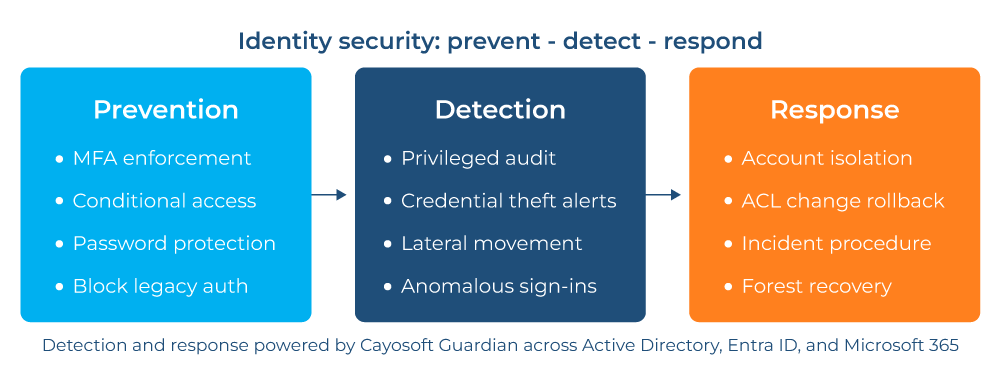
Cayosoft Guardian Protector provides continuous, agentless monitoring across Active Directory, Entra ID, and Microsoft 365 at no cost. It delivers real-time alerts on privilege escalation, group membership changes, and anomalous service account activity, closing the detection gap between point-in-time scans and the moment that lateral movement begins.
Protect against password spray and brute force
Password spray attacks test a few common passwords across thousands of accounts to avoid lockout thresholds. They work especially well if your environment has not enforced password bans, uses weak default passwords on service accounts, or exposes endpoints using OWA or Active Directory Federation Services (ADFS). A single successful guess against a privileged account is enough for initial access.
Entra ID Smart Lockout blocks authentication attempts that show spray patterns, and the global banned password list blocks the most common weak passwords. On-premises deployments still need the Entra ID Password Protection agent to apply the same controls to Active Directory.
Deploy Entra ID Password Protection to every domain controller, enable Smart Lockout with a 10-attempt threshold, and monitor for distributed spray patterns; many accounts, a few attempts each, from a narrow IP range. Audit every account with a password older than 365 days, prioritizing service accounts.
To detect password spray patterns in Entra ID sign-in logs and find stale service account passwords, run:
					# Detect password spray pattern in Entra ID sign-in logs (KQL)
union AADNonInteractiveUserSignInLogs, SigninLogs
| where ResultType != 0
| summarize AttemptCount = count(),
            DistinctAccounts = dcount(UserPrincipalName)
  by IPAddress, bin(TimeGenerated, 1h)
| where DistinctAccounts > 20 and AttemptCount < DistinctAccounts * 5
| sort by DistinctAccounts desc

# Find accounts with passwords older than 365 days
Get-ADUser -Filter * -Properties PasswordLastSet, PasswordNeverExpires |
  Where-Object {
    $_.PasswordLastSet -lt (Get-Date).AddDays(-365) -and
    -not $_.PasswordNeverExpires
  } |
  Select-Object Name, SamAccountName, PasswordLastSet, PasswordNeverExpires |
  Sort-Object PasswordLastSet
Reference: Microsoft: Entra ID Password Protection
Enforce least privilege across roles and delegation
Standing privileged access is one of the highest-risk configurations in any Microsoft environment, since an account with permanent Domain Admin rights is a target even when unused.
Privileged identity management (PIM) in Entra ID grants just-in-time access: Accounts request elevation, an approval workflow validates the request, and access expires automatically. On-premises, tiered administration and Domain Admin restriction to specific privileged access workstations apply the same principle.
To put this into practice, follow this sequence:
- Identify every account with a standing privileged role assignment in Entra ID.
- Convert standing assignments to eligible-only using PIM (require approval and justification for every PIM activation).
- Set the maximum activation duration to 4 hours for Domain Admin–equivalent roles
- Review PIM activation history monthly for unusual patterns.
To list all active, standing privileged role assignments in Entra ID, run:
					# List all active (standing) privileged role assignments in Entra ID
$users = Get-MgUser -All | Group-Object Id -AsHashTable
$roles = Get-MgRoleManagementDirectoryRoleDefinition -All | Group-Object Id -AsHashTable

Get-MgRoleManagementDirectoryRoleAssignment -All |
  ForEach-Object {
    [PSCustomObject]@{
      User = $users[$_.PrincipalId].UserPrincipalName
      Role = $roles[$_.RoleDefinitionId].DisplayName
    }
  }
Cayosoft Administrator — Centralized Viewpoint
Cayosoft Administrator provides centralized lifecycle management for Active Directory and Entra ID accounts, including automated provisioning, deprovisioning, and delegation control. It enforces least-privilege delegation without requiring custom scripts or direct AD permissions, so helpdesk staff can perform their role without holding Domain Admin rights.
Prepare an identity-specific incident response procedure
Generic incident response playbooks treat identity compromise as a subset of a broader response. Still, the containment steps, forensic artifacts, and recovery sequence all differ from those of a compromised workstation. Without a dedicated procedure, your team improvises, and improvised identity responses often result in incomplete remediation or extended outages.
The procedure must cover four phases:
- Detection and scoping: Determining relevant accounts and systems and over what window
- Containment: Disabling accounts, revoking sessions, and halting replication if domain controllers are involved
- Evidence preservation: Exporting logs before remediation overwrites them
- Recovery: Credential resets in sequence, a double reset of the krbtgt (the Kerberos Ticket Granting Ticket account that signs every domain authentication ticket), and an ACL audit
Before an incident occurs, document the following:
- Which accounts can disable a domain controller, reset krbtgt, or revoke Entra ID sessions
- Where offline copies of break-glass credentials are stored as well as which physical access controls are in place
The credential reset sequence to follow is: Domain Admins first, then service accounts, then standard users. The correct process for exporting security, Directory Service, and Entra ID sign-in logs, and to perform a tabletop exercise twice a year to test the procedure.
To revoke active sessions and deactivate a compromised account during containment, run:
					# Revoke all active sessions for a compromised Entra ID account
Connect-MgGraph -Scopes 'User.ReadWrite.All'
Revoke-MgUserSignInSession -UserId 'compromised@contoso.com'

# Disable a compromised AD account and force logoff
Disable-ADAccount -Identity 'compromiseduser'

Invoke-Command -ComputerName DC01 -ScriptBlock {
  quser | Where-Object { $_ -match 'compromiseduser' } | ForEach-Object {
    $sessionId = ($_ -split '\s+')[2]
    logoff $sessionId
  }
}
Cayosoft Guardian Instant Forest Recovery
If an identity-based attack reaches the forest level—e.g., DCSync abuse, golden ticket infrastructure, or domain trust manipulation—manual recovery means sequencing DC promotion, flexible single master operations (FSMO) assignment, and DNS restoration by hand. Guardian Instant Forest Recovery automates that sequence, including the krbtgt reset, in minutes instead of days, with no sequencing errors.
Reference: Microsoft: AD Forest Recovery guide
Conclusion
Identity-based attacks succeed because you treat identity security as a configuration task rather than an ongoing operational discipline. Privileged accounts accumulate. MFA coverage gaps persist. ACLs drift. Service principals go unreviewed. Each of these failures widens the window available to an attacker who has already obtained credentials.
The ten practices above address the controls that close that window. Together, they cover the full path from initial credential theft to contained, remediated compromise, making identity attacks harder to execute, faster to detect, and easier to remediate fully.
Stop AD Threats As They Happen
Cayosoft Protector provides continuous monitoring and real-time alerts across your entire Microsoft Identity stack
Like This Article?
Subscribe to our LinkedIn Newsletter to receive more educational content