



TL;DR
Intune is Tier 0 by function. Learn how to improve Intune security and how Cayosoft supports identity resilience across entire Microsoft environments.
Microsoft Intune has traditionally been treated as an endpoint management platform. In modern Microsoft environments, that view is outdated.
Intune is Tier 0 by function.
Tier 0 is not defined by where a system runs. Tier 0 is defined by what a system can control. If a platform can directly or indirectly impact identity, administrator access, and enterprise operations at scale, it belongs in Tier 0 conversations.
When privileged access in Entra ID is abused, Intune becomes one of the fastest ways to convert identity compromise into immediate, enterprise-wide disruption. Intune security is now an identity resilience problem, not just an endpoint hygiene discussion.
Why Intune belongs in Tier 0
Scale changes everything
Intune was designed to operate at scale. That is its greatest strength, and its greatest risk.
With legitimate administrative permissions, Intune can wipe devices, retire devices, reset devices, and push configuration changes across large populations. If a platform can remove data, disrupt productivity, and disable access paths across the organization in minutes, it must be protected like Tier 0.
Intune is tightly coupled to Entra ID
Intune does not operate independently.
Entra ID determines:
- Who can administer Intune
- Which roles are assigned
- How administrators authenticate
Intune in turn determines:
- Device availability
- Compliance signals used by Conditional Access
- Whether endpoints remain usable for admins and users
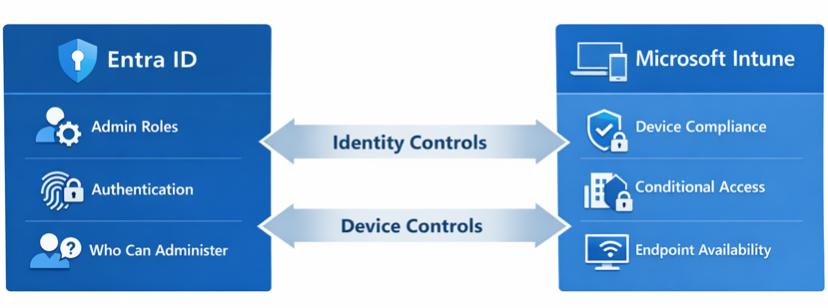
This creates a closed control loop.
Identity controls Intune. Intune controls the devices used to access identity. That relationship elevates the platform from endpoint tooling to a core pillar of the identity control plane, making Intune Tier 0 security a functional reality.
Intune abuse looks legitimate
One of the most dangerous aspects of Intune risk is that abuse looks legitimate.
A device wipe issued through Intune uses native APIs and generates expected logs. There is no exploit and no malware. The platform is doing exactly what it was built to do.
That is why Intune Tier 0 security must be monitored and governed as a critical priority. High-risk Intune actions are security events, not just IT operations.
The identity-driven Intune attack pattern
The pattern is consistent across identity incidents:
- Privileged identity access is obtained
- Legitimate administrative capabilities become the mechanism
- Intune is used for disruption through bulk wipe, reset, or destructive configuration changes
The same lesson repeats across identity incidents.
If attackers control identity, they control the environment.
Intune accelerates the impact.
What Tier 0 security looks like for Intune
Implementing Intune Tier 0 security does not require a total architectural redesign. It requires adding barriers and enforcing Tier 0 discipline.
The objective is simple. No single identity should be able to cause large-scale disruption on its own.
These ten Intune security best practices establish the baseline for securing Intune as a Tier 0 system.
1) Reduce who can make high-impact changes
Only a small number of identities should be capable of destructive Intune actions.
Scope Intune roles to real responsibilities and remove tenant-wide permissions from routine admins. Eliminate standing privilege wherever possible. Fewer privileged identities means less blast radius.
2) Separate destructive actions from daily administration
Daily administration should not include destructive capabilities.
Keep wipe, reset, and retire in a tightly controlled role. Do not bundle those permissions with policy, app, or compliance work. If a routine admin account is compromised, the result should not be enterprise disruption.
3) Discontinue using global targeting for risky changes
“All devices” and “All users” create instant scale.
Replace global assignments with segmented groups and filters. Stage high-risk changes to limit instant scale. Limiting scope slows impact and creates opportunities to detect issues before they spread.
4) Use just-in-time access for Intune administrators
Standing privileged access increases exposure.
Intune admin access should be time-bound and explicitly activated. Authentication for roles capable of high-impact actions should be phishing-resistant because Tier 0 failure is immediate and widespread.
5) Implement phishing-resistant MFA for Intune admin roles
Basic MFA is no longer sufficient for Tier 0 systems. Phishing-resistant authentication belongs in the baseline for any role that can issue high-impact Intune actions.
6) Separate duties between Entra ID and Intune
One account should not control everything. Separate identity administration from Intune administration to the reduce blast radius and prevent single-account dominance.
7) Require multi-admin approval for high-risk actions
Microsoft Intune supports Multi-Admin Approval for high-impact actions, including device wipe, retire, delete, role changes, configuration and compliance policies, scripts, and app deployments.
With Multi-Admin Approval enabled, a single administrator cannot execute these actions alone. The request pauses, a second identity is required, an audit trail is created, and responders gain time to react.
8) Get alerted on mass Intune actions
Approval workflows slow things down. They do not replace detection. Security teams still need alerts when bulk wipe or reset requests are submitted; large numbers of devices are targeted, or behavior deviates from normal patterns.
9) Monitor Intune and Entra ID changes together
Intune risk is identity driven.
Track policy edits, role changes, app deployments, compliance updates, and risky sign-ins in one view. Viewed separately, actions can look normal. Viewed together, risk becomes visible.
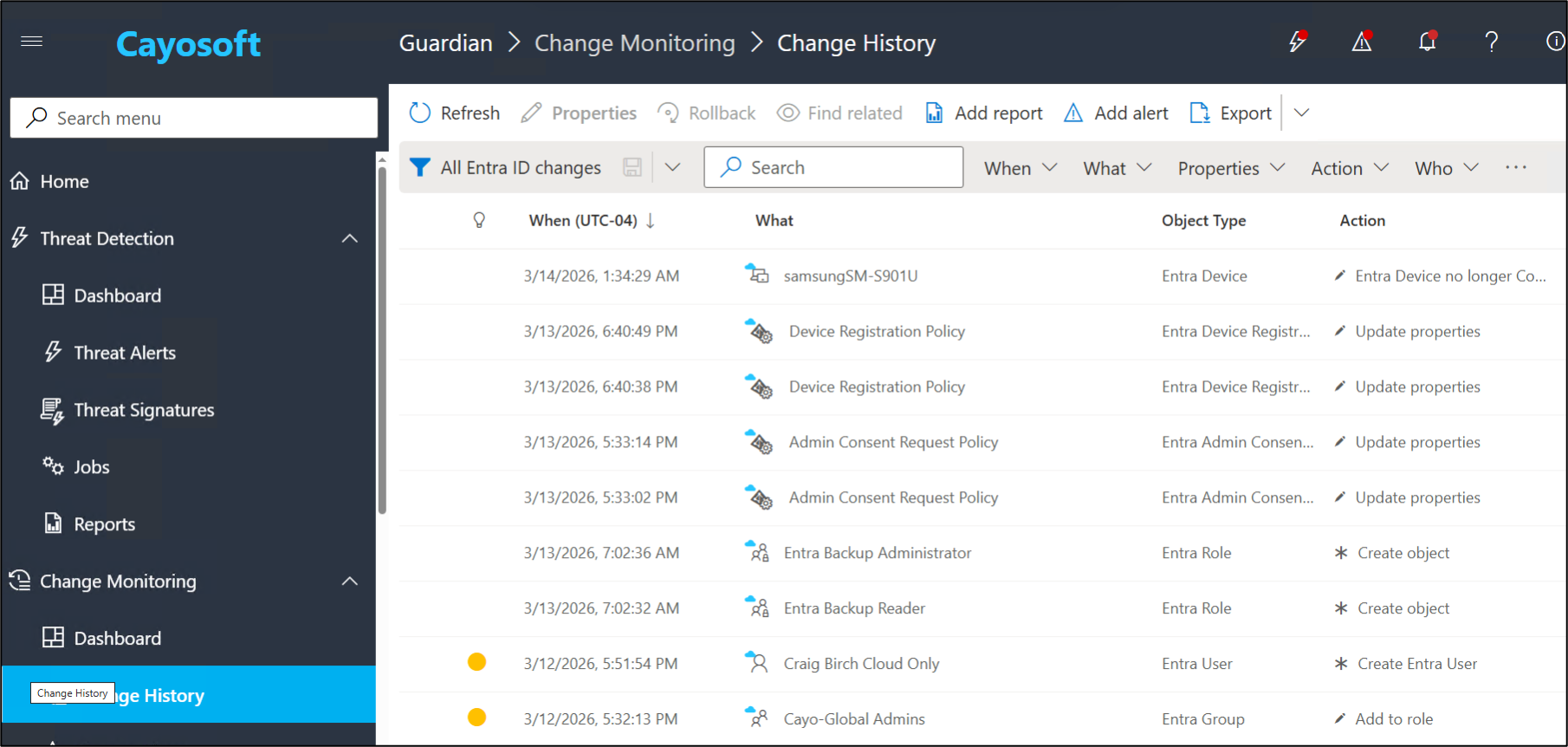
Cayosoft Guardian Change History logs and alerts on Entra ID and Intune changes from a single console.
10) Make recovery part of the plan
Tier 0 security includes recovery.
Be ready to roll back Conditional Access, reapply Intune baselines, restore configurations, and redeploy apps quickly. Recovery readiness limits damage when preventative controls fail.
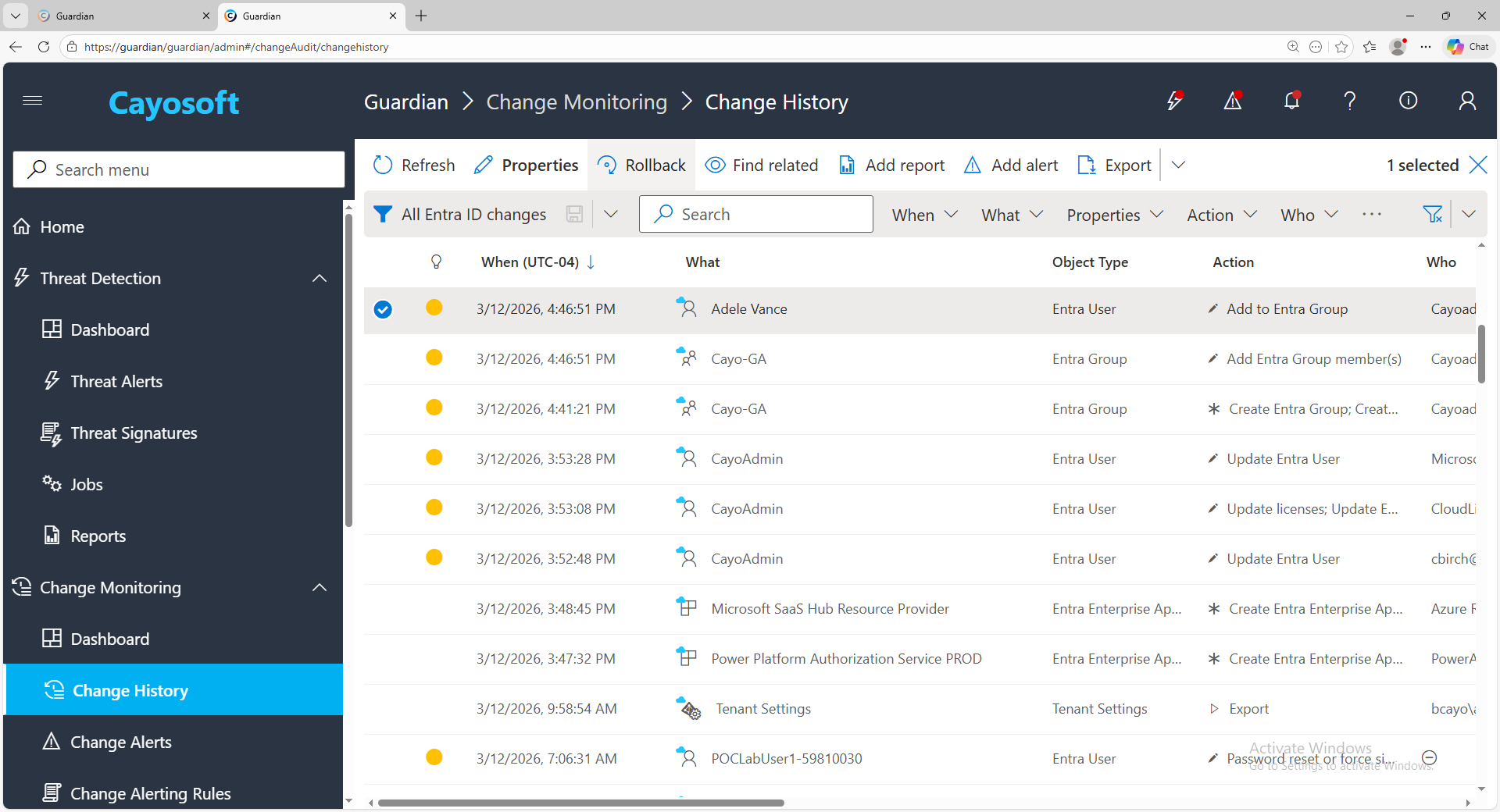
Cayosoft Guardian easily rolls back unwanted changes with a single click.
Where Cayosoft fits —and why Entra ID and Intune are central
Modern identity attacks don’t target a single system. They exploit the relationships between them. That’s why Cayosoft approaches Microsoft identity security holistically, treating Active Directory, Entra ID, Microsoft 365, and Intune as one interconnected control plane, not isolated products.
Cayosoft Guardian reflects this philosophy. Guardian is not an Intune‑only solution. It provides unified monitoring and threat detection across Entra ID, Intune, Active Directory and Microsoft 365, giving security teams visibility into identity‑driven risk across the entire Microsoft ecosystem.
Cayosoft Administrator complements Guardian by addressing the problem before abuse occurs. Administrator governs who can access high‑risk roles and groups across AD, Entra ID, Microsoft 365, and Intune using restricted group membership, approval workflows, and least‑privilege delegation. This reduces standing privilege and limits who can reach the Intune scale lever in the first place.
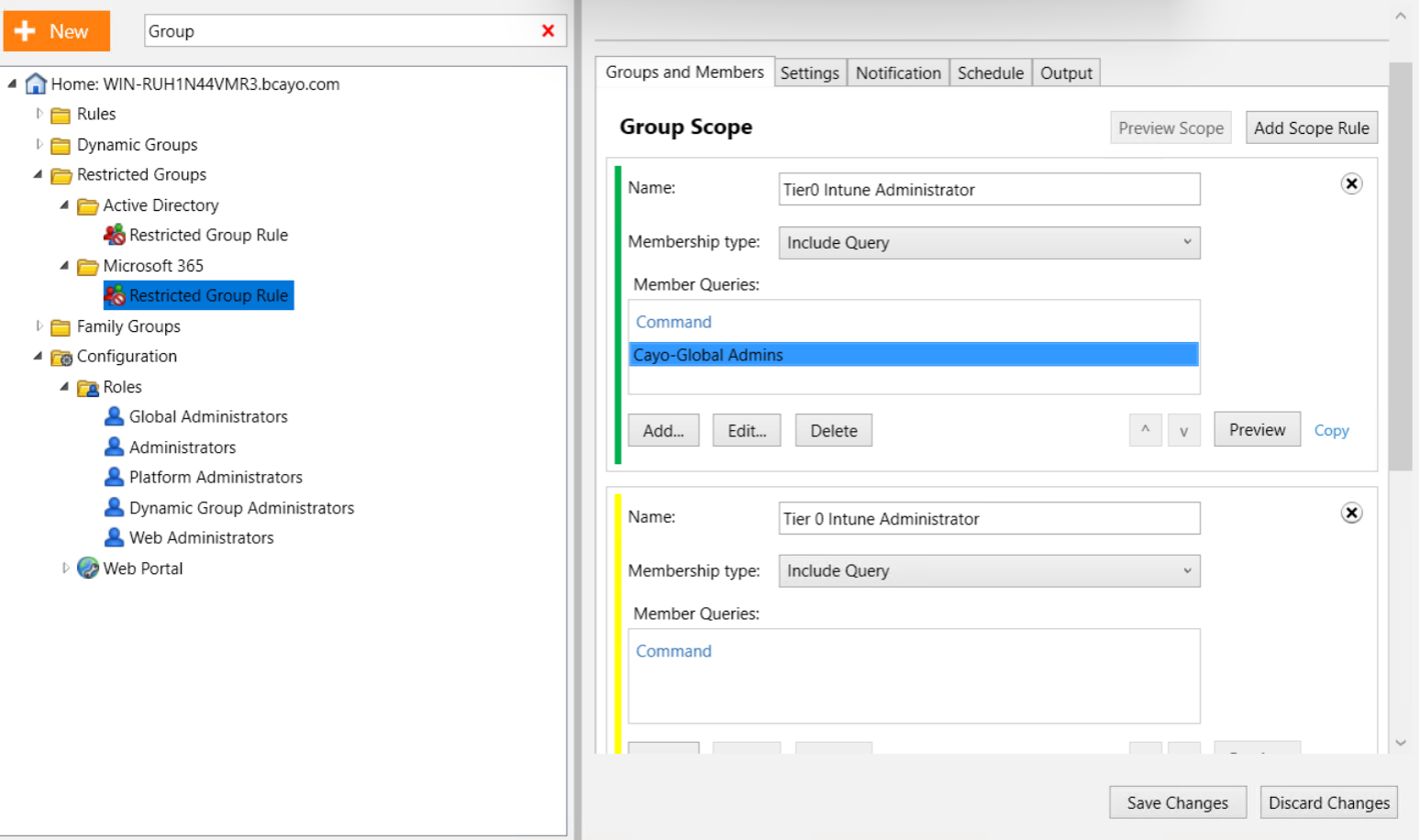
Cayosoft Administrator strengthens Intune security by restricting global admins and groups.
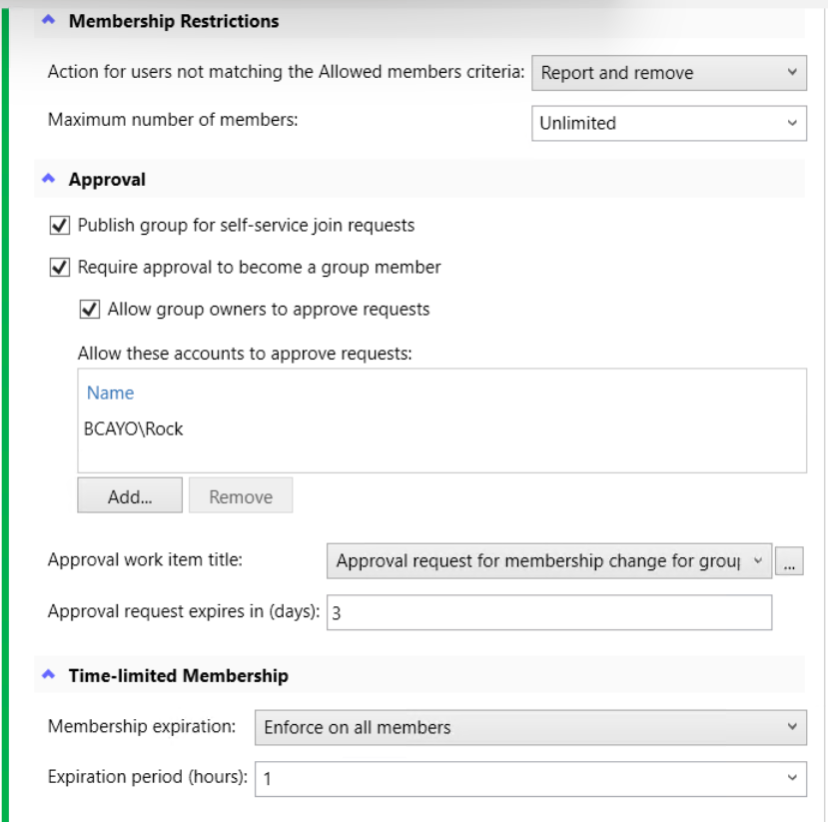
Cayosoft Administrator restricts memberships to improve Intune security.
Together, they align directly to real-world attack patterns.
In identity driven attacks, Entra ID is the privilege boundary. Intune is the scale lever.
Administrator controls access to that boundary. Guardian monitors how that access is used.
Guardian’s differentiation lies in correlation and context. Guardian detects high-risk‑ Intune actions such as mass device wipe, correlates those actions with privileged identity activity in Entra ID, and surfaces behavior that appears legitimate in isolation but dangerous in context.
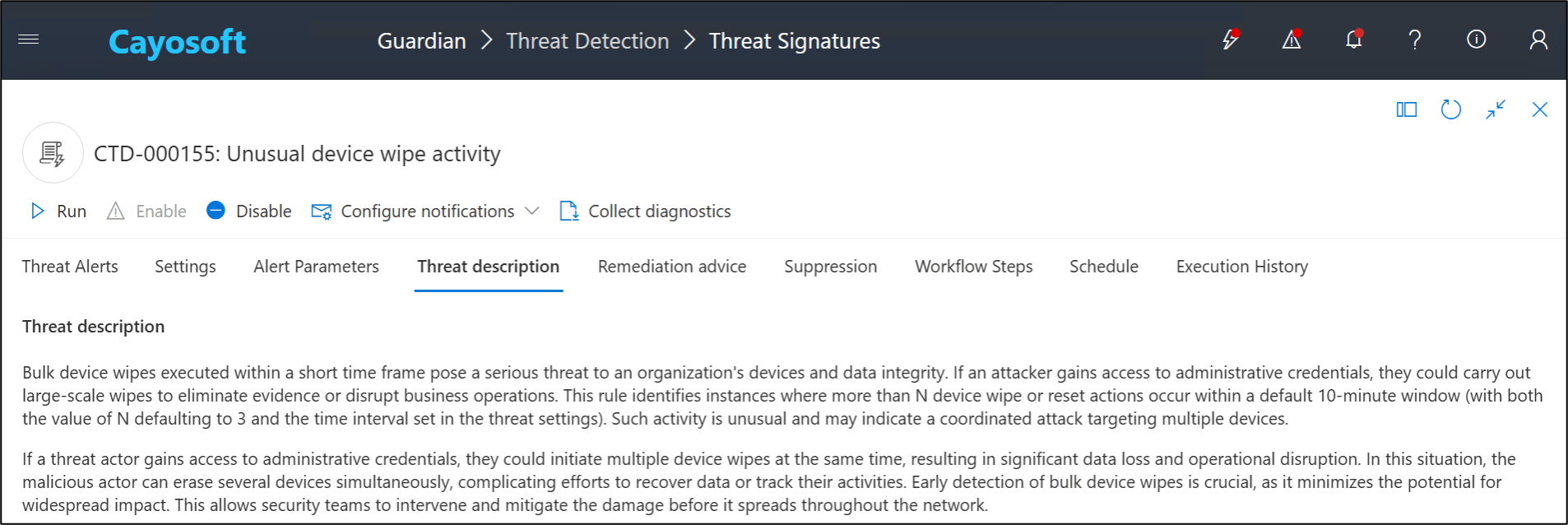
The goal is not to replace Microsoft native controls. The goal is to prevent abuse of trust, detect misuse of legitimate access, and respond quickly across the identity and device management boundary where Tier 0 risk now exists.
Reframing Intune security and identity resilience
If a platform can disable administrators’ endpoints at scale, it is Tier 0 by outcome. That platform is Intune today.
When organizations talk about identity resilience, Intune Tier 0 security can no longer be ignored or treated as just endpoint management. Intune is part of the identity control plane because it is directly coupled to Entra ID and capable of immediate enterprise-wide impact.
Treat Intune like Tier 0: remove standing privilege, enforce phishing-resistant admin authentication, require multi-admin approval for high-risk actions, monitor for mass device activity, and alert fast to responders who can act.
Identity is still the crown jewel. But Intune is one of the fastest ways to turn identity compromise into real-world disruption.
FAQ
Traditionally, Tier 0 was reserved for identity providers like Active Directory and Entra ID. However, because Intune has the power to manage every device, wipe enterprise data, and influence Conditional Access, it is now part of the identity control plane. Intune Tier 0 security recognizes that if a platform can cause enterprise-wide disruption at scale, it must be protected with the highest level of restrictive access and monitoring.
Intune is tightly coupled with Entra ID; identity controls Intune, and Intune controls the devices used to access identity. When a privileged identity is compromised, an attacker can use Intune’s legitimate administrative tools to disable an entire organization’s hardware. This makes Intune Tier 0 security a vital component of identity resilience, as it prevents identity compromise from turning into a total operational shutdown.
Multi-Admin Approval is a critical barrier that prevents any single compromised account from causing mass damage. By requiring a second administrator to authorize high-risk actions (such as bulk device wipes or changes to compliance policies), it creates a “four-eyes” verification process. This is a cornerstone of a robust Intune Tier 0 security strategy, ensuring no single point of failure.
The most dangerous actions are those that operate at scale, such as “Wipe,” “Retire,” or “Delete” commands, as well as modifications to scripts and configuration profiles. Because these actions use native APIs and look like legitimate IT operations, they can bypass traditional malware detection. Organizations must treat these specific actions as security events rather than routine maintenance.
Yes. You don’t need a total redesign to achieve Intune Tier 0 security. The focus should be on enforcing Tier 0 discipline: reducing standing privileges (using Just-In-Time access), requiring phishing-resistant MFA for all admins, and shifting away from “All Users” or “All Devices” targeting in favor of segmented, staged deployments.
See Cayosoft in Action
Only Cayosoft provides immediate threat detection and rollback of unwanted changes in Intune, Entra ID. Microsoft 365 and Active Directory. All from a single pane of glass. Schedule a demo to see the capabilities in depth.