



Identity is now the primary security perimeter for enterprise environments. Running both on-premises Active Directory and Azure Active Directory (now Microsoft Entra ID) expands that perimeter as well as your attack surface.
Hybrid identity management connects these two worlds, but every synchronization point, authentication pathway, and permission setting creates a potential vulnerability. Attackers know that compromising on-premises AD grants access to cloud resources and vice versa. Microsoft has recently observed the same on-prem-to-cloud pivot in Storm-0501 campaigns: after gaining strong on-premises access, attackers targeted Microsoft Entra Connect Sync infrastructure and then used that access to change passwords for synced (hybrid) accounts in Microsoft Entra ID, enabling persistent cloud access.
This article covers specific security challenges facing hybrid Active Directory environments, providing actionable steps to protect your identity infrastructure. You’ll learn how lateral movement attacks exploit hybrid configurations, which misconfigurations create the biggest risks, and what security controls prevent compromise.
What Is Hybrid Identity Management?
Hybrid identity management refers to the practice of maintaining and securing user identities across both on-premises Active Directory and cloud-based identity services like Microsoft Entra ID (formerly Azure AD). It lets organizations preserve their existing AD infrastructure while extending authentication and authorization capabilities to cloud applications and services.
Defining Hybrid Identity in Active Directory Environments
In a hybrid setup, your organization runs Active Directory domain controllers on the premises while simultaneously using Entra ID for cloud resources. These two systems must stay synchronized to ensure that users can access both on-premises applications and cloud services like Microsoft 365 with a consistent identity. Identity and access management is critical because each synchronization point, authentication pathway, and permission setting creates additional exposure that security teams must monitor.
Think of hybrid identity as a bridge connecting two security domains. When a user’s credentials authenticate successfully in one domain, that authentication must be recognized and trusted in the other. This interconnection creates efficiency but also introduces risk: Compromise one domain and attackers can pivot to the other. Understanding this relationship helps you implement appropriate controls at each junction point.
Hybrid identity management synchronizes on-premises Active Directory with cloud identity services, enabling unified authentication while creating potential pathways for lateral attacks between environments.
Key Components of Hybrid Identity Infrastructure
A functioning hybrid identity infrastructure requires several technical components working together. In Microsoft hybrid identity, there are two primary “bridge” models that connect on-premises Active Directory (AD) to Microsoft Entra ID:
- Sync-based bridge (most common): On-prem AD identities are synchronized into Entra ID using either Microsoft Entra Connect or Microsoft Entra Cloud Sync, and users sign in using cloud-managed authentication (typically Password Hash Sync or Pass-through Authentication).
- Federation-based bridge: Entra ID trusts an on-premises identity provider (most commonly AD FS) to authenticate users and issue tokens for cloud access.
In a sync-based design, organizations must choose between Microsoft Entra Connect (for complex, feature-rich requirements) and Entra Cloud Sync (for lightweight, agent-based architectures). Both tools synchronize identity data between your on-premises AD and Entra ID, including user accounts and group memberships (and optionally password hashes). If you use Pass-through Authentication (PTA), lightweight on-prem agents validate credentials directly against domain controllers without storing passwords in the cloud. Entra ID then handles authentication for cloud applications, enforces Conditional Access policies, and manages application permissions. In a federation-based design, AD FS (or another federation service) provides single sign-on by issuing trusted tokens, but it also adds infrastructure complexity and becomes a high-value security dependency that must be tightly monitored, hardened, and patched.
Top Security Threats to Hybrid Identity
Understanding the specific threats facing hybrid environments helps you prioritize security investments and response strategies. These vulnerabilities emerge from the complexity of connecting on-premises and cloud systems, where authentication mechanisms, permission structures, and monitoring capabilities differ significantly.
Lateral Movement from On-Premises AD to the Cloud
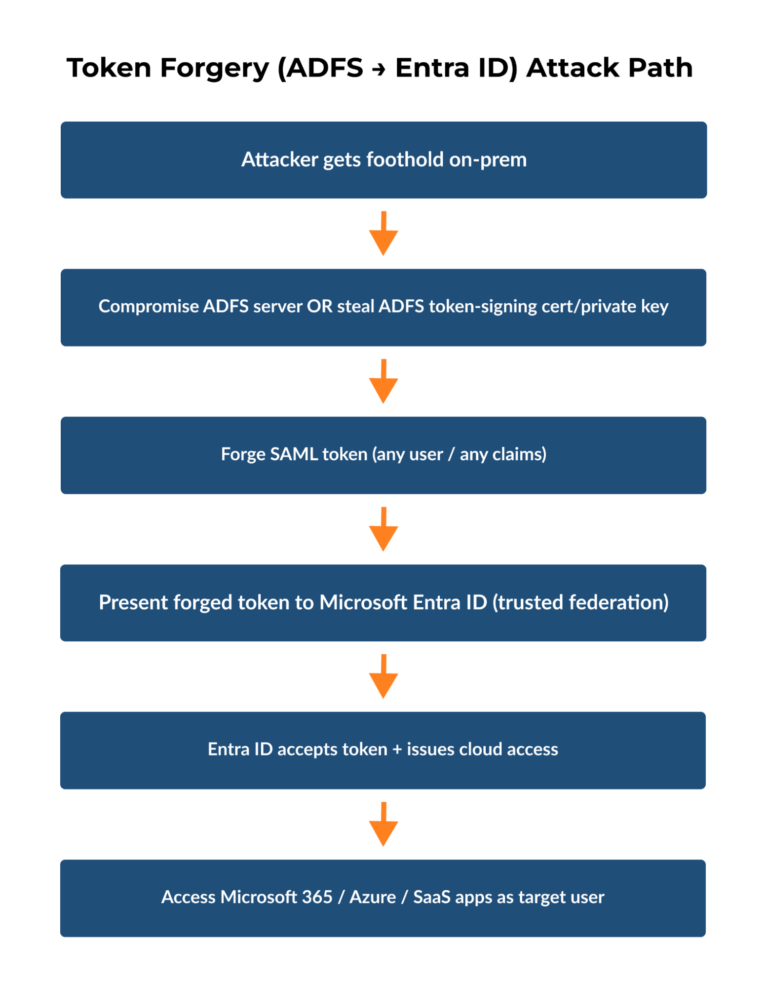
Attackers who gain initial access to your on-premises environment don’t stop there. They use compromised domain administrator accounts or exploit trust relationships to move between on-premises AD and Entra ID. The SolarWinds breach demonstrated this pattern clearly: Attackers first dominated on-premises infrastructure, then used those privileges to compromise federation infrastructure and forge authentication tokens for cloud access.
The connection works both ways. Entra Connect synchronization relies on service accounts that run with high-level permissions in both environments; compromise these service accounts, and attackers gain credentials that authenticate to both domains. Federation services like ADFS become prime targets because they issue tokens that grant access to cloud resources. An attacker controlling your ADFS infrastructure can mint tokens for any user, including administrators, without needing actual credentials.
Federation services represent a critical control point where on-premises compromise translates directly into cloud access through forged authentication tokens.
Detection becomes difficult because these attacks use legitimate authentication mechanisms. Your logs show successful logins from valid accounts using proper protocols. Without detailed monitoring of authentication patterns, privilege escalations, and cross-environment access flows, these intrusions blend into normal administrative activity.
Credential Compromise and Token Forgery
Phishing remains the entry point for most identity-based attacks. An attacker who captures a single user’s credentials through a spoofed login page now has access to both on-premises resources and any cloud applications that that user can reach. Password hash synchronization, while convenient, means that compromising the on-premises password also compromises cloud access.
Token forgery attacks exploit the trust relationship between identity providers. ADFS uses signing certificates to create SAML tokens that prove a user’s identity to Entra ID. Steal or compromise these certificates and attackers can create tokens for any account, including those that were never synchronized from on-premises AD. These forged tokens bypass password-based authentication entirely, rendering password changes useless as a remediation step.
Pass-through authentication reduces some of these risks because it validates credentials directly against on-premises domain controllers without storing password hashes in the cloud. However, this approach requires running authentication agents on your internal network, which then themselves become potential targets. Log management systems that can correlate authentication attempts across both environments help detect credential stuffing attacks and impossible travel scenarios, such as an account authenticating from geographically distant locations within a few minutes.
Misconfigurations and Permission Creep
Hybrid identity management introduces complexity that breeds configuration mistakes. Applications granted permissions in Entra ID often receive more access than necessary because administrators struggle to understand the permission model. A third-party application might request permissions to read user profiles but end up with rights to modify directory data or read sensitive mailbox content.
Role assignments create another problem area. Entra ID uses role-based access control differently than on-premises AD’s group-based permissions. Administrators familiar with traditional AD security groups might assign broad directory roles when narrower permissions would suffice. Synchronized accounts from on-premises systems that join privileged Entra ID roles create a path for on-premises compromise to escalate into cloud administrative access.
Common Hybrid Identity Misconfigurations
The table below outlines the most frequent configuration mistakes in hybrid identity environments, their potential security consequences, and how you can identify them in your organization.
Misconfiguration Type | Security Impact | Detection Method |
Synchronized accounts with the Global Administrator role | On-premises compromise grants full cloud control | Regular RBAC role audits |
Applications with excessive directory permissions | Third-party breach exposes entire directory | Application permission reviews |
Conditional Access policies not applied to all accounts | Unprotected authentication paths remain | Policy coverage analysis |
Legacy authentication protocols enabled | MFA bypass through older protocols | Authentication method monitoring |
Permission creep accelerates in hybrid environments because access reviews must span both systems. An employee who changes roles might lose on-premises permissions but retain cloud access, or vice versa. Service accounts created for specific integration projects often persist long after those projects end, maintaining privileged access that nobody monitors or reviews.
5 Steps to Strengthen Hybrid Identity Security
Protecting hybrid identity requires specific technical controls applied consistently across both on-premises and cloud environments. These five steps address the most critical vulnerabilities in hybrid Active Directory deployments, reducing attack surface and improving detection capabilities.
Step 1: Implement Multi-Factor Authentication Across Environments
Multi-factor authentication stops most credential-based attacks because stolen passwords alone can’t grant access. Deploy MFA for all user accounts accessing both on-premises and Entra ID resources, with a particular focus on administrative accounts and external access points. Configure Conditional Access policies in Entra ID to enforce MFA based on risk signals like location, device compliance, and sign-in patterns.
Some legacy applications don’t support MFA, creating security gaps. Identify these applications through authentication logs and either upgrade them or place them behind an application proxy that handles authentication separately. For on-premises applications, Entra ID Application Proxy extends cloud-based authentication controls to internal resources without requiring VPN access.
Step 2: Choose a Resilient Hybrid Authentication Method (Prefer Password Hash Sync)
Microsoft supports multiple hybrid authentication methods (Password Hash Synchronization, Pass-through Authentication, and Federation). From a resilience standpoint, Microsoft recommends implementing Password Hash Synchronization (PHS) when possible, because it only depends on on-premises AD during sync, not during each sign-in. That means users can keep authenticating to Microsoft Entra ID and cloud apps even if on-premises connectivity or domain controllers are temporarily unavailable.
For resilience, Microsoft recommends Password Hash Synchronization (PHS) where possible because cloud authentication does not depend on on-premises identity components during sign-in.
Pass-through Authentication (PTA) is still a valid option when you can’t use PHS (for example, due to policy constraints), though it is important to note that PTA is supported by Microsoft Entra Connect but is not currently supported by Entra Cloud Sync. Additionally, PTA has more on-premises dependencies during authentication. With PTA, Microsoft Entra ID forwards sign-in attempts to on-premises PTA agents, which must be reachable and able to contact a domain controller, so agent servers, network paths, firewalls, and AD availability all become potential failure points. Federation (AD FS) adds even more moving parts and operational dependency, and Microsoft Entra certificate-based authentication (CBA) can reduce reliance on AD FS in some scenarios.
Step 3: Apply Least Privilege Access Controls
Review every privileged role assignment in both Active Directory and Entra ID. Remove synchronized accounts from high-privilege Entra ID roles like Global Administrator or Privileged Role Administrator. When on-premises accounts hold cloud administrative permissions, a single compromised domain controller grants attackers control over your entire cloud infrastructure. Instead, create dedicated cloud-only accounts for Entra ID administration that exist outside your on-premises directory.
Administrative units in Entra ID let you scope permissions to specific sets of users or resources rather than granting directory-wide access. For example, create an administrative unit for each department, then assign helpdesk staff permissions to reset passwords only for users in their assigned units. This containment strategy limits the blast radius when accounts are compromised.
Step 4: Conduct Regular Permission Audits
Application permissions in Entra ID often exceed actual requirements because administrators approve consent requests without understanding the implications. Generate reports showing which applications have permissions like Mail.ReadWrite.All or Directory.ReadWrite.All and evaluate whether these broad permissions are necessary. Cloud infrastructure access management solutions automate this discovery process and flag excessive permissions that violate least privilege principles.
Service accounts present another audit challenge. Document the purpose and owner of each service account in both environments, then schedule quarterly reviews to verify that they’re still needed. Disable or delete accounts associated with completed projects or departed employees.
Step 5: Establish Continuous Monitoring and Alerting
Real-time monitoring detects attacks while they’re unfolding rather than during post-incident analysis. Configure alerts for high-risk events like privilege escalations, bulk password resets, modification of federation settings, and unusual geographic login patterns. Correlation between on-premises AD logs and Entra ID sign-in logs reveals lateral movement attempts that single-source monitoring would miss.
Integration with SIEM platforms centralizes security event analysis and enables automated response workflows. When suspicious activity triggers an alert, automated playbooks can disable accounts, revoke sessions, or isolate affected systems before attackers complete their objectives. This detection and response capability transforms security from a reactive cleanup operation into an active defense mechanism that frustrates attack progression.
Advanced Protection and Recovery for Hybrid Identity
Securing hybrid identity requires detection capabilities that spot attacks as they happen and recovery tools that restore compromised systems quickly. When attackers gain access to Active Directory or Entra ID, every minute counts. The difference between containment and catastrophic data loss often comes down to how fast you can identify the breach, understand what changed, and restore configurations to a known-good state.
Traditional backup systems create restore points every few hours or days, leaving gaps that attackers exploit. Attribute-level monitoring and recovery fill those gaps by tracking every change in real time and enabling granular restoration.
Real-Time Threat Detection and Response
Continuous monitoring of both Active Directory and Entra ID generates alerts the moment suspicious changes occur. When someone modifies federation trust settings, adds a new privileged account, or changes group memberships outside normal business hours, your security team receives immediate notification. High visibility matters because attackers work quickly once inside.
SIEM integration centralizes these alerts alongside network traffic analysis, endpoint detection logs, and application security events. Correlating identity changes with other security signals reveals attack patterns that isolated systems miss. For example, a user account authenticating successfully followed immediately by unusual Azure AD role assignments suggests credential compromise and privilege escalation. Without correlation, each event looks benign; together, they indicate active attack progression.
Attribute-Level Recovery Capabilities
When attacks succeed despite your defenses, recovery speed determines business impact. Traditional AD restoration involves promoting a domain controller from backup, a process that takes hours and restores the entire directory to a previous state, potentially losing legitimate changes made since the backup. Attribute-level recovery takes a different approach, tracking every individual change to users, groups, OUs, and GPOs, then restoring only what attackers modified.
A granular approach lets you undo specific malicious actions without reverting the entire directory. If attackers add themselves to Domain Admins, change passwords for service accounts, and modify delegation settings, you can reverse exactly those changes while preserving legitimate updates made during the same timeframe. The recovery window shrinks from hours to minutes because you’re not rebuilding infrastructure but rather surgically removing attack artifacts.
How Cayosoft Guardian Secures Hybrid Environments
Cayosoft Guardian addresses protection and recovery requirements specifically for hybrid identity environments. The solution continuously monitors both Active Directory and Entra ID, providing unified visibility across your entire identity infrastructure. When unauthorized changes occur, Guardian triggers real-time alerts with detailed audit trails showing exactly what changed, when, and by whom.
The platform’s instant recovery capability restores compromised objects, attributes, or entire directory structures down to the attribute level. This means you can reverse specific attack actions without full directory restoration, maintaining business continuity while eliminating attacker persistence mechanisms. Guardian integrates with existing SIEM tools to provide context for security investigations and automated response workflows.
Protection Capabilities Comparison
The following table compares Guardian’s capabilities against traditional backup solutions and native Active Directory tools, highlighting the differences in recovery speed, granularity, and threat detection:
Capability | Traditional Backup | Native AD Recycle Bin | Cayosoft Guardian |
Recovery Granularity | Full directory only | Deleted objects within 30 days | Individual attributes and objects |
Change Tracking | Snapshot at backup intervals | Deletion events only | All modifications in real time |
Hybrid Coverage | On-premises only | On-premises only | AD and Entra ID unified |
Recovery Time | Hours | Minutes but for deletions only | Minutes for any change |
Threat Detection | None | None | Real-time alerts and SIEM integration |
For organizations running a hybrid identity infrastructure, Guardian provides the specialized protection that native tools and generic backup solutions can’t deliver. The combination of continuous monitoring, real-time alerting, and granular recovery creates a defense layer specifically designed for identity infrastructure vulnerabilities. When securing hybrid identity environments where on-premises compromise threatens cloud resources and vice versa, this focused approach addresses risks that general security tools miss.
Schedule a demo to see how Guardian’s unified monitoring and recovery capabilities work across your entire hybrid identity infrastructure.
Conclusion
Hybrid identity management presents security challenges that require specialized solutions beyond traditional perimeter defenses. Attackers focus on the connection points between on-premises Active Directory and Entra ID because successful exploitation in one environment grants access to the other.
The five-step framework outlined here establishes foundational protection but won’t prevent every breach. When attacks succeed, your recovery capability determines whether you face hours of downtime or minutes of surgical remediation. Organizations serious about protecting hybrid environments need tools that detect threats across both domains and restore compromised configurations at the attribute level.
Evaluate your current monitoring and recovery capabilities against the requirements discussed here, identify gaps where attacks could slip through undetected, and implement solutions designed specifically for hybrid identity protection before the next breach tests your defenses.
FAQs
Password hash synchronization stores encrypted password hashes in the cloud for authentication, while pass-through authentication validates credentials directly against on-premises domain controllers without cloud storage. Pass-through authentication reduces cloud exposure but requires authentication agents running on your internal network.
Yes, attackers can bypass MFA by exploiting legacy authentication protocols that don’t support modern authentication methods or by compromising federation services to forge authentication tokens. Organizations should disable legacy protocols and implement strict monitoring of federation infrastructure to prevent these bypass techniques.
Review privileged role assignments monthly and conduct comprehensive application permission audits quarterly to catch excessive permissions and orphaned service accounts. More frequent reviews are necessary after organizational changes like mergers, major application deployments, or detected security incidents.
Attackers with Domain Administrator access can compromise synchronization agents, modify federation settings, or use synchronized credentials to access cloud resources in hybrid identity management environments. This lateral movement from on-premises to cloud is why separating privileged accounts and implementing real-time monitoring across both environments is critical.
No, the AD Recycle Bin only recovers deleted objects within a limited timeframe and doesn’t restore modified attributes or track unauthorized changes. Ransomware attacks often modify permissions and group memberships rather than deleting objects, requiring attribute-level recovery capabilities to fully remediate the damage.
Want to See Cayosoft in Action?
Cayosoft is recognized by Gartner as an ITDR solution provider and provides solutions that make identities more resilient to attacks and guarantee a fast forest recovery, if needed. Learn how Cayosoft Guardian facilitates granular change tracking, post-breach analysis, and long-term AD security improvements. Schedule a demo to see the capabilities in depth.