



Home » How to Build a Resilient Plan Using Disaster Recovery Best Practices » Business Continuity and Disaster Recovery: 10 Best Practices for Microsoft Environments
Business Continuity and Disaster Recovery: 10 Best Practices for Microsoft Environments
Learn ten proven best practices for building a resilient business continuity and disaster recovery framework across Microsoft environments.
Explore the chapters:
Next Chapter >
Table of Contents
Stop AD Threats As They Happen
Cayosoft Protector provides continuous monitoring and real-time alerts across your entire Microsoft Identity stack
Like This Article?
Subscribe to our LinkedIn Newsletter to receive more educational content
Business continuity and disaster recovery (BCDR) defines the operational discipline of keeping your organization running when infrastructure fails and then restoring it quickly when it does not. In Microsoft environments, BCDR spans on-premises Active Directory, hybrid identity services, Microsoft 365 workloads, and the backup and recovery infrastructure that underpins them all. A gap in any one of these areas is a gap in your ability to recover.
Most BCDR failures are not technical but procedural. Backup jobs complete successfully for months, then fail silently, and recovery procedures get written once and never tested. Recovery time objective (RTO) and recovery point objective (RPO) targets get set without verifying whether the backup strategy meets them, and ransomware campaigns target backup infrastructure directly, since eliminating recovery options forces a ransom negotiation.
This article covers ten best practices for building a BCDR framework that holds up under real incident conditions, spanning Active Directory, Microsoft Entra ID, Microsoft 365, and on-premises workloads.
Summary of BCDR best practices
| Best practice | Description |
|---|---|
| Define RTO and RPO for each workload tier | Map every workload to a recovery time objective and a recovery point objective before an incident occurs. |
| Implement immutable backups for AD and Microsoft 365 | Configure immutable, air-gapped backup storage for Active Directory, Entra ID, and Microsoft 365. |
| Test Active Directory forest recovery procedures | Run a rehearsed AD forest recovery drill at least once a year, covering DC promotion, FSMO seizure, and krbtgt reset. |
| Protect backup infrastructure from ransomware | Isolate backup servers from the production network, enforce MFA on backup consoles, and audit backup agent credentials. |
| Establish a clean recovery environment | Maintain a preconfigured, isolated staging network so rebuilt systems can be validated before rejoining production. |
| Test failover for hybrid identity services | Verify that Entra ID Connect sync, AD FS, and certificate authority failover work before a real incident. |
| Monitor backup job health continuously | Alert on backup job failures, schedule gaps, and storage capacity thresholds in real time. |
| Maintain offline and off-site copies | Follow the 3-2-1 backup rule: three copies, two media types, one offsite and offline. |
| Define a communication and escalation plan | Document who declares a disaster, who authorizes recovery actions, and how regulators are notified. |
| Conduct regular BCDR exercises | Run tabletop simulations and live recovery drills on a schedule, and measure recovery time against your RTO targets. |
Manage, Monitor & Recover AD, Entra ID, Microsoft 365

Unified Console
Use a single tool to administer and secure AD, Entra ID, and M365

Track Threats
Monitor AD for unwanted changes – detect for security or critical functions

Instant Recovery
Recover global enterprise-wide Active Directory forests in minutes, not days
Define RTO and RPO for each workload tier
The recovery time objective defines the maximum time your organization can tolerate a system being offline, while the recovery point objective reflects the maximum acceptable data loss, measured in time. Without these defined for each workload, your team has no basis for prioritizing recovery actions or measuring whether the backup strategy fits its purpose.
Different workloads carry different tolerances. For example, a domain controller typically has a lower RTO than a file server, while Exchange Online has a lower RPO than an internal wiki. Mapping each workload to its RTO and RPO, then validating that the backup frequency actually meets those targets, is the foundation on which every other BCDR practice builds.
This distinction matters more for a cyber incident than for an infrastructure failure. Restoring a domain controller after a hardware failure or a data center outage genuinely restores service, since the environment was trustworthy before the outage. Recovering from a compromise is different because you need to define the RTO for Tier 1 identity workloads as the point at which the environment is verified to be trustworthy, not simply when domain controllers respond to authentication requests again. A forest recovery that restores Active Directory in an hour, but leaves persistence mechanisms or compromised credentials in place, has not met a genuine RTO for a cyber incident. In this case, indeed, the systems are back online, but the environment is not yet safe to trust.
Inventory all workloads and classify each as Tier 1 (time-sensitive), Tier 2 (important), or Tier 3 (non-critical), then assign RTO and RPO values signed off by business stakeholders rather than IT alone. Document recovery dependencies; for example, a Tier 1 application that depends on a Tier 2 database inherits the lower tier’s RTO.
To confirm that Azure Backup schedules align with each workload’s RPO, run:
					# Report on Azure Backup policy RPO alignment
$vaults = Get-AzRecoveryServicesVault
foreach ($vault in $vaults) {
    Set-AzRecoveryServicesVaultContext -Vault $vault
    Get-AzRecoveryServicesBackupProtectionPolicy |
        Select-Object Name, WorkloadType, @{N='ScheduleFrequency';E={$_.SchedulePolicy.ScheduleRunFrequency}} |
        Sort-Object WorkloadType
}
Reference: Microsoft: Define recovery objectives
Manage, Monitor & Recover AD, Entra ID, M365, Teams
| Platform | Admin Features | Single Console for Hybrid (On-prem AD, Entra ID, M365, Teams) | Change Monitoring & Auditing | User Governance (Roles, Rules, Automation) | Forest Recovery in Minutes |
| Microsoft AD Native Tools | ✓ | ||||
| Microsoft AD + Cayosoft | ✓ | ✓ | ✓ | ✓ | ✓ |
Watch our recorded & upcoming educational webinars about identity protection
Implement immutable backups for AD and Microsoft 365
Ransomware campaigns now target backup infrastructure before deploying encryption payloads. Attackers disable backup agents, delete snapshots, and corrupt restore points to force a ransom negotiation. An immutable backup that cannot be modified or deleted for a defined retention period removes that lever, so recovery points remain intact even if production is fully encrypted.
Azure Backup’s Immutable Vault prevents AD recovery points from being deleted or modified for the duration you set. For Microsoft 365, retention policies in Microsoft Purview retain mailbox and SharePoint data regardless of whether a user or an admin deletes it. Neither control works retroactively; both need to be configured before an incident.
Enable Immutable Vault on every Azure Recovery Services vault holding domain controller backups, with a minimum retention lock of 14 days—enough to survive a delayed-detonation campaign. Configure Microsoft 365 retention policies in Purview for Exchange, SharePoint, and Teams, and store backup service account credentials in a separate credential vault rather than on the backed-up systems.
To enable and verify immutability on an Azure Recovery Services vault, run:
					# Enable immutability on an Azure Recovery Services vault
$vault = Get-AzRecoveryServicesVault -Name 'ProdVault' -ResourceGroupName 'BackupRG'

Update-AzRecoveryServicesVault `
  -ResourceGroupName 'BackupRG' `
  -Name 'ProdVault' `
  -ImmutabilityState 'Locked'

# Verify vault immutability state
(Get-AzRecoveryServicesVault -Name 'ProdVault' -ResourceGroupName 'BackupRG').Properties.ImmutabilitySettings.ImmutabilityState'BackupRG').SecuritySettings.ImmutabilitySettings.State
Reference: Microsoft: Immutable vault for Azure Backup
Free Ransomware webinar: Why Traditional AD Recovery Tools Aren’t Enough
Test Active Directory forest recovery procedures
Active Directory forest recovery is the most complex recovery operation in a Microsoft environment. The procedure requires restoring domain controllers in sequence, seizing Flexible Single Master Operations (FSMO) roles, and resetting krbtgt twice, with a 10-hour interval between resets. The krbtgt account signs every domain authentication ticket and is formally known as the Kerberos Ticket Granting Ticket.
Organizations that rehearse this process recover in hours; those that do not routinely take days. A forest recovery procedure must be documented to the command level and tested in an isolated lab at least annually, with a timed walkthrough conducted by the personnel who would execute it.
Work through the recovery sequence in this order:
- Restore the primary domain controller (PDC) Emulator DC first and seize all five FSMO roles.
- Reset the krbtgt password, then wait for the domain’s maximum ticket lifetime before promoting more DCs.
- Validate DNS resolution and SYSVOL replication before bringing up additional domain controllers.
- Run a full replication health check with repadmin before returning systems to production. Document the elapsed time and any steps that caused delays.
To check FSMO role placement and validate replication health after a recovery, run:
					# Check FSMO role placement after recovery
netdom query fsmo
# Validate AD replication health post-recovery
repadmin /replsummary
repadmin /showrepl
Restoring Active Directory from backup meets an infrastructure RTO, but a cyber incident is not resolved when the domain controllers come back online. Before declaring a compromised forest recovered, confirm the root cause: which account, credential, or vulnerability gave the adversary initial access, and whether that path is now closed. Eradicate persistence mechanisms the adversary may have planted, including AdminSDHolder ACL modifications and unauthorized DCSync grants – permissions abused to replicate password hashes directly from a domain controller, bypassing normal authentication.
Reset credentials for every account the incident response investigation flags as compromised, not only privileged accounts, since an adversary who obtained one set of valid credentials often collects others while undetected. Review certificate authority templates and issued certificates for unauthorized modifications, since a compromised certificate authority lets an adversary mint valid authentication certificates that outlast a password reset. Validate every trust relationship the forest maintains, including domain and forest trusts, federation trusts, and any conditional access configuration that depends on the recovered environment, before treating the recovery as complete.
Cayosoft Guardian Instant Forest Recovery - Operations Back In Minutes
Cayosoft Guardian Instant Forest Recovery automates the entire AD forest recovery sequence—DC promotion, FSMO role assignment, DNS restoration, and SYSVOL configuration—completing in minutes rather than hours. Its continuously validated standby environment means the recovery infrastructure is tested and verified before your team needs it.
Pair Guardian Instant Forest Recovery with Guardian Protector‘s continuous threat detection and Guardian Audit & Restore‘s change history to confirm the recovered environment is trustworthy, not only online. Complete post-recovery cleanup using a break-glass account that exists solely in the isolated standby environment, never in production. Then configure alerting on any change that does not originate from that break-glass account during the recovery window. A change from any other source during that window is a strong signal of continued adversary access, surfaced immediately rather than discovered in a later audit.
Reference: Microsoft: AD Forest Recovery guide
Protect backup infrastructure from ransomware
Backup servers and storage are high-value targets for ransomware operators, since destroying them eliminates the victim’s leverage. Common attack vectors include compromised backup agent service accounts with excessive permissions, backup consoles exposed to the same network segment as production, and backup software with unpatched vulnerabilities.
Protecting backup infrastructure means treating it as a separate security tier. Backup servers should avoid joining the production domain or be part of a tiered administration model that blocks lateral movement from production. Service accounts should hold only the minimum required permissions, with credentials rotated on a schedule.
Place backup servers in a dedicated management VLAN with no inbound access from production workstations, and enforce multi-factor authentication on every backup console. Restrict backup service account permissions to the minimum required, disable interactive logon, and patch backup software on the same schedule as production; backup agents are frequent targets of exploitation. Alert on any backup policy modification, schedule change, or agent disable event.
The example below assumes that backup service accounts include “backup” in their name, adjust the filter to match your actual naming convention or query by OU or managed service account type instead. To audit backup service accounts for excessive group membership, run:
					# Audit backup service accounts for excessive permissions
Get-ADUser -Filter { ServicePrincipalName -like '*backup*' } `  -Properties MemberOf, LastLogonDate, PasswordLastSet |  Select-Object Name, SamAccountName, LastLogonDate, PasswordLastSet,    @{N='Groups'; E={$_.MemberOf -join '; '}}
Establish a clean recovery environment
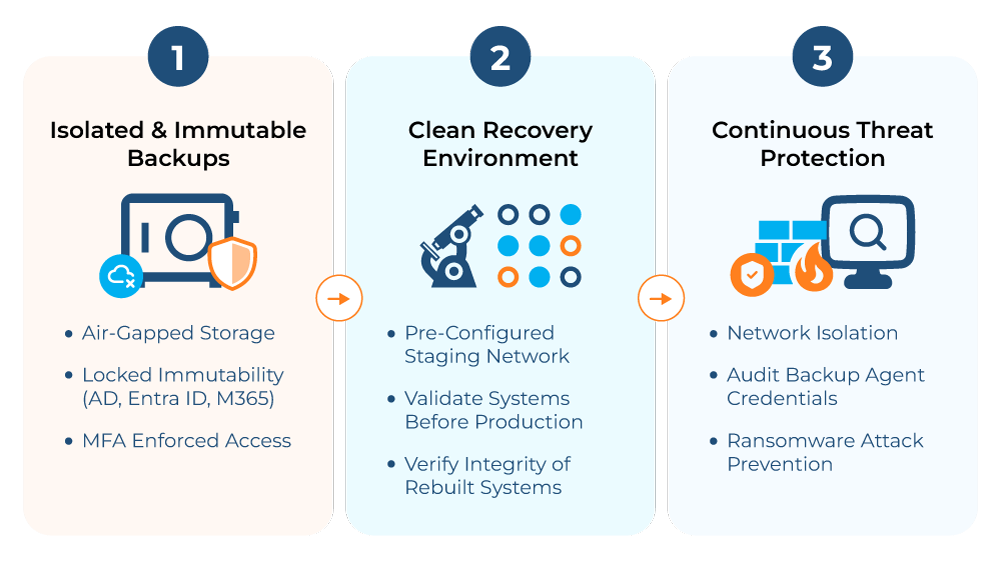
Rebuilding systems on the production network during an active incident risks reinfection before recovery completes. Attacker-controlled devices still on the network, or persistence mechanisms that survived partial remediation, can reach newly restored systems the moment they connect. A staging network, physically or logically isolated from production, is where rebuilt systems are validated before they rejoin production.
The staging environment needs its own DNS, DHCP, and a clean domain controller with no trust relationship to the compromised domain. Every rebuilt system passes integrity validation in staging before production connectivity is restored; this is not optional for Tier 1 workloads, since it is the control that prevents a recovery from becoming a second incident.
Deploying a temporary DC means building a new domain controller from clean installation media, never from a backup of a potentially compromised DC, inside a VLAN or Azure subscription with no network path to production. Configure an independent DNS zone and DHCP scope for the staging network, since pointing rebuilt systems at production DNS risks both name-resolution conflicts and exposure to a DNS server that an attacker may still control. Enforce network isolation at the firewall or Network Security Group (NSG) level, with no rules allowing staging-to-production traffic. Lift that block only after endpoint detection and response validation confirms a clean scan, current signature definitions, and zero active detections on each rebuilt system.
Scheduled task audits catch persistence hiding in plain sight, as the example below shows. Registry run-key checks compare the HKLM and HKCU Run, RunOnce, Winlogon, Shell, and Userinit values against a known-clean baseline. Flag any entry pointing to a script in a Temp or AppData folder, an unsigned binary, or a command invoking an encoded PowerShell argument. Local administrator reviews compare local Administrators group membership on each rebuilt system against the provisioning baseline from Active Directory or your endpoint management tool. Flag any account added outside that process, and confirm the built-in Administrator account remains disabled.
To list scheduled tasks on a rebuilt server not owned by SYSTEM or Microsoft, run:
					# List scheduled tasks on a rebuilt server not owned by SYSTEM or Microsoft
Get-ScheduledTask |  Where-Object {    $_.Principal.UserId -notin @('SYSTEM','NT AUTHORITY\SYSTEM','LOCAL SERVICE','NETWORK SERVICE') -and    $_.TaskPath -notlike '\Microsoft\*'  } | Select-Object TaskName, TaskPath, @{N='Author'; E={$_.Principal.UserId}}
Test failover for hybrid identity services
Hybrid identity services, Entra ID Connect sync, Active Directory Federation Services (AD FS), and the certificate authority are frequently overlooked in BCDR planning. A recovery that leaves Entra ID Connect sync broken or AD FS unavailable results in authentication failures across all cloud applications, even after on-premises systems are fully restored.
Failover testing for hybrid services means verifying that three things occur:
- Entra ID Connect re-establishes sync
- AD FS tokens remain trusted after a recovery
- Certificate authority continuity does not lapse mid-incident
Each has a sequence that differs from a standard system restore.
Document the Entra ID Connect sync account credentials and configuration export, and store both offline. Test Entra ID Connect reinstallation against a restored DC in staging, and verify that the AD FS (Active Directory Federation Services) service account credentials are included in the credential reset sequence. Verify that the certificate authority’s CRL (Certificate Revocation List) distribution points remain accessible from the recovery environment.
To check Entra ID Connect sync status and export its configuration for offline storage, run:
					# Check Entra ID Connect sync status and last sync time
Get-ADSyncScheduler | Select-Object SyncCycleEnabled, NextSyncCyclePolicyType, NextSyncCycleStartTimeInUTC
# Export Entra ID Connect configuration for offline storageGet-ADSyncGlobalSettings | Export-Csv C:\BCDRDocs\EntraIDConnect_Config.csv -NoTypeInformation
Cayosoft Guardian Audit & Restore - Unified Change History
Cayosoft Guardian Audit & Restore maintains a granular, time-stamped change history across Active Directory, Entra ID, Exchange Online, and Teams. During a hybrid identity recovery, your team can identify exactly which sync configurations, service principal credentials, or Conditional Access policies changed during the incident window and restore them to a known-clean state without manual reconstruction.
Monitor backup job health continuously
A backup job that completes with warnings is not the same as one that succeeds. Warning states, insufficient storage, agent connectivity issues, and throttled transfers frequently precede outright failures. By the time a job fails silently for a week, the last clean recovery point may be too old to meet the RPO.
Monitoring backup health means more than watching for failed jobs. It means alerting on jobs that did not run on schedule, recovery point age thresholds, storage utilization approaching capacity, and agent version drift. Each is an early warning well before it shows up as a job error.
Alert on any backup job failure or warning within 30 minutes of completion, and on a recovery point whose age exceeds 1.5 times the scheduled backup interval. Watch storage utilization at 70% and 85% of capacity, flag an agent that has not checked in for 24 hours, and alert when a protected VM drops out of a backup policy.
To report backup job failures across all vaults in the last 24 hours, run:
					# Report backup job failures in the last 24 hours across all vaults
$vaults = Get-AzRecoveryServicesVault

foreach ($vault in $vaults) { Set-AzRecoveryServicesVaultContext -Vault $vault Get-AzRecoveryServicesBackupJob -Status Failed -From (Get-Date).AddHours(-24) | Select-Object JobId, WorkloadName, Status, StartTime, Duration | Sort-Object StartTime -Descending}
Cayosoft Guardian Protector - Always-On Monitoring
Cayosoft Guardian Protector provides continuous, agentless monitoring across Active Directory, Entra ID, and Microsoft 365 at no cost. During the recovery window, it delivers real-time alerts on privilege escalation, configuration changes, and new account activity. Your team can confirm the environment is clean before declaring recovery complete.
Reference: Microsoft: Monitor Azure Backup
Maintain offline and off-site copies
The 3-2-1 backup rule defines the minimum configuration: three copies of your data, on two different media types, where one copy is stored offsite and offline. This rule exists because every single-location or single-medium strategy has a known failure mode. An immutable cloud vault addresses ransomware, an off-site tape addresses data center destruction, and an air-gapped copy addresses a compromised cloud account.
For Microsoft environments, the off-site and offline requirements span three categories: domain controller system state and AD database backups; Microsoft 365 data for compliance and recovery; and BCDR documentation. That documentation—runbooks, passwords, and topology diagrams—is what your team needs to execute a recovery, and a procedure stored only in SharePoint is inaccessible when Microsoft 365 is unavailable.
Export AD system state backups to an immutable Azure vault and to encrypted offline media quarterly. Configure Microsoft 365 backup using Microsoft 365 Backup or a third-party solution with off-site export, and store BCDR runbooks and break-glass credentials on encrypted offline media in a physically secured location. Verify offline media readability every six months; media degrades, and encryption keys rotate.
To export an AD system state backup and list available backup versions, run:
					# Export AD system state backup to a local path (run on DC)
wbadmin start systemstatebackup -backupTarget:E: -quiet
# List available system state backup versions
wbadmin get versions -backupTarget:E:
Define a communication and escalation plan
A BCDR plan without a communication plan fails when leadership asks for a status update. Who declares a disaster, who authorizes the decision to fail over rather than recover in place, and who notifies customers, partners, and regulators? These questions need documented, tested answers that do not depend on systems that may themselves be unavailable during the incident.
US regulatory notification obligations trigger when an incident affects customer data. The Cyber Incident Reporting for Critical Infrastructure Act of 2022 (CIRCIA) requires impacted entities to report incidents to the Cybersecurity and Infrastructure Security Agency (CISA) within 3 days. The Health Insurance Portability and Accountability Act (HIPAA) requires notification to the Department of Health and Human Services within 60 days for incidents involving protected health information. Public companies must file Form 8-K with the SEC within four business days if material. All of these timelines run from the moment of discovery, not recovery.
Before an incident occurs, document the following: Who can invoke BCDR procedures, and at what level of impact. All of the following are incident communications that should be retained for post-incident review:
- An out-of-band contact list (mobile numbers, personal email, and a non-Microsoft channel for the response team)
- Regulatory notification obligations and their deadlines, mapped at the start of every incident
- A customer and partner notification template, drafted in advance rather than under pressure
- A single communications lead, to prevent contradictory information from reaching stakeholders.
Reference: CISA: Cyber incident reporting
Conduct regular BCDR exercises
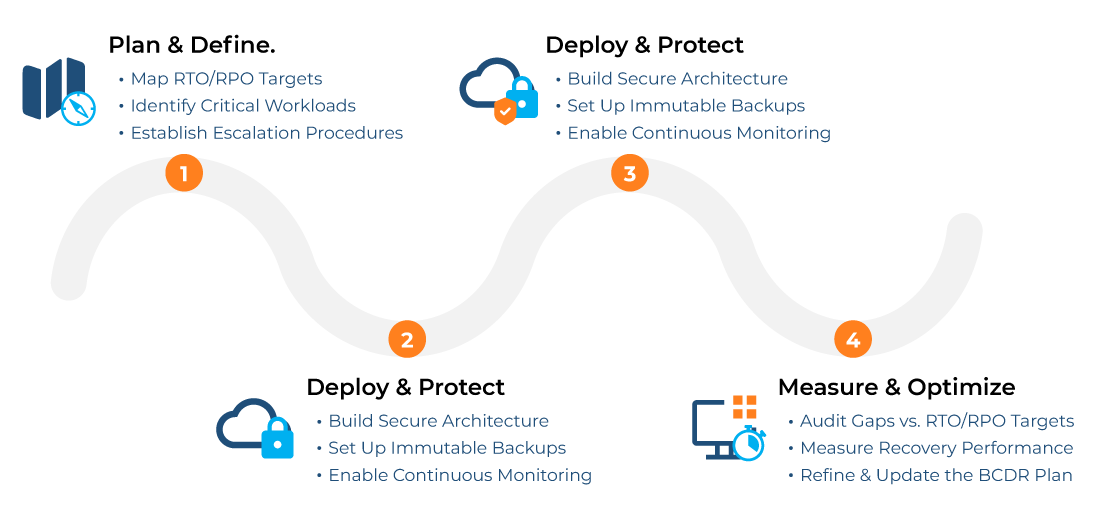
A BCDR plan that has never been tested is a hypothesis. Tabletop simulations reveal procedure gaps and authority conflicts without the pressure of a live incident. Live recovery drills measure actual recovery time against your RTO targets and expose the gap between what the procedure says and what the team can execute; tabletops identify what is missing; drills confirm what works.
BCDR exercises must run on a schedule. Run one tabletop simulation per quarter, each covering a different scenario: ransomware, datacenter outage, hybrid identity failure, or Microsoft 365 unavailability. Run one live recovery drill per year that restores AD from backup in an isolated environment, measuring elapsed time against the RTO target.
A quarterly tabletop walk-through takes decision-makers through a failure scenario, forcing sequencing and authority decisions on paper. A bi-annual restore test restores a domain controller from backup in staging and confirms it joins the domain correctly. An annual forest recovery drill executes the complete sequence, timed with the actual response team, and an annual Microsoft 365 failover test verifies that Exchange, Teams, and SharePoint remain accessible during a simulated outage.
To measure AD replication convergence time after a recovery drill, run:
					# Measure AD replication convergence time after a recovery drill
$startTime = Get-Date
repadmin /syncall /AdeP
$elapsed = (Get-Date) - $startTime
Write-Host "Replication sync completed in $($elapsed.TotalSeconds) seconds"
Cayosoft Guardian Instant Forest Recovery - Operations Back In Minutes
Cayosoft Guardian Instant Forest Recovery provides a continuously validated standby environment, meaning the recovery infrastructure is automatically tested rather than only during scheduled drills. When your team runs a live forest recovery exercise, the sequence executes in minutes rather than hours, giving you a realistic baseline for your RTO measurements.
Reference: NIST SP 800-34: Contingency Planning Guide
Watch our recorded & upcoming educational webinars about identity protection
Conclusion
BCDR failures are almost always predictable in retrospect. The backup job that failed silently three weeks before the incident, the forest recovery procedure that had never been run against a real restore, and the off-site copy had not been verified since the prior year. Each represents a gap between the plan on paper and the plan that actually works under pressure.
Cayosoft’s Guardian suite addresses these gaps directly, automating forest recovery, maintaining unified change history across Active Directory and Microsoft 365, and providing continuous monitoring during the recovery window. Each capability targets one of the practices above, turning a documented plan into a tested, repeatable recovery.
See how Cayosoft can strengthen your BCDR posture. Schedule a demo today.
Stop AD Threats As They Happen
Cayosoft Protector provides continuous monitoring and real-time alerts across your entire Microsoft Identity stack
Like This Article?
Subscribe to our LinkedIn Newsletter to receive more educational content