



TL;DR
Active Directory unconstrained delegation allows compromised servers to store and reuse any user’s authentication tickets, creating a direct path for attackers to steal credentials and achieve domain-wide control. Organizations must audit their environments to identify accounts with this legacy setting enabled, transition to constrained delegation alternatives, and implement real-time monitoring to detect exploitation attempts before they escalate into full domain compromise.
Active Directory unconstrained delegation is a legacy feature that creates a serious security gap. When enabled, it lets a computer or service account impersonate any user who authenticates to it by storing their Ticket-Granting Tickets (TGTs) in memory. Attackers who compromise these accounts and devices extract those TGTs and move laterally across your network with domain admin privileges. This is a proven attack vector in real breaches, especially in environments where delegation settings haven’t been audited recently.
This guide explains how unconstrained delegation works, why it’s dangerous, and how to detect and disable it. You’ll get practical steps to audit your environment and implement safer alternatives that protect your hybrid Microsoft infrastructure.
What Is Unconstrained Delegation in Active Directory?
To understand Active Directory unconstrained delegation, you need to see how authentication moves through your network. This feature lets a server or service act as any user who authenticates to it, operating with their full privileges across your entire domain.
How Kerberos Authentication Works
- Initial Authentication: Your credentials go to the KDC, which verifies them and issues a Ticket-Granting Ticket (TGT).
- Service Request: When you need to access a resource like a file share or web application, your workstation presents the TGT to the KDC and requests a service ticket.
- Service Access: The KDC issues a service ticket encrypted for that specific resource, which you present to gain access.
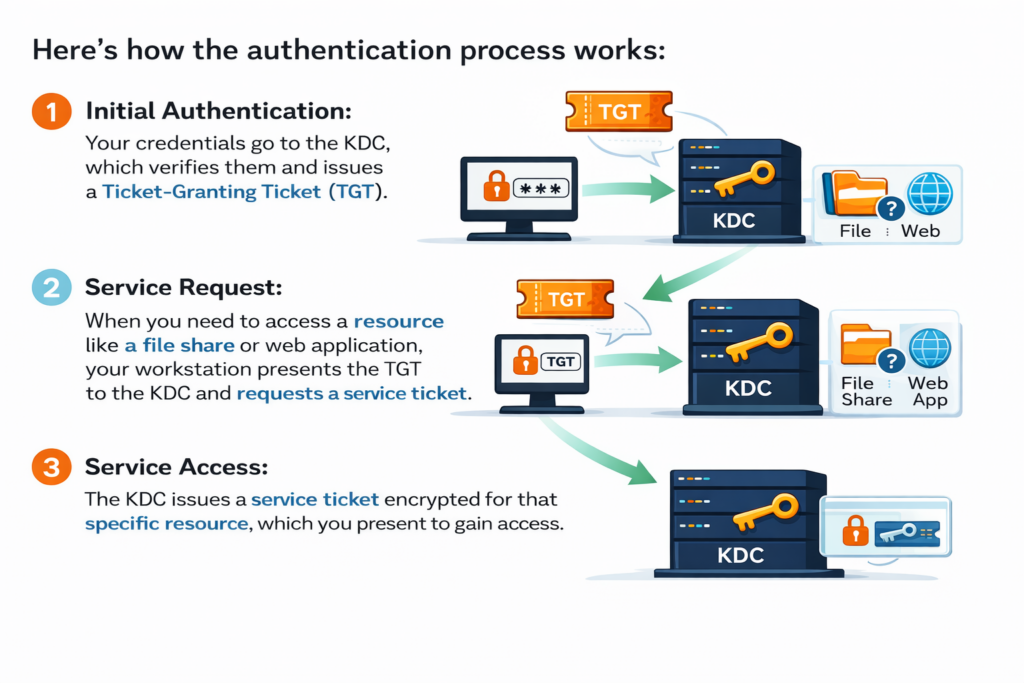
This ticket-based system removes the need to repeatedly enter passwords while maintaining security through encryption and time-limited access tokens.
The Role of Ticket-Granting Tickets (TGTs)
The TGT is your master key within a Kerberos environment, proving that you’ve authenticated successfully and letting you request service tickets without re-entering credentials. TGTs typically remain valid for 10 hours by default, though administrators can adjust this timeframe.
The ticket contains your security identifier, group memberships, and privilege information, basically, everything a service needs to determine what you’re allowed to do. When a server with unconstrained delegation receives your authentication request, it stores this TGT in memory.
A stored TGT gives that server the power to request service tickets on your behalf to any resource in the domain, whether you intended that access or not.
Why Active Directory Unconstrained Delegation Exists
Microsoft introduced unconstrained delegation in Windows Server 2000 to solve a specific problem: multi-tier applications. This feature allowed services to access other services on behalf of an authenticated user without requiring reauthentication. If a user authenticated to a web server, that server could then impersonate the user to access back-end databases without prompting for credentials again.
For administrators in 2000, this was the only delegation option available. Enabling it required just a single checkbox under the Delegation tab in Active Directory Users and Computers. The simplicity made it appealing, especially when complex web applications refused to function without it. Many organizations enabled unconstrained delegation to make applications work, then never revisited that decision.
Unconstrained Delegation Security Risks
Unconstrained delegation turns any compromised account into a master key for your entire domain. Let’s examine the specific attack vectors that make this configuration so dangerous.
TGT Forwarding and Credential Theft
When you authenticate to a server with unconstrained delegation enabled, your TGT gets cached in that server’s memory. An attacker who gains access to that server can extract stored tickets using tools like Mimikatz or Rubeus without ever touching your actual password.
The extraction process takes seconds. Once an attacker dumps the Local Security Authority Subsystem Service (LSASS) process memory, they have access to every TGT stored on that machine. They can then inject these tickets into their own session and authenticate as those users to any service in the domain. Your credentials never left your workstation, yet the attacker operates with your full privileges.
The attacker doesn’t need your password, just access to a server where your TGT is cached. This makes traditional password rotation ineffective as a defense.
The timing creates another layer of risk. Since TGTs remain valid for up to 10 hours by default, an attacker has a substantial window to use stolen tickets before they expire. During that time, they can request service tickets, access resources, and establish persistence mechanisms, all while impersonating legitimate users.
Domain Controller Compromise Scenarios
Domain controllers represent the most critical targets in any Active Directory environment. When attackers identify accounts with unconstrained delegation, they often use a specific technique called “printer bug” or coerced authentication to force a domain controller to authenticate to their compromised server.
Here’s how the attack unfolds. The attacker compromises a server with unconstrained delegation enabled, then uses the Print System Remote Protocol (MS-RPRN) or similar protocols to trigger the domain controller to authenticate to their controlled machine. When the domain controller authenticates, it forwards its TGT. The attacker now has a domain controller’s TGT and can create Golden Tickets or perform DCSync attacks to extract password hashes for every account in the domain.
This isn’t a vulnerability in the traditional sense; it’s a feature working exactly as designed. Microsoft has documented this behavior, but many administrators don’t recognize the security implications until after an incident. According to Altered Security, understanding these Kerberos-based attacks requires hands-on practice in controlled environments because the attack chain involves multiple steps that must be executed in sequence.
Lateral Movement and Privilege Escalation
Once attackers obtain TGTs through unconstrained delegation, lateral movement becomes straightforward. They can authenticate to file shares, databases, web applications, and management interfaces without additional exploitation. Each new system they access potentially yields more cached TGTs, creating a cascading effect that spreads their access across your environment.
The privilege escalation path typically follows a predictable pattern. This table shows the standard progression that attackers use to move from initial compromise to full domain control.
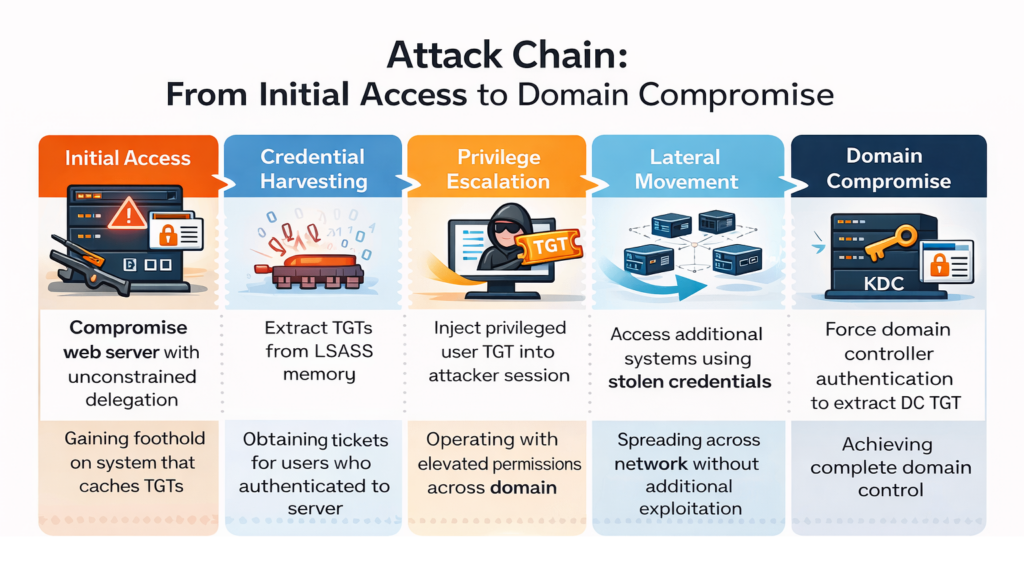
The speed of this progression depends on your environment’s configuration and which users authenticate to compromised systems. In environments where administrators regularly access servers with unconstrained delegation enabled, the timeline from initial compromise to domain admin access can be measured in hours rather than days or weeks.
How to Detect and Audit Unconstrained Delegation
Finding accounts with unconstrained delegation enabled is the first step toward securing your environment. You need systematic detection methods combined with continuous monitoring to catch both existing misconfigurations and new threats as they emerge.
Identifying Accounts with Unconstrained Delegation Enabled
- Open PowerShell with administrative credentials on a domain-joined machine with the Active Directory module installed.
- Run the following command to identify computer accounts:
- Query user and service accounts separately:
- Document each account’s purpose and owner by cross-referencing with your CMDB or asset inventory to understand why delegation was enabled.
- Assess criticality and exposure by checking which users regularly authenticate to these systems and whether domain admins are among them.
Get-ADComputer -Filter {TrustedForDelegation -eq $true} -Properties TrustedForDelegation
This returns all computer accounts configured for unconstrained delegation.
Get-ADUser -Filter {TrustedForDelegation -eq $true} -Properties TrustedForDelegationUser accounts with this setting are especially high-risk.
Monitoring for Exploitation Attempts
Detection without monitoring leaves you blind to active exploitation. Attackers don’t announce themselves when they extract TGTs from compromised systems. You need to watch for specific behaviors that indicate that someone is weaponizing unconstrained delegation against you.
Event log monitoring provides your first line of defense. When an attacker extracts TGTs or uses tools like Mimikatz, specific event IDs appear in your security logs. For example, Event ID 4624 (successful logon) with logon type 3 combined with Event ID 4768 (Kerberos TGT request) can indicate TGT forwarding activity. Event ID 4769 shows service ticket requests, which spike abnormally when attackers use stolen TGTs to access multiple resources rapidly.
Watch for coerced authentication attempts where attackers force your domain controllers to authenticate to compromised servers. The printer bug exploit generates Event ID 5145 (network share access) when attackers trigger the Print Spooler service remotely. Behavioral analytics that detect authentication patterns deviating from baseline activity (like a web server suddenly accessing file shares it never touched before) signal potential credential theft in progress.
Continuous Visibility Across Hybrid Environments
Your attack surface extends beyond on-premises Active Directory. Hybrid environments that span Microsoft Entra ID (formerly Azure AD) and Microsoft 365 create additional complexity. An attacker who compromises an on-premises account with unconstrained delegation can potentially access cloud resources through synchronized identities or federated authentication relationships.
Organizations managing hybrid identity need visibility that spans both environments simultaneously. JumpCloud emphasizes that privileged access management requires understanding which accounts have elevated permissions across all connected systems, not just in isolated silos. Your monitoring must track changes to delegation settings, privilege assignments, and authentication patterns across Active Directory, Microsoft Entra ID, Exchange Online, and other connected services.
Native Microsoft tools offer fragmented visibility: Active Directory Users and Computers shows on-premises settings, while the Entra ID portal displays cloud configurations. Correlating changes between these systems requires manual effort that delays threat detection. When an attacker modifies delegation settings or extracts credentials, the time gap between action and detection determines whether you can respond before damage occurs.
Defending Against Unconstrained Delegation Attacks
Removing unconstrained delegation from your environment requires a methodical approach that balances security requirements with business continuity. Legacy applications sometimes still rely on this configuration, so you can’t simply disable everything without the risk of breaking critical services. The objective is to systematically reduce exposure while setting up detection controls that alert you to exploitation attempts as they happen.
Disable Unnecessary Unconstrained Delegation
Begin by removing unconstrained delegation from accounts that don’t actually need it. A PowerShell audit, as described in the previous section, will identify these accounts; now you need to verify whether each one genuinely requires delegation enabled. This validation process helps you eliminate unnecessary risk without disrupting application functionality.
Collaborate with application owners to test disabling delegation in non-production environments first. Many applications configured with unconstrained delegation years ago no longer need it because of application updates or architecture changes. Document your testing results and create a rollback plan before implementing changes in production. For accounts where you’ve confirmed that delegation isn’t necessary, disable it through Active Directory Users and Computers: open the account properties, go to the Delegation tab, select “Do not trust this computer for delegation,” and apply the change.
Service accounts deserve particular attention: If you discover user accounts configured for unconstrained delegation, prioritize removing this setting right away. User accounts with this configuration represent extremely high-value targets because they combine credential storage with interactive login capabilities. Computer accounts configured for delegation should be evaluated based on their function; web servers, application servers, and other internet-facing systems need remediation first because they face elevated compromise risk.
Implement Constrained Delegation Alternatives
Constrained delegation addresses the same multi-tier application challenges without the security weaknesses of unconstrained delegation. This configuration limits which services an account can impersonate users to, establishing clear boundaries that prevent attackers from using stolen credentials throughout your entire domain.
Implementation varies depending on your application’s authentication requirements. Here’s how different delegation options compare regarding security and functionality.
Delegation Type | Scope of Access | Protocol Support | Security Level |
Unconstrained | Any service in the domain | All protocols | High risk: enables lateral movement |
Constrained (Kerberos only) | Specific services defined by administrator | Kerberos only | Moderate risk: limits but doesn’t eliminate exposure |
Resource-Based Constrained | Controlled by resource owner, not delegating account | Kerberos only | Lower risk: provides granular control with audit trail |
Resource-based constrained delegation offers the strongest security because the resource you’re protecting controls which accounts can delegate to it, rather than the service account declaring what it can access. This inverted trust model means that compromising a service account doesn’t automatically grant access to resources. The attacker would need to compromise both the service account and modify permissions on target resources, which generates additional audit events.
Transitioning from unconstrained to constrained delegation requires careful planning and testing, but the security improvement justifies the effort for any account exposed to authentication from multiple users.
Real-Time Threat Detection with Cayosoft Guardian Protector
After you’ve removed unnecessary delegation settings and implemented constrained alternatives, you still need continuous monitoring to detect misconfigurations, unauthorized changes, and active exploitation attempts. Traditional tools provide snapshots of your security state at a single point in time, leaving you blind to changes that happen between scans. Cayosoft Guardian Protector delivers real-time visibility across your entire hybrid Microsoft identity infrastructure without requiring agents or complex deployment.
Guardian Protector monitors every delegation setting change across Active Directory and Microsoft Entra ID the moment it happens. When an administrator enables unconstrained delegation on an account, whether intentionally or accidentally, you receive an immediate alert with full context about who made the change, from which workstation, and at what time. This real-time detection closes the window that attackers need to exploit newly misconfigured accounts before your security team notices.
The platform tracks specific indicators that signal delegation-based attacks in progress: unusual authentication patterns from accounts with delegation enabled, suspicious service ticket requests that deviate from baseline behavior, and privilege escalations that follow the attack patterns described earlier in this guide. Unlike SIEM solutions that depend on delayed log ingestion, Guardian Protector captures these events directly from your identity infrastructure, eliminating the lag time that allows attackers to complete their objectives before detection.
Organizations managing hybrid environments get unified visibility across on-premises Active Directory and cloud services, including Microsoft Entra ID, Exchange Online, Microsoft Teams, and Intune. When an attacker compromises an on-premises account with delegation enabled and attempts to move to cloud resources, Guardian Protector correlates the authentication chain across both environments. This hybrid visibility prevents the blind spots that occur when security teams monitor on-premises and cloud systems separately.
Guardian Protector provides unlimited monitoring of Microsoft identity objects across your entire environment. There are no caps on the number of accounts, groups, or policies you can track, making it suitable for organizations of any size, without hidden quotas or surprise license restrictions. The platform automatically updates its threat detection intelligence to identify new attack techniques as they emerge, protecting you against evolving threats without requiring manual rule updates or custom scripts.
Ready to close the security gaps created by unconstrained delegation? Download Guardian Protector for free to continuously detect threats and change monitoring across your hybrid Microsoft identity infrastructure.
Securing Your Identity Infrastructure
Unconstrained delegation is a serious vulnerability in Active Directory environments, providing attackers with a clear route to domain compromise through standard authentication mechanisms. Mitigating the risk associated with it combines systematic auditing, migration to constrained alternatives, and ongoing monitoring to convert this legacy risk into a controlled security state.
The technical steps presented here establish a repeatable process to remove unconstrained delegation while keeping applications running smoothly. Begin with your highest-risk accounts: those internet-facing servers and service accounts where administrators regularly authenticate, and progress methodically through your environment. Run your audit this week, rank accounts for remediation, and put monitoring in place that notifies you of both configuration errors and active attacks throughout your hybrid Microsoft infrastructure.
FAQs
Unconstrained delegation should be avoided in production environments since it creates significant security vulnerabilities that attackers actively exploit. Microsoft introduced constrained and resource-based constrained delegation as secure alternatives that provide the same functionality without the extensive attack surface.
Attackers commonly use Mimikatz and Rubeus to dump TGTs from LSASS memory on compromised servers. These tools can extract cached tickets in seconds, allowing attackers to impersonate legitimate users without ever obtaining their passwords.
Unconstrained delegation allows a service to impersonate users to any resource across the entire domain, while constrained delegation limits impersonation to specific services defined by administrators. This restriction significantly reduces the risk of lateral movement if the service account becomes compromised.
Some older applications may experience authentication issues when delegation is disabled, which is why testing in non-production environments is essential before making changes. However, many applications configured with delegation years ago no longer require it due to updates or architectural changes.
It exploits the MS-RPRN protocol to force domain controllers to authenticate to attacker-controlled servers with unconstrained delegation, allowing attackers to capture the domain controller’s TGT. This captured ticket can then be used to perform DCSync attacks and achieve complete domain compromise.
See Cayosoft in Action
Cayosoft is recognized by Gartner as an ITDR solution provider and provides solutions that make identities more resilient to attacks and guarantee a fast forest recovery, if needed. Learn how Cayosoft Guardian facilitates granular change tracking, post-breach analysis, and long-term AD security improvements. Schedule a demo to see the capabilities in depth.