
Home » Implementing Zero Trust Security with Microsoft Entra » The Essential Guide to Entra ID Backup Best Practices
The Essential Guide to Entra ID Backup Best Practices
Learn about best practices for backing up Entra ID, including comprehensive coverage, centralized automation, data retention, recovery testing, change tracking, encryption, data residency, and protecting user accounts, groups, and applications.
Explore the chapters:
Stop AD Threats As They Happen
Cayosoft Protector provides continuous monitoring and real-time alerts across your entire Microsoft Identity stack
Like This Article?
Subscribe to our LinkedIn Newsletter to receive more educational content
In a cloud-first world, identity is the first layer of access to applications and data, making it highly susceptible to security attacks. An accidental deletion, misconfiguration, or security incident can prevent access to resources, disrupt business operations, and result in compliance failures.
Entra ID is the definitive identity foundation for the entire Microsoft ecosystem (including Azure, Microsoft 365, and Intune). But it does not provide comprehensive protection by default, so understanding what and how to back up in your Entra ID environment is a business imperative.
This article explores the key aspects of Entra ID backup, examines the limitations of its built-in protections, and provides solutions, such as Cayosoft Guardian, to protect your digital identity infrastructure. It focuses on best practices to ensure organizational success.
Summary of Entra ID backup best practices
The following table outlines standard best practices for backing up Entra ID.
| Best practice | Description |
|---|---|
| Ensure comprehensive backup coverage | Back up all Entra ID object types, data, configuration, and policies. |
| Employ centralized backup automation | Utilize a specialized backup solution to automate backups instead of relying on manual exports. Avoid using multiple tools. |
| Pay attention to data retention | Establish long-term data retention in line with company policies and compliance requirements. |
| Do recovery tests | Perform regular recovery drills to validate backup integrity and the ability to quickly restore the environment to a known good state when a failure occurs. |
| Set up change tracking and rollback | Implement auditing to log all configuration changes and enable rapid reversal of unauthorized actions. |
| Implement robust encryption | Protect your high-value backup data against unauthorized access and malicious compromise. |
| Ensure proper data residency and compliance | Simplify audit preparation by ensuring that your backup solution aligns with required regulatory standards. |
Manage, Monitor & Recover AD, Azure AD, Office 365

Unified Console
Use a single tool to administer and secure AD, Azure AD, and Office 365

Track Threats
Monitor AD for unwanted changes – detect for security or critical functions

Instant Recovery
Recover global enterprise-wide Active Directory forests in minutes, not days
Entra ID data and objects
User accounts are not the only identity infrastructure that is important and should be backed up; in a hybrid environment, there are other configurations that user accounts depend on and must also be protected. For example, in the event of a recovery, you need to not only restore users but also ensure that you don’t lose the multi-factor authentication settings they use.
Let’s start by looking at various Entra ID data and objects, their interdependencies, and other information that must be backed up. This will help you determine what you must protect and the risk of not backing up properly, which will, in turn, aid you in choosing the right backup solution.
User accounts and their attributes
User accounts sit at the core of an identity infrastructure, representing the digital identities of users within an organization. They contain names, email addresses, job titles, role assignments, and access permissions, among many other types of information.
Accounts also include various attributes related to authentication settings, such as:
- Multi-factor authentication (MFA) configurations and registered devices
- Passwordless authentication enrollments
- Phone numbers and email addresses associated with authentication
- Security questions and answers
- Custom attributes
In addition, there are other important attributes to consider, such as user principal names, proxy addresses, manager relationships, direct reports, license assignments, and service plans.
Groups and memberships
Groups are used to organize user accounts and devices for efficient access management and to apply policies. Group attributes include memberships, dynamic group definitions, and relationships.
Applications and service principals
Entra ID supports application registrations, which are digital identifiers for applications. This allows apps to access resources, data, and APIs securely. Application registrations contain configuration data such as:
- Application identifiers and redirect URIs
- API permissions and consents
- Client IDs, secrets, and certificates
- Token configurations and claim mappings
- Branding, publisher verification status, and ownership assignments
Applications use service principals to access resources, which include additional information like:
- Role assignments that grant application permissions to Azure resources
- Conditional access policies for the application
- Users and groups that can access the application
- Single sign-on (SSO) configurations
Manage, Monitor & Recover AD, Azure AD, M365, Teams
| Platform | Admin Features | Single Console for Hybrid (On-prem AD, Azure AD, M365, Teams) | Change Monitoring & Auditing | User Governance (Roles, Rules, Automation) | Forest Recovery in Minutes |
| Microsoft AD Native Tools | ✓ | ||||
| Microsoft AD + Cayosoft | ✓ | ✓ | ✓ | ✓ | ✓ |
Conditional Access policies
Conditional Access policies serve as the primary enforcement engine of zero trust in Entra ID. These policies define the conditions that allow or block access to resources. A Conditional Access policy consists of assignment information—such as the users, groups, and roles the policy affects—as well as inclusions and exclusions. It specifies which applications and actions trigger the policy as well as the conditions under which evaluations are performed, including sign-in risks, device platforms, and locations. It also includes information on controls that determine access, such as requiring multi-factor authentication (MFA).
Synchronization information for hybrid environments
Entra ID holds information on Entra Connect synchronization settings for hybrid identity environments with both AD and Entra. These settings define how identities across on-premises and cloud environments align. The cloud-side configuration that Entra ID holds includes synchronized object mappings and attribute flow rules, password hash synchronization and passthrough authentication settings, and filters and scopes.
The need for Entra ID backup
Cloud-based identity solutions, such as Entra ID, have become a de facto standard for modern business-critical applications, authenticating and authorizing users as the first step to access applications, data, and resources. The consequences of data loss due to accidental deletions, failed migrations, misconfigurations, or security breaches can be catastrophic, resulting in significant business disruptions. Let’s look at some of the reasons why your organization needs a backup solution for Entra ID.
Shared responsibility
The cloud delivery model is a shared responsibility model between the service provider and the organization consuming the service. This shared responsibility also applies to Entra ID. While Microsoft is responsible for managing the infrastructure for Entra ID, organizations are responsible for managing their own data within it, so protecting your users, groups, roles, and other objects—including their configurations, policies, and relationships—is the organization’s responsibility. Ensuring a robust backup and recovery mechanism as a proactive measure is, therefore, a must.
Protection from deletions
One of the key objectives of having Entra ID backup is protection against deletions, whether intentional or accidental. Consider an example where an administrator executes a script to remove inactive guest users from the wrong organization unit, or worse, from the entire organization, deleting critical B2B collaboration accounts with vendors and partners. Or how about bulk modifications to the wrong objects and their attributes, removing access to critical applications and data for users. An accidental deletion of a group with granular access control relationships built over time is another example that can take serious effort to undo manually.
With limited native support from Entra ID for restoring objects, configurations, and policies, the manual restoration process can be time-consuming, leading to business disruption and other compounding issues.
Learn why U.S. State’s Department of Information Technology (DOIT) chose Cayosoft
Migration and upgrade failures
Migration scenarios, such as transitioning from legacy identity to Entra ID, consolidating multiple Entra ID tenants due to mergers or acquisitions, or upgrading authentication methods, may result in failures. A backup solution providing automated backups with point-in-time recovery capabilities can minimize downtime in the event of failed migrations and upgrades.
Misconfigurations and configuration drifts
Misconfigurations and configuration drifts—such as an application being excluded from MFA for temporary troubleshooting or a user with exceptions to Conditional Access policies as a one-time process—can weaken the security posture over time. Manual tracking and reverting can be challenging and easily overlooked. Entra ID backups can help with change tracking, and logs can be used to manage these changes more effectively.
Security
Threat actors increasingly believe that attacking or compromising identity systems is more valuable than alternative approaches, as it provides opportunities for longer and broader access. The Microsoft Digital Defense Report 2025 says that the first half of the year saw a 32% rise in identity-based attacks along with an increase in the novelty of such attacks with assistance from AI.
Security incidents—such as an attacker gaining access to Entra ID and registering malicious applications, creating hidden admin accounts, exploiting workload identities with higher privileges, or modifying conditional access policies—underscore the need for backups of identity infrastructures outside the primary environment to expedite detection and recovery.
Hybrid identity
Organizations with hybrid identity configurations are at risk of losing unsynchronized attributes and objects that live in Entra ID only. This includes strong authentication settings, group memberships, dynamic group configurations, Entra-joined devices, and Conditional Access policies, among others. For example, if a user account is disabled in on-premises AD, its corresponding Teams memberships in Entra ID are hard removed. Without a backup, these configurations must be created manually.
Compliance and governance use case
The need for Entra ID backup extends beyond operational resilience. For many regulated organizations governed by regulatory frameworks such as GDPR, HIPAA, SOC2, and ISO, there are strict requirements regarding data protection, recoverability, retention, and security. Some of these regulatory requirements include contingency planning through a backup and recovery process, the ability to recover and restore access to personal data in the event of data loss, storing historical configurations and access changes, proving that access controls are in place, and retaining logs for audits and investigations.
For example, ISO 27001 requires a policy to back up an organization’s information, which includes identity. GDPR Article 32c requires the ability to restore availability and access to personal data promptly in case of an incident. Similarly, HIPAA requires backup and disaster recovery planning, including the storage of compliance records and logs for a period of six years.
Entra ID backup solutions help organizations meet these requirements and more. They are invaluable during audits, as the solution’s advanced reporting provides detailed trails and insights into access policies—including when they were changed, by whom, and the justification for the changes. The enhanced audit capability is essential for compliance and can even provide deep visibility into critical administrative activities like user or policy deletion and restoration attempts within Entra ID.
Native backup capabilities
Entra ID offers several built-in features that provide a basic level of protection, such as soft delete and the recycle bin. It also provides audit logs.
Soft delete and the recycle bin
Entra ID offers a soft delete capability for specific objects, including users, Microsoft 365 Groups, and applications. When an object is soft deleted, it is sent to the recycle bin, from which it can be restored within 30 days, after which they are permanently deleted. The following objects support soft delete:
- Users
- Microsoft 365 groups
- Cloud security groups
- Application registration
- Service principals
- Administrative units
- Conditional Access policies
- Named locations
Objects that do not support soft delete are hard deleted, so they cannot be restored.
For example, to restore deleted users, navigate to the Deleted users section in the Microsoft Entra admin center, located under Users.
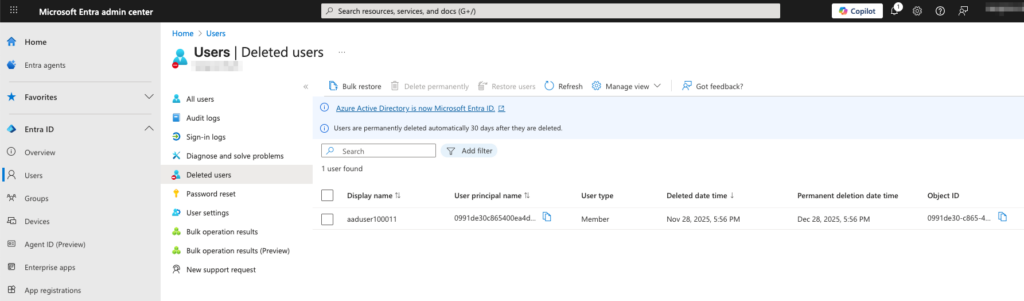
Deleted users in the Microsoft Entra admin center
Similarly, groups can be restored from the Deleted groups section under Groups, and applications can be restored from the Deleted applications section under App registrations.
Recycle bin for Active Directory (AD)
In a hybrid identity setup, you can enable the Active Directory Recycle Bin feature in the on-premises AD. Upon restoring a deleted on-premises AD object, Entra ID also restores the corresponding object. Note that the 30-day limit also applies in this case.
Microsoft Entra audit logs
Microsoft Entra audit logs provide a comprehensive report of every logged event, including changes to users, groups, applications, licenses, and custom security attributes. This feature can be used to review changes and, in the event of accidental deletions, restore data for up to 30 days. They show important details on tenant activities such as:
- The date and time of the occurrence
- The service that logged the occurrence
- The category and name of the activity
- The status of the activity
Additionally, you can view detailed information for a log entry, such as:
- The correlation ID for troubleshooting
- Details about the actor or target resource associated with the activity
- Where applicable, old and new values for the changed properties
These audit logs also provide helpful records to meet compliance requirements.
Audit logs can be accessed from the Audit logs section in the Monitoring & health section of the Microsoft Entra admin center.
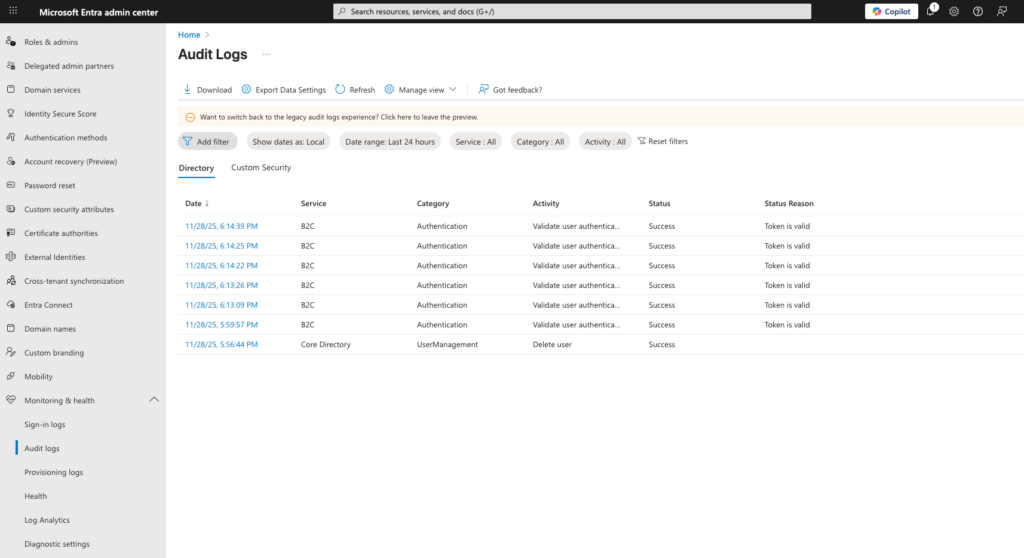
Audit logs in the Microsoft Entra admin center
Key features to look for in an Entra ID backup solution
When selecting a backup solution for Entra ID, organizations should seek capabilities that encompass protection, recovery, and compliance requirements. The following is a discussion of features to look for.
Comprehensive coverage
Since the native soft delete and recycle bin of Entra ID only support limited objects, consider a solution that provides comprehensive coverage for all Entra ID data and object types. This should include users, groups, applications, service principals, Conditional Access policies, authentication methods, administrative units, and coverage of cloud-only configuration for hybrid environments.
Centralized and automated backups
Manual backup processes using PowerShell or Graph API can be inconsistent and inefficient. Identity infrastructure is prone to frequent changes, which means the backup scripts need to be updated frequently. Additionally, updates to PowerShell modules, modifications to Graph API schemas, or the introduction of new objects also require updates to the script.
Select backup software that provides centralized and automated backup scheduling capabilities, ensuring comprehensive and consistent backups along with regular updates.
Extended backup retention
Entra ID does not have a native backup solution, so it does not provide any backup retention. Regulatory requirements require that Entra ID have backups that are stored for a specific duration, depending on the compliance and jurisdiction. Consider a backup solution that offers configurable retention periods through a lifecycle policy.
Recoverability
The ability to restore an Entra ID backup quickly when needed is obviously essential. Recovery capabilities such as point-in-time recovery can reduce recovery time, enabling organizations to quickly restore Entra ID to its last known good state. Granular restoration can enable the restoration of only affected objects.
Change tracking and automated rollback
Look for a backup solution that logs all changes to objects and their configurations, along with detailed information on who, what, when, and where. Change tracking helps with audit trails, compliance, troubleshooting, and security investigations. An automated rollback feature can use change tracking to reverse unauthorized changes or policy violations.
Support for compliance frameworks
A backup solution aligned with compliance frameworks makes it easy to track and report their status. Dashboards make it easier to generate reports, view documentation, and audit.
Strong access control and encryption
Choose a backup solution that supports role-based access control and encrypted backups, as these are essential given the sensitive nature of the data being backed up. The backup location, which contains snapshots of Entra ID, becomes a high-value target for malicious actors. Compliance frameworks also require that backups be encrypted, and only authorized personnel are allowed to access them.
Cayosoft Guardian for Entra ID backup and recovery
Cayosoft Guardian delivers the full spectrum of capabilities required in a modern Entra ID backup solution, providing comprehensive protection against data loss and misconfiguration.
- It offers a point-in-time recovery capability, enabling organizations to recover quickly in the event of disasters or errors. Unlike Microsoft Entra’s native 30-day soft-delete, Guardian supports unlimited data retention and continuously backs up Entra ID and Active Directory, so you can quickly and easily revert unexpected changes to any point in the past. This is also an invaluable feature for scenarios like cascading misconfigurations, investigations, and historical state reconstruction.
- Its granular restoration feature allows administrators to preview and restore individual data and objects, specific attributes, or policies, reducing recovery time and minimizing operational disruption. It also helps preserve unchanged parts of the identity infrastructure and avoid overwriting working changes that do not need to be reverted. Previews ensure that there are no unintended consequences before applying.
- Cayosoft Guardian uses change tracking to capture configuration changes that occur across all supported object types, providing visibility into what has changed, who made the change, and when it was made. It offers detailed reports, which can be helpful in meeting compliance requirements for frameworks such as GDPR, HIPAA, and SOC 2. You can also generate comparison reports, identify drifts, and track policy changes over time.
- The product supports hybrid identity infrastructures and understands synchronization relationships between Entra ID and Active Directory. Thus, it can back up attributes and configurations that exist only on the cloud.
- Guardian also supports auto-rollback, which detects and reverses unauthorized and/or unintended changes to Entra ID configuration. This proactive protection and automated remediation mechanism lets you define baselines that specify objects, attributes, and configurations that should not change, and through continuous monitoring, it can watch for deviations.
Learn why U.S. State’s Department of Information Technology (DOIT) chose Cayosoft
Conclusion
An organization’s digital identity infrastructure is a critical piece of its overall infrastructure, and backing it up cannot be an afterthought. Entra ID is a key component of digital infrastructure in many organizations, and without a backup solution in place, business continuity in the event of an incident is at significant risk.
It is not a question of if your organization will face an Entra ID disruption but rather when. Your ability to respond quickly and effectively under scenarios such as human error, unexpected failure, or security incident has a direct impact on your business.
Microsoft Entra’s native capabilities fall short of providing comprehensive protection. Solutions like Cayosoft Guardian address these challenges by providing automated scheduled backups, point-in-time recovery, automatic rollbacks, granular restoration, and detailed audit trails. And Guardian provides coverage that extends beyond just backup, encompassing areas such as faster recovery and compliance.
Like This Article?
Subscribe to our LinkedIn Newsletter to receive more educational content