
Missing Conditional Access Policy for requiring compliant devices in Entra ID
Cayosoft Threat Definition CTD-000166
Tune into Guardians of the Directory Podcast.




Stop AD Threats As They Happen
Cayosoft Protector provides continuous monitoring and real-time alerts across your entire Microsoft Identity stack
Like This Article?
Subscribe to our LinkedIn Newsletter to receive more educational content
Risk Summary
The absence of a Conditional Access policy that requires compliant devices poses a significant security risk. Devices that do not meet compliance requirements can be used to gain unauthorized access, bypass security controls, and execute malicious actions. Enforcing device compliance ensures that only managed and secured endpoints can access critical resources in Microsoft Entra ID.
- Severity: Medium
- Platform: Entra ID
- Category: Account protection
- MITRE ATT&CK Tactics: Persistence, Defense Evasion, Credential Access
- MITRE D3FEND Tactics: D3-APA (Access Policy Administration)
Description
The absence of a Conditional Access Policy to require compliant devices allows unmanaged or non-hardened endpoints to sign in to your Microsoft Entra tenant. Such devices can be leveraged by threat actors to gain unauthorized access, bypass security configurations, or execute malicious actions within your environment. Requiring compliant devices ensures that only managed and secured devices, adhering to organizational standards, can access critical resources.

Real-World Scenario
An attacker phishes a user and obtains valid Entra ID credentials. Because there is no Conditional Access policy requiring device compliance, the attacker signs in from an unmanaged personal laptop that has no corporate security controls, EDR, or full-disk encryption. From this unmanaged device, the attacker accesses email, SharePoint, and sensitive SaaS applications, then adds persistence by registering additional authentication methods and creating application consent grants. The organization’s traditional perimeter and VPN controls never see this traffic because access is fully cloud-based. CTD-000166 would have highlighted the missing compliant-device enforcement so the security team could implement the right Conditional Access policy before the compromise occurred.
Stop Privilege Escalation—Then Undo It with Cayosoft Guardian Audit & Restore
Real-time alerts across AD & Entra ID with one-click rollback.
Detect this and other threats with Cayosoft Guardian Protector (Free of Charge)
1.) Download Cayosoft Guardian Protector for free real-time threat detection and monitoring of your hybrid AD and Microsoft 365 environment. Once downloaded, sign in and navigate to the Threat Detection Dashboard.


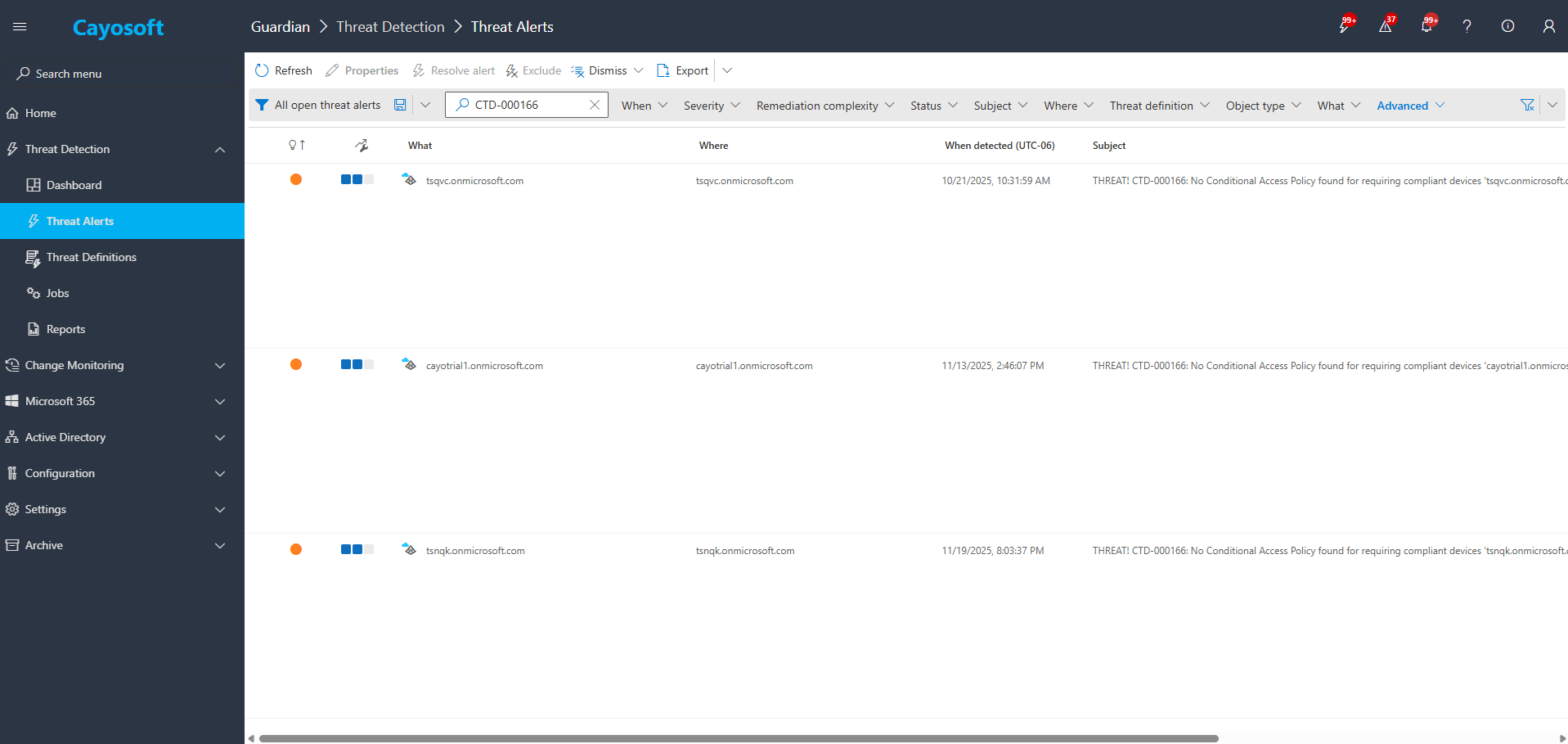
2.) Search for CTD-000166 or “Missing Conditional Access Policy for requiring compliant devices in Entra ID”.
3.) Open any alert and Click for details (from Raise Threat Alert action).
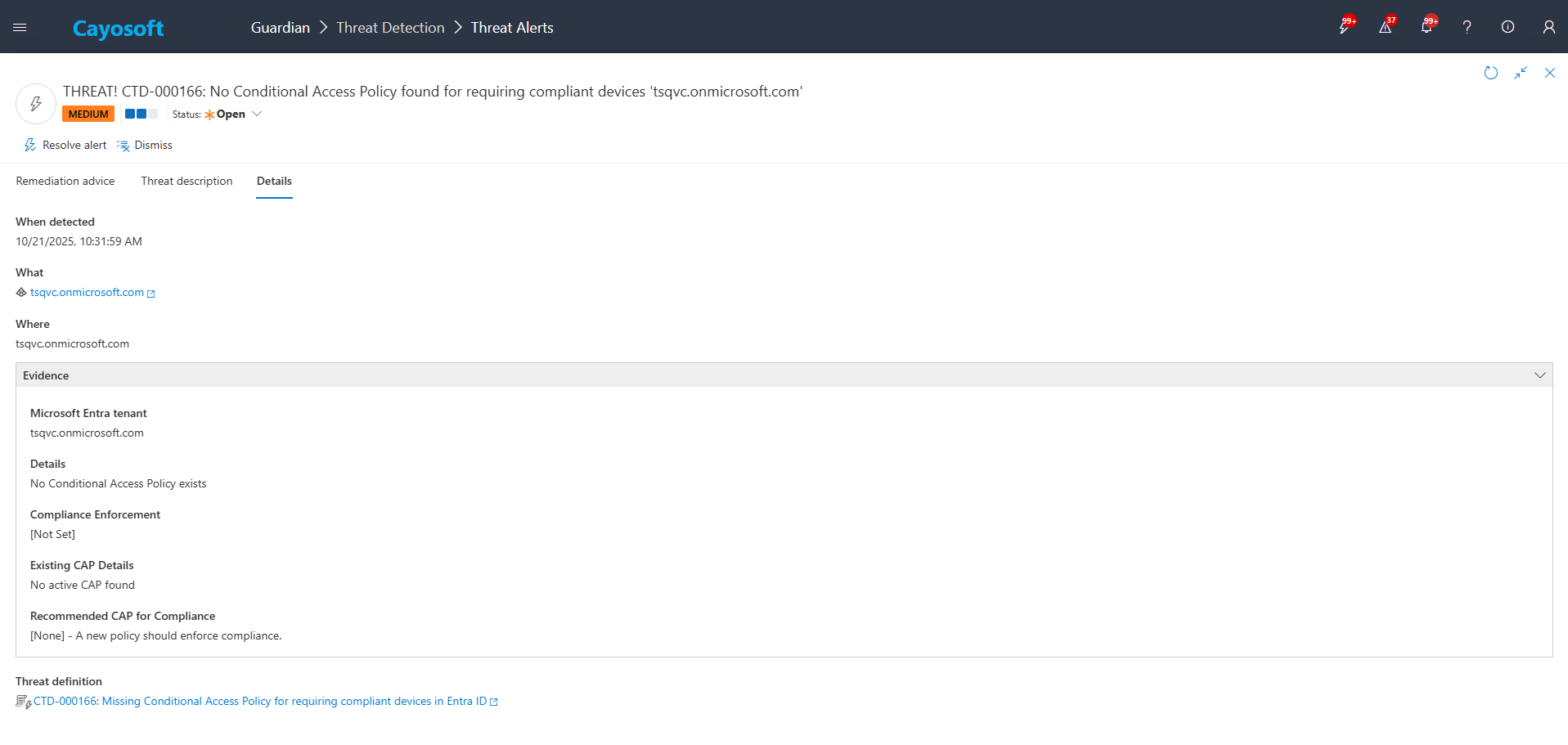
4.)Evidence:
- Microsoft Entra tenant – Tenant name (example from configuration).
- Details – Specific findings or gaps related to compliant-device enforcement.
- Compliance Enforcement – Current state of device-compliance requirements in Conditional Access.
- Existing CAP Details – Summary of existing Conditional Access policies that may partially cover device compliance.
- Recommended CAP for Compliance – Suggested Conditional Access configuration to enforce compliant devices.
Remediation Steps
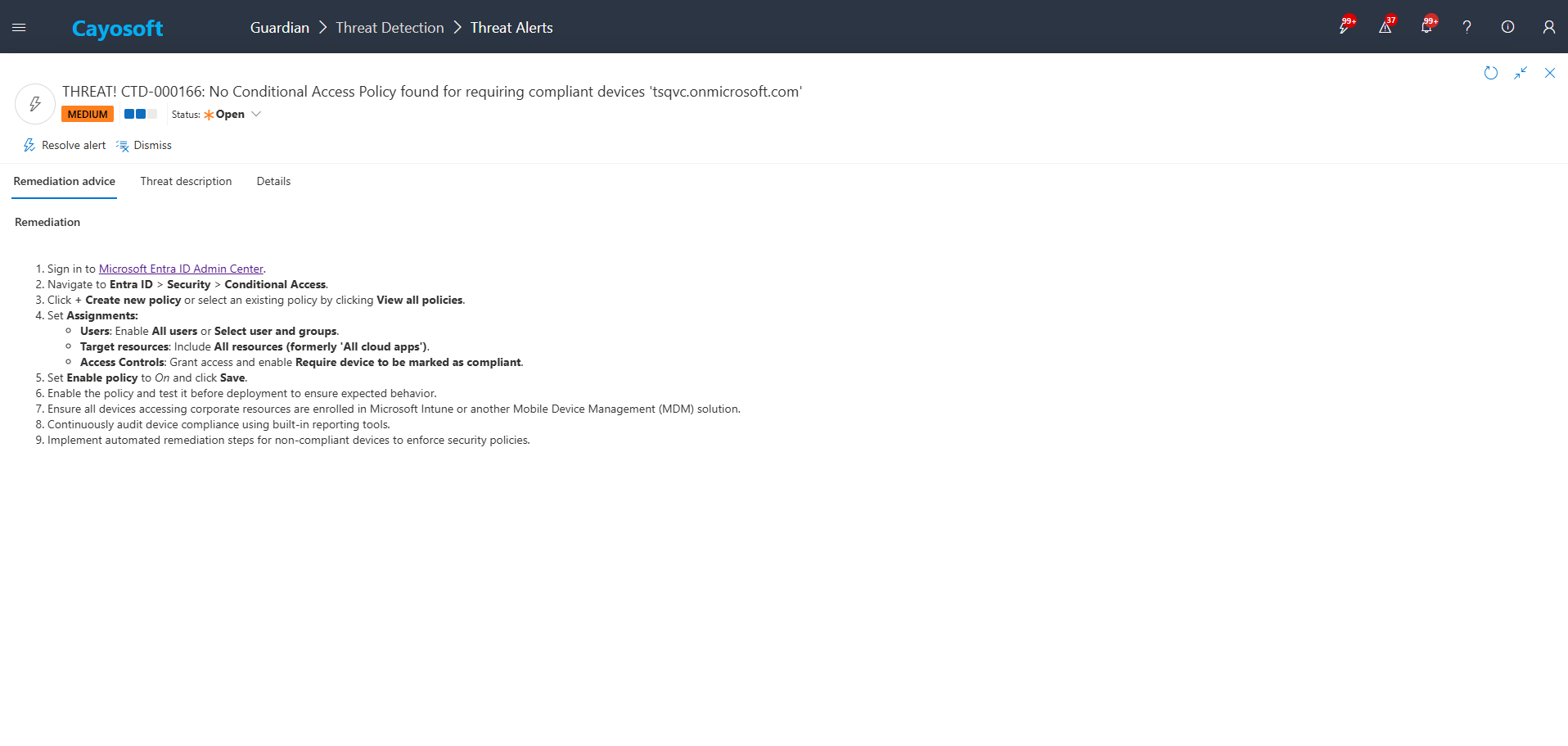
- ) Sign in to Microsoft Entra ID Admin Center.
- ) Navigate to Entra ID > Security > Conditional Access.
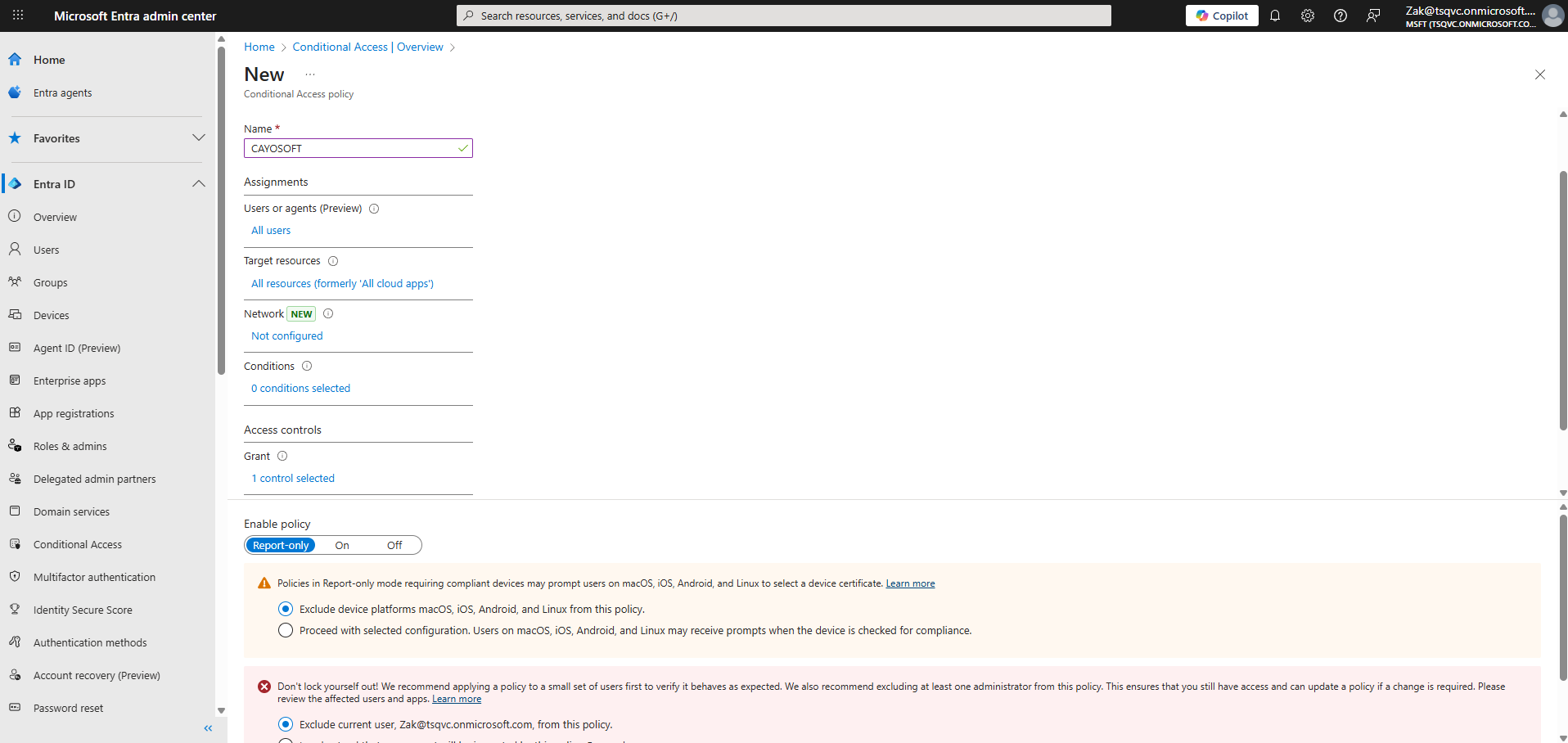
- ) Click + Create new policy or select an existing policy by clicking View all policies.
- ) Set Assignments:
- Users: Enable All users or Select user and groups.
- Target resources: Include All resources (formerly ‘All cloud apps’).
- Access Controls: Grant access and enable Require device to be marked as compliant.
- ) Set Enable policy to On and click Save.
- ) Enable the policy and test it before deployment to ensure expected behavior.
- ) Ensure all devices accessing corporate resources are enrolled in Microsoft Intune or another Mobile Device Management (MDM) solution.
- ) Continuously audit device compliance using built-in reporting tools.
- ) Implement automated remediation steps for non-compliant devices to enforce security policies.
How to Prevent It
Cayosoft Guardian can proactively detect and alert on Missing Conditional Access Policy for requiring compliant devices in Entra ID. It continuously monitors Microsoft Entra ID, Microsoft 365, Intune, and related configurations for risky gaps in Conditional Access. By keeping at least one properly scoped, active policy that requires compliant devices for critical users and resources, you reduce the chances that attackers can use unmanaged endpoints to gain and maintain access. Regularly review Guardian risk assessment findings and align Conditional Access policies with your organization’s device-compliance and zero-trust standards.
FAQ
Without this policy, attackers can log in from unmanaged, insecure, or compromised devices that lack corporate controls such as EDR, disk encryption, or configuration baselines. This allows credential theft, persistence, and lateral movement without endpoint visibility.
At minimum, all privileged roles and users handling sensitive data. Most organizations progressively expand the policy to all users, with exceptions only for emergency access accounts or specific service principles.
Yes, if users have unmanaged or incorrectly enrolled devices. To avoid disruption, organizations should validate Intune enrollment, verify compliance policies, and test the Conditional Access rule in report-only mode before enforcing it.
Yes. Microsoft provides built-in tools such as the Entra Admin Center, Conditional Access insights, and Sign-in logs that help identify misconfigurations.
However, they do not provide real-time monitoring or correlation. This is why many organizations complement them with free capabilities in Cayosoft Guardian Protector, which can detect and alert on missing compliant-device controls.
Yes. Cayosoft Guardian continuously monitors Entra ID, detects when compliant-device Conditional Access policies are missing or misconfigured, alerts security teams, and provides prescriptive remediation steps. It also correlates related risks across Entra ID, Intune, AD, and Microsoft 365 to ensure continuous Zero Trust enforcement.
References
- Microsoft Entra ID Admin Center: https://entra.microsoft.com/
Final Thought
Proactive monitoring and timely remediation of configuration risks is essential to maintaining a secure Active Directory and Microsoft 365 environment. By addressing issues like Missing Conditional Access Policy for requiring compliant devices in Entra ID, you reduce attack surfaces and strengthen your organization’s overall security posture.