
Microsoft Entra role with permanent eligible members
Cayosoft Threat Definition CTD-000017
Tune into Guardians of the Directory Podcast.




Stop AD Threats As They Happen
Cayosoft Protector provides continuous monitoring and real-time alerts across your entire Microsoft Identity stack
Like This Article?
Subscribe to our LinkedIn Newsletter to receive more educational content
Risk Summary
Permanent eligible role assignments might be an indication of threat activities or misconfiguration. If a permanently eligible account is compromised, an attacker can quickly activate high privileges—especially if activation guardrails are weak—creating a fast path to tenant control.
- Severity: High
- Platform: Entra ID
- Category: Privileged Access Management
- MITRE ATT&CK Tactics: Persistence, Privilege Escalation, Defense Evasion
- MITRE D3FEND Tactics: User Account Permissions
Description
Permanent eligible role assignments might be an indication of threat activities or misconfiguration. If an account with permanent eligible role membership is compromised, a threat actor might immediately get access to administrative privileges if role activation is not properly protected. Using only time-limited role assignments for administrators increases security posture in your tenant.

Real-World Scenario
A contractor was granted permanent eligible membership for the Privileged Role Administrator role “for convenience.” After a phishing campaign, the attacker signs in as the contractor and uses weak MFA prompts to succeed. Because the membership is permanently eligible, the attacker can self-activate administrator permissions at any time without waiting for a new assignment to be created. They perform short, surgical changes (e.g., add a backdoor app registration) and then deactivate to blend in with normal activity. Cayosoft Guardian detects the exposure by flagging the presence of permanent eligible members on sensitive Entra roles so the team can remove or time-bound them before abuse.
Stop Privilege Escalation—Then Undo It with Cayosoft Guardian Audit & Restore
Real-time alerts across AD & Entra ID with one-click rollback.
Detect this and other threats with Cayosoft Guardian Protector (Free of Charge)
1.) Download Cayosoft Guardian Protector for free real-time threat detection and monitoring of your hybrid AD and Microsoft 365 environment. Once downloaded, sign in and navigate to the Threat Detection Dashboard.


2.) View All Alerts and search for CTD-000017 or Microsoft Entra role with permanent eligible members.
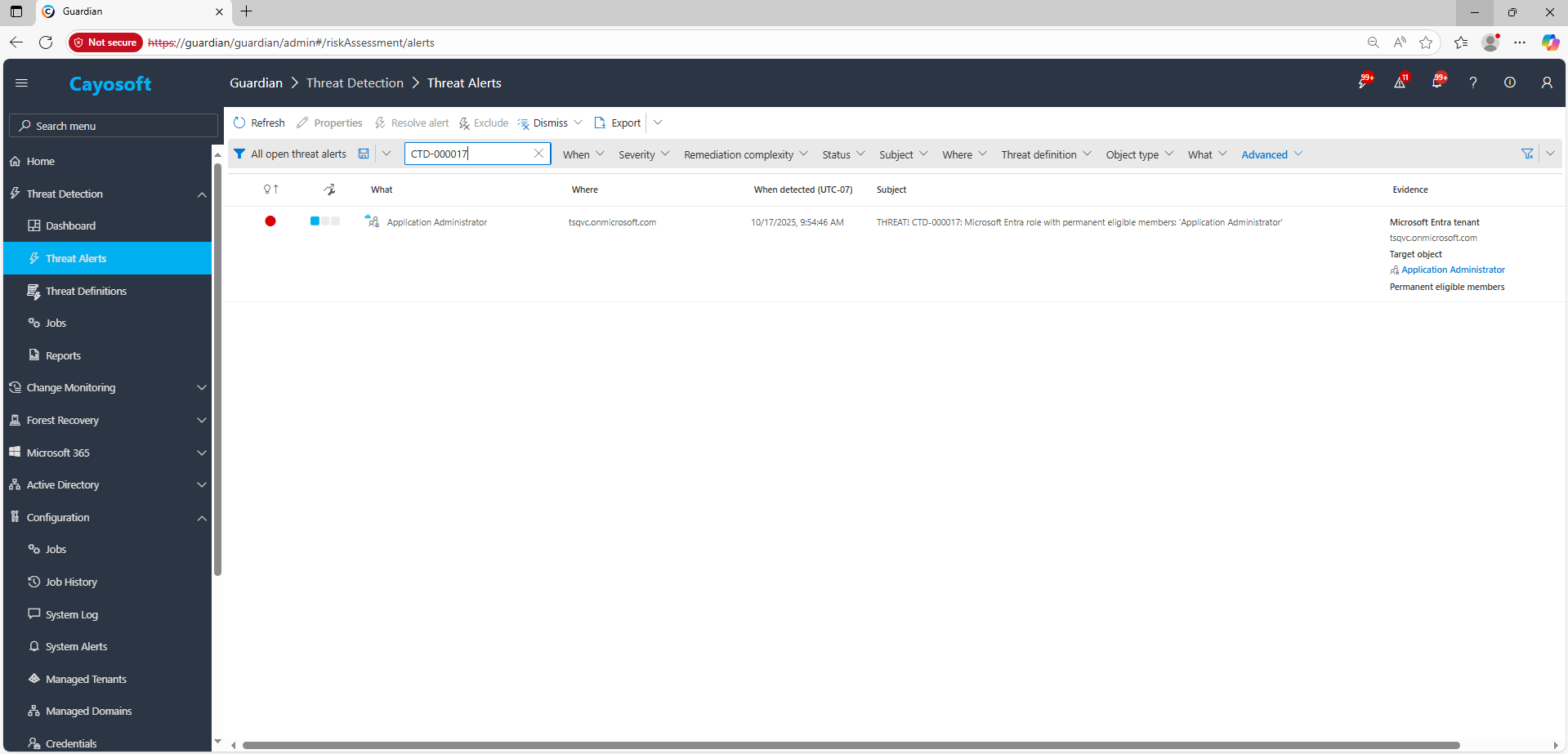
3.) Open any alert and Click for details (from Raise Threat Alert action).
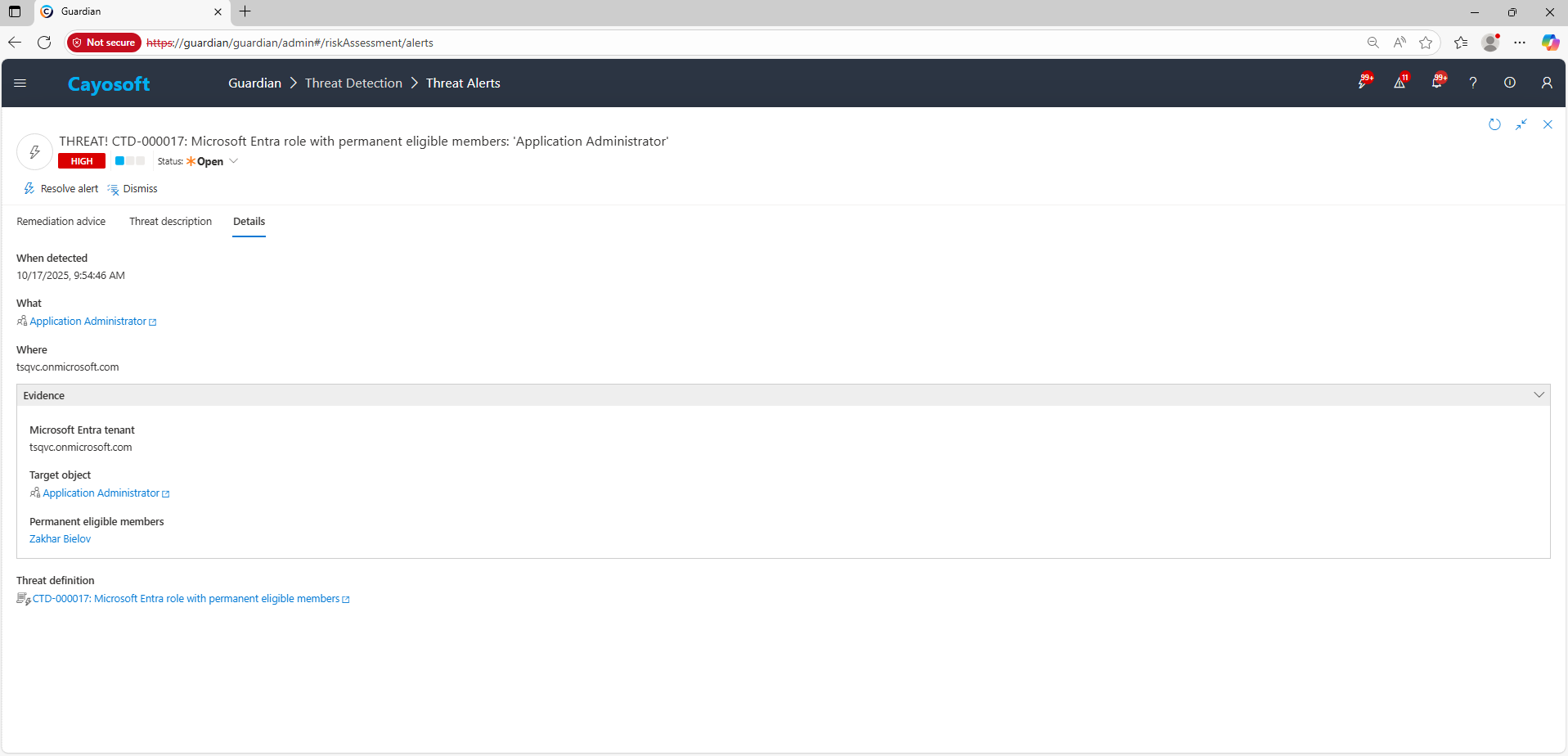
4.) Evidence:
- Microsoft Entra tenant
- Target object (role)
- Permanent eligible members
Remediation Steps
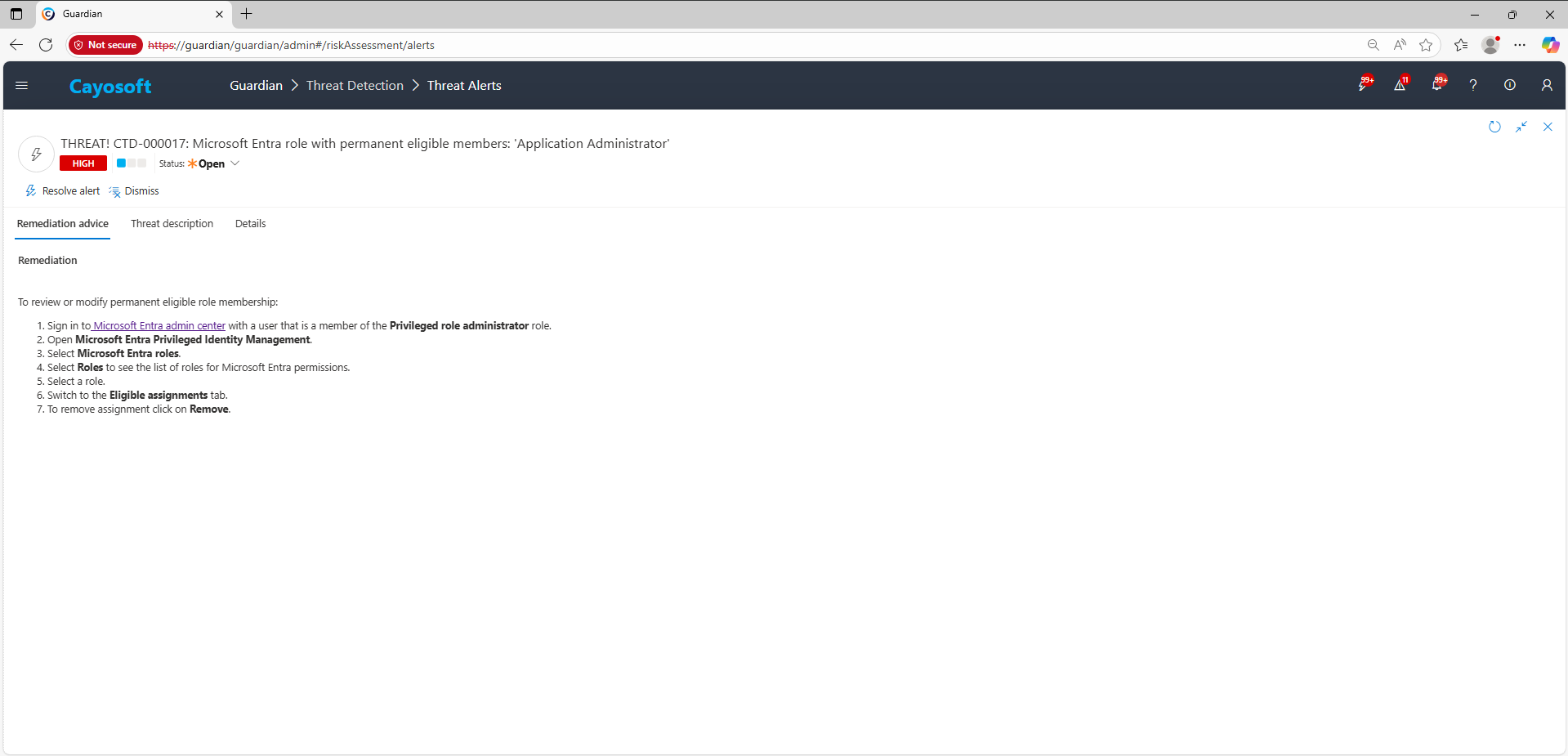
To review or modify permanent eligible role membership:
- ) Sign in to Microsoft Entra admin center with a user that is a member of the Privileged role administrator role.
- ) Open Microsoft Entra Privileged Identity Management.
- ) Select Microsoft Entra roles.
- ) Select Roles to see the list of roles for Microsoft Entra permissions.
- ) Select a role.
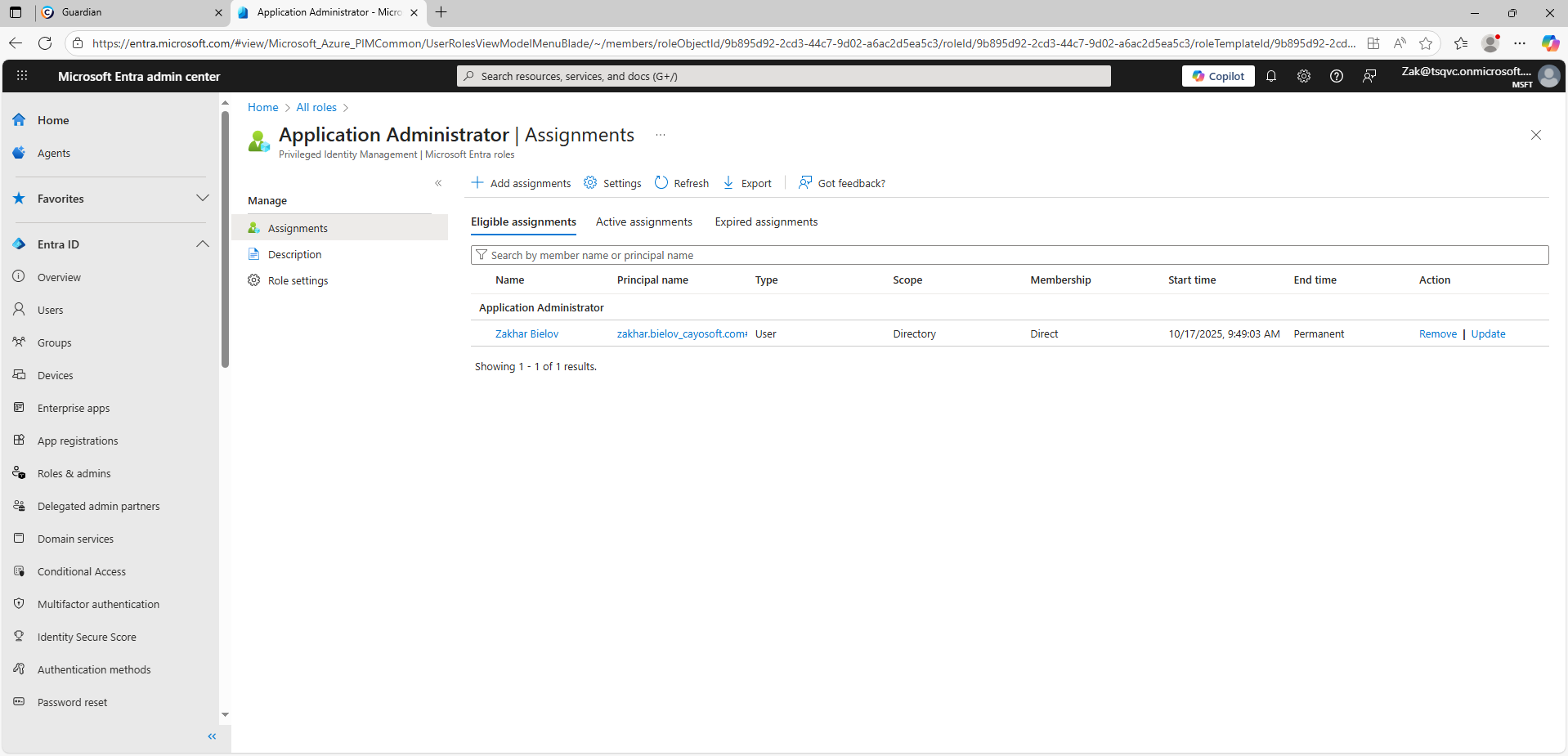
- ) Switch to the Eligible assignments tab.
- ) To remove assignment click on Remove.
How to Prevent It
- Use time-bound eligibility for all Entra admin roles; avoid permanent eligible memberships.
- Require approval, justification, and MFA for role activation in PIM.
- Configure just-in-time (JIT) access with shortest viable durations and activation notifications.
- Review role membership weekly for Tier-0 roles (e.g., Global Administrator, Privileged Role Administrator).
- Continuously monitor with Cayosoft Guardian to alert on new or reintroduced permanent eligible members.
FAQ
Even though activation is required, permanently eligible members can elevate their privileges at any time. If such an account is compromised, an attacker can self-activate high privileges instantly—especially if approval or MFA are misconfigured—making it difficult to prevent privilege escalation.
In the Microsoft Entra admin center, go to
Privileged Identity Management (PIM) → Microsoft Entra roles → Roles → select the role → Eligible assignments,
then remove any assignments that are permanent. Reassign them with time-bound eligibility and MFA/approval requirements.
Prioritize Tier-0 and high-impact roles such as Global Administrator, Privileged Role Administrator, User Administrator, Application Administrator, and Cloud Application Administrator. These roles grant broad tenant control and should never have permanent eligible members.
Yes. You can use Microsoft Entra PIM (built into Entra ID) and Microsoft Graph PowerShell scripts to list and audit role assignments. Additionally, Azure AD Identity Protection provides baseline visibility into risky assignments and user activity without extra licensing.
Yes. Cayosoft Guardian continuously monitors Entra ID for misconfigurations such as permanent eligible members, alerting in real time and providing remediation guidance. Other enterprise IAM and SIEM platforms like Microsoft Defender for Cloud Apps, Quest On Demand Audit, or Semperis DSP also offer detection and alerting capabilities.
References
- Microsoft Entra admin center: https://entra.microsoft.com/
- PowerShell wildcards (mask syntax reference): https://learn.microsoft.com/en-us/powershell/module/microsoft.powershell.core/about/about_wildcards
Final Thought
Proactive monitoring and timely remediation of configuration risks is essential to maintaining a secure Active Directory and Microsoft 365 environment. By addressing issues like Microsoft Entra role with permanent eligible members, you reduce attack surfaces and strengthen your organization’s overall security posture.