
Entra ID application owner attribute populated with a hybrid user account
Cayosoft Threat Definition CTD-000161
Tune into Guardians of the Directory Podcast.




Stop AD Threats As They Happen
Cayosoft Protector provides continuous monitoring and real-time alerts across your entire Microsoft Identity stack
Like This Article?
Subscribe to our LinkedIn Newsletter to receive more educational content
Risk Summary
The Application Owner attribute in Entra ID specifies the account responsible for managing an application’s lifecycle. When the application owner attribute is set to a hybrid user account synchronized from on-premises Active Directory, the organization increases the risk of persistence, privilege escalation, and lateral movement if that account is compromised.
- Severity: Medium
- Platform: Entra ID
- Category: Account protection, Privileged Access Management
- MITRE ATT&CK Tactics: Persistence, Privilege Escalation, Lateral Movement
- MITRE D3FEND Tactics: D3-ACH (Application Configuration Hardening)
Description
The Application Owner attribute in Entra ID specifies the account responsible for managing an application’s lifecycle. When this attribute is set to a hybrid user account synchronized from the on-premises Active Directory, it introduces significant risks. These hybrid accounts are typically subject to legacy authentication protocols, shared account usage, or administrative roles not intended for cloud application management. A compromise of this account provides attackers a persistent foothold in the environment, with the ability to reconfigure or exploit applications in Entra ID for malicious purposes.

Real-World Scenario
An attacker compromises a hybrid user account that is synchronized from on-premises Active Directory and has been quietly added as the owner of a critical Entra ID enterprise application. Using the legitimate owner role, the attacker registers additional credentials, adjusts permissions, and configures service principals to grant broader access across Microsoft 365 resources. Because all changes appear to come from a “normal” hybrid user, the activity blends in with routine administration and avoids obvious detection. Over time, the attacker uses the application to read mailboxes, access SharePoint data, and pivot to other cloud workloads. The threat Entra ID application owner attribute populated with a hybrid user account (CTD-000161) identifies applications with hybrid owners so security teams can review and replace them with secure cloud-only identities. Cayosoft Guardian would detect the risky ownership configuration early, limiting the attacker’s ability to maintain persistence and move laterally.
Stop Privilege Escalation—Then Undo It with Cayosoft Guardian Audit & Restore
Real-time alerts across AD & Entra ID with one-click rollback.
Detect this and other threats with Cayosoft Guardian Protector (Free of Charge)
1.) Download Cayosoft Guardian Protector for free real-time threat detection and monitoring of your hybrid AD and Microsoft 365 environment. Once downloaded, sign in and navigate to the Threat Detection Dashboard.


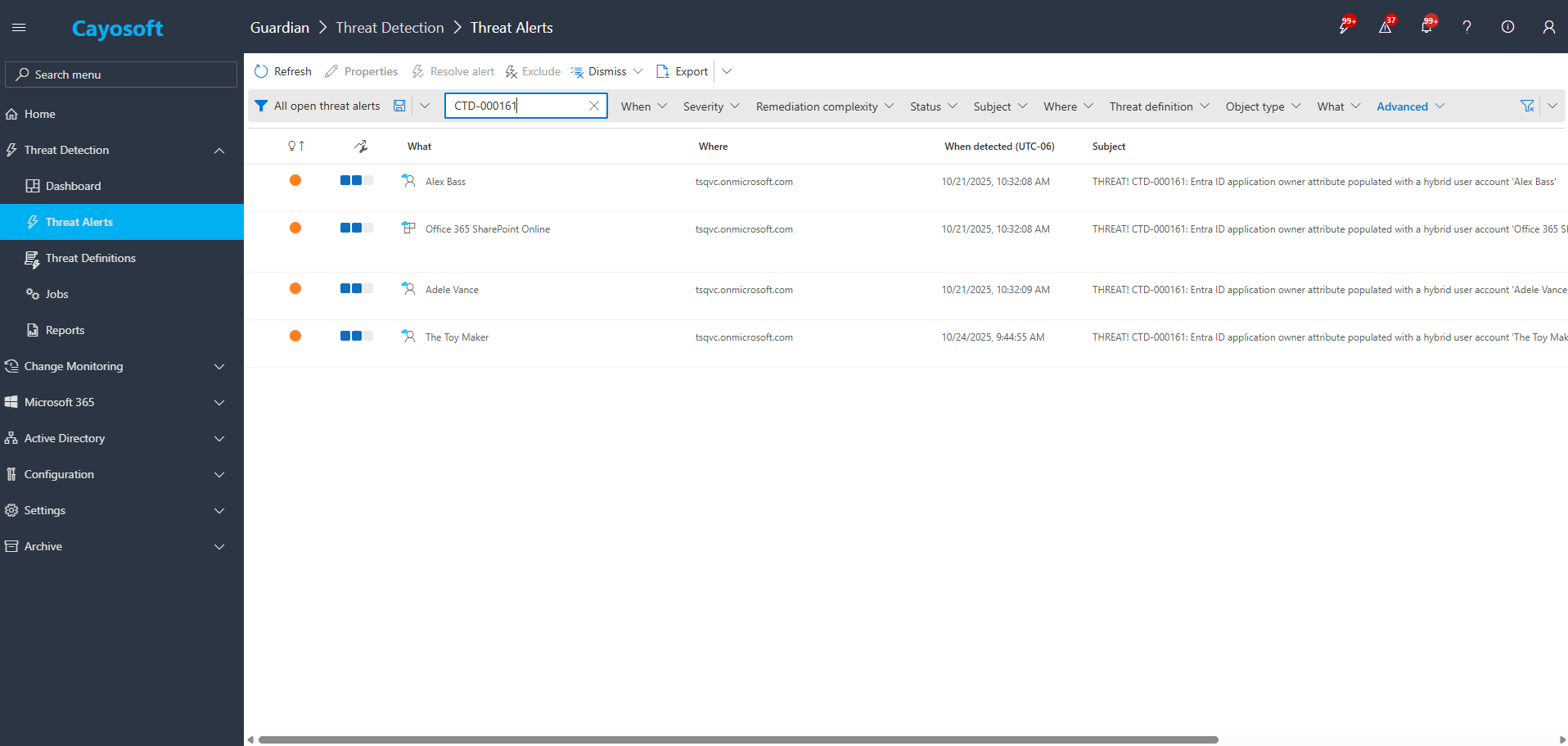
2.) Search for CTD-000161 or “Entra ID application owner attribute populated with a hybrid user account”.
3.) Open any alert and Click for details (from Raise Threat Alert action).
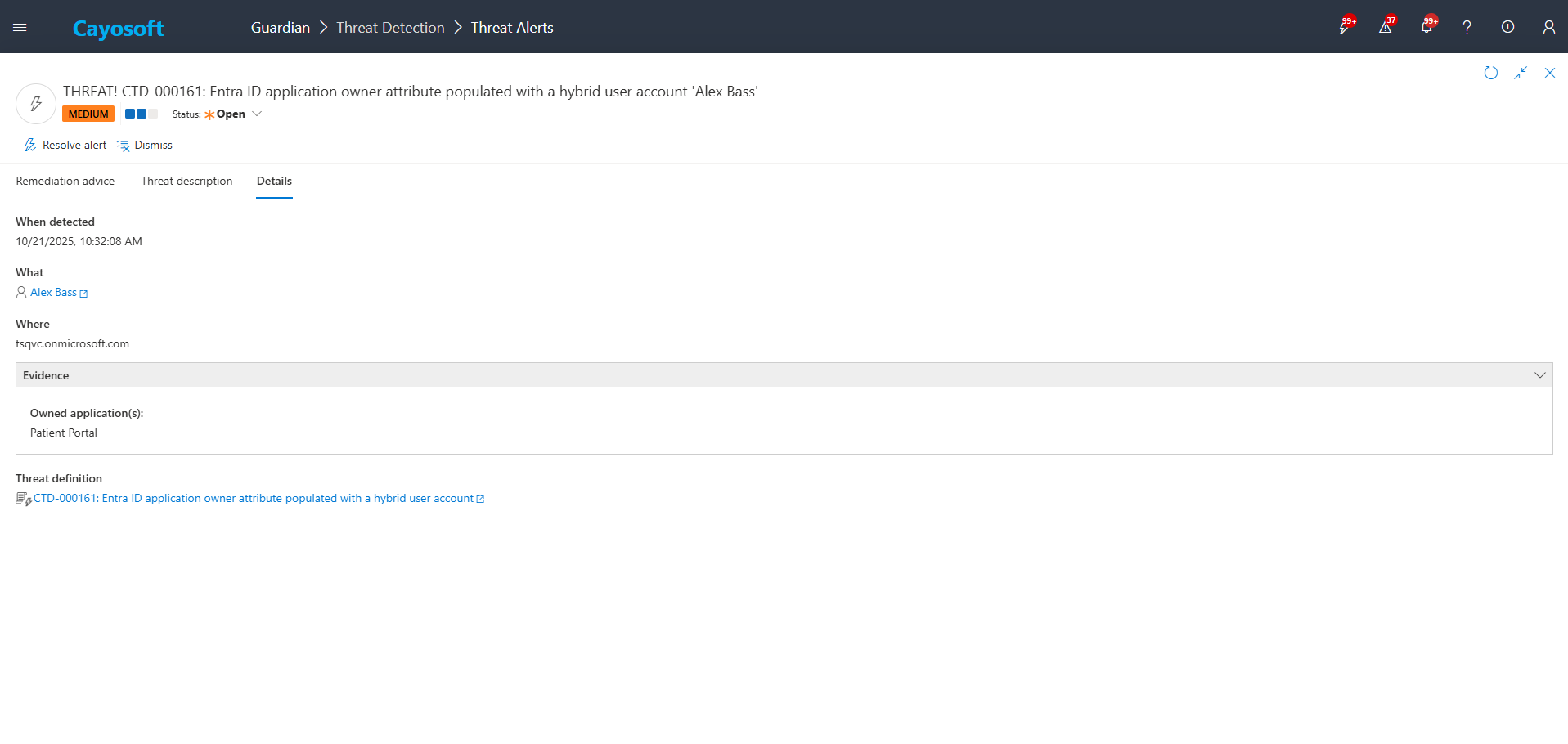
4.)Evidence:
- Owned application(s)
Remediation Steps
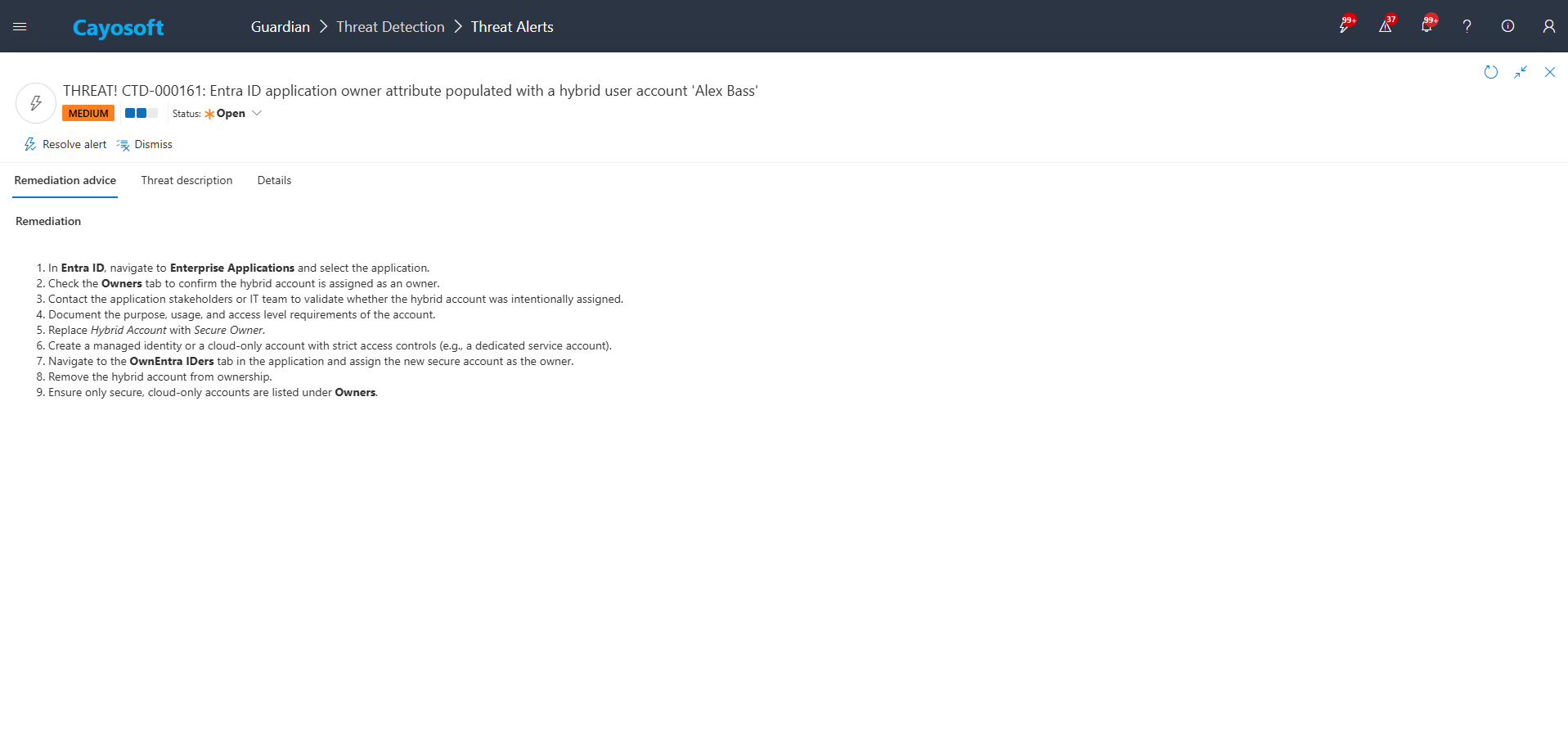
- ) In Entra ID, navigate to Enterprise Applications and select the application.
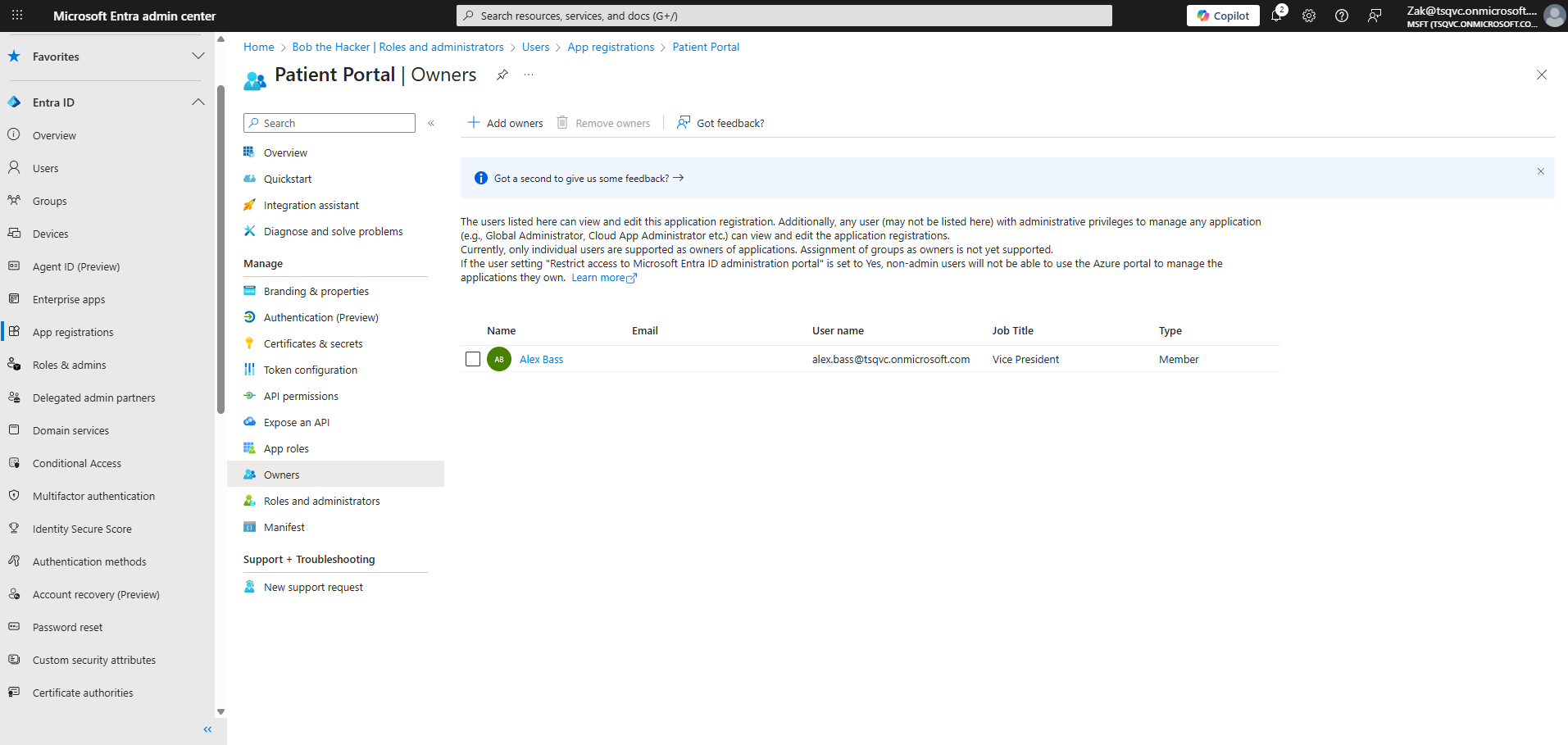
- ) Check the Owners tab to confirm the hybrid account is assigned as an owner.
- ) Contact the application stakeholders or IT team to validate whether the hybrid account was intentionally assigned.
- ) Document the purpose, usage, and access level requirements of the account.
- ) Replace Hybrid Account with Secure Owner.
- ) Create a managed identity or a cloud-only account with strict access controls (e.g., a dedicated service account).
- ) Navigate to the OwnEntra IDers tab in the application and assign the new secure account as the owner.
- ) Remove the hybrid account from ownership.
- ) Ensure only secure, cloud-only accounts are listed under Owners.
How to Prevent It
- Cayosoft Guardian can proactively detect and alert on Entra ID application owner attribute populated with a hybrid user account. It continuously monitors Active Directory, Entra ID, Microsoft 365, and Intune for over 200 misconfigurations, providing early warning before attackers can exploit them.
- Establish a policy that only cloud-only service accounts or managed identities may be used as Entra ID application owners.
- Prohibit hybrid user accounts from owning cloud applications, especially those with privileged or broad data access.
- Enforce least privilege for application owners and periodically review ownership for high-value applications.
- Disable or restrict legacy authentication for hybrid accounts and monitor for anomalous sign-ins.
- Regularly review Cayosoft Guardian alerts for CTD-000161 and follow up on any newly detected hybrid-owned applications.
FAQ
Hybrid user accounts are synchronized from on-prem Active Directory and may rely on legacy authentication, shared credentials, or broad access not intended for cloud app administration. If compromised, attackers can use the owner role to modify applications, inject malicious credentials, or establish long-term persistence in Entra ID.
A compromised hybrid owner can register additional secrets or certificates, grant excessive permissions to service principals, alter app roles, and create persistent access paths that appear legitimate—enabling privilege escalation and lateral movement across Microsoft 365 workloads.
Any owner account that is hybrid-synchronized, uses legacy authentication, is a shared account, or lacks a defined business justification should be replaced with a controlled cloud-only service account or managed identity following least-privilege principles.
Microsoft provides built-in tools such as Entra Admin Center, Directory Roles views, and Graph PowerShell cmdlets, which allow manual review of application owners. While useful, they do not provide correlation, automation, or continuous monitoring. Free features of Cayosoft Guardian Protector can assist with visibility, but not full detection or remediation workflows.
Yes. Cayosoft Guardian provides continuous detection of hybrid user ownership on Entra ID applications, alerts security teams, surfaces evidence, and includes prescriptive remediation guidance. It also correlates activity across Entra ID, Active Directory, Intune, and Microsoft 365 to reduce the risk of persistence and privilege escalation.
Final Thought
Proactive monitoring and timely remediation of configuration risks is essential to maintaining a secure Active Directory and Microsoft 365 environment. By addressing issues like Entra ID application owner attribute populated with a hybrid user account, you reduce attack surfaces and strengthen your organization’s overall security posture.