
AD domain with multiple failed authentication attempts via process
Cayosoft Threat Definition CTD-000106
Tune into Guardians of the Directory Podcast.




Stop AD Threats As They Happen
Cayosoft Protector provides continuous monitoring and real-time alerts across your entire Microsoft Identity stack
Like This Article?
Subscribe to our LinkedIn Newsletter to receive more educational content
Risk Summary
A process failing to authenticate with multiple users may indicate a threat actor attempting initial access or privilege elevation via password spraying against Active Directory.
- Severity: High
- Platform: Active Directory
- Category: Account protection, Password Spraying
- MITRE ATT&CK Tactics: Initial Access
- MITRE D3FEND Tactics: Local Account Monitoring
Description
A process generating many Event ID 4625 failures across different users can reflect a password spray using native logon attempts. Logon Type 2 describes an interactive logon attempt. NOTE: This threat rule uses a built-in lookback window of 25 hours; only events occurring within that period are processed.

Real-World Scenario
Malware lands on a jump server and launches cmd.exe/powershell.exe to iterate a common password against dozens of domain accounts, producing a spike of Event 4625 failures on multiple computers within minutes. Help desk sees lockouts, while the attacker throttles attempts to evade simple thresholds. One weak account eventually authenticates, enabling domain foothold and lateral movement. Cayosoft Guardian correlates repeated failures by process across many users within the 25-hour window and raises CTD-000106 before successful compromise spreads.
Stop Privilege Escalation—Then Undo It with Cayosoft Guardian Audit & Restore
Real-time alerts across AD & Entra ID with one-click rollback.
Detect this and other threats with Cayosoft Guardian Protector (Free of Charge)
1.) Download Cayosoft Guardian Protector for free real-time threat detection and monitoring of your hybrid AD and Microsoft 365 environment. Once downloaded, sign in and navigate to the Threat Detection Dashboard.


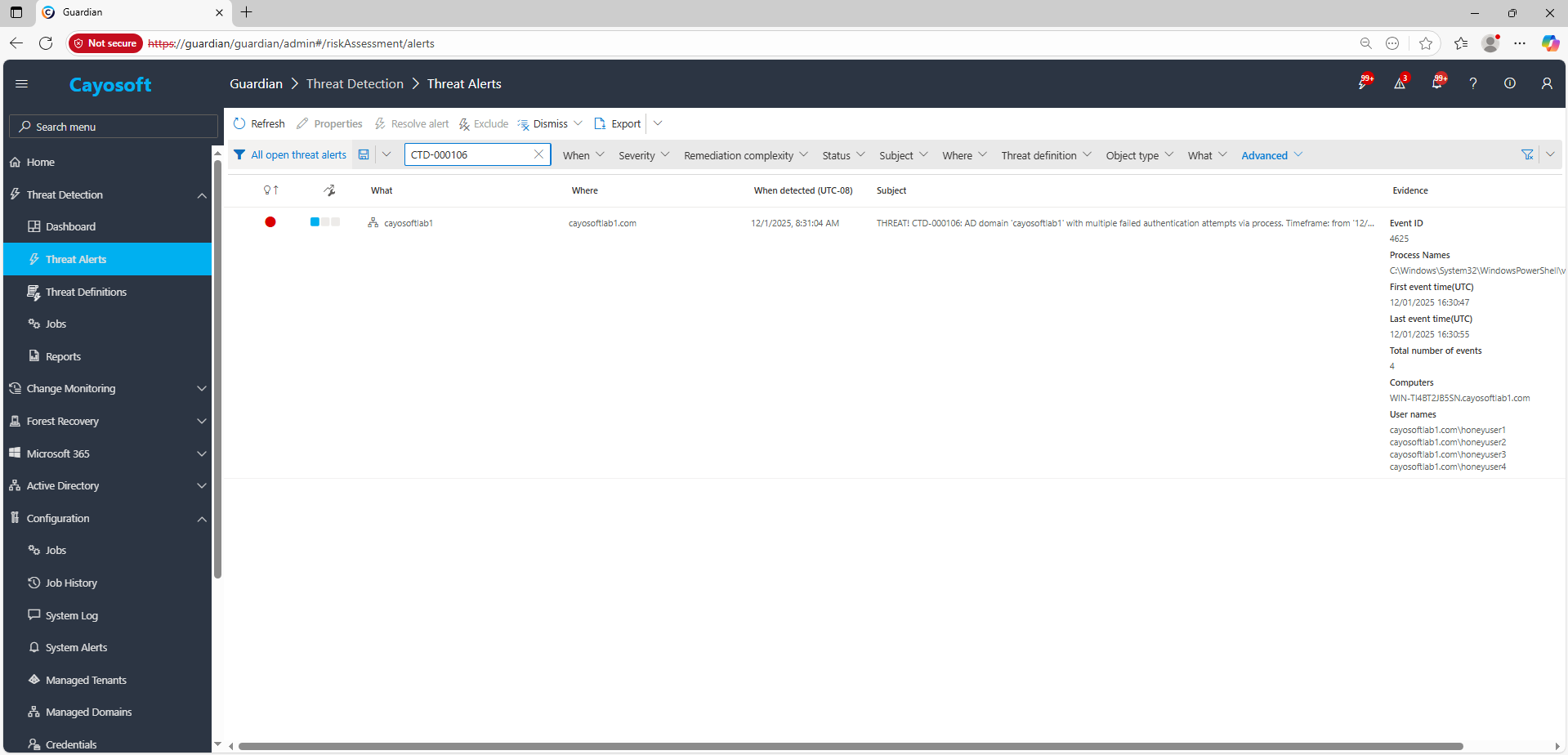
2.) Open All Alerts and search for CTD-000106 or AD domain with multiple failed authentication attempts via process.
3.) Open any alert and Click for details (from Raise Threat Alert action).
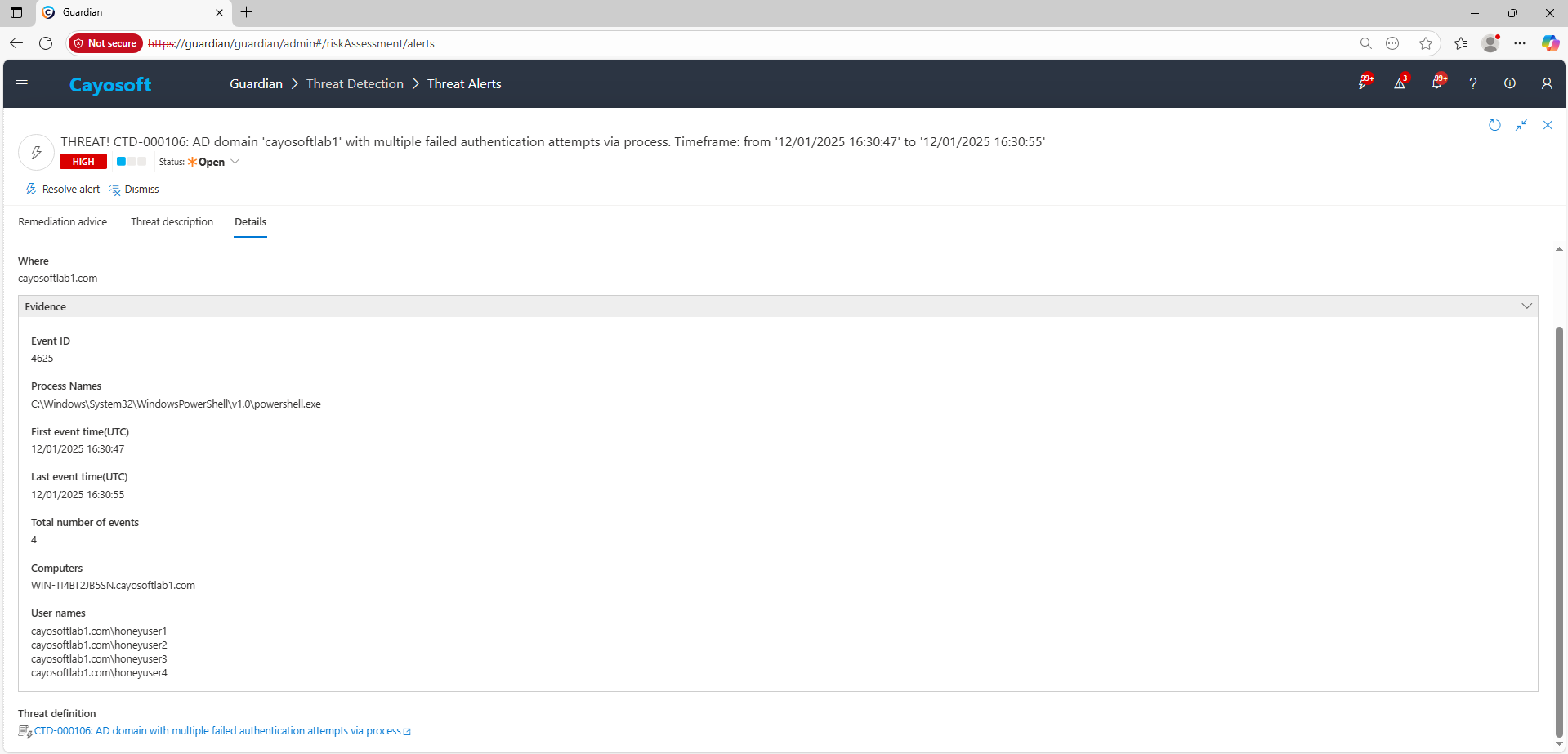
4.)Evidence:
- Event ID
- Process Names
- First event time (UTC)
- Last event time (UTC)
- Total number of events
- Computers
- User names
Remediation Steps
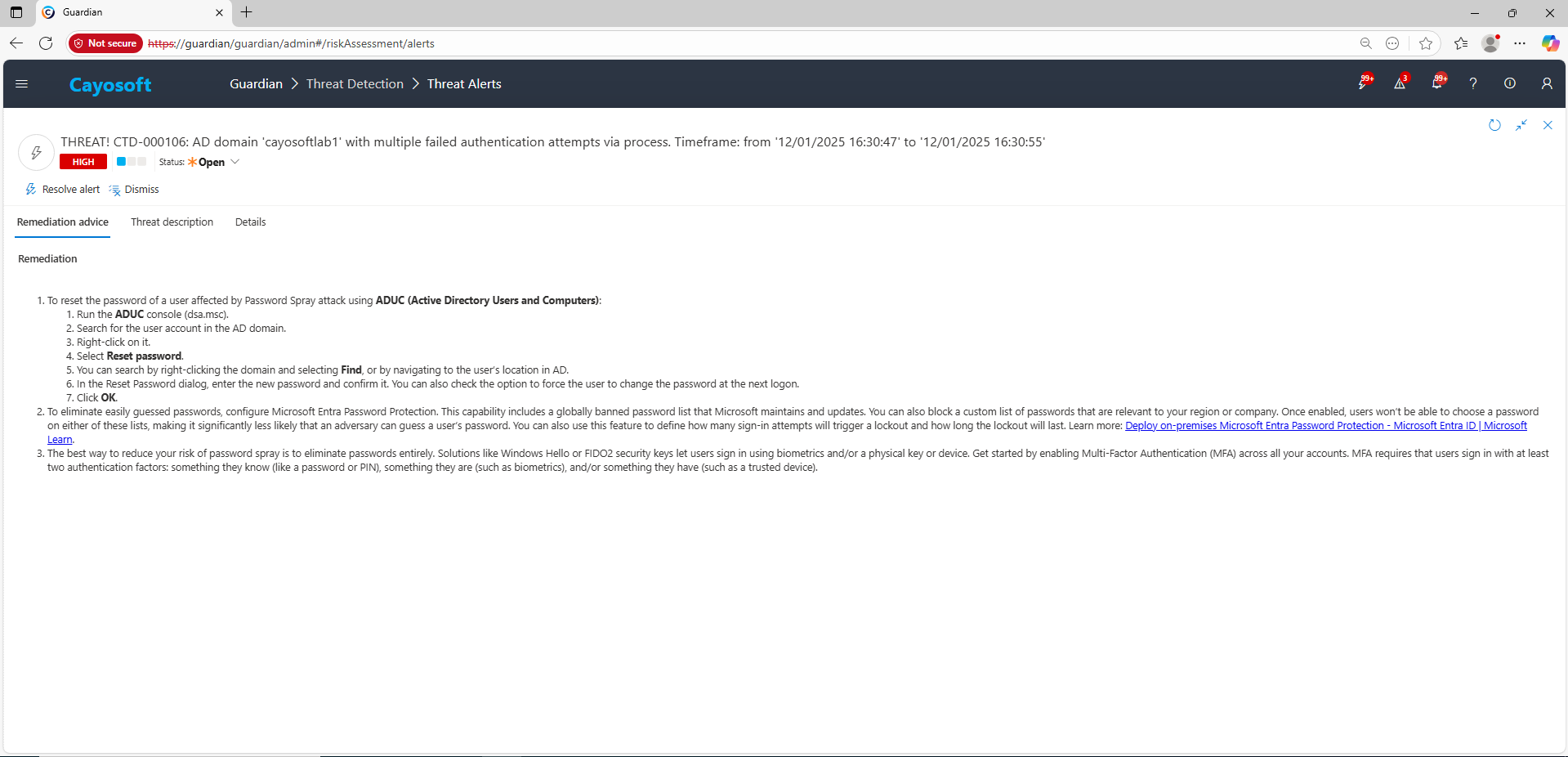
- ) To reset the password of a user affected by Password Spray attack using ADUC (Active Directory Users and Computers):
- ) Run the ADUC console (dsa.msc).
- ) Search for the user account in the AD domain.
- ) Right-click on it.
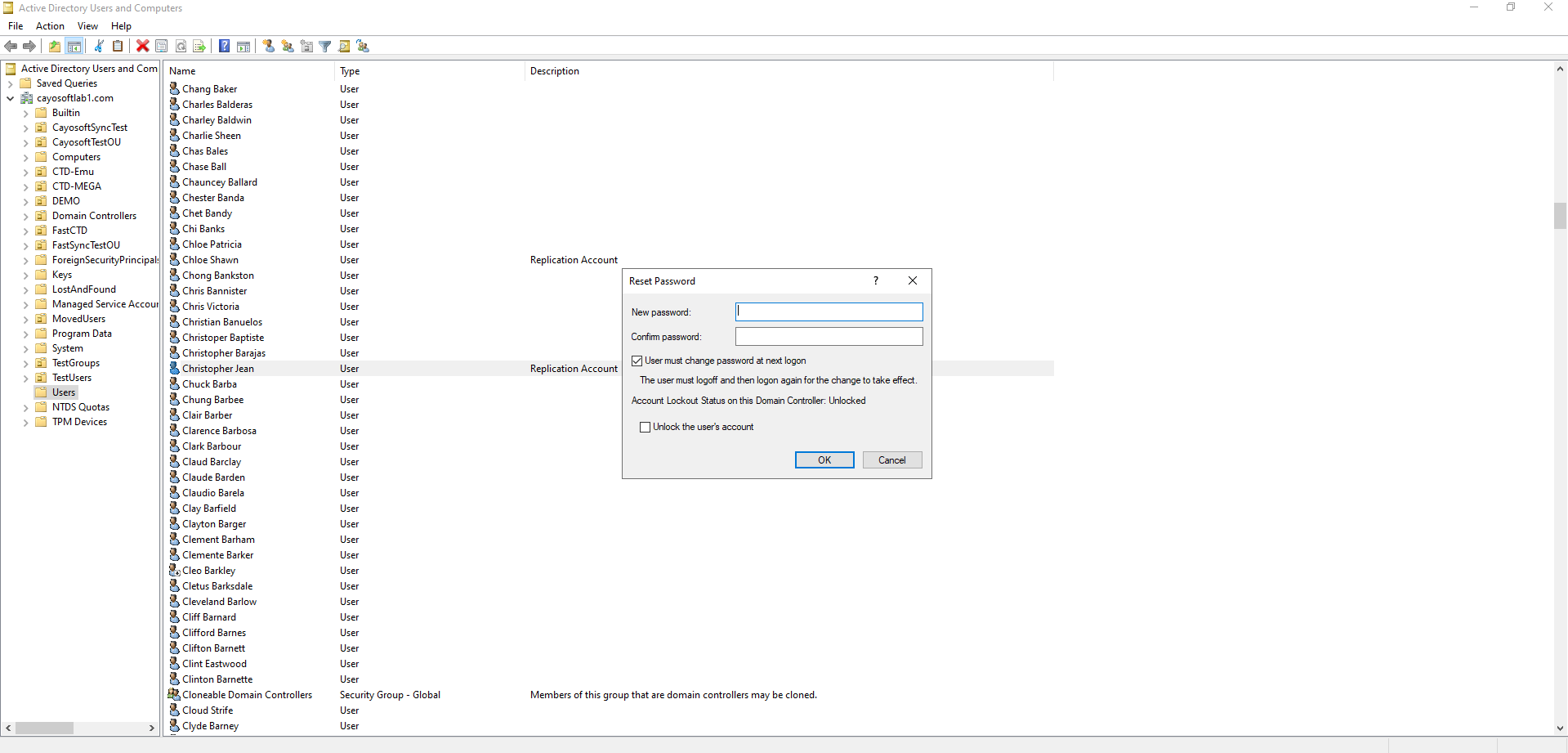
- ) Select Reset password.
- ) You can search by right-clicking the domain and selecting Find, or by navigating to the user’s location in AD.
- ) In the Reset Password dialog, enter the new password and confirm it. You can also check the option to force the user to change the password at the next logon.
- ) Click OK.
- ) To eliminate easily guessed passwords, configure Microsoft Entra Password Protection. This capability includes a globally banned password list that Microsoft maintains and updates. You can also block a custom list of passwords that are relevant to your region or company. Once enabled, users won’t be able to choose a password on either of these lists, making it significantly less likely that an adversary can guess a user’s password. You can also use this feature to define how many sign-in attempts will trigger a lockout and how long the lockout will last. Learn more: Deploy on-premises Microsoft Entra Password Protection – Microsoft Entra ID | Microsoft Learn.
- ) The best way to reduce your risk of password spray is to eliminate passwords entirely. Solutions like Windows Hello or FIDO2 security keys let users sign in using biometrics and/or a physical key or device. Get started by enabling Multi-Factor Authentication (MFA) across all your accounts. MFA requires that users sign in with at least two authentication factors: something they know (like a password or PIN), something they are (such as biometrics), and/or something they have (such as a trusted device).
How to Prevent It
Cayosoft Guardian can proactively detect and alert on AD domain with multiple failed authentication attempts via process. It continuously monitors Active Directory, Entra ID, Microsoft 365, and Intune for over 200 misconfigurations and behaviors, providing early warning before attackers can exploit them.
FAQ
A single process can quickly attempt common passwords across many accounts, causing widespread failed logons, lockouts, or eventual account compromise that grants initial domain access.
Security Event ID 4625 records failed authentication attempts. Logon Type 2 indicates interactive logons commonly abused during password spraying.
Strong lockout thresholds reduce the number of guesses an attacker can make per account, while weak policies allow much higher spraying volume before triggering lockout.
Yes. Native Windows Event Viewer, PowerShell-based log parsing, and free SIEM options (such as Windows Defender for Identity’s limited capabilities, Elastic, or Splunk Free) can surface clusters of Event ID 4625 failures tied to a specific process.
Yes. Cayosoft Guardian provides real-time monitoring, correlation, and alerting for process-based authentication failures and offers prescriptive remediation. Other commercial SIEM/XDR platforms also provide detection logic for password spraying behaviors.
References
- Deploy on-premises Microsoft Entra Password Protection – Microsoft Learn: https://learn.microsoft.com/en-us/entra/identity/authentication/howto-password-ban-bad-on-premises-deploy
Final Thought
Proactive monitoring and timely remediation of configuration risks is essential to maintaining a secure Active Directory and Microsoft 365 environment. By addressing issues like AD domain with multiple failed authentication attempts via process, you reduce attack surfaces and strengthen your organization’s overall security posture.