
AD domain with misconfigured LDAP signing policy on the domain controllers
Cayosoft Threat Definition CTD-000194
Tune into Guardians of the Directory Podcast.




Stop AD Threats As They Happen
Cayosoft Protector provides continuous monitoring and real-time alerts across your entire Microsoft Identity stack
Like This Article?
Subscribe to our LinkedIn Newsletter to receive more educational content
Risk Summary
When LDAP signing is not enforced on domain controllers, attackers can intercept or modify clear-text LDAP authentication traffic, enabling credential theft, privilege escalation, and user impersonation. An AD domain with misconfigured LDAP signing policy on the domain controllers significantly increases exposure to man-in-the-middle and LDAP relay attacks across the entire forest.
- Severity: High
- Platform: Active Directory
- Category: Forest-wide, Infrastructure, Privileged Access Management
- MITRE ATT&CK Tactics: Privilege Escalation; Credential Access; Lateral Movement; Defense Evasion
- MITRE D3FEND Tactics: Application Configuration Hardening
Description
The Lightweight Directory Access Protocol (LDAP) is used by clients and services to query and interact with Active Directory. When LDAP signing is not enforced, authentication traffic between clients and domain controllers is transmitted in clear text and can be intercepted or modified by attackers. This exposes the environment to man-in-the-middle (MitM) and LDAP relay attacks, which can result in credential theft, privilege escalation, or user impersonation.
To mitigate these risks, Microsoft strongly recommends configuring domain controllers to require LDAP signing. Enforcing signed LDAP communication ensures data integrity and authenticity, preventing unauthorized entities on the network from tampering with or relaying LDAP requests.

Real-World Scenario
An attacker gains a foothold on an internal workstation and discovers that LDAP signing is not required on the domain controllers in the AD domain with misconfigured LDAP signing policy on the domain controllers. The attacker runs a relay tool on the local subnet, intercepting unsigned LDAP authentication attempts from management tools and services. By relaying these credentials to a domain controller, the attacker creates a new privileged account and quietly adds it to a high-privilege group, then uses standard administrative tools to avoid obvious detection. The attacker moves laterally to critical servers, exfiltrating data and changing group memberships while appearing as a legitimate administrator. Cayosoft Guardian would have detected the misconfigured LDAP signing policy on the domain controllers early, raising CTD-000194 before the attacker could exploit the configuration gap.
Stop Privilege Escalation—Then Undo It with Cayosoft Guardian Audit & Restore
Real-time alerts across AD & Entra ID with one-click rollback.
Detect this and other threats with Cayosoft Guardian Protector (Free of Charge)
1.) Download Cayosoft Guardian Protector for free real-time threat detection and monitoring of your hybrid AD and Microsoft 365 environment. Once downloaded, sign in and navigate to the Threat Detection Dashboard.


2.) Search for CTD-000194 or “AD domain with misconfigured LDAP signing policy on the domain controllers.”
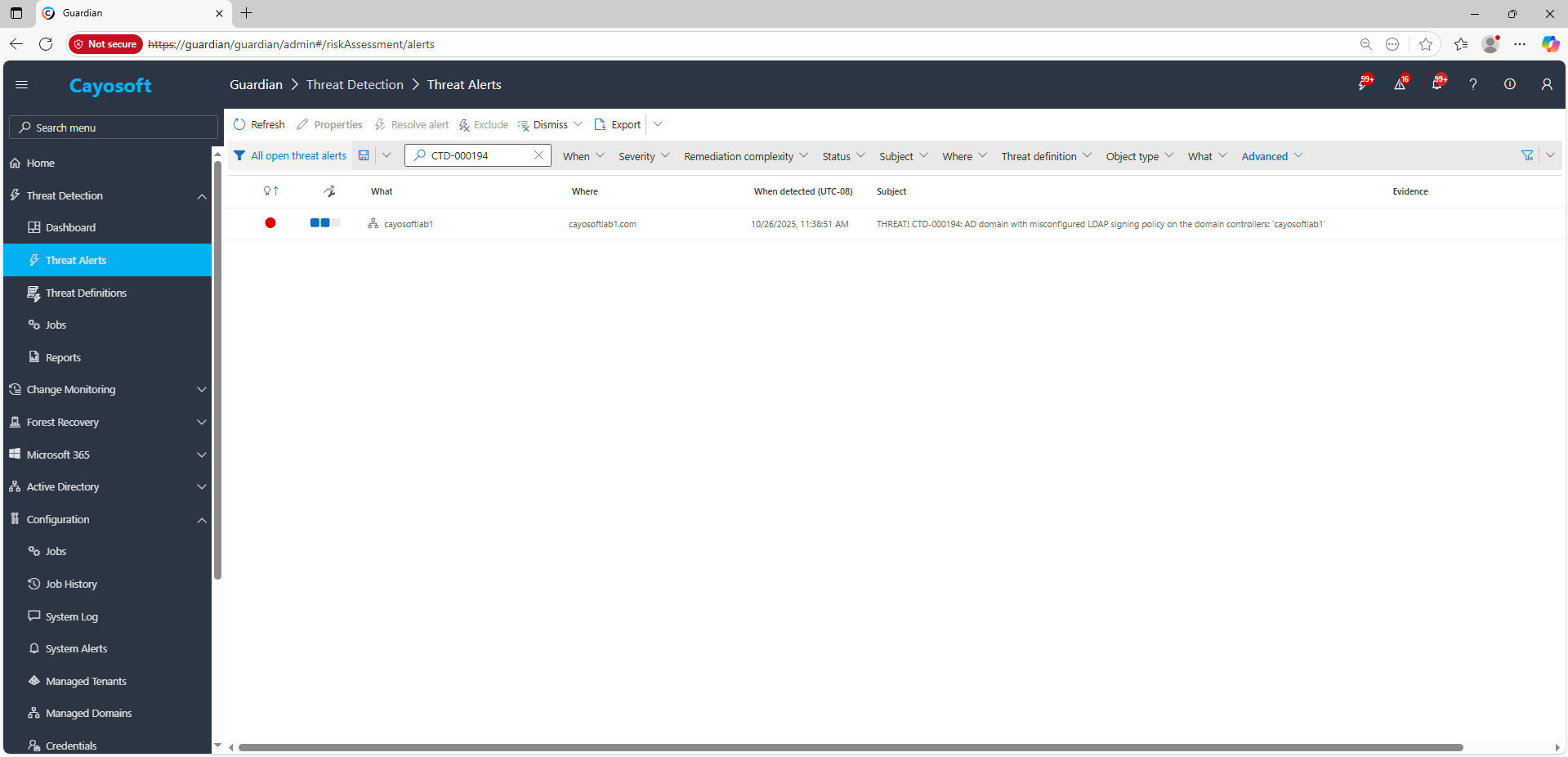
3.) Open any alert and Click for details (from Raise Threat Alert action).
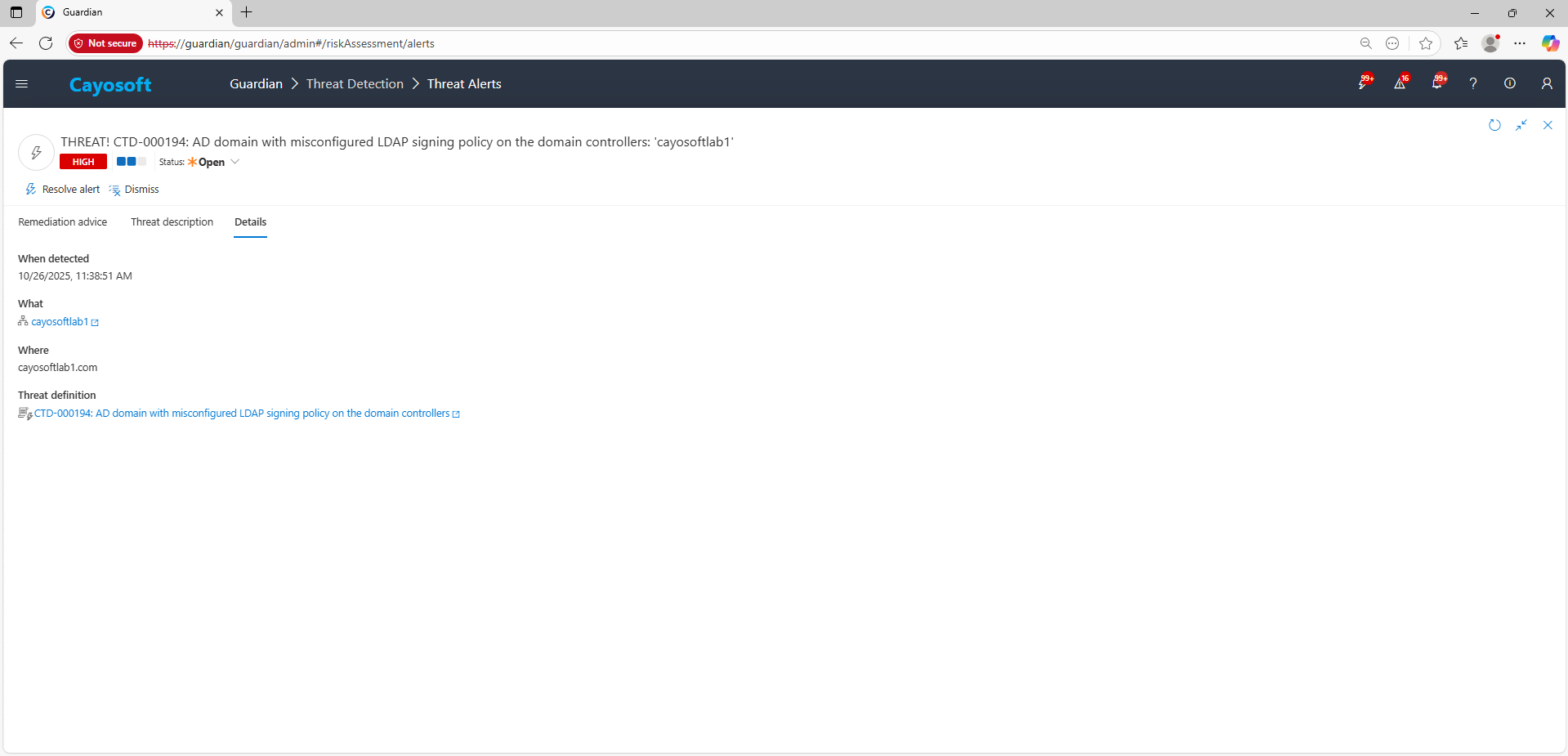
4.) Evidence:
- What – Affected domain / domain controllers.
- Where – Forest and domain context where the misconfiguration exists.
- Who – Accounts or services involved in related LDAP activity, if surfaced by connected alerts.
- When – Detection time and last run data for the threat definition.
- Actions – Linked remediation or operational actions taken on the alert.
Remediation Steps
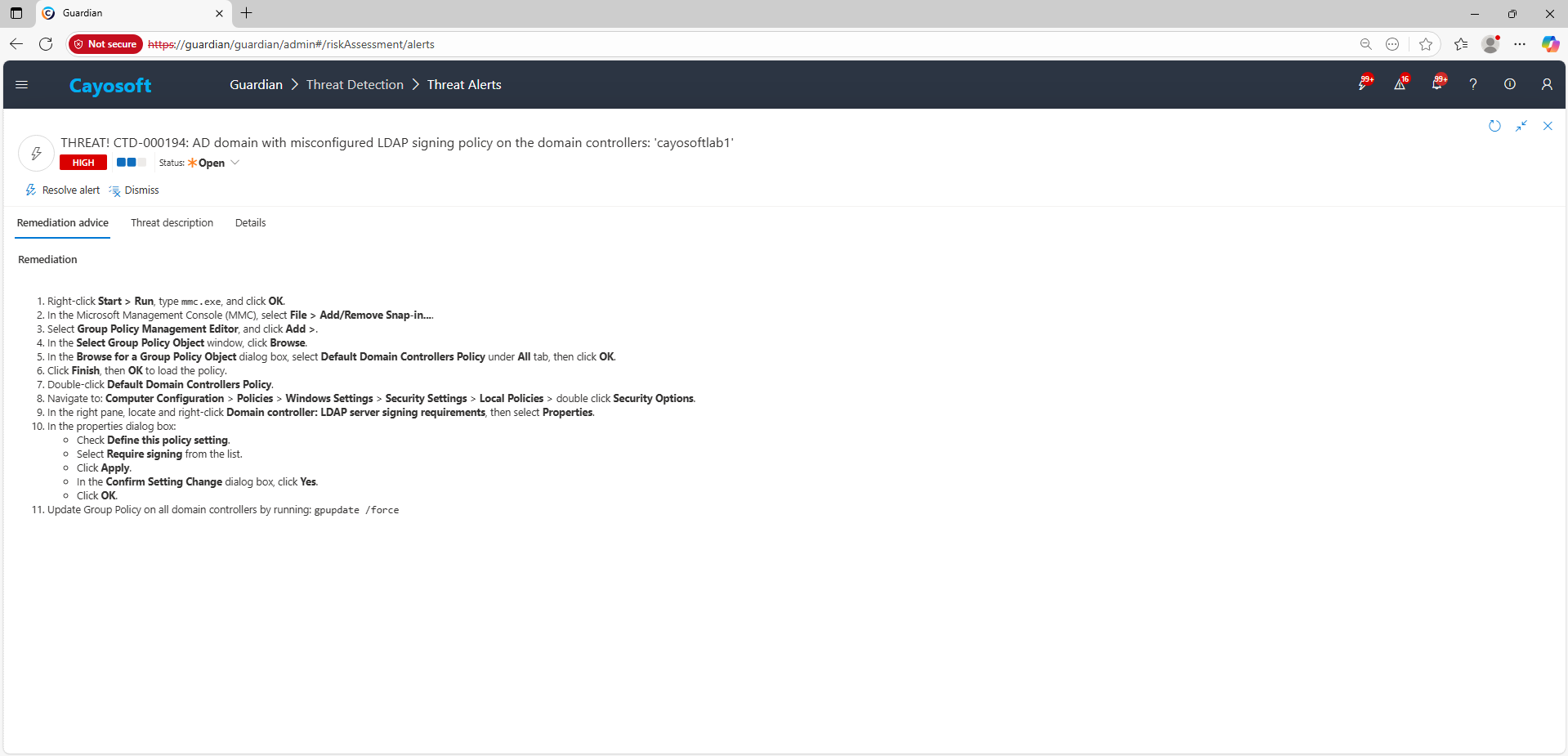
- ) Right-click Start > Run, type
mmc.exe, and click OK. - ) In the Microsoft Management Console (MMC), select File > Add/Remove Snap-in….
- ) Select Group Policy Management Editor, and click Add >.
- ) In the Select Group Policy Object window, click Browse.
- ) In the Browse for a Group Policy Object dialog box, select Default Domain Controllers Policy under All tab, then click OK.
- ) Click Finish, then OK to load the policy.
- ) Double-click Default Domain Controllers Policy.
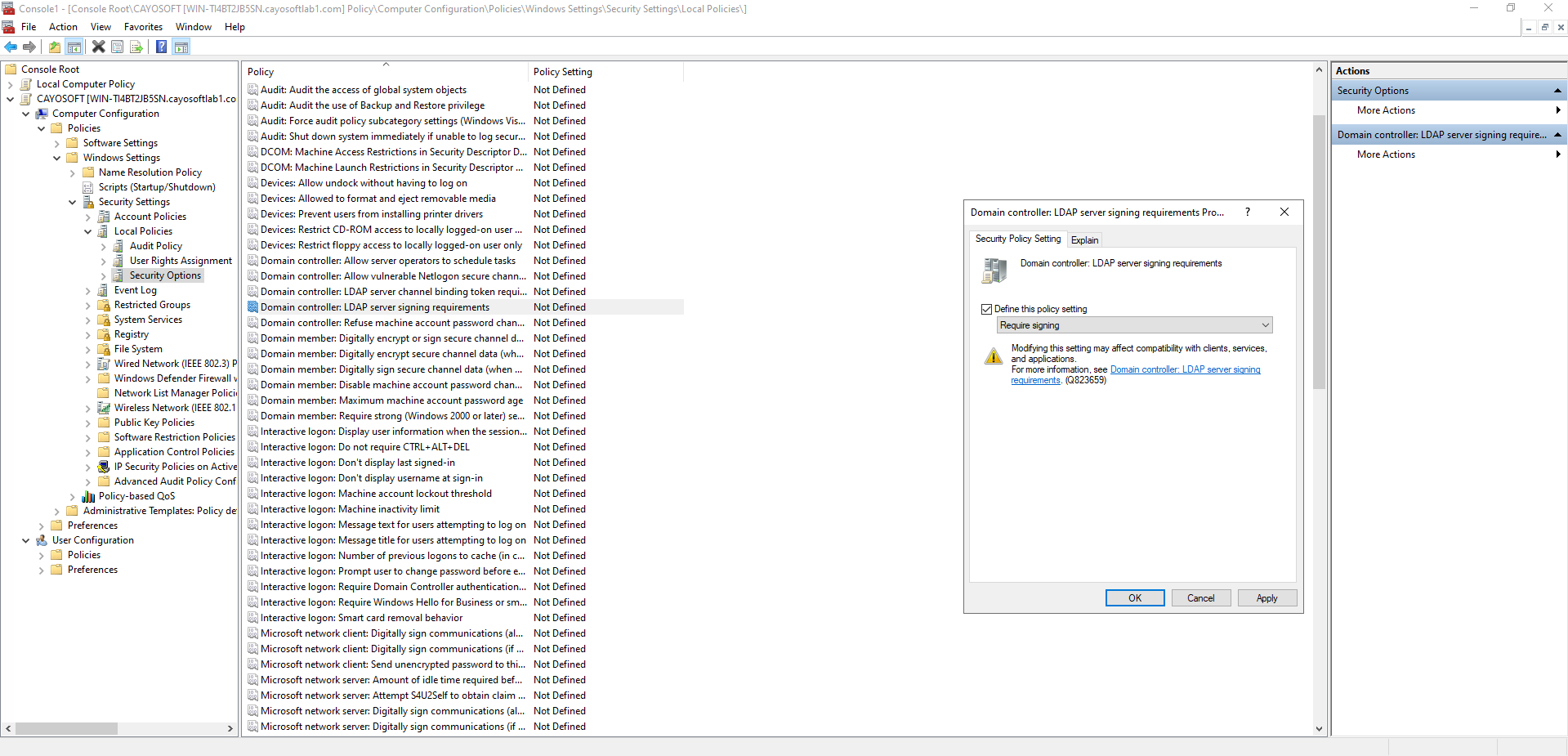
- ) Navigate to: Computer Configuration > Policies > Windows Settings > Security Settings > Local Policies > double click Security Options.
- ) In the right pane, locate and right-click Domain controller: LDAP server signing requirements, then select Properties.
- ) In the properties dialog box:
- Check Define this policy setting.
- Select Require signing from the list.
- Click Apply.
- In the Confirm Setting Change dialog box, click Yes.
- Click OK.
- ) Update Group Policy on all domain controllers by running:
gpupdate /force
How to Prevent It
Cayosoft Guardian can proactively detect and alert on AD domain with misconfigured LDAP signing policy on the domain controllers. Cayosoft Guardian continuously monitors Active Directory, Entra ID, Microsoft 365, and Intune for misconfigurations, providing early warning before attackers can exploit weaknesses such as missing LDAP signing requirements. Regularly reviewing and remediating CTD-000194 alerts keeps LDAP communication hardened and reduces opportunities for credential theft and privilege escalation.
FAQ
Because unsigned LDAP traffic can be intercepted or relayed, allowing attackers to steal credentials, impersonate users, escalate privileges, and quietly move through the environment without triggering standard security controls.
The environment becomes vulnerable to LDAP relay and man-in-the-middle attacks, where an attacker captures authentication traffic and uses it to gain elevated access or create persistent privileged accounts.
It may affect older applications, devices, or network appliances that do not support signed LDAP. Administrators should test in a lab, evaluate dependent systems, and coordinate with application owners before enforcing the policy.
Yes, Cayosoft Guardian Protector.
Final Thought
Proactive monitoring and timely remediation of configuration risks is essential to maintaining a secure Active Directory and Microsoft 365 environment. By addressing issues like AD domain with misconfigured LDAP signing policy on the domain controllers, you reduce attack surfaces and strengthen your organization’s overall security posture.