
AD domain allowing NTLM authentication
Cayosoft Threat Definition CTD-000077
Tune into Guardians of the Directory Podcast.




Stop AD Threats As They Happen
Cayosoft Protector provides continuous monitoring and real-time alerts across your entire Microsoft Identity stack
Like This Article?
Subscribe to our LinkedIn Newsletter to receive more educational content
Risk Summary
NTLM and NTLMv2 are vulnerable to SMB replay, man-in-the-middle, and brute-force attacks. Allowing NTLM in a domain increases credential theft risk and enables stealthy lateral movement.
- Severity: Medium
- Platform: Active Directory
- Category: GPO, Domain-wide
- MITRE ATT&CK Tactics: Privilege Escalation; Defense Evasion; Credential Access; Lateral Movement
- MITRE D3FEND Tactics: Application Configuration Hardening
Description
NTLM allows legacy authentication that is susceptible to replay, MITM, and password-guessing attacks. Reducing and eliminating NTLM forces use of stronger mechanisms such as Kerberos v5 or smart cards. If domain controllers and servers deny NTLM requests, attacks that depend on NTLM traffic are eliminated.

Real-World Scenario
An attacker gains a foothold on a legacy app server and sniffs NTLM challenge/response traffic via SMB relay. Using captured hashes, the attacker authenticates to a file server that still accepts NTLM, escalates to local admin, and harvests additional credentials. To avoid obvious detection, the attacker routes traffic over signed but legacy SMB sessions and times activity during backup windows. With NTLM allowed domain-wide, lateral movement continues until a domain admin token is obtained. Cayosoft Guardian flags CTD-000077: AD domain allowing NTLM authentication so ops can audit and then block NTLM before privileges are abused.
Stop Privilege Escalation—Then Undo It with Cayosoft Guardian Audit & Restore
Real-time alerts across AD & Entra ID with one-click rollback.
Detect this and other threats with Cayosoft Guardian Protector (Free of Charge)
1.) Download Cayosoft Guardian Protector for free real-time threat detection and monitoring of your hybrid AD and Microsoft 365 environment. Once downloaded, sign in and navigate to the Threat Detection Dashboard.


2.) Open All Alerts and search for CTD-000077 or AD domain allowing NTLM authentication.
3.) Open any alert and Click for details (from Raise Threat Alert action).
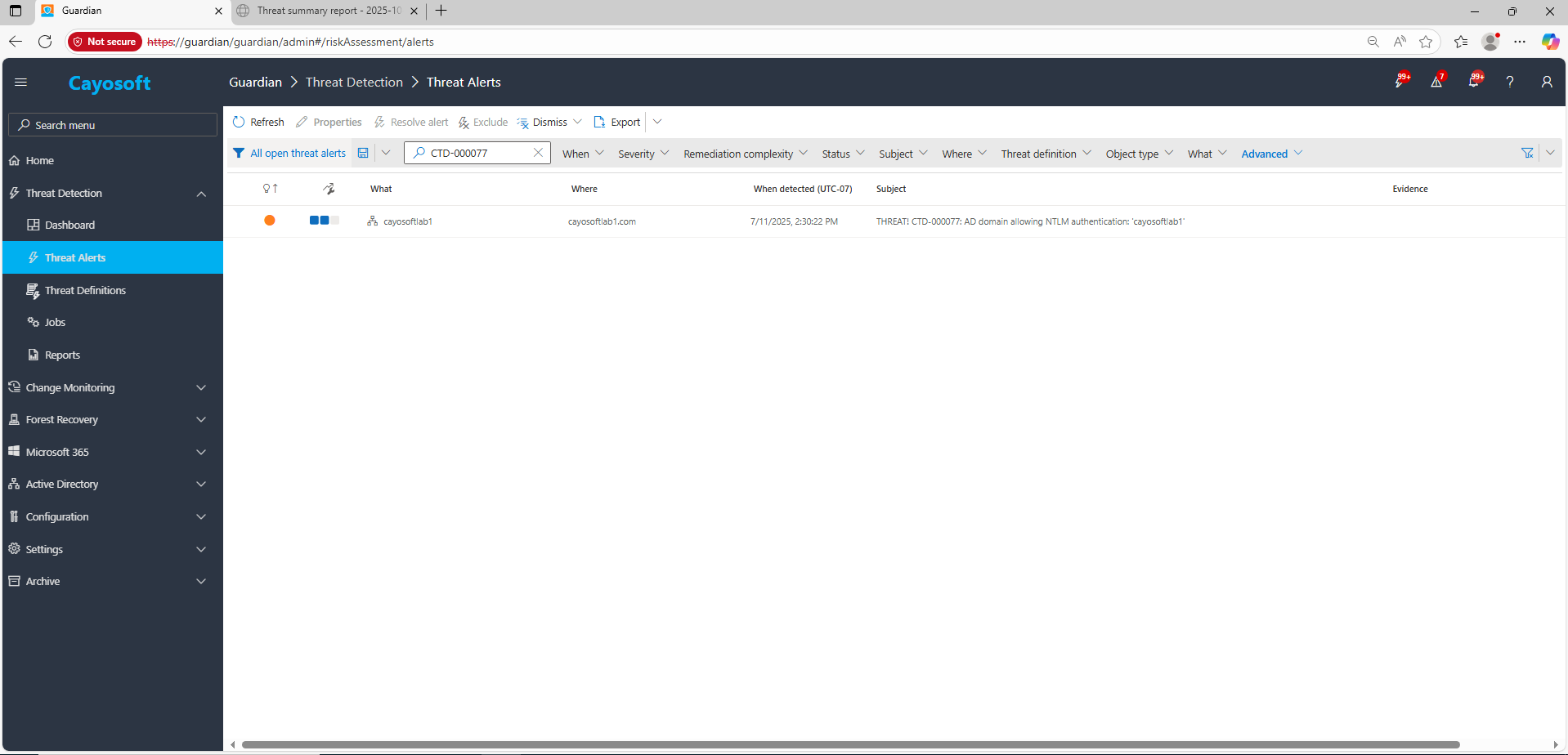
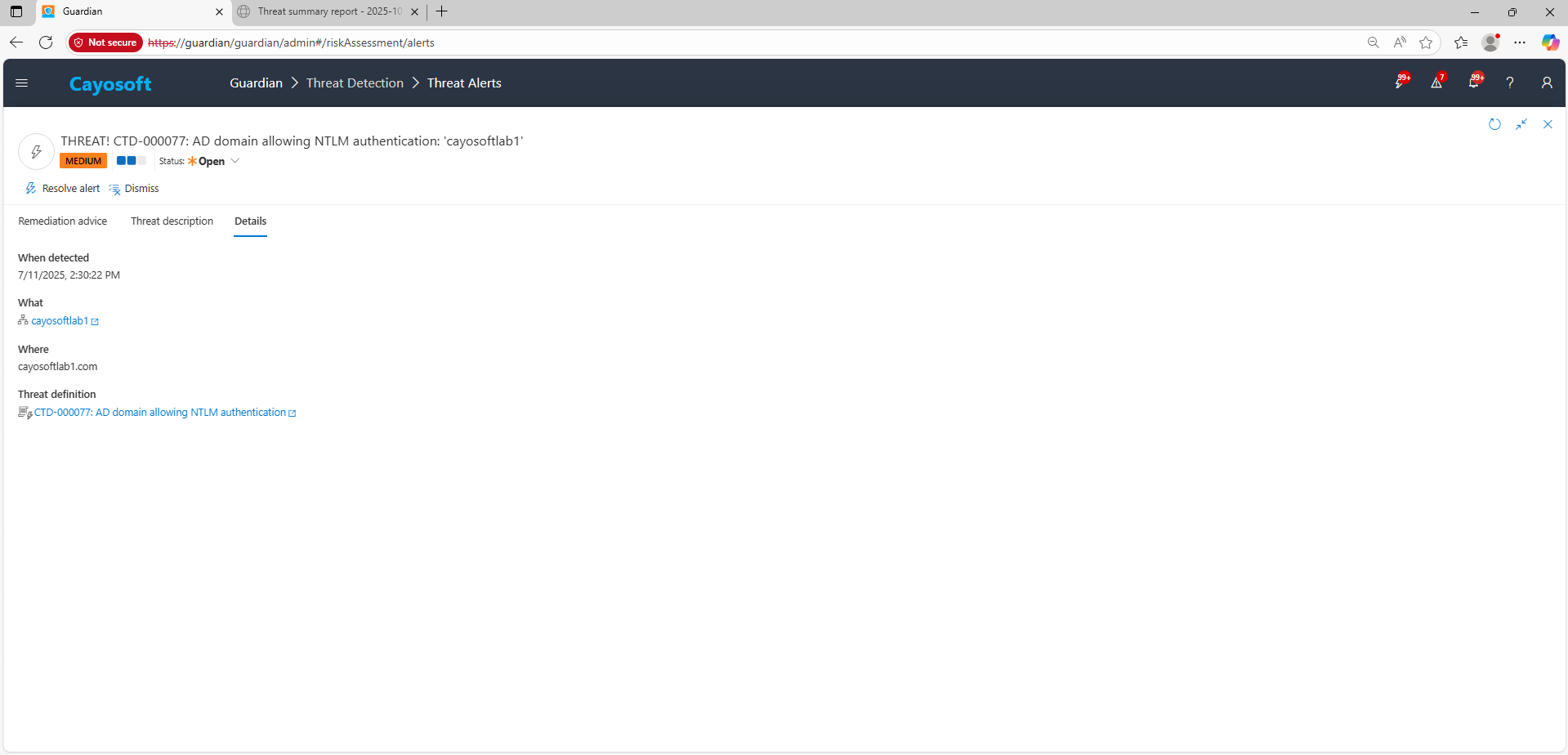
4.) Review alert context (What/Type/Where/When/Who/Severity/Threat definition) for domains where NTLM is permitted.
Remediation Steps
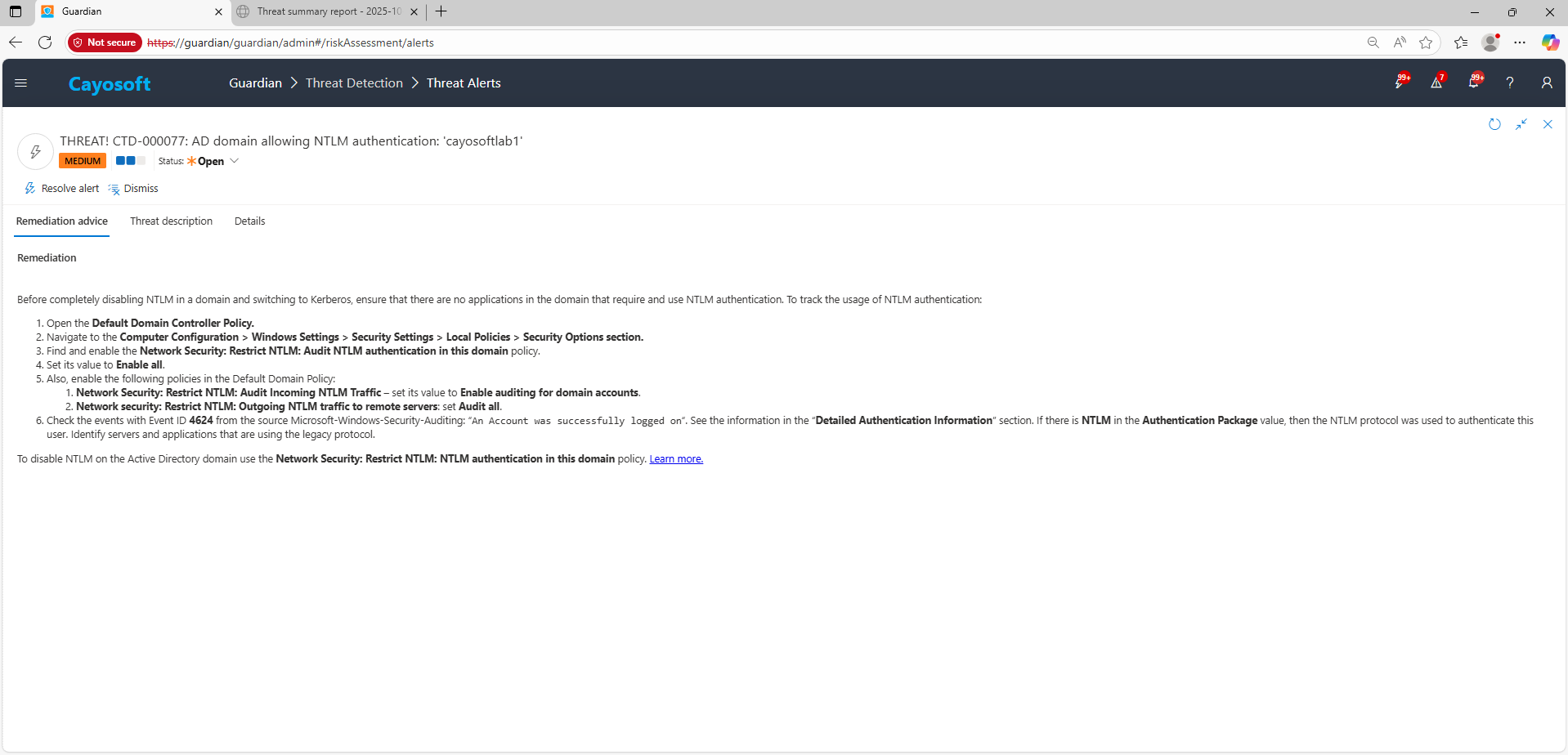
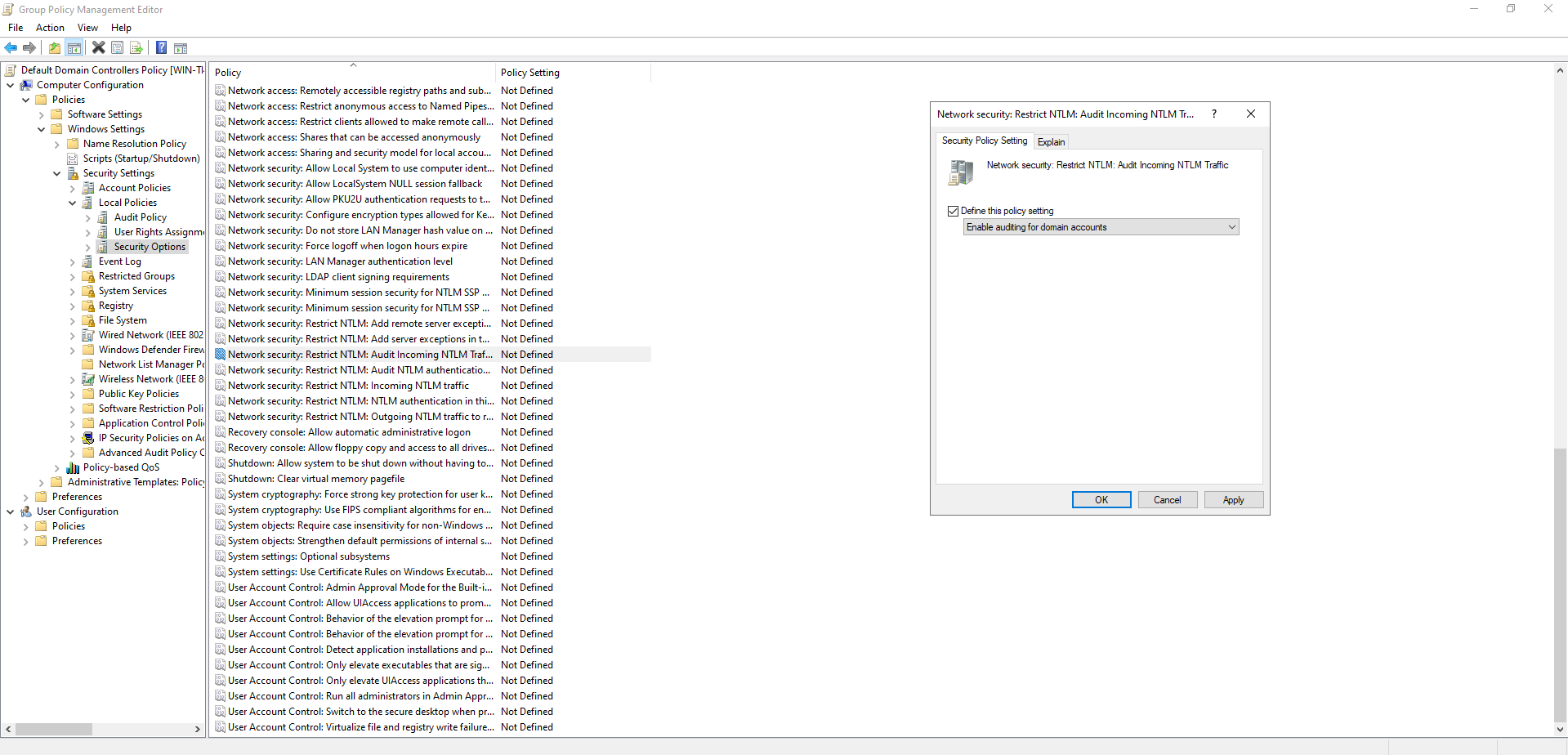
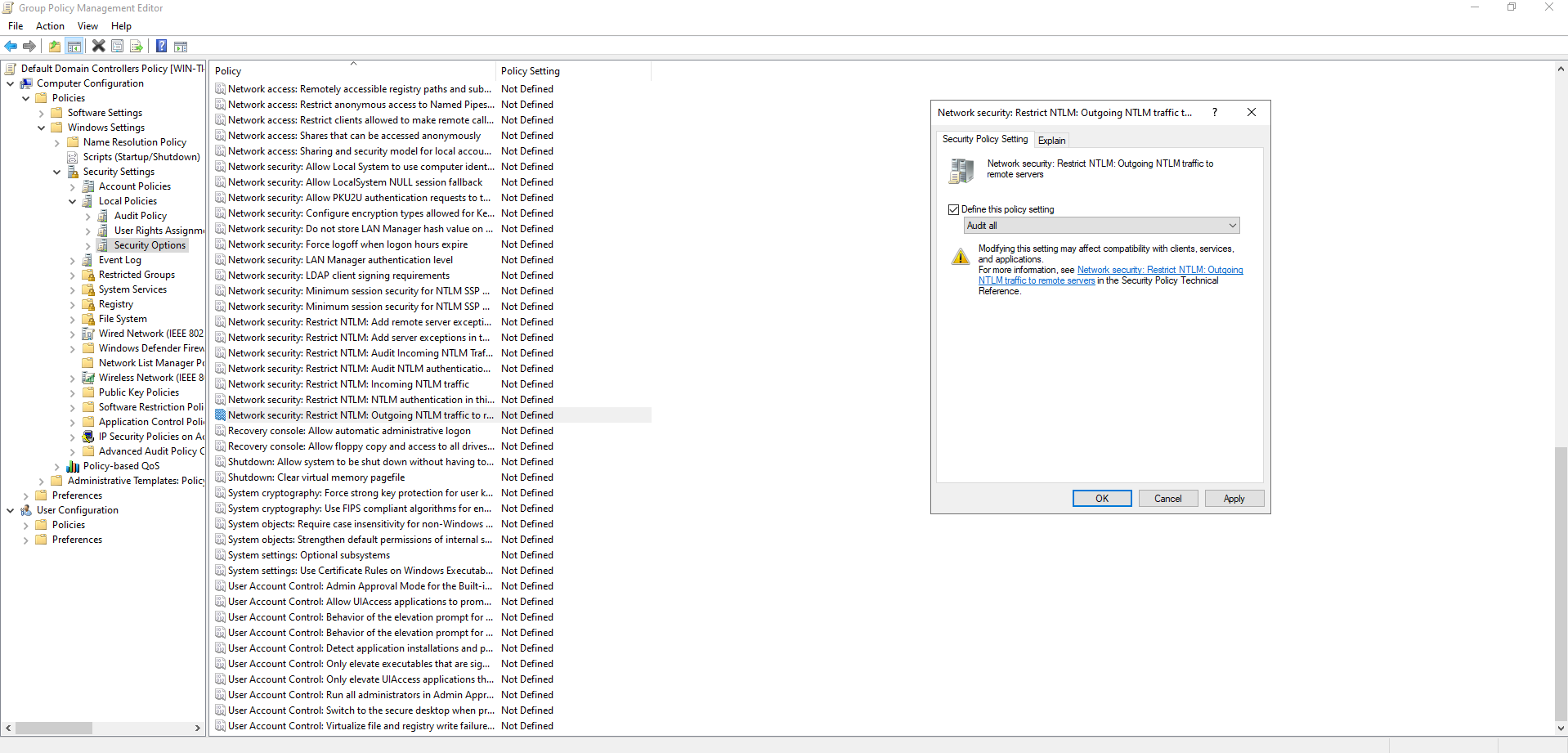
Before completely disabling NTLM in a domain and switching to Kerberos, ensure that there are no applications in the domain that require and use NTLM authentication. To track the usage of NTLM authentication:
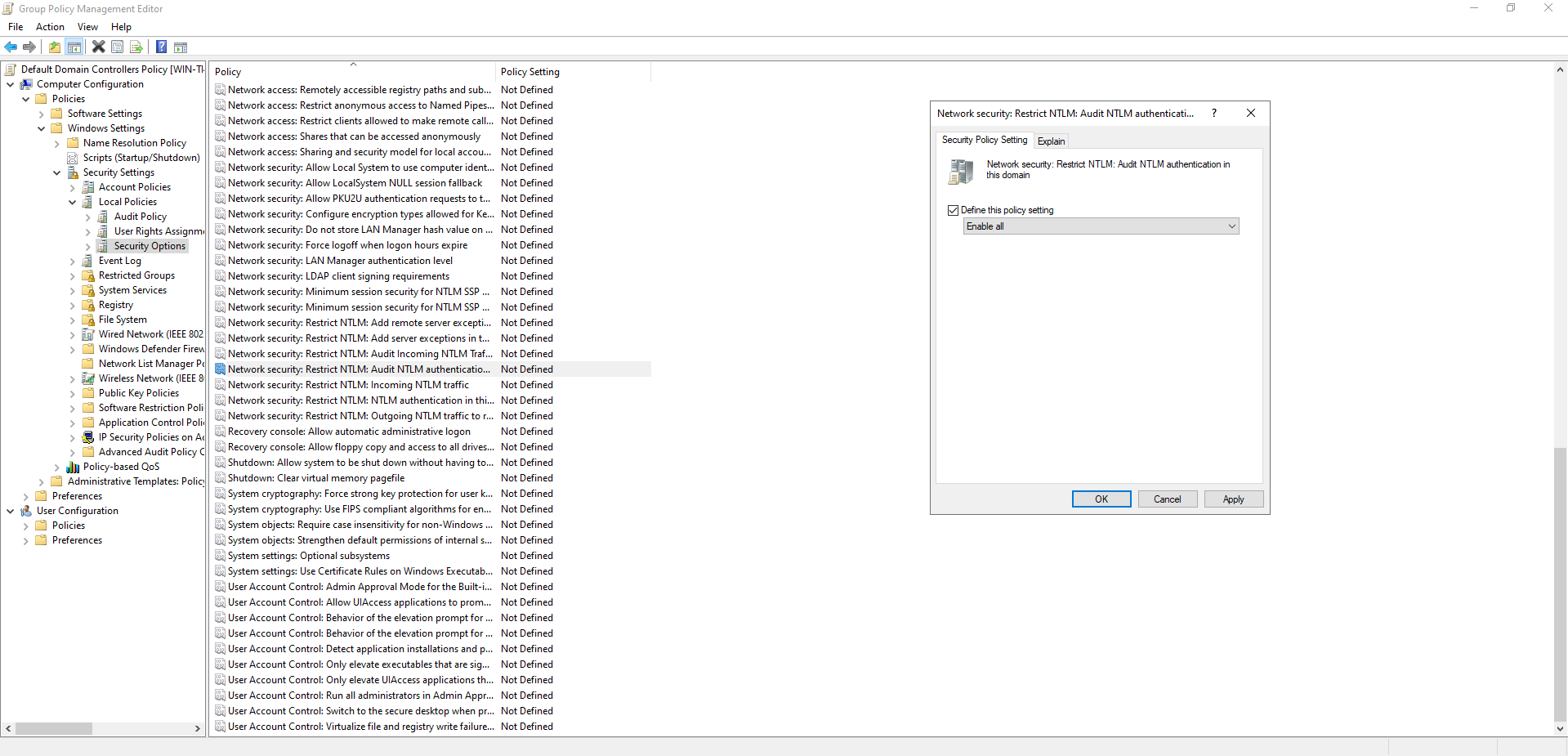
- Open the Default Domain Controller Policy.
- Navigate to the Computer Configuration > Windows Settings > Security Settings > Local Policies > Security Options section.
- Find and enable the Network Security: Restrict NTLM: Audit NTLM authentication in this domain policy.
- Set its value to Enable all.
- Also, enable the following policies in the Default Domain Policy:
- Network Security: Restrict NTLM: Audit Incoming NTLM Traffic – set its value to Enable auditing for domain accounts.
- Network security: Restrict NTLM: Outgoing NTLM traffic to remote servers: set Audit all.
- Check the events with Event ID 4624 from the source Microsoft-Windows-Security-Auditing: “
An Account was successfully logged on“. See the information in the “Detailed Authentication Information” section. If there is NTLM in the Authentication Package value, then the NTLM protocol was used to authenticate this user. Identify servers and applications that are using the legacy protocol.
To disable NTLM on the Active Directory domain use the Network Security: Restrict NTLM: NTLM authentication in this domain policy. Learn more.
How to Prevent It
Cayosoft Guardian can proactively detect and alert on AD domain allowing NTLM authentication. It continuously monitors Active Directory, Entra ID, Microsoft 365, and Intune for over 200 misconfigurations, providing early warning before attackers can exploit them.
FAQ
Allowing NTLM authentication in an Active Directory domain exposes your environment to several attack types, including SMB relay, man-in-the-middle, and brute-force password attacks. Attackers can use NTLM hashes to move laterally, escalate privileges, or impersonate legitimate users. Disabling NTLM significantly reduces these risks by enforcing stronger authentication protocols like Kerberos.
Administrators can sign in to the Cayosoft Guardian Threat Detection Dashboard, open All Alerts, and search for CTD-000077 or AD domain allowing NTLM authentication. The alert details identify which domains still permit NTLM, helping teams assess where legacy authentication is in use before implementing blocking policies.
First, audit systems and applications to confirm which ones still rely on NTLM. Then, through Group Policy, enable auditing settings under Network Security: Restrict NTLM to monitor usage. Once dependencies are resolved, change the policy to block NTLM authentication domain-wide. Continuous monitoring ensures new systems do not reintroduce NTLM vulnerabilities.
Yes, native Windows auditing, PowerShell scripts, and SIEM solutions can detect and alert on NTLM authentication attempts.
Yes, Cayosoft Guardian provides continuous monitoring, alerting, and prescriptive guidance to audit and block NTLM safely across the domain.
References
- Microsoft: Network Security: Restrict NTLM: NTLM authentication in this domain – learn the policy behaviors and options.
https://learn.microsoft.com/en-us/windows/security/threat-protection/security-policy-settings/network-security-restrict-ntlm-ntlm-authentication-in-this-domain
Final Thought
Proactive monitoring and timely remediation of configuration risks is essential to maintaining a secure Active Directory and Microsoft 365 environment. By addressing issues like AD domain allowing NTLM authentication, you reduce attack surfaces and strengthen your organization’s overall security posture.