
Active Directory missing KDS root key required for gMSA support
Cayosoft Threat Definition CTD-000193
Tune into Guardians of the Directory Podcast.




Stop AD Threats As They Happen
Cayosoft Protector provides continuous monitoring and real-time alerts across your entire Microsoft Identity stack
Like This Article?
Subscribe to our LinkedIn Newsletter to receive more educational content
Risk Summary
When an Active Directory domain is missing the KDS root key required for gMSA support, group managed service accounts cannot be used and services fall back to traditional accounts with manually managed passwords. This increases the risk of weak, reused, or stale credentials being compromised and then leveraged for privilege escalation. The misconfiguration expands the attack surface across service accounts and critical infrastructure services.
- Severity: High
- Platform: Active Directory
- Category: Privileged Access Management, Infrastructure
- MITRE ATT&CK Tactics: Privilege Escalation, Credential Access
- MITRE D3FEND Tactics: Application Configuration Hardening
Description
Group Managed Service Accounts (gMSAs) depend on the Key Distribution Service (KDS) and its Root Key to securely generate and distribute account passwords. The KDS root key enables domain controllers to create cryptographically strong, automatically managed passwords for gMSAs.
If the domain lacks a KDS root key, gMSA functionality is disabled, and any attempt to create or use gMSAs will fail. This misconfiguration forces services to rely on traditional accounts with manually rotated passwords, increasing administrative overhead and expanding the potential attack surface through weak or stale credentials.

Real-World Scenario
An organization deploys several business-critical applications using traditional service accounts because the Active Directory domain is missing the KDS root key required for gMSA support. Over time, the service account passwords are rarely rotated and are shared among administrators and scripts. An attacker compromises one application server, dumps the credentials for a highly privileged service account, and then uses that account to sign in interactively and modify group memberships, gaining elevated access to additional servers. The attacker moves laterally across infrastructure using the same compromised service credentials without triggering standard user risk monitoring. Cayosoft Guardian would have highlighted CTD-000193 early, showing that Active Directory is missing the KDS root key required for gMSA support so the environment could migrate to gMSAs and eliminate this class of weak service credentials.
Stop Privilege Escalation—Then Undo It with Cayosoft Guardian Audit & Restore
Real-time alerts across AD & Entra ID with one-click rollback.
Detect this and other threats with Cayosoft Guardian Protector (Free of Charge)
1.) Download Cayosoft Guardian Protector for free real-time threat detection and monitoring of your hybrid AD and Microsoft 365 environment. Once downloaded, sign in and navigate to the Threat Detection Dashboard.


2.) Search for CTD-000193 or “Active Directory missing KDS root key required for gMSA support.”
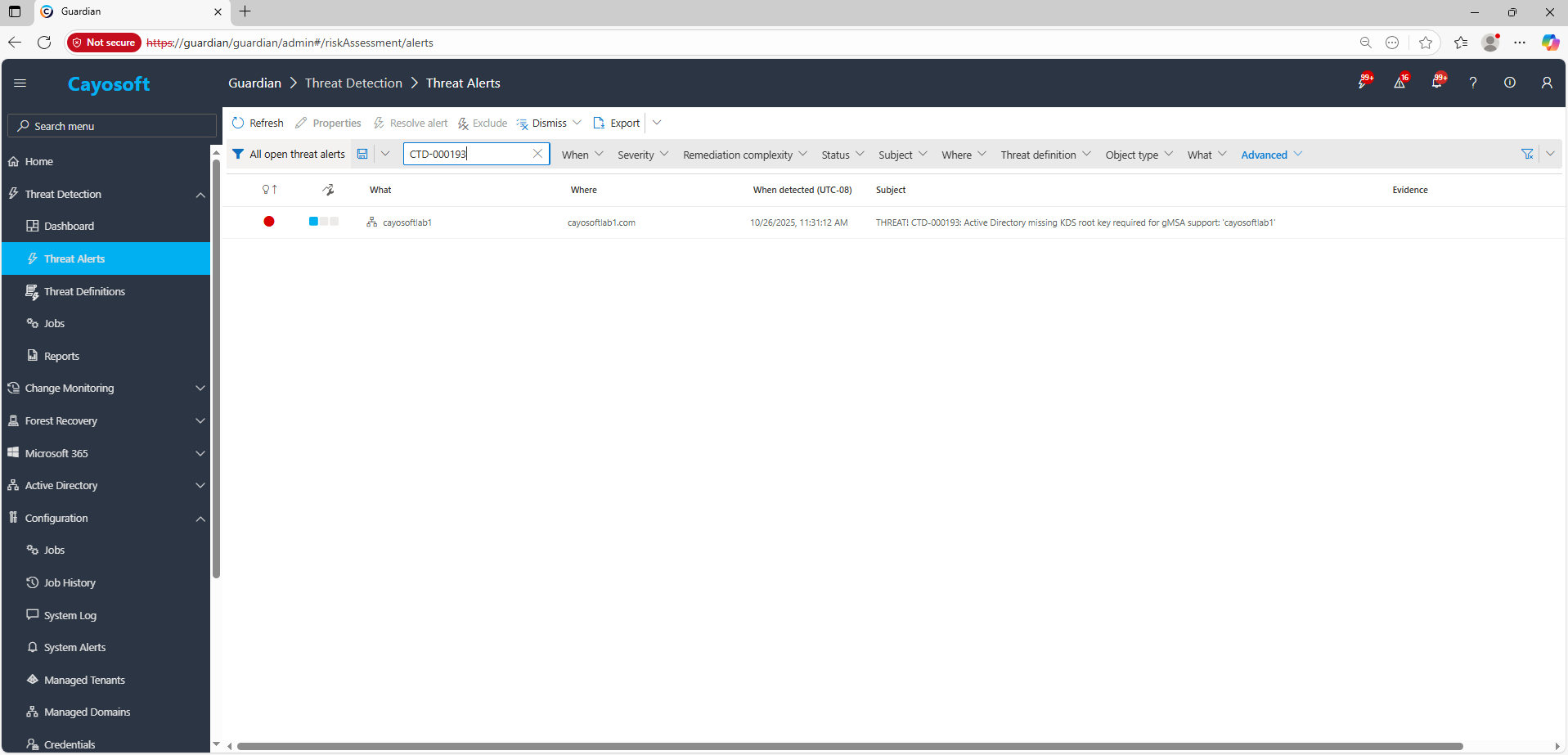
3.) Open any alert and Click for details (from Raise Threat Alert action).
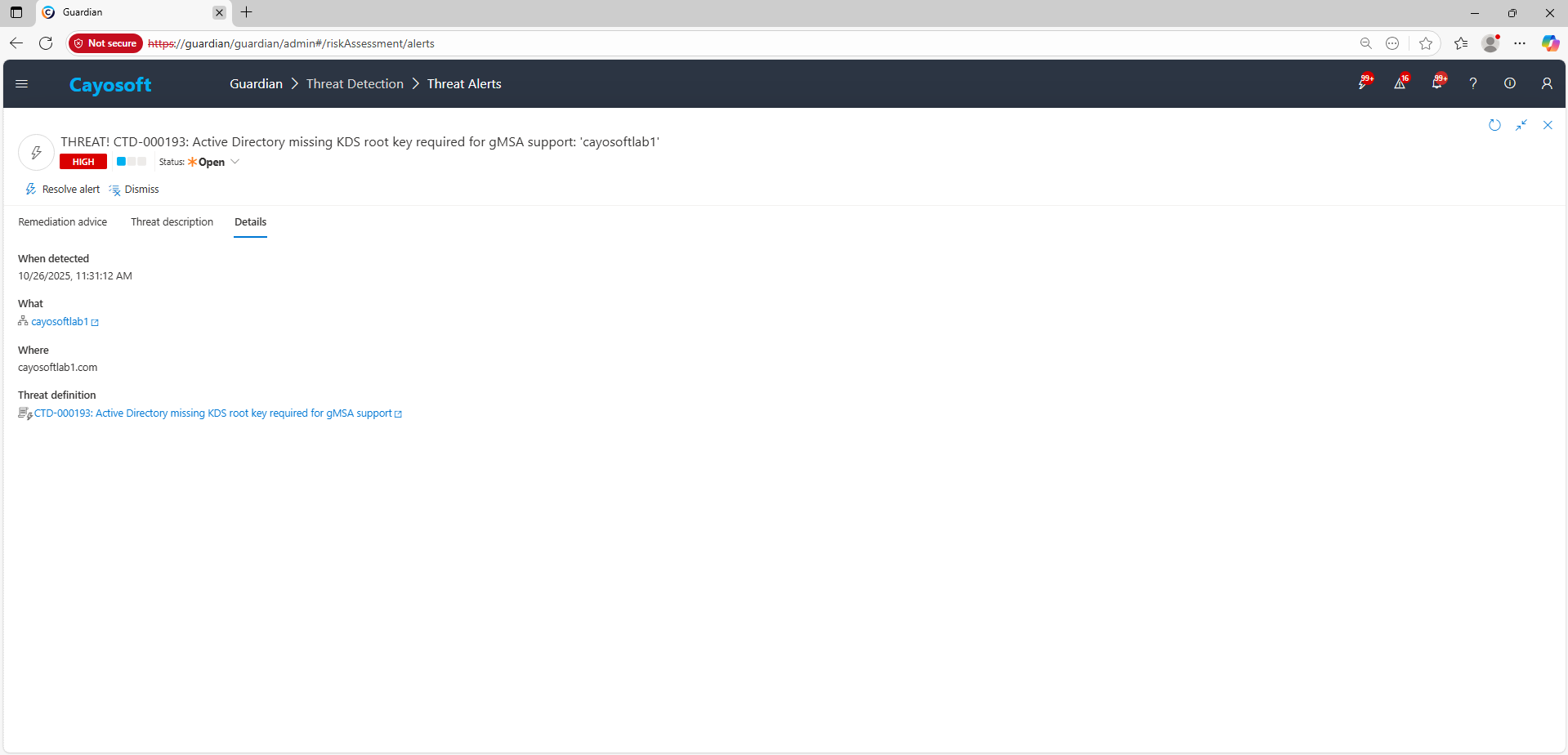
4.) Review the What, Where, Who, and When fields to identify which domain and domain controllers are affected by the missing KDS root key required for gMSA support.
Remediation Steps
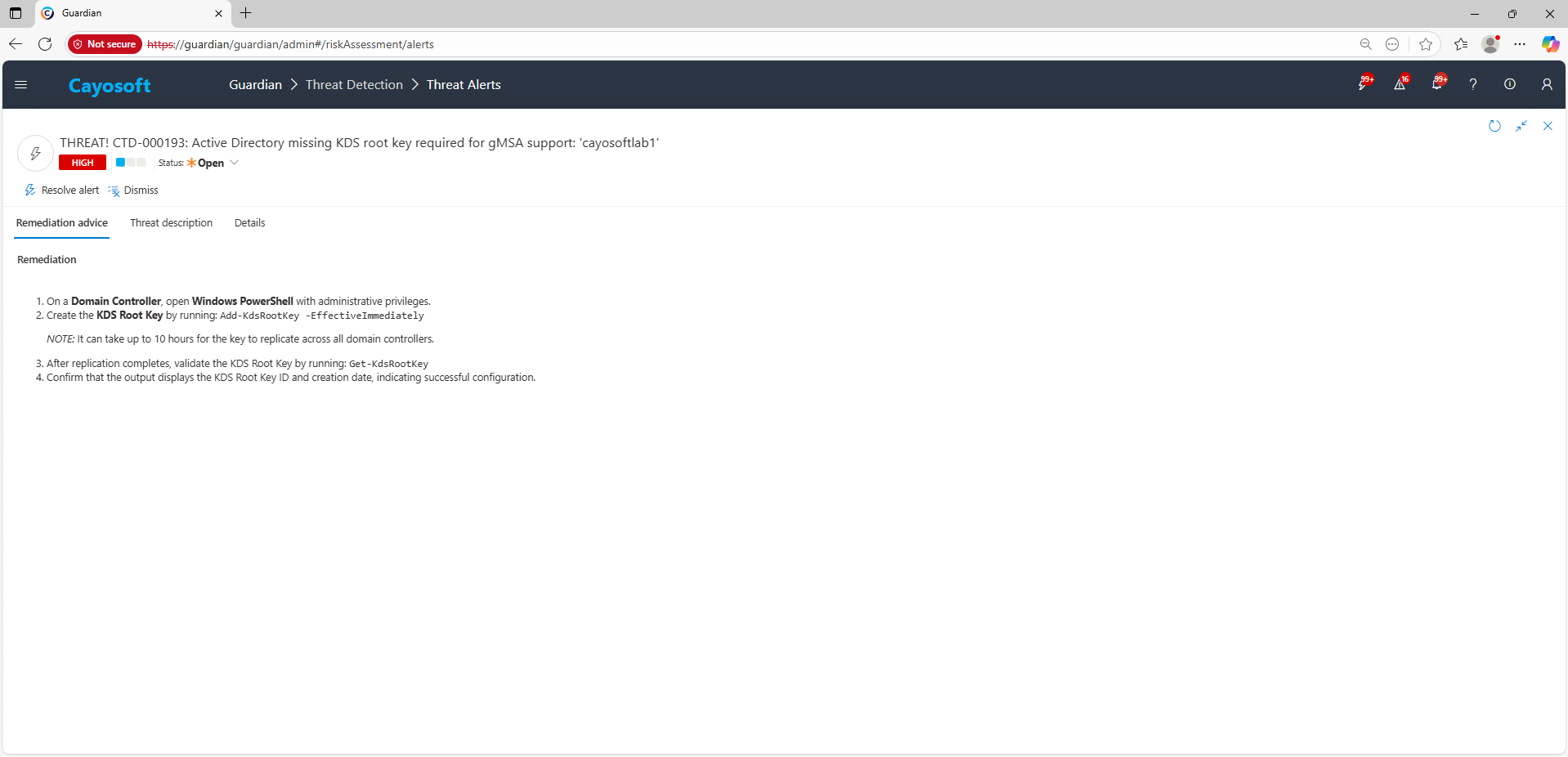
- ) On a Domain Controller, open Windows PowerShell with administrative privileges.
- ) Create the KDS Root Key by running:
Add-KdsRootKey -EffectiveImmediatelyNOTE: It can take up to 10 hours for the key to replicate across all domain controllers.
- ) After replication completes, validate the KDS Root Key by running:
Get-KdsRootKey - ) Confirm that the output displays the KDS Root Key ID and creation date, indicating successful configuration.
How to Prevent It
Cayosoft Guardian can proactively detect and alert on Active Directory missing KDS root key required for gMSA support. Cayosoft Guardian continuously monitors Active Directory, Entra ID, Microsoft 365, and Intune for configuration issues and misconfigurations, providing early warning before attackers can exploit weaknesses such as weak or manually managed service account credentials. Regularly reviewing and clearing CTD-000193 alerts ensures that the KDS root key is present so the organization can adopt gMSAs and reduce risk from service account compromise.
FAQ
Without the KDS root key, gMSAs cannot be used and organizations fall back to traditional service accounts with manually managed passwords. These passwords often become weak, reused, or stale, increasing the likelihood of credential theft and privilege escalation.
No. Existing traditional service accounts continue functioning, but the environment cannot deploy gMSAs, forcing continued reliance on less secure, manually rotated service credentials.
When gMSAs cannot be used, services rely on static service accounts. If attackers compromise one of these accounts, they can reuse the privileged credentials across servers to move laterally and escalate privileges with little resistance.
Yes, Cayosoft Guardian Protector.
Final Thought
Proactive monitoring and timely remediation of configuration risks is essential to maintaining a secure Active Directory and Microsoft 365 environment. By addressing issues like Active Directory missing KDS root key required for gMSA support, you reduce attack surfaces associated with service accounts and strengthen your organization’s overall security posture.