



TL;DR
Active Directory SID History injection is a privilege escalation attack where hackers modify a user’s sIDHistory attribute to gain administrative access without appearing in privileged groups, bypassing traditional security monitoring that only tracks group membership changes. Attackers exploit a legacy migration feature to inject privileged Active Directory SID values into standard user accounts, creating hidden backdoors that survive password resets and require specialized attribute-level monitoring to detect and prevent.
Ben from HR shouldn’t have Domain Admin rights, but after an Active Directory SID History injection attack, he has it despite not appearing in any privileged groups. This is what makes SID History injection so dangerous. Attackers modify a single attribute in a user account to grant themselves administrative control across your entire domain.
Standard security tools miss the problem because they track group membership changes, not attribute modifications. With this attack, the user’s group list looks normal, but their permissions tell a different story. Active Directory SID History injection attacks work by abusing a legacy migration feature that most organizations never use but rarely disable. Attackers who compromise a single privileged account can weaponize this feature to create hidden backdoors that survive password resets and account demotions.
Understanding Active Directory SID
Every user, group, and computer in your domain carries a unique identifier that Active Directory uses to manage permissions and access. This identifier operates behind the scenes during authentication, determining what resources you can access and what actions you can perform.
What Is an Active Directory SID?
An Active Directory Security Identifier (SID) functions as a unique digital fingerprint for every security principal in your domain. When you create a user account like “Ben,” Active Directory generates a SID that looks something like S-1-5-21-3623811015-3361044348-30300820-1013. This string of numbers remains permanently attached to that account throughout its lifecycle.
The structure follows a specific pattern. Each section tells Active Directory something about the account. The first part (S-1-5) identifies it as a security principal in Windows. The middle section (21-3623811015-3361044348-30300820) represents your domain’s unique identifier. The final number (1013) distinguishes this specific account from every other object in your domain.
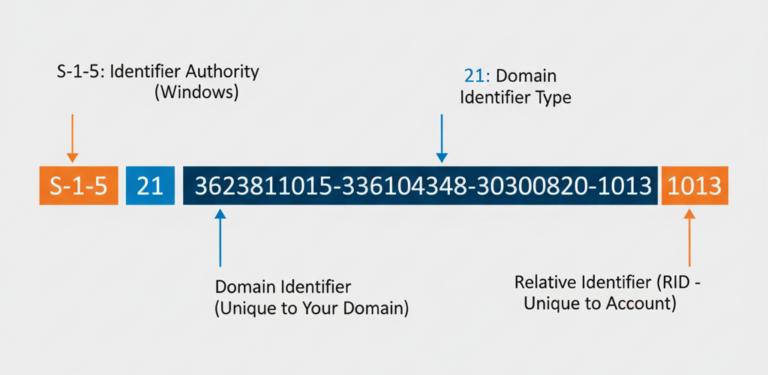
Anatomy of an Active Directory Security Identifier (SID)
Active Directory SIDs are unique identifiers that never change, even when you rename an account or move it between organizational units.
Consider this comparison: Your username is like your legal name and can change through marriage or personal choice. Your Active Directory SID is like your DNA: It’s permanent and unchangeable. When you rename “Ben” to “Robert,” Active Directory updates the display name but keeps the same SID. This permanence matters because permissions in your environment reference SIDs, not usernames.
How Active Directory SID Works in Authentication
When Ben logs into his computer, Active Directory doesn’t check his username against permission lists. Instead, it collects all the SIDs associated with his account: his personal Active Directory SID plus the SIDs of every group he belongs to. This collection forms his access token, which Windows uses throughout his session to grant or deny access to resources.
According to core Active Directory architecture principles, this token accompanies every action Ben takes. When he tries to open a file, Windows compares the SIDs in his token against the SIDs in the file’s access control list. A match grants access. No match means denial.
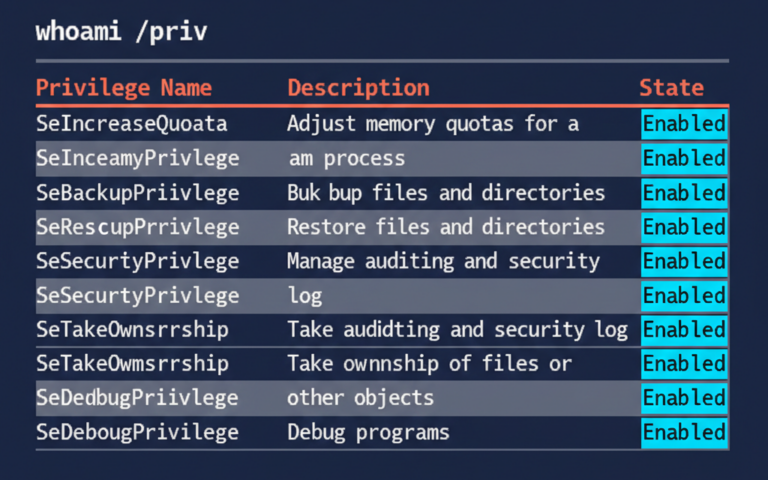
This system works because Active Directory SIDs provide consistent, reliable identifiers that survive account modifications. You can change Ben’s department, manager, or job title, but his Active Directory SID stays constant. This stability makes SID-based permissions more reliable than name-based systems, which break when accounts get renamed. However, this same reliability becomes a vulnerability when attackers manipulate SID-related attributes to escalate privileges.
The SID History Injection Threat
SID History injection takes a feature built for legitimate domain migrations and weaponizes it for privilege escalation. Attackers manipulate an attribute that most security teams never monitor, creating administrative access without touching group memberships. This attack works because it operates outside what traditional security tools watch for.
What Is SID History and What Is Its Legitimate Purpose?
The sIDHistory attribute solves a specific challenge during domain migrations. When organizations merge or restructure their Active Directory environments, users need continued access to resources from their previous domain. The sIDHistory attribute stores the old SID alongside the new one, maintaining access throughout the transition.
Consider a typical acquisition scenario. Company A buys Company B and starts migrating users from Domain B to Domain A. Ben gets a new account in Domain A with a fresh SID, but he still needs access to files in Domain B that reference his old SID. Administrators add his original Domain B SID to his sIDHistory attribute. When Ben accesses a file in the old domain, Active Directory checks both his current SID and any SIDs in his sIDHistory attribute, granting access if either matches.
These migrations typically wrap up within weeks or months, at which point organizations should clear sIDHistory values. Unfortunately, many environments have accounts with populated sIDHistory attributes years after migrations finish. This lingering data creates an attack surface that security teams often overlook entirely.
How Attackers Exploit SID History Injection
An attacker with the right privileges can inject any SID into the sIDHistory attribute of an account they control. They usually target the SID of Domain Admins or another privileged group. Once injected, that user account inherits all permissions tied to the injected SID without showing up in actual group membership lists.
The attack follows a predictable pattern:
- Initial compromise: The attacker gains access to an account with privileges to modify user attributes, typically through credential theft or exploitation of a misconfigured service account.
- SID identification: They enumerate the domain to identify the SID of privileged groups like Domain Admins (typically ending in -512 for the domain).
- Injection: Using specialized tools like Mimikatz or the Active Directory Migration Tool (ADMT), they modify the sIDHistory attribute of a standard user account to include the privileged group’s SID.
- Privilege escalation: The compromised account now operates with Domain Admin permissions while appearing as a regular user in group membership queries.
SID History injection grants administrative privileges without modifying group membership, making the attack invisible to most monitoring solutions.
This technique is particularly dangerous because it survives standard remediation efforts. Password resets don’t remove the injected SID, and removing the user from administrative groups has zero effect. The malicious attribute persists until someone specifically examines and cleans the sIDHistory field.
Tools Used for SID History Attacks
Several tools enable SID History injection attacks, each with different sophistication levels and detection challenges. Understanding these tools helps security teams recognize attack patterns and implement appropriate defenses.
Here’s a breakdown of the most frequently observed tools and methods attackers use for SID History injection.
Tool/Method | Privileges Required | Detection Difficulty | Primary Use |
Mimikatz | Domain Admin or equivalent | Medium | Direct attribute manipulation through LSASS access |
ADMT (Active Directory Migration Tool) | Domain Admin or equivalent | High | Abuse of a legitimate migration tool to inject SIDs into the history attribute. |
Offline Attack Methods | Physical or SYSTEM access to NTDS.dit | Very High | Modifying the Active Directory database file directly while it is offline to bypass all live security checks. |
Custom Scripts | Varies by implementation | High | Automated injection across multiple accounts |
Mimikatz remains the most recognized tool for SID History injection attacks. Its “sid::patch” and “sid::add” modules enable direct manipulation of the sIDHistory attribute when executed with sufficient privileges. Security teams often focus on detecting Mimikatz execution, but attackers increasingly turn to native Windows tools like PowerShell to accomplish the same objective with far less detection risk.
The shift toward legitimate administrative tools creates a serious detection challenge. When an attacker uses the Set-ADUser cmdlet or ADSI Edit to modify sIDHistory, they generate the same log entries as a legitimate administrator performing a domain migration. Context becomes critical for distinguishing malicious activity from administrative tasks, but standard security tools lack the capability to analyze that context effectively.
Why Traditional Monitoring Fails to Detect This Attack
Security teams spend considerable time and money monitoring their Active Directory environments, yet SID History injection attacks consistently evade detection. This isn’t because of poor tools or careless administrators. The problem runs deeper: There’s a fundamental disconnect between what attackers actually modify and what most security solutions are designed to watch. Most security tools focus on tracking group membership changes, the traditional path to privilege escalation. Attackers understand this pattern and have adjusted their methods to work around it.
Group Membership vs. Attribute Monitoring
Traditional security monitoring centers on group membership changes because historically, adding someone to Domain Admins has been the clearest red flag for privilege escalation. Your SIEM triggers alerts when someone joins a privileged group. Your audit logs capture every modification to security groups. Your monthly compliance reports detail all group membership changes. This approach works well for obvious attacks but completely misses manipulation at the attribute level.
SID History injection sidesteps this entire monitoring framework by changing a user attribute instead of touching any group memberships. When an attacker injects the Domain Admins SID into Ben’s sIDHistory attribute, Ben receives administrative privileges without triggering a single group membership alert. Your security tools still show Ben as a member of standard user groups. Your monthly audit reveals no suspicious additions to privileged groups. Yet Ben’s access token now includes the Domain Admins SID with every authentication, granting complete administrative control.
Monitoring group changes without tracking attribute modifications creates a blind spot that attackers actively exploit through SID History injection.
The technical distinction matters because Active Directory treats group membership and attribute values as completely separate data points. When you query a user’s group membership through standard administrative tools or PowerShell cmdlets like Get-ADPrincipalGroupMembership, the results display only explicit group assignments. The sIDHistory attribute lives in a different part of the user object schema. Unless you specifically query that attribute, it stays hidden during routine security checks.
The Visibility Gap in Standard Security Tools
Standard security information and event management (SIEM) systems typically collect logs from domain controllers, but those logs need proper configuration to capture attribute changes. Event ID 5136 records directory service object modifications, including attribute changes, but many organizations either don’t collect this event or fail to parse it effectively. This event generates substantial log volume, which affects storage costs and analysis performance. Security teams often filter out what they consider “noisy” events, unintentionally excluding the exact data that would expose SID History injection.
Even organizations that maintain thorough logs face significant analysis challenges. A single domain controller in an active environment produces thousands of attribute modification events each day. Users update phone numbers, managers adjust organizational structures, and automated systems sync information from HR databases. Hidden within this legitimate activity, an attacker’s modification of the sIDHistory attribute creates an event that appears identical in format to hundreds of other attribute changes. Without specific detection logic targeting sIDHistory modifications, security analysts lack the necessary context to spot the malicious change among normal administrative actions.
Detecting and Preventing SID History Injection
Detection requires shifting your focus from group membership monitoring to attribute-level surveillance. You need to implement specific monitoring strategies that track changes to the sIDHistory attribute while maintaining practical alerting thresholds that don’t overwhelm your security team with false positives. Prevention demands both technical controls and architectural decisions about when and how sIDHistory should ever contain values in your environment.
How to Audit SID History Attributes
Start by identifying which accounts currently have populated sIDHistory attributes. A simple PowerShell query reveals this information across your entire domain. Run Get-ADUser with a filter for accounts where sIDHistory exists, and export the results to CSV for review. In most environments that haven’t completed a recent domain migration, this list should be empty or contain only a handful of service accounts with documented business justification.
For each account with a populated sIDHistory attribute, document why that value exists and when you can safely remove it. Legacy migration accounts often retain these values years after projects finish because nobody remembered to clean them up. Create a remediation plan with specific timelines for clearing unnecessary sIDHistory entries. This baseline audit establishes what normal looks like in your environment, making future unauthorized changes immediately suspicious.
Regular audits of the sIDHistory attribute help identify both legacy migration artifacts and potential security compromises before attackers can exploit injected privileges.
Schedule recurring audits on a monthly basis to catch new additions. Compare each month’s results against your baseline to spot unauthorized changes. Some organizations implement automated scripts that query sIDHistory daily and alert on any differences from the approved baseline. This approach provides rapid detection but requires maintaining accurate documentation of legitimate sIDHistory usage.
Implementing Attribute-Level Change Monitoring
Effective monitoring requires capturing and analyzing Event ID 5136 from your domain controllers. This event logs directory service object modifications, including attribute changes. You can configure your domain controllers to capture this event and forward it to your SIEM or log analysis platform. The challenge lies in parsing the event data correctly to extract meaningful information about sIDHistory modifications specifically.
Event ID 5136 contains several key fields that identify what changed. The AttributeLDAPDisplayName field shows which attribute was modified. When this field contains “sIDHistory,” you have a potential security event that warrants investigation. The AttributeValue field reveals what SID was added or removed. Cross-reference this SID against known privileged groups in your domain to determine if someone injected administrative permissions.
Protecting Your Environment with Cayosoft Guardian
Cayosoft Guardian addresses the SID History injection threat through continuous monitoring of Active Directory attributes at the granular level that standard tools miss. Rather than focusing solely on group membership changes, Guardian tracks modifications to security-sensitive attributes, including sIDHistory, providing real-time alerts when unauthorized changes occur.
The solution offers several capabilities specifically designed to combat attribute-based attacks. Here’s how Guardian compares to traditional SIEM solutions when it comes to detecting and responding to these threats:
Capability | Traditional SIEM | Cayosoft Guardian |
sIDHistory Attribute Monitoring | Requires custom rules and complex parsing | Built-in detection with contextual analysis |
Real-Time Alerting | Delay of minutes to hours depending on log forwarding | Immediate notification of attribute changes |
Attribute-Level Recovery | Not available: requires manual restoration | Instant rollback to previous attribute values |
Change Context | Basic log data without operational context | Detailed change history with before/after comparison |
Guardian’s continuous monitoring examines every attribute modification across your Active Directory environment, applying threat intelligence to distinguish legitimate administrative actions from suspicious changes. When Guardian detects a sIDHistory modification, it provides complete context about the change, including who made it, when it occurred, what the previous value was, and what privileged access the injected SID grants. This context eliminates the guesswork that plagues generic SIEM alerts.
The instant recovery capability addresses the response challenge inherent in SID History injection attacks. Once you confirm an unauthorized sIDHistory modification, Guardian allows you to restore the attribute to its previous state immediately without waiting for ticket queues or change approval processes. This speed matters because every minute an attacker retains Domain Admin access through an injected SID represents additional risk to your environment.
Integration with your existing security operations center workflow happens through Guardian’s SIEM connectivity. Alerts flow into your existing security monitoring dashboards, while detailed investigation data remains accessible through Guardian’s interface. This architecture preserves your team’s established processes while adding the specialized detection capabilities necessary to catch attribute-level attacks that conventional tools overlook. If you want to see how Guardian detects and responds to SID History injection attempts in your specific environment, schedule a demo with our team.
Conclusion
SID History injection represents a serious privilege escalation vector that bypasses the group membership monitoring most organizations rely on for security. Attackers exploit a legacy migration feature to grant themselves administrative access through attribute manipulation, creating backdoors that survive password resets and standard remediation procedures.
Your security team needs to shift focus from exclusively monitoring group changes to implementing attribute-level surveillance that captures sIDHistory modifications in real time. Start by auditing which accounts currently have populated sIDHistory values, establish a baseline of legitimate usage, and implement monitoring that captures Event ID 5136 with proper parsing logic.
The gap between what attackers target and what security tools monitor won’t close itself; you need to take deliberate action to protect against this specific attack vector. Solutions like Cayosoft Guardian provide purpose-built detection for these attribute-based attacks, offering the contextual analysis and immediate response capabilities that generic SIEM platforms struggle to deliver.
FAQs
Yes. Attackers can perform SID History injection remotely if they’ve compromised an account with sufficient privileges to modify user attributes, such as Domain Admin credentials or accounts with delegated write permissions. Direct domain controller access isn’t required; the attack can be executed from any domain-joined machine using PowerShell or other administrative tools.
Without dedicated attribute monitoring, SID History injection attacks often go undetected for months or even years since they don’t trigger standard group membership alerts. Organizations typically discover these attacks only during comprehensive security audits or incident response investigations after other suspicious activity surfaces.
Removing the malicious Active Directory SID from the sIDHistory attribute immediately revokes the associated privileges, though the attacker’s current session may retain elevated access until they log out and reauthenticate. This makes rapid detection and removal critical to minimizing the attack window.
An attacker needs write access to the target user’s sIDHistory attribute, which typically requires Domain Admin privileges or membership in Account Operators, though some environments have custom delegations that could permit this action with lower privileges. Organizations should regularly audit who has write permissions to security-sensitive attributes.
MFA protects the initial login but doesn’t prevent privilege abuse once an attacker authenticates with a compromised account that has an injected SID in its sIDHistory attribute. The malicious SID grants elevated permissions regardless of authentication strength, making attribute-level monitoring essential alongside MFA.
Want to See Cayosoft in Action?
Cayosoft is recognized by Gartner as an ITDR solution provider and provides solutions that make identities more resilient to attacks and guarantee a fast forest recovery, if needed. Learn how Cayosoft Guardian facilitates granular change tracking, post-breach analysis, and long-term AD security improvements. Schedule a demo to see the capabilities in depth.