



TL;DR
hello
If your environment still has RC4 dependencies, legacy authentication will break when enforcement lands. This article explains what’s changing, why it matters, and the exact steps to avoid outages as Kerberos transitions fully to AES.
Why This Matters
For years, RC4 has quietly persisted as a fallback cipher for Kerberos service tickets even in environments that believed they were “AES‑only.” Attackers exploit RC4’s weaknesses to crack service account passwords offline, and those accounts often have elevated privileges. Microsoft’s response is a mandatory shift away from RC4 via phased enforcement detect → warn → enforce → remove fallback.
The 3 Phases of Eliminating Kerberos RC4
1) January 13, 2026 – Initial Deployment (Audit Phase)
This update introduces the telemetry and controls to discover where RC4 still exists. Domain Controllers log new KDCSVC events (201–209).
Phase Tip
Use RC4DefaultDisablementPhase to opt into early behavior during testing. Set to 1 for Audit‑only; set to 2 to simulate April enforcement. Restart required.
It also introduces the temporary registry value RC4DefaultDisablementPhase so you can choose how aggressively the KDC applies the upcoming behavior. This phase alone does not fully mitigate CVE‑2026‑20833, you must move to Enforcement.
2) April 2026 – Second Deployment (AES‑Only Defaults)
The default DefaultDomainSupportedEncTypes (DDSET) for accounts without explicit encryption types becomes AES‑SHA1 only (0x18). Implicit RC4 fallback is effectively disabled applications still expecting RC4 begin to fail.
April Reality Check
If any app still expects RC4, it will begin failing here. Fix service accounts and app configs before April.
3) July 2026 – Enforcement Phase (RC4 Disabled)
Audit Mode is removed, RC4DefaultDisablementPhase is no longer read, and RC4 fallback is removed from the protocol path. Only explicitly configured accounts can still allow RC4 (strongly discouraged).
Final Enforcement
After July 2026, Audit Mode is gone and the registry key is ignored. Only AES remains for defaults.
Critical Registry Control (Admins)
Registry Path
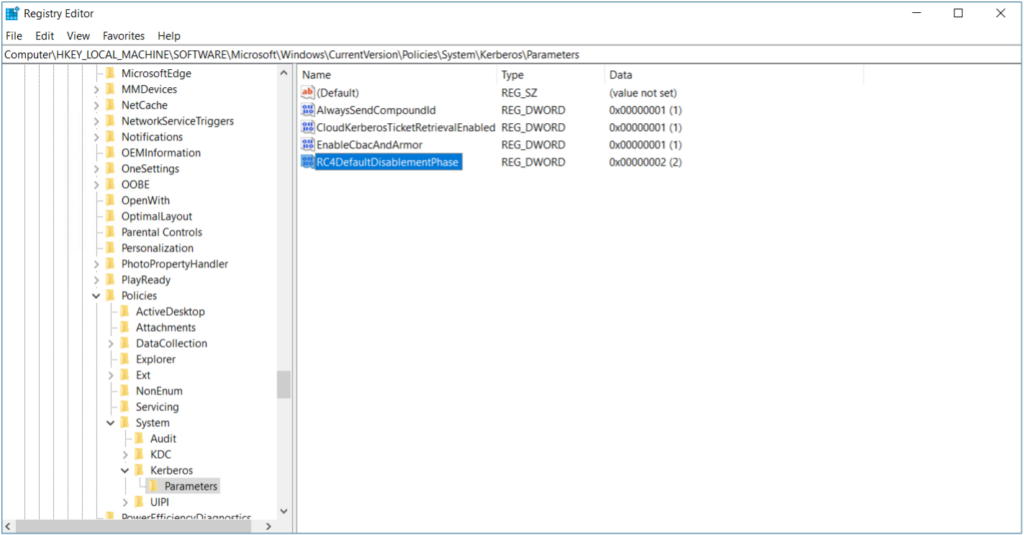
HKLM/Software/Microsoft/Windows/CurrentVersion/Policies/System/Kerberos/Parameters
Value: RC4DefaultDisablementPhase (REG_DWORD)
Restart required: Yes
Values:
0 = No audit, no change (legacy behavior)
1 = Audit only (Phase 1 default)
2 = Assume RC4 is disabled (Phase 2 behavior)
Quick set (PowerShell):
$path = 'HKLM:\SOFTWARE\Microsoft\Windows\CurrentVersion\Policies\System\Kerberos\Parameters'
if (-not (Test-Path $path)) { New-Item -Path $path -Force | Out-Null }
New-ItemProperty -Path $path -Name 'RC4DefaultDisablementPhase' -PropertyType DWord -Value 2 -Force | Out-Null
Image of Enforcement mode:
What You Need To Do Now (Update • Monitor • Move)
1) Patch All Domain Controllers
Install the January 2026 update (or newer) on every DC. This enables KDCSVC audit events, the temporary registry control, and new defaults.
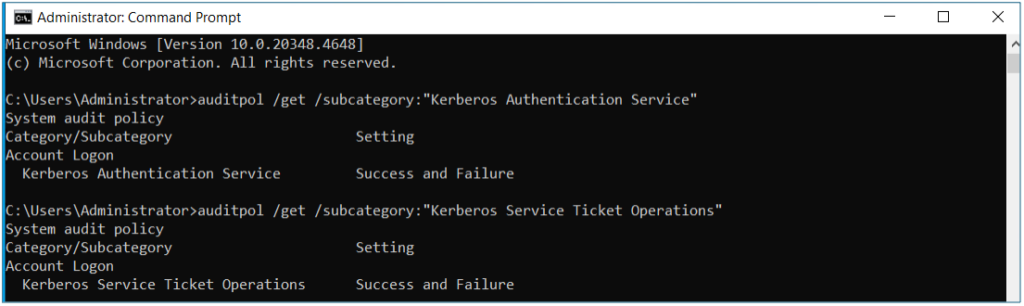
2) Enable Audit Mode & Monitor
Admin Quick Copy
auditpol /get /subcategory:”Kerberos Authentication Service” auditpol /get /subcategory:”Kerberos Service Ticket Operations”
3) Fix Accounts Still Using RC4 (Bad vs. Good with Hex)
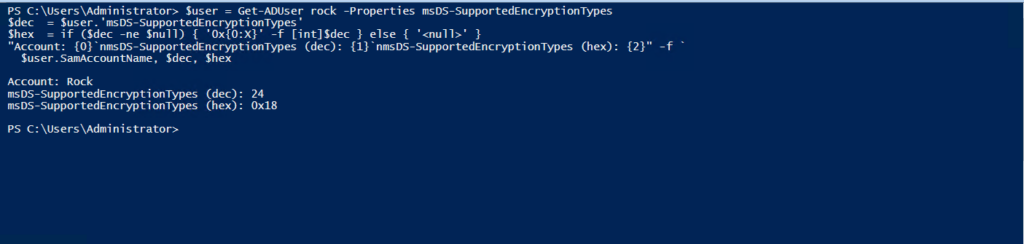
Use the checks below to display decimal and hex values.
$user = Get-ADUser  -Properties msDS-SupportedEncryptionTypes
$dec  = $user.'msDS-SupportedEncryptionTypes'
$hex  = if ($dec -ne $null) { '0x{0:X}' -f [int]$dec } else { '' }
"Account: {0}`nmsDS-SupportedEncryptionTypes (dec): {1}`nmsDS-SupportedEncryptionTypes (hex): {2}" -f `
  $user.SamAccountName, $dec, $hex
dec: 4   hex: 0x4    # RC4‑HMAC only (insecure)
dec: 7   hex: 0x7    # DES + RC4 (very insecure)
dec:     hex: <null> # Attribute not set—depends on domain defaults
dec: 24  hex: 0x18   # AES128 + AES256 (best)
dec: 16  hex: 0x10   # AES256 only
dec: 8   hex: 0x8    # AES128 only
Don’t Forget to Rekey After enabling AES, reset service account passwords or machine secrets so the KDC issues AES-only tickets.
Update Legacy Apps (Bad vs. Good)
JAVA (KRB5.INI)
Bad:
# BAD (Allows Kerberos RC4)
default_tkt_enctypes = rc4-hmac
default_tgs_enctypes = rc4-hmac
permitted_enctypes   = rc4-hmac
Good:
# GOOD
default_tkt_enctypes = aes256-cts aes128-cts
default_tgs_enctypes = aes256-cts aes128-cts
permitted_enctypes   = aes256-cts aes128-cts
Validate & Fix DefaultDomainSupportedEncTypes (DDSET)
DDSET Target
DefaultDomainSupportedEncTypes = 0x18 (AES128 + AES256)
$path = 'HKLM:\SYSTEM\CurrentControlSet\Control\Lsa\Kerberos\Parameters'
$val  = (Get-ItemProperty -Path $path -Name DefaultDomainSupportedEncTypes -ErrorAction SilentlyContinue).DefaultDomainSupportedEncTypes
"{0} (hex 0x{0:X})" -f $val
# Bad: 0x27  (includes RC4 and DES)
# Good: 0x18 (AES128 + AES256)
Detect RC4‑Only Devcies with Event 4768 (Session Key)
Since January 2025, Event 4768 logs include the session key encryption type negotiated by the client. If it shows RC4 (0x17), the device only supports RC4 even if the TGT itself is AES.
Ensure KRBTGT has AES Keys
KDCs encrypt TGTs with AES only if the KRBTGT account has AES keys. Ensure KRBTGT supports AES (msDS‑SupportedEncryptionTypes = 0x18) and rotate KRBTGT key material as appropriate.
Prepare for July Enforcement (what “ready” looks like)
Readiness Checklist
- No KDCSVC 201–209 warnings (indicates Kerberos RC4 usage)
- Accounts at 0x18 and rekeyed
- Apps updated for AES
- DDSET = 0x18
- Optional: RC4DefaultDisablementPhase = 2 validated (pre‑July)
KDCSVC Audit Events (201–209)
Event ID 201 - Client RC4-Only; Service/Defaults Not Explicit
Type: Warning | Log: System | Source: KDCSVC
Meaning: Client advertises RC4-only; service has no msDS-SET; domain has no DDSET. Audit (Phase=1); becomes 203 in Enforcement. Not logged if DDSET defined (205 instead).
Event ID 202 - Service Account Lacks AES Service Defaults Not Explicit
Type: Warning | Log: System | Source: KDCSVC
Meaning: Service has no msDS-SET; service account lacks AES keys. Audit; becomes 204 in Enforcement; per request; not logged if DDSET defined.
Event ID 203 - Blocked (Enforcement of 201)
Type: Error | Log: System | Source: KDCSVC
Meaning: RC4 blocked because service has no msDS-SET and client is RC4-only. Fires with Phase=2 or July.
Event ID 204 - Blocked (Enforcement of 202)
Type: Error | Log: System | Source: KDCSVC
Meaning: RC4 blocked because service has no msDS-SET and service account lacks AES keys. Fires with Phase=2 or July.
Event ID 205 - DDSET Explicitly Insecure
Type: Warning | Log: System | Source: KDCSVC
Meaning: DefaultDomainSupportedEncTypes includes insecure ciphers. Never error; logged at KDCSVC start. Admin: set DDSET=0x18.
Event ID 206 - Client Lacks AES; Service/DDSET Require AES
Type: Warning | Log: System | Source: KDCSVC
Meaning: Client RC4-only but service msDS-SET is AES-only or DDSET is AES-only. Becomes 208 in Enforcement (Phase=1).
Event ID 207 - Service Account Lacks AES; Service/DDSET Require AES
Type: Warning | Log: System | Source: KDCSVC
Meaning: Service AES-only (msDS-SET or DDSET) but account lacks AES keys. Becomes 209 in Enforcement (Phase=1).
Event ID 208 - Denied (Enforcement of 206)
Type: Error | Log: System | Source: KDCSVC
Meaning: Client RC4-only; service or DDSET require AES; request denied (Phase=2 or July).
Event ID 209 - Denied (Enforcement of 207)
Type: Error | Log: System | Source: KDCSVC
Meaning: Service account lacks AES keys; service or DDSET require AES; request denied (Phase=2 or July).
Key Takeaway
This is a secure‑by‑design evolution: Kerberos RC4 isn’t just discouraged, it’s being eliminated. If you still rely on RC4, authentication will break during the April or July updates. By patching DCs, auditing, fixing accounts, updating apps, and setting domain defaults to AES, you’ll avoid outages and dramatically strengthen your identity posture.
hello
FAQs
Historically, yes, Windows has allowed Kerberos to use RC4 as a fallback encryption type for compatibility. However, with the release of the CVE-2026-20833 update, Microsoft is actively disabling this capability. Future updates will force all Kerberos authentication to use the stronger AES standard, blocking RC4 entirely.
Unfortunately, yes. RC4 is still used today by legacy applications, older non-Windows devices (like printers or file shares), and service accounts that haven’t been re-keyed in years. It often persists unnoticed in the background until hardening updates—like the one in 2026—cause those connections to fail.
The main risk is that Kerberos RC4 is an outdated encryption standard that attackers can easily crack to steal credentials (a technique known as “Kerberoasting”). Starting in 2026, Microsoft is blocking RC4 by default to prevent these attacks.
You can detect Kerberos RC4 usage by enabling audit logs on your Domain Controllers. Look for Event ID 201 or 4768 in the System and Security logs. If the “Ticket Encryption Type” shows 0x17, that device or account is relying on RC4 and needs to be updated to AES.
Contributing Sources & References
- Microsoft Support (KB 5073381): CVE‑2026‑20833 phases, KDCSVC 201–209, registry key, DDSET.
- Microsoft TechCommunity – AD Hardening Part 4 (Devore): blank msDS‑SET fallback; 4768 session key detection.
- Microsoft TechCommunity – AskDS (Cartwright): auditing setup; 4768/4769 RC4=0x17.
- Windows Server Blog – Beyond RC4 (Palko): strategic mid‑2026 AES direction; logging fields.
- Microsoft Learn – Detect & remediate RC4 usage: procedural discovery and remediation.
- M365 Message Center recap – initial deployment; temporary registry key behavior.
Want to See Cayosoft in Action?
Cayosoft is recognized by Gartner as an ITDR solution provider and provides solutions that make identities more resilient to attacks and guarantee a fast forest recovery, if needed. Learn how Cayosoft Guardian facilitates granular change tracking, post-breach analysis, and long-term AD security improvements. Schedule a demo to see the capabilities in depth.